danghung/jenkins repository overview
Jenkins dockerfile
Installed component
- docker
- awscli
- kubectl
- slack cli
- jq
- python
To pull from private repository
You need generate ssh key and copy it to jenkins
ssh-keygen -t rsa -b 4096 -C "your-email"
# when asked for path just type .

# mount folder which includes id_rsa, id_rsa.pub to /root/.ssh
Send message to slack we use slack cli
- Create a slack bot
- Add bot to channel (#dev for example)
- Copy API Token
- In Jenkins Execute shell
export SLACK_CLI_TOKEN=<your-token-here>
slack chat send "hi from jenkins !" -ch dev
AWS ECS
- Create IAM call jenkins Role
- AmazonS3ReadOnlyAccess (get .env to build your app)
- AmazonECS_FullAccess (push service to ecs)
- AmazonEC2ContainerRegistryPowerUser (push built image to ecr)
- Create EC2 instance
- Choose jenkins role created above
- Paste below bash script to user-data
#!/bin/bash

sudo su
sudo apt-get update
sudo apt-get -y install \
    apt-transport-https \
    ca-certificates \
    curl \
    software-properties-common
sudo curl -fsSL https://download.docker.com/linux/ubuntu/gpg | sudo apt-key add -
sudo add-apt-repository \
   "deb [arch=amd64] https://download.docker.com/linux/ubuntu \
   $(lsb_release -cs) \
   stable"
sudo apt-get update
sudo apt-get -y install docker-ce
sudo curl -L https://github.com/docker/compose/releases/download/1.18.0/docker-compose-`uname -s`-`uname -m` -o /usr/local/bin/docker-compose
sudo chmod +x /usr/local/bin/docker-compose
sudo useradd hung
sudo usermod -aG sudo hung
sudo usermod -aG docker hung

# swap 1GB memory (if needed)
# sudo fallocate -l 2G /swapfile
# sudo chmod 600 /swapfile
# sudo mkswap /swapfile
# sudo swapon /swapfile
# sudo echo "/swapfile   swap    swap    sw  0   0" >> /etc/fstab

# to check swap work
# free -m
- Start jenkins by run docker compose
cp .env.example .env
# modify .env
docker-compose up -d
# You may need to go inside docker and do this if you cannot pull from private repository
chmod 600 /root/.ssh/id_rsa
chmod 600 /root/.ssh/id_rsa.pub
Then go to jenkins website and setup
- Create ECS Cluster
- Remember your ecs cluster name
- Create ECR
- Create ECR
- Copy Repository URI (I called it REGISTRY_URL)
- Copy Your repository name (I called it REPOSITORY_NAME)
- Create target group
- Goto EC2 -> load balancer -> target group
- Copy ARN
- Prepare your project, add these files to root folder
- Add Dockerfile
- Add taskdef.json (example like below)
{
  "family": "<your-reposity-name>",
  "containerDefinitions": [
    {
      "image": "%REPOSITORY_URI%:v_%BUILD_NUMBER%",
      "name": "<your-reposity-name>",
      "cpu": 256,
      "memory": 256,
      "essential": true,
      "portMappings": [
        {
          "containerPort": <port-you-exposed-in-dockerfile",
          "hostPort": 0
        }
      ]
    }
  ]
}
- Create a jenkins job
- Setup git (if you use private repository, you have to setup ssh key )
- Execute shell: copy .env from s3 & docker login
#!/bin/bash

aws s3 cp s3://smartlog-build-config/web-service.env .env
DOCKER_LOGIN=`aws ecr get-login --no-include-email --region ap-southeast-1`
${DOCKER_LOGIN}
- Execute shell: Docker build and publish
#!/bin/bash

REGISTRY_URL=<Created-ECR-above-step>
docker build -t ${REGISTRY_URL}:v_${BUILD_NUMBER} --pull=true ${WORKSPACE}
docker tag ${REGISTRY_URL}:v_${BUILD_NUMBER} ${REGISTRY_URL}:latest
docker push ${REGISTRY_URL}:v_${BUILD_NUMBER}
docker push ${REGISTRY_URL}
- Execute shell: start ECS Service You need to modify all Constants
#!/bin/bash
#Constants
REGISTRY_URL=<Created-ECR-above-step>
REGION=ap-southeast-1
REPOSITORY_NAME=<Created-ERC-above-step>
CLUSTER=<your-ecs-cluster-name>
targetGroupArn=
containerName=
containerPort=

FAMILY=`sed -n 's/.*"family": "\(.*\)",/\1/p' taskdef.json`
NAME=`sed -n 's/.*"name": "\(.*\)",/\1/p' taskdef.json`
SERVICE_NAME=${NAME}-service
echo "family $FAMILY"
echo "NAME $NAME"
echo "service name $SERVICE_NAME"

#Store the repositoryUri as a variable
REPOSITORY_URI=`aws ecr describe-repositories --repository-names ${REPOSITORY_NAME} --region ${REGION} | jq .repositories[].repositoryUri | tr -d '"'`
echo "respository uri $REPOSITORY_URI"
echo "build number $BUILD_NUMBER"
#Replace the build number and respository URI placeholders with the constants above
sed -e "s;%BUILD_NUMBER%;${BUILD_NUMBER};g" -e "s;%REPOSITORY_URI%;${REPOSITORY_URI};g" taskdef.json > ${NAME}-v_${BUILD_NUMBER}.json
#Register the task definition in the repository
aws ecs register-task-definition --family ${FAMILY} --cli-input-json file://${WORKSPACE}/${NAME}-v_${BUILD_NUMBER}.json --region ${REGION}
SERVICES=`aws ecs describe-services --services ${SERVICE_NAME} --cluster ${CLUSTER} --region ${REGION} | jq .services[].status`

#Get latest revision
REVISION=`aws ecs describe-task-definition --task-definition ${NAME} --region ${REGION} | jq .taskDefinition.revision`

echo "revision aws ecs describe-task-definition --task-definition ${NAME} --region ${REGION} | jq .taskDefinition.revision"
#Create or update service
echo "service $SERVICES"
if [ "$SERVICES" = "\"ACTIVE\"" ]; then
  echo "entered existing service"
  DESIRED_COUNT=`aws ecs describe-services --services ${SERVICE_NAME} --cluster ${CLUSTER} --region ${REGION} | jq .services[].desiredCount`
  if [ ${DESIRED_COUNT} = "0" ]; then
    DESIRED_COUNT="1"
  fi
  aws ecs update-service --cluster ${CLUSTER} --region ${REGION} --service ${SERVICE_NAME} --task-definition ${FAMILY}:${REVISION} --desired-count ${DESIRED_COUNT}

else

  echo "entered new service"
  echo "aws ecs create-service --service-name ${SERVICE_NAME} --desired-count 1 --task-definition ${FAMILY} --cluster ${CLUSTER} --region ${REGION}"
  aws ecs create-service --service-name ${SERVICE_NAME} --desired-count 1 --task-definition ${FAMILY} --cluster ${CLUSTER} --region ${REGION} --load-balancers targetGroupArn=${targetGroupArn},containerName=${containerName},containerPort=${containerPort}

fi
docker rmi ${REGISTRY_URL}:v_${BUILD_NUMBER}
Jenkins master & slave for bulid
Jenkins slave ECS
https://wiki.jenkins.io/display/JENKINS/Amazon+EC2+Container+Service+Plugin // TODO:
- Setup IAM account & role
- Install Amazon EC2 Container Service Plugin
- Build jenkins slave image that can run node, aws-cli, slack, ...
Jenkins slave EC2
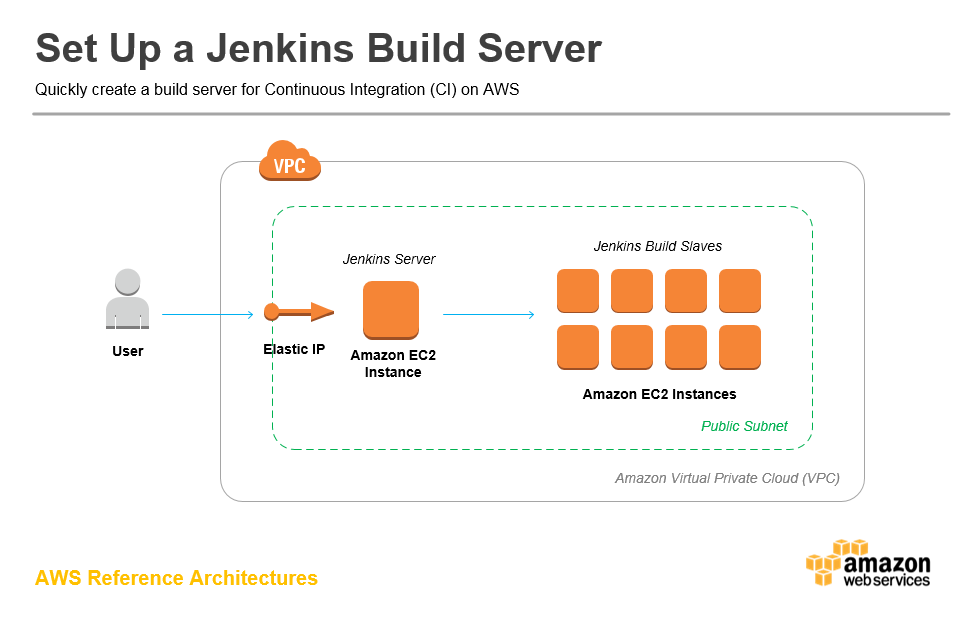 https://aws.amazon.com/getting-started/projects/setup-jenkins-build-server/
Jenkins slave dockerfile (ssh key)
https://engineering.riotgames.com/news/jenkins-ephemeral-docker-tutorial
Tag summary
Content type
Image
Digest
Size
666.4 MB
Last updated
over 8 years ago
docker pull danghung/jenkins