danimoya/claude-b
AI agent CLI: background Claude Code, Telegram bot, voice, REST API, multi-host orchestration.
3.5K
danimoya/claude-b repository overview
Claude-B
Background-capable Claude Code — async AI workflows, a Telegram bot, a REST API, and multi-host orchestration in a single container.
Why
- Fire-and-forget tasks. Kick off long Claude Code jobs and keep working. Results wait in an inbox until you're ready.
- Telegram remote control. Get notified when a session finishes. Reply by text or voice note from your phone — Whisper transcribes, Claude optimises, TTS plays the result back.
- REST API + WebSocket. Programmatic access to every session. Build bots, dashboards, CI integrations.
- Multi-host orchestration. Distribute work across machines with health-aware routing and automatic failover.
- Tmux bridge. Live Claude Code panes post completion notifications to Telegram via a
Stophook. No code changes to your existing workflow. - Stateless on config, stateful on data. One
.envfile configures everything. All session state lives in a mounted volume.
The voice pipeline — the actual differentiator
Other Telegram/WhatsApp AI integrations forward your voice note to one model and play the reply back. Claude-B chains four specialised models per voice-to-voice round-trip, and the middle step — prompt optimisation with fresh session context — turns "um, can you uh, fix the thing we were just working on" into an actionable prompt Claude Code can execute.
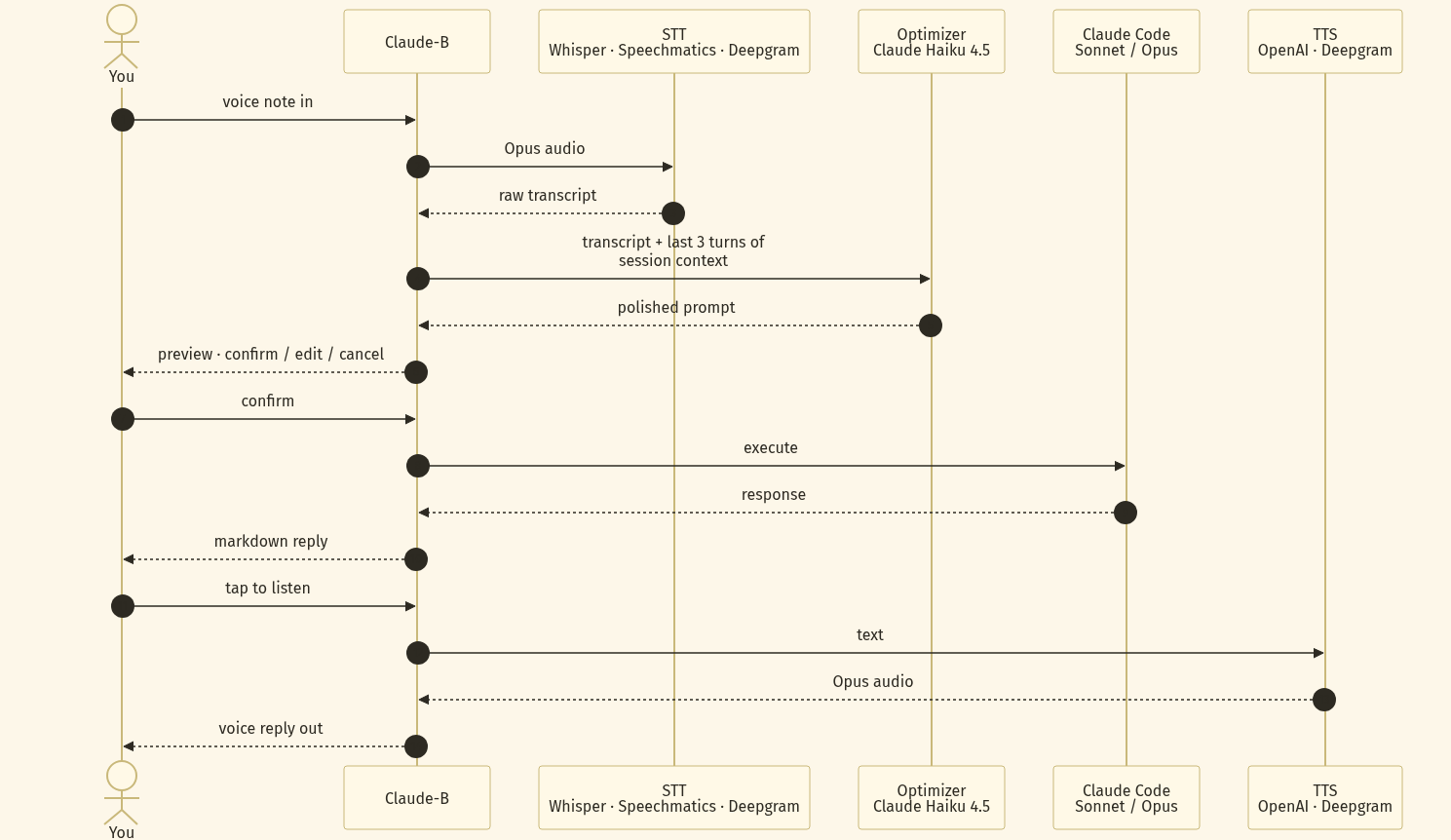
Every stage is provider-swappable. Default stack: Whisper → Claude Haiku 4.5 → your session's
main model (Sonnet / Opus) → OpenAI gpt-4o-mini-tts. Confirm-before-execute is baked in, so
a botched transcription never becomes a rogue rm -rf.
Quick start
Pull the image and run — everything reads from ~/.claude-b/.env, created by cb init on
first run.
# 1. One-time interactive setup
docker run --rm -it \
  -v "$HOME/.claude-b:/root/.claude-b" \
  danimoya/claude-b:latest cb init

# 2. Run the daemon
docker run -d \
  --name claude-b \
  --restart unless-stopped \
  -v "$HOME/.claude-b:/root/.claude-b" \
  -p 3847:3847 \
  danimoya/claude-b:latest

# 3. Use it from the container
docker exec -it claude-b cb "summarise README.md"
cb init walks you through BotFather, auto-captures your Telegram chat id, and writes the .env
file for you. You never copy tokens by hand.
docker-compose
services:
  claude-b:
    image: danimoya/claude-b:latest
    restart: unless-stopped
    ports:
      - "3847:3847"
    volumes:
      - claude-b-data:/root/.claude-b
    environment:
      ANTHROPIC_API_KEY: ${ANTHROPIC_API_KEY}
      TELEGRAM_BOT_TOKEN: ${TELEGRAM_BOT_TOKEN}      # optional
      OPENAI_API_KEY: ${OPENAI_API_KEY}              # optional — enables voice notes

volumes:
  claude-b-data:
docker compose up -d
docker compose exec claude-b cb init   # if you didn't set env vars above
Configuration
Precedence: process env > /root/.claude-b/.env > ./.env.
| Variable | Required | Purpose |
|---|---|---|
ANTHROPIC_API_KEY | yes | Claude Code authentication |
TELEGRAM_BOT_TOKEN | no | Enable Telegram remote control |
TELEGRAM_ALLOWED_CHAT_IDS | no | Comma-separated list of allowed chat ids |
OPENAI_API_KEY | no | Whisper STT + TTS for voice notes |
SPEECHMATICS_API_KEY / DEEPGRAM_API_KEY | no | Alternative STT providers |
CB_DATA_DIR | no | Override /root/.claude-b (rarely needed in containers) |
CB_REST_HOST / CB_REST_PORT | no | REST API bind address (defaults 0.0.0.0:3847) |
CB_REST_API_KEY | no | Pre-set REST API key (auto-generated otherwise) |
Tags
| Tag | Points at | Use for |
|---|---|---|
latest | newest release | quick start, demos |
0.3, 0 | newest 0.3.x / 0.x | pin to a minor/major series |
0.3.2, v0.3.2 | exact release | reproducible deploys |
Images are multi-arch: linux/amd64 and linux/arm64 (runs on Raspberry Pi, Apple Silicon,
Graviton).
Alternatives to Docker
# One-line install — auto-detects npm or docker
curl -fsSL https://cb.danielmoya.cv | bash

# npm (requires Node.js 20+)
npm i -g claude-b && cb init

# Build from source
git clone https://github.com/danimoya/Claude-B.git
cd Claude-B && pnpm install && pnpm build && pnpm link --global
Links
- Source & docs: https://github.com/danimoya/Claude-B
- Issues: https://github.com/danimoya/Claude-B/issues
- GHCR mirror:
ghcr.io/danimoya/claude-b - License: AGPL-3.0
Topics
AI agents · Anthropic Claude · Claude Code · coding assistant · AI automation · background jobs · async workflows · Telegram bot · voice assistant · Whisper STT · OpenAI TTS · REST API · WebSocket · CLI tool · developer tools · DevOps · tmux · multi-host orchestration · self-hosted · Node.js · TypeScript
Tag summary
Content type
Image
Digest
sha256:51665b073…
Size
67.8 MB
Last updated
4 months ago
docker pull danimoya/claude-b