datastax/cql-proxy
A client-side CQL proxy/sidecar.
10K+
datastax/cql-proxy repository overview
cql-proxy
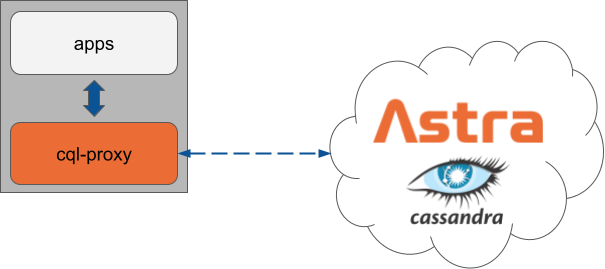
A CQL proxy/sidecar. It listens on a local address and securely forwards your application's CQL traffic.
Getting started
Run against a DataStax Astra cluster:
docker run -p 9042:9042 \
  datastax/cql-proxy:v0.1.2 \
  --astra-token <astra-token> --astra-database-id <astra-database-id>
The <astra-token> can be generated using these instructions. The proxy also supports using the Astra Secure Connect Bundle, but it requires mounting the bundle to a volume in the container:
docker run -v <your-secure-connect-bundle.zip>:/tmp/scb.zip -p 9042:9042 \
--rm datastax/cql-proxy:v0.1.2 \
--astra-bundle /tmp/scb.zip --username <astra-client-id> --password <astra-client-secret>
Run against a Apache Cassandra cluster:
docker run -p 9042:9042 \
  datastax/cql-proxy:v0.1.2 \
  --contact-points <cluster node IPs or DNS names> [--username <username>] [--password <password>]
Configuration
Use the -h or --help flag to display a listing all flags and their corresponding descriptions and environment variables (shown below as items starting with $):
$ ./cql-proxy -h
Usage: cql-proxy

Flags:
  -h, --help                                              Show context-sensitive help.
  -b, --astra-bundle=STRING                               Path to secure connect bundle for an Astra database. Requires '--username' and '--password'. Ignored if using the token or contact points option
                                                          ($ASTRA_BUNDLE).
  -t, --astra-token=STRING                                Token used to authenticate to an Astra database. Requires '--astra-database-id'. Ignored if using the bundle path or contact points option
                                                          ($ASTRA_TOKEN).
  -i, --astra-database-id=STRING                          Database ID of the Astra database. Requires '--astra-token' ($ASTRA_DATABASE_ID)
      --astra-api-url="https://api.astra.datastax.com"    URL for the Astra API ($ASTRA_API_URL)
  -c, --contact-points=CONTACT-POINTS,...                 Contact points for cluster. Ignored if using the bundle path or token option ($CONTACT_POINTS).
  -u, --username=STRING                                   Username to use for authentication ($USERNAME)
  -p, --password=STRING                                   Password to use for authentication ($PASSWORD)
  -r, --port=9042                                         Default port to use when connecting to cluster ($PORT)
  -n, --protocol-version="v4"                             Initial protocol version to use when connecting to the backend cluster (default: v4, options: v3, v4, v5, DSEv1, DSEv2) ($PROTOCOL_VERSION)
  -m, --max-protocol-version="v4"                         Max protocol version supported by the backend cluster (default: v4, options: v3, v4, v5, DSEv1, DSEv2) ($MAX_PROTOCOL_VERSION)
  -a, --bind=":9042"                                      Address to use to bind server ($BIND)
  -f, --config=CONFIG                                     YAML configuration file ($CONFIG_FILE)
      --debug                                             Show debug logging ($DEBUG)
      --health-check                                      Enable liveness and readiness checks ($HEALTH_CHECK)
      --http-bind=":8000"                                 Address to use to bind HTTP server used for health checks ($HTTP_BIND)
      --heartbeat-interval=30s                            Interval between performing heartbeats to the cluster ($HEARTBEAT_INTERVAL)
      --idle-timeout=60s                                  Duration between successful heartbeats before a connection to the cluster is considered unresponsive and closed ($IDLE_TIMEOUT)
      --readiness-timeout=30s                             Duration the proxy is unable to connect to the backend cluster before it is considered not ready ($READINESS_TIMEOUT)
      --num-conns=1                                       Number of connection to create to each node of the backend cluster ($NUM_CONNS)
      --rpc-address=STRING                                Address to advertise in the 'system.local' table for 'rpc_address'. It must be set if configuring peer proxies ($RPC_ADDRESS)
      --data-center=STRING                                Data center to use in system tables ($DATA_CENTER)
      --tokens=TOKENS,...                                 Tokens to use in the system tables. It's not recommended ($TOKENS)
To pass configuration to cql-proxy, either command-line flags or environment variables can be used. Using the docker method as an example, the following samples show how the token and database ID are defined with each method.
Using flags
docker run -p 9042:9042 \
  --rm datastax/cql-proxy:v0.1.2 \
  --astra-token <astra-token> --astra-database-id <astra-datbase-id>
Using environment variables
docker run -p 9042:9042  \
  --rm datastax/cql-proxy:v0.1.2 \
  -e ASTRA_TOKEN=<astra-token> -e ASTRA_DATABASE_ID=<astra-datbase-id>
When to use cql-proxy
The cql-proxy sidecar enables unsupported CQL drivers to work with DataStax Astra. These drivers include both legacy DataStax drivers and community-maintained CQL drivers, such as the gocql driver and the rust-driver.
cql-proxy also enables applications that are currently using Apache Cassandra or DataStax Enterprise (DSE) to use Astra without requiring any code changes. Your application just needs to be configured to use the proxy.
If you're building a new application using DataStax drivers, cql-proxy is not required, as the drivers can communicate directly with Astra. DataStax drivers have excellent support for Astra out-of-the-box, and are well-documented in the driver-guide guide.
Tag summary
Content type
Image
Digest
sha256:41b9d625e…
Size
11.1 MB
Last updated
about 1 year ago
docker pull datastax/cql-proxy:v0.2.0This week's pulls
Pulls:
101
Jan 20 to Jan 26