davewalker5/adsbtracker repository overview
adsbtracker
adsbtracker is the containerised Tracker Hub and integrated browser UI from the ADS-B BaseStation Reader project.
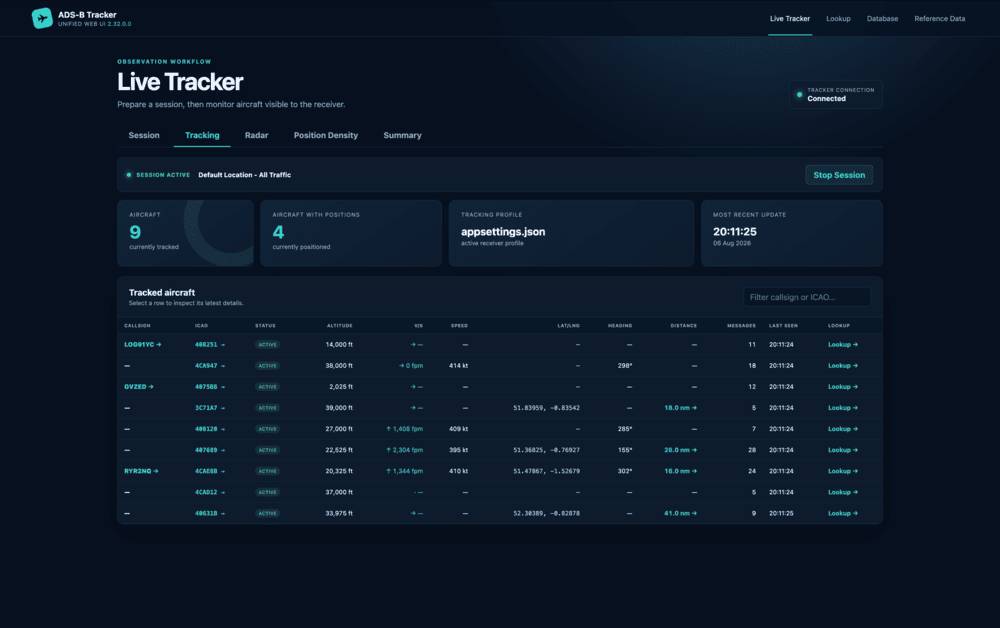
It consumes a BaseStation-format ADS-B message feed, typically supplied by dump1090, and provides live observation, local SQLite history, lookup, and reference-data workflows.
Core tracking is local-first and does not require a commercial flight-tracking service. External APIs and Mapbox are optional. The project Wiki is the main source of application, configuration, data-retention, and operating documentation.
Getting Started
Prerequisites
Install Docker with Docker Compose support on Windows, macOS, or Linux. You will also need a BaseStation-compatible TCP message feed that the container can reach.
Create two host directories before starting:
./data
./profiles
dataholds the SQLite database and its durable write spool.profilesholds optional JSON tracking profiles and the last-selected profile marker.
Docker Compose
Docker Compose is the recommended way to run the image:
services:
  adsbtracker:
    container_name: adsbtracker
    image: davewalker5/adsbtracker:latest
    platform: linux/amd64
    restart: unless-stopped
    ports:
      # Publish the container's HTTP UI and SignalR port.
      - "8104:5000"
    extra_hosts:
      # Makes host.docker.internal available to Linux containers as well as Docker Desktop.
      - "host.docker.internal:host-gateway"
    environment:
      # BaseStation message source. Replace the host if the feed runs elsewhere.
      ApplicationSettings__Host: host.docker.internal
      ApplicationSettings__Port: 30003

      # Optional external API credentials. Indices follow the services supplied in appsettings.json:
      # 0 = AeroDataBox, 1 = AirLabs, 2 = CheckWXApi, 3 = SkyLink.
      ApplicationSettings__ApiServices__0__Key: ""
      ApplicationSettings__ApiServices__1__Key: ""
      ApplicationSettings__ApiServices__2__Key: ""
      ApplicationSettings__ApiServices__3__Key: ""

      # Optional Mapbox token used by route and flight-path maps.
      Mapbox__AccessToken: ""

      # Container locations for profiles and the SQLite database.
      WebUi__TrackingProfilesPath: /var/opt/adsbtrackingprofiles
      ConnectionStrings__BaseStationReaderDB: "Data Source=/var/opt/adsbtracker/aircrafttracker.db;Default Timeout=5;Pooling=True"
    volumes:
      - ./data:/var/opt/adsbtracker
      - ./profiles:/var/opt/adsbtrackingprofiles
Save this as docker-compose.yml and adjust it for the deployment.
The published image is currently built for linux/amd64; the platform entry allows Docker Desktop on other architectures to select that image through emulation. The BaseStation source can instead be another container name or any reachable network hostname or address. If it is another Compose service, attach both services to the same Docker network and use that service name as ApplicationSettings__Host.
Receiver coordinates and tracking limits are selected through tracking profiles in the integrated UI. Mount profile JSON files into ./profiles; when no named profile is selected, the image's default application settings are used. See the Wiki pages for Tracking Profiles and tracking configuration.
The browser UI uses Tracker Hub's in-process tracking service. No WebUi__SignalRHubUrl setting is required. The public SignalR endpoint for compatible external clients is exposed automatically at /hubs/aircraft on the same published HTTP port.
Starting the Application
From the directory containing docker-compose.yml:
docker compose up -d
Open http://localhost:8104, or replace localhost with the Docker host's name or address.
View startup and application output with:
docker compose logs -f adsbtracker
Stop the container gracefully with:
docker compose down
Persistent Data and Upgrades
The data mount preserves the database and the relative spool directory used for pending database writes. Do not run the container without persistent storage if its observation history must survive container replacement.
To update the image:
docker compose pull
docker compose up -d
Tracker Hub applies pending database migrations when it starts.
Before an important upgrade or host migration, stop the container and back up both mounted directories. Keeping the database, any SQLite -wal and -shm files, the spool, and profile selection together provides a consistent recovery point.
Optional Integrations
API credentials can be left blank or their environment entries omitted. Core ADS-B tracking and local reference-data lookup continue to work, while features requiring the omitted provider return no external results.
Without a Mapbox token, functionality that does not require Mapbox remains available, but applicable route and flight-path background maps cannot be rendered.
Only import or retain third-party data when its licence and terms permit storage and reuse. External lookup responses are transient and are not used to populate the local reference database automatically.
Network Security
The container's HTTP interface includes session and reference-data management and does not provide its own user-authentication layer. Publish it only on a trusted network, bind the host port to an appropriate interface, or place it behind a secured reverse proxy when remote access is required.
Find Us
Versioning
Available versions are listed in the repository's tags.
License
This project is licensed under the MIT License. See LICENSE.
Tag summary
Content type
Image
Digest
sha256:14b299807…
Size
145.1 MB
Last updated
about 2 months ago
docker pull davewalker5/adsbtracker