davidburela/riscv-emulator repository overview
RISC-V emulator docker image
A pre-configured QEMU & Debian RISC-V image. Allows you to get started working on an emulated RISC-V environment. Is a quick way to see what libraries and frameworks work on RISC-V without sourcing hardware.
Structure:
- Debian host (debian:sid)
- QEMU. Running as emulated RISC-V with soft-mmu support
- Debian guest. RISC-V image
- RISC-V u-boot kernel
- QEMU. Running as emulated RISC-V with soft-mmu support
How to use
Quick start:
# 1. Pull the image from Docker Hub
docker pull davidburela/riscv-emulator

# 2.
# Run with QEMU default of 2CPU & 2G ram.
# Expose port 2222 which is routed through into the QEMU RISC-V guest
docker run -d --publish 127.0.0.1:2222:2222/tcp davidburela/riscv-emulator

# 3. SSH directly into the QEMU RISC-V guest. Pass: root. (Might take a few minutes before startup finishes)
ssh root@localhost -p 2222
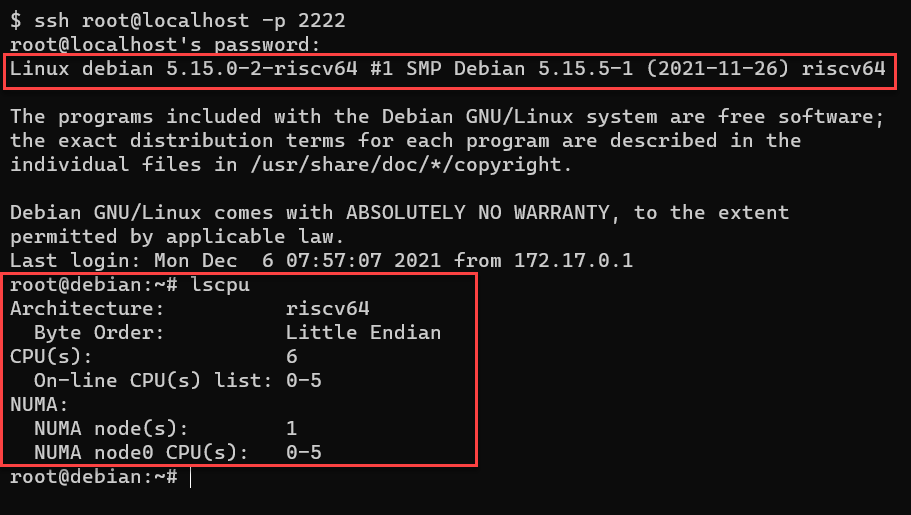
Options (RAM, CPU, etc)
# 2. Alternative: Allocate more CPU / RAM to QEMU guest
# Start the container, and manually start QEMU with the required specs.
# replace AAAA with desired cpus (e.g. 2 or 4)
# replace BBBB with desired RAM (e.g. 2G or 4G)
docker run -d --publish 127.0.0.1:2222:2222/tcp davidburela/riscv-emulator qemu-system-riscv64 -smp AAAA -m BBBB -cpu rv64 -nographic -machine virt -kernel /usr/lib/u-boot/qemu-riscv64_smode/uboot.elf -device virtio-blk-device,drive=hd -drive file=artifacts/image.qcow2,if=none,id=hd -device virtio-net-device,netdev=net -netdev user,id=net,hostfwd=tcp::2222-:22 -object rng-random,filename=/dev/urandom,id=rng -device virtio-rng-device,rng=rng -append "root=LABEL=rootfs console=ttyS0"
Example uses
I have used the emulated environment to verify if Open Source projects run on RISC-V, and shared the findings:
How it was built
- Was built based on the steps in my blog post https://blog.davidburela.com/2020/11/15/emulating-risc-v-debian-on-wsl2/
- Utilising Giovanni Mascellani’s prebaked Debian images
- Full source on GitHub https://github.com/DavidBurela/riscv-emulator-docker-image
Tag summary
Content type
Image
Digest
sha256:e620dadba…
Size
681.4 MB
Last updated
over 3 years ago
docker pull davidburela/riscv-emulator