dbzocchi/mcp-station
Turn APIs into MCP tools. Self-hosted, multi-account, for compatible local and cloud AI clients.
6.3K
dbzocchi/mcp-station repository overview
MCP Station
Turn your APIs and services into MCP tools.
One integration. Multiple accounts. Your local and cloud AI clients.
Self-host your integrations and connect them to ChatGPT, Claude, Claude Code, and LibreChat through compatible MCP features. Use local or cloud models through an MCP client such as LibreChat. Build from API documentation with the optional Assistant, reuse a module across service accounts, and manage tools, endpoints, and access in one workspace. Client availability depends on supported features, plans, and admin policy; these are compatibility targets, not certified integrations. Websites without usable APIs require an authorized adapter, not a promise of universal browsing.
GitHub · Source · Documentation source · Product page
MCP Station 2.7.0 stable
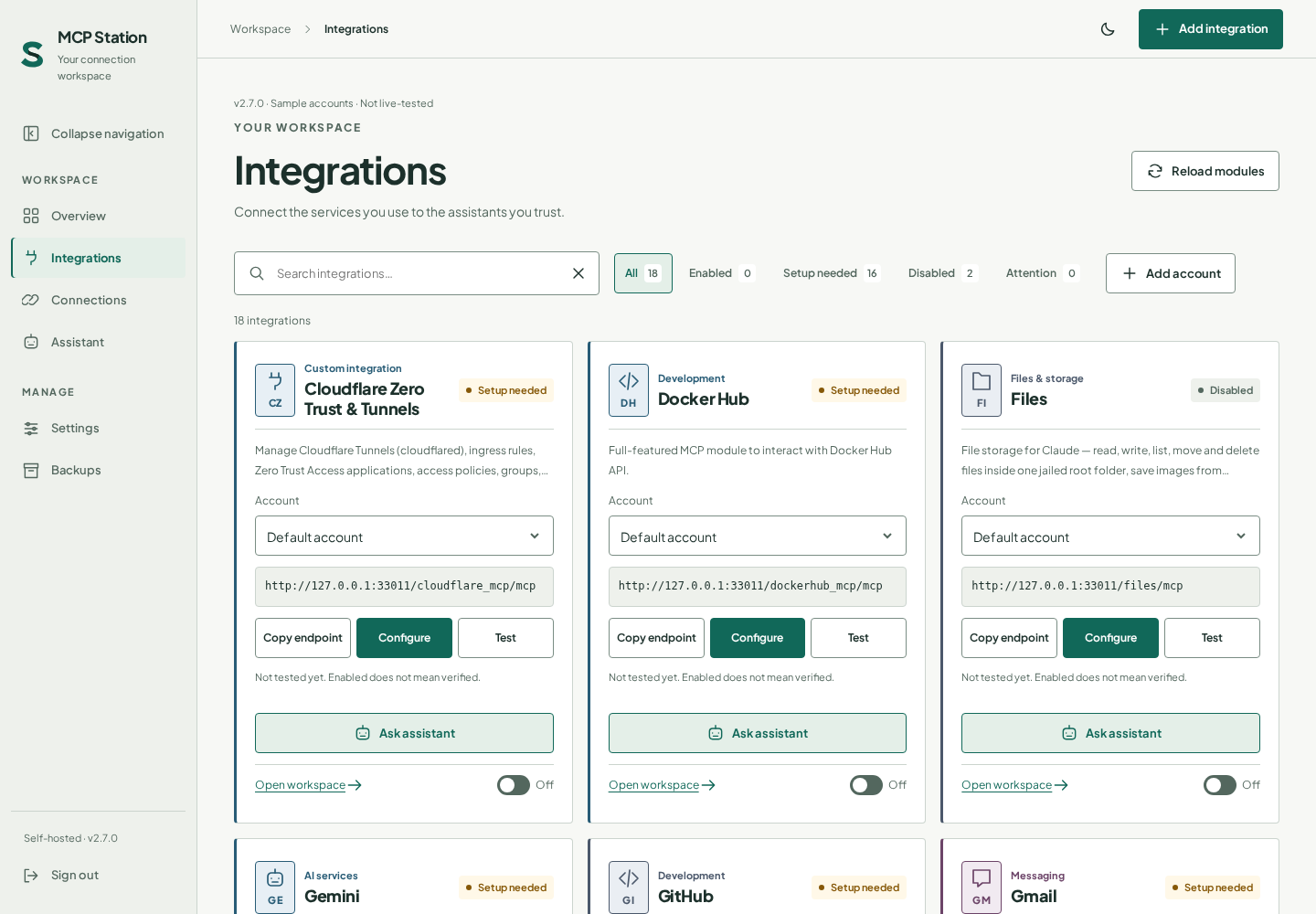
All 18 service modules, account workspaces, Connections, measured Usage, full-page Assistant, and installable PWA support are included. Screenshots use labeled sample data, not customer activity.
| Image | Use |
|---|---|
dbzocchi/mcp-station:2.7.0 | Pin this stable release. |
dbzocchi/mcp-station:2.7 | Follow stable 2.7 updates. |
dbzocchi/mcp-station:latest | Follow the current stable release. |
Record a verified image digest for exact reproducibility. Older stable/beta tags remain historical rollback options with matching validated backups, not current installation recommendations.
Run stable locally first
Create a private .env with a strong APP_PASSWORD, keep it out of Git, and restrict its file
permissions. Save this as compose.yaml:
services:
  mcp-station:
    image: dbzocchi/mcp-station:2.7.0
    restart: unless-stopped
    ports:
      - "127.0.0.1:8788:8788"
    environment:
      APP_PASSWORD: ${APP_PASSWORD:?set APP_PASSWORD in .env}
      PUBLIC_URL: ${PUBLIC_URL:-}
      COOKIE_SECURE: ${COOKIE_SECURE:-0}
      MCP_TOKEN: ${MCP_TOKEN:-}
    volumes:
      - ./data:/data
      - ./mcps:/app/mcps
      - ./files:/files
docker compose up -d
curl --fail http://127.0.0.1:8788/healthz
Sign in at http://127.0.0.1:8788. Configure required module settings, inspect its tools, run its
connection test, and enable deliberately. If a source has no real test() function, Test may only
confirm that it loads; a copied endpoint or green test is not proof of a working client connection.
Remote HTTPS and OAuth
For remote connectors, configure your reverse proxy/tunnel, set PUBLIC_URL to the exact public
HTTPS origin without a path, and use COOKIE_SECURE=1. The public origin must reach the station
without an intervening login wall. The local loopback port above needs deliberate networking if
your proxy is in another container or host.
Copy https://your-station.example/<slug>/mcp into a compatible custom connector and approve its
OAuth consent. Bearer clients use that URL with Authorization: Bearer <token>; prefer a scoped
module/account token. The optional master MCP_TOKEN reaches all endpoints. Client support and
product/plan availability vary.
Persistent state is required
Persist /data and /app/mcps. Leave SESSION_SECRET unset to use /data/secret.key, or choose a
strong fixed value before storing settings and preserve it separately. Changing it later can make
encrypted settings unreadable. Back up external Files storage separately.
Setup and configuration · Historical 2.4 technical archive
Bundled source modules
2.7.0 includes 18 service modules plus a template.
GitHub · Docker Hub · Cloudflare · n8n · Gmail · Google Drive · Files · SiYuan · Todoist · Telegram · Pushover · Radarr · Sonarr · Gemini · OpenProject · Xero · Proton Pass · MCP Station.
The eight additions contribute 185 tools, with 274 offline checks recorded in the bundle audit, not live-service certification. They ship with empty credentials and actionable preflight errors. Fresh installs may discover modules before they are authenticated; disable what you do not need. Gmail/Drive declare access-token or complete refresh-token alternatives for readiness; run Test and a read-only call to verify actual service access.
A fresh install seeds all 18 service-module folders. Missing bundled folders are seeded on startup;
existing source folders are never overwritten. Persist /app/mcps and review source updates deliberately.
The expanded bundle covers 18 of 30 supplied NAS service modules. Private business adapters,
Unraid host-control/execution modules, and unreviewed agent packages remain deferred. _template
is a scaffold. Upstream permissions/plans apply; these are project-maintained integrations.
Bundle audit ·
AI-client setup
Account boundaries and data flow
- Service accounts are not human-user accounts. One administrator controls all of them.
- Additional accounts start blank, disabled, and untested; each has its own endpoint, settings, tokens, tests, and scoped grants. Shared source edits affect every account using it.
- Secret settings fields are AES-256-GCM encrypted at rest and masked in ordinary settings responses; ordinary fields and source are not encrypted secret storage.
- Modules execute as trusted in-process code, not a tenant sandbox. Station management and station-wide credentials retain broad privileges.
- Modules call configured external services. Assistant conversation, context, relevant source, and tool output go to the selected AI provider or gateway; provider charges/policies apply. Never paste real keys into chat or hard-code them in source.
Usage and recovery
Usage retains only time, account/source IDs, registered tool name, duration, and outcome. It does not retain tool arguments/results, bodies, credentials, or client identifiers. History is bounded globally to 30 days / 5,000 events, not a complete billing/audit ledger. Setup tests, initialization, tool listing, denied requests, and aborted responses do not count as recorded calls.
Use a full private .tar.gz backup for station recovery, including account registry and
usage. It contains sensitive state and the persisted encryption key. Save externally supplied
SESSION_SECRET and Files storage separately. Portable JSON covers default-account configuration,
not additional accounts, usage, or source. Module ZIPs share source without managed settings/chat;
review them for manually embedded secrets before sharing.
Project and support
Source and issues · Security policy · MIT license
Current setup guides target 2.7.0 stable. Source edits alone do not publish the GitHub release, registry images, wiki or this overview; publication is verified by the parent release process. Original Ribbon S artwork belongs to the project; third-party names imply no affiliation.
Tag summary
Content type
Image
Digest
sha256:2812ed40c…
Size
104.1 MB
Last updated
3 days ago
docker pull dbzocchi/mcp-station