dbzocchi/omniforge
Turn your Python and Node scripts into tools for your AI. Self-hosted, trusted-code workspace.
304
dbzocchi/omniforge repository overview
OmniForge
Turn your Python and Node scripts into tools for your AI.
Author trusted code, save it, test the saved version, then expose an enabled
script through /mcp. Python, Node, a browser dashboard and SQLite storage in
one self-hosted container.
MCP Station connects integrations. OmniForge turns code you author into tools.
Product page · GitHub source · Reviewed installation guide · Wiki source documentation
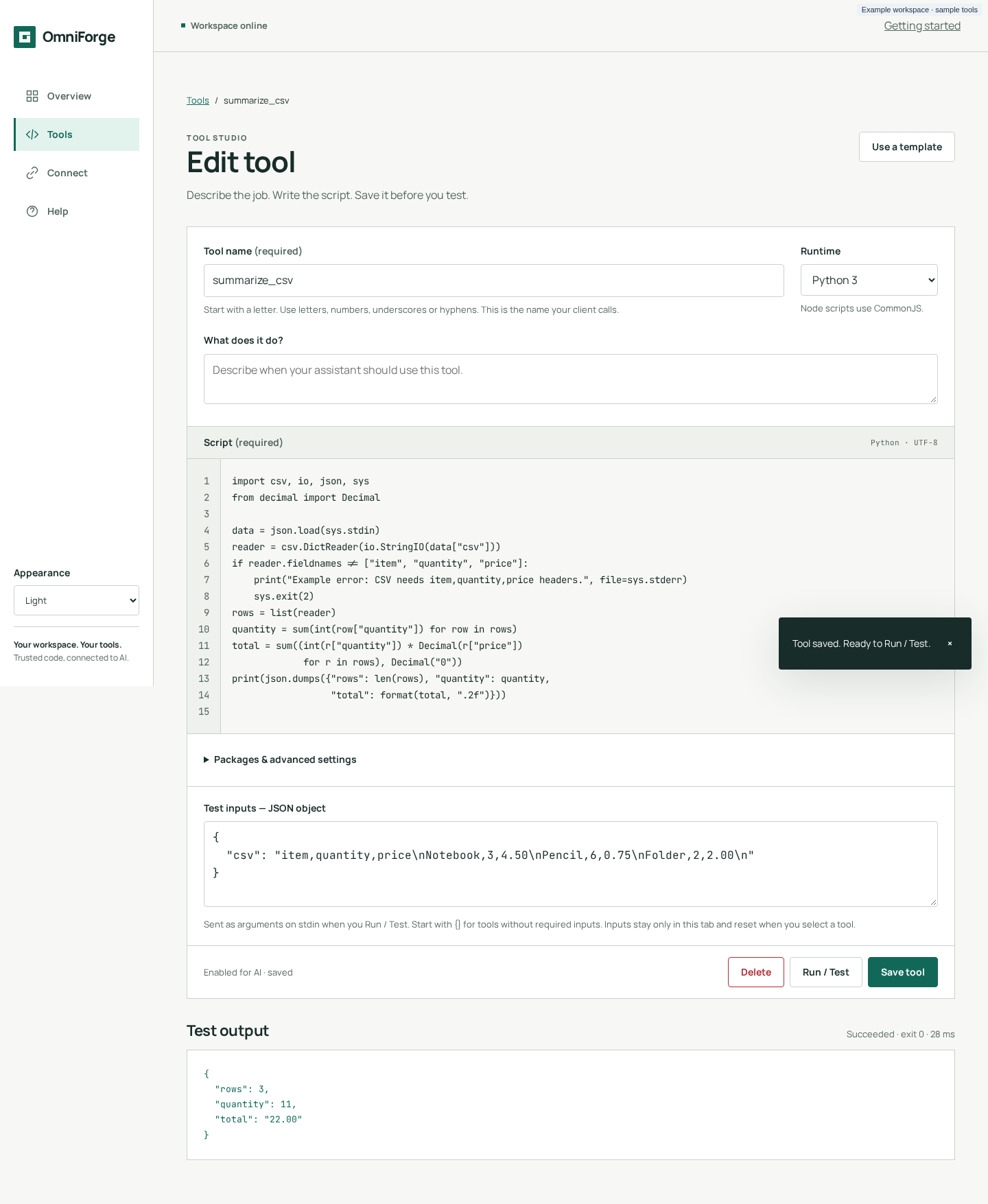
The repository and screenshot are public. The reviewed guides above use the documentation branch pending merge, not the older main-branch README or a native GitHub wiki. Pages is configured at the exact product-page URL above; publication was verified successfully.
Before you install
Single-admin, trusted-network use only. There is no human login or account system. The dashboard and management API are unauthenticated: anyone who can reach them can read code and create, change or run tools.
Scripts share the application container, environment (including the MCP key), network and writable data. This is not a sandbox. The optional key protects POST /mcp only, not the dashboard, management API or GET /mcp. A key holder who can create and call tools can execute code. Never port-forward this service or tunnel its open admin surface to cloud connectors.
Choose an image
Inventory checked October 16, 2026:
| Tag | Last published (UTC) | Runtime platform |
|---|---|---|
latest | October 13, 2026 | Linux/amd64 |
0.2.0_beta | October 16, 2026 | Linux/amd64 |
latest is a moving main-channel tag, not a stable release guarantee. The
beta declares OCI revision 6466945aef5a6854d241c286e0579db57bc50f42;
latest has no revision label. Tags do not prove feature parity. This guide describes reviewed source, not
certified image behaviour. Test your chosen digest.
docker buildx imagetools inspect dbzocchi/omniforge:latest
For reproducibility, use dbzocchi/omniforge@sha256:<verified-digest> in Compose.
Start locally
Requires Docker on an amd64 host and OpenSSL. In a new deployment directory,
create a private .env containing a generated MCP key:
umask 077
printf 'OMNIFORGE_API_KEY=%s\n' "$(openssl rand -hex 32)" > .env
Save as compose.yaml alongside .env:
services:
  omniforge:
    image: dbzocchi/omniforge:latest
    ports:
      - "127.0.0.1:8000:8000"
    environment:
      OMNIFORGE_API_KEY: ${OMNIFORGE_API_KEY:?Generate a key in .env first}
    volumes:
      - omniforge_data:/opt/omniforge/data
      - omniforge_lib:/opt/omniforge/lib
    restart: unless-stopped
volumes:
  omniforge_data:
  omniforge_lib:
docker compose up -d
Open http://localhost:8000 on the Docker host. This is intentionally
local-only; other hosts/containers cannot use that host-local address. A
trusted-LAN deployment needs an explicit interface/firewall decision. Changing
the bind does not add authentication. Keep .env out of version control.
Save, then test
In the reviewed dashboard: Start with a template → Python greeting → Save tool → Run / Test. Saving does not syntax-check, install or execute anything. Testing runs the saved version and shows stdout, stderr, exit code, timeout status and duration. Check exit code, not just HTTP 200.
Scripts receive one JSON object on stdin ({} for no inputs). Print results
with print(json.dumps(...)) or console.log(JSON.stringify(...)); a function's
return value alone is not captured. Exit 0 means success. Never print secrets:
output may enter an AI conversation. The greeting needs no packages.
Verify MCP discovery
Load the generated key, then list tools:
set -a
. ./.env
set +a
curl --fail-with-body -sS http://localhost:8000/mcp \
  -H 'Content-Type: application/json' \
  -H "Authorization: Bearer $OMNIFORGE_API_KEY" \
  -d '{"jsonrpc":"2.0","id":1,"method":"tools/list","params":{}}'
Reviewed source supports initialize, tools/list, tools/call and ping
through JSON-RPC POST. This is not full MCP Streamable HTTP: no OAuth,
sessions, resumable streams or change notifications. GET /mcp emits one stub
SSE event and closes. Verify discovery and execution with your exact client;
there is no universal ChatGPT/Claude compatibility claim. Cloud connectors need security work.
Enabled tools appear on the next tools/list without a restart. Refresh clients
after changes. omniforge_instructions explains authoring;
omniforge_create_tool saves a new tool without running it.
Inputs and packages
HTTP create bodies use json_schema; MCP authoring uses inputSchema.
JSON Schema Draft 2020-12 validates object inputs, with local references only.
An omitted/empty schema means no inputs; defaults are not inserted. The
dashboard preserves schemas but cannot edit them.
Requirements are strict arrays of at most 50 names: Python name/name==version;
Node names/scoped names with optional exact semver pins. Packages install on
first run into per-tool caches: Python wheels from PyPI, npm from its public
registry with lifecycle scripts disabled. No URLs, paths, flags, system binaries
or private registries. Node packages use CommonJS require, not ESM resolution.
Storage and operating limits
| Path | Purpose |
|---|---|
/opt/omniforge/data | Persist and back up SQLite: tool code and metadata |
/opt/omniforge/lib | Persistent, rebuildable package caches |
/tmp/omniforge | Shared script scratch directory, not an isolation boundary |
The image runs as 1000:1000; bind mounts must be writable by that UID/GID. Stop the service before copying its database volume.
Reviewed-source execution and installs block the request worker. The default script timeout is 30000 ms plus 15 seconds, after package preparation. Per-script memory limits are not enforced, output is uncapped, and a timeout does not terminate the process tree. Use Docker resource limits, short scripts and trusted dependencies. Container hardening does not isolate scripts from the app.
Before updating, back up and record the current digest. Select a tested image,
then docker compose pull && docker compose up -d; re-test discovery and a tool.
Do not use docker compose down -v unless you intend to remove stored data.
Source and rights
Source and detailed docs are publicly accessible through the links above. All rights reserved: no repository licence grants MIT or other permissive reuse rights. Public source and image availability do not grant an open-source licence. The Python image includes application source; review distributed image contents before publishing. Third-party font licences remain separate.
Tag summary
Content type
Image
Digest
sha256:224ecd8cd…
Size
130.8 MB
Last updated
3 days ago
docker pull dbzocchi/omniforge