dependencytrackaddons/eol-dependencytrack
Dependency-Track End-of-life SBOM tool. Reports EoL as vulnerabilities. Uses endoflife.date dataset.
939
dependencytrackaddons/eol-dependencytrack repository overview
Dependency-Track End-of-Life SBOM Integration
Integration for Dependency-Track that fetches and reports EoL info for your software bill of materials project dependencies. Monitors and assigns EoL state as vulnerabilities to the components. Uses endoflife.date dataset by default; supports custom datasets. Early PoC / experimental.
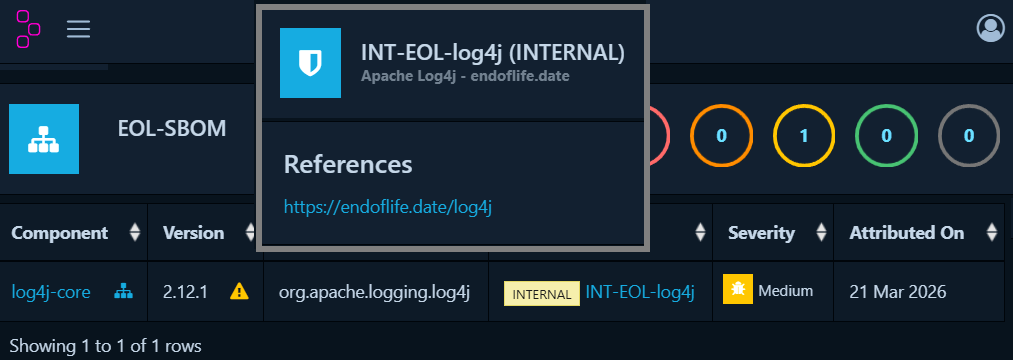
The integration is provided as:
- Binaries for Linux and Windows: Best if you already have a running Dependency-Track installation
- Docker image: Install Dependency-Track and the endoflife.date integration in docker
Dependency-Track API-Key
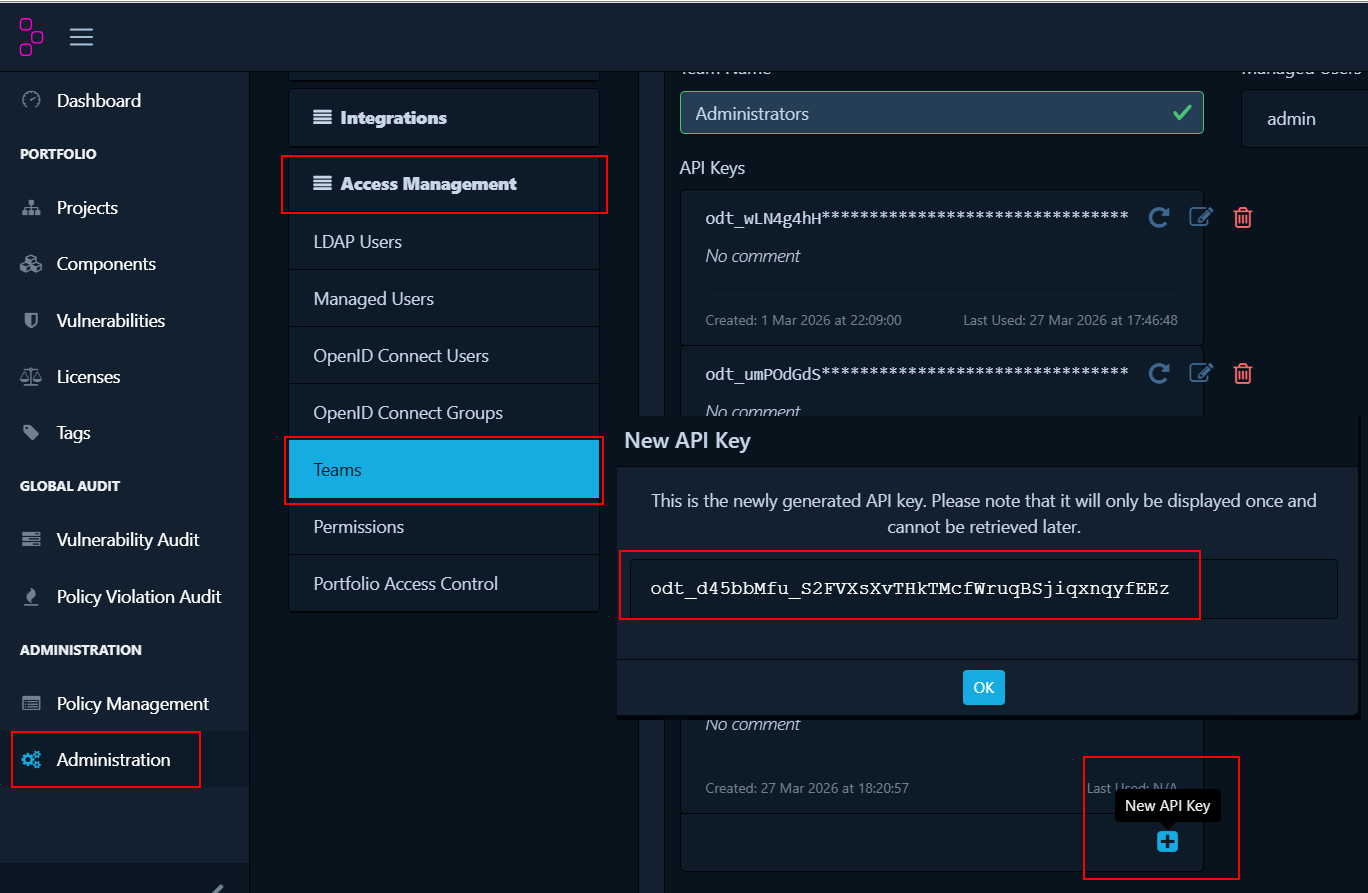
The eol integration uses the Dependency-Track API. You can create an API key in the Web UI:
Quick Start (Existing Dependency-Track Installation)
Linux
# Download the latest binary
curl -LO https://github.com/Chriz76/endoflife-dependencytrack/releases/download/v0.1.0-alpha/eol-dt-linux-x64.tar.gz

# Extract the archive
tar -xzvf eol-dt-linux-x64.tar.gz

# Make it executable
chmod +x eol-dt

# Run it
./eol-dt --apikey YOUR_DEPENDENCY_TRACK_API_KEY
Windows
- Download the latest Windows binary
- Unzip it
- Run it with your api key
eol-dt --apikey YOUR_DEPENDENCY_TRACK_API_KEY
Quick Start (Docker)
# Download the latest Docker Compose file
curl -LO https://raw.githubusercontent.com/Chriz76/endoflife-dependencytrack/main/docker-compose.yml

# Start the Dependency-Track stack using Docker Compose
docker compose up -d

# Run the endoflife.date integration (replace with your API-Key):
docker run --rm --network dtrack-net -e DT_APIURL="http://apiserver:8080/api/" -e DT_APIKEY="YOUR_DEPENDENCY_TRACK_API_KEY" dependencytrackaddons/eol-dependencytrack:latest
Motivation and Outlook
EOL software is risky because it no longer receives security updates, leaving vulnerabilities unpatched. Unlike maintained libraries, security flaws in EOL software are often not reported or tracked, so researchers rarely check them — but attackers may still exploit them. Relying on such outdated components exposes your software and data to hidden but real threats.
The endoflife.date dataset is a great start and it finds the most important dependencies. This will be further extended with information from package repositories like NuGet, npm, PyPI, Maven Central, etc. and CVE-data. Using an automated approach with heuristics and research combined with the option for manual edits. To give strong signals for EoL.
Remarks
- This project is experimental. Only use it in test environments.
- The endoflife.date cycles are matched by PURL, CPE and name (in this order) of the component in the SBOM.
- The identfiers or endoflife.date are enriched by the data from purl2cpe. See the endoflife.date mapped purl2cpe.json
- Identifiers can be wrong or missing which can lead to wrong or missing mappings.
- For your own eol dataset use the endoflife.date format and the --eoldata option to pass either a URL or a local filename.
- The created vulnerabilites are visible in the Dependency-Track UI. Search for "INT".
- The program output shows detailled information about the projects and components found in Dependency-Track, eol matching, etc
- Please get in contact and open an issue if you have questions, feature requests or find bugs.
Usage
Usage: eol-dt [options]

Options:
  --help, -h           Show this help message and exit
  --apikey <key>       Set the DependencyTrack API key
  --apiurl <url>       Set the DependencyTrack API base URL
                       (default: http://localhost:8081/api/)
  --eoldata <source>   Set the End of Life data source URL
                       (default: https://endoflife.date/api/v1/products/full)
                       or a local path
  --telemetry <on|off> Enable or disable telemetry (default: on)
  --loglevel <0-5>     Set verbosity level
                       (0 = trace, 5 = critical, default: 2)
Configuration via Environment Variables
All CLI options can also be set via environment variables prefixed with DT_:
| Option | Environment Variable | Default |
|---|---|---|
--apikey | DT_APIKEY | — (required if not in config) |
--apiurl | DT_APIURL | http://localhost:8081/api/ |
--eoldata | DT_EOLDATA | https://endoflife.date/api/v1/products/full |
--telemetry | DT_TELEMETRY | on |
--loglevel | DT_LOGLEVEL | 2 |
License
EOL-DT is free to use under the terms of the LICENSE.
It is provided as-is, without warranty or liability. See LICENSE for details.
Telemetry & Privacy
EOL-DT may send usage and error data.
For full details, including what data is collected and how to disable telemetry, see PRIVACY.md.
Tag summary
Content type
Image
Digest
sha256:ae25d9607…
Size
103.7 MB
Last updated
7 months ago
docker pull dependencytrackaddons/eol-dependencytrack