derkezorm/nexview
Media request dashboard for Radarr, Sonarr or nexcrate, with Plex, Jellyfin, Emby and OIDC sign-in.
2.5K
derkezorm/nexview repository overview

Nexview
Find something to watch — and request it straight from Radarr and Sonarr, or from nexcrate.
Nexview is a self-hosted media discovery dashboard for a household — family, flatmates, a circle of friends. It shows new releases from TMDB, marks what is already in your library, and hands requests to whatever procures for you: Radarr (movies) and Sonarr (shows), or nexcrate, which does both in one. Everyone gets their own account, with roles, approvals and quotas.
You pick one of the two when you set Nexview up, and you can switch later — an assistant walks through it and writes a backup first, because there is no other way back.
It downloads nothing itself and stores no media. It is the front door to a setup you already run — it does not replace any part of it.
Without a TMDB key Nexview starts with sample data, so you can look around before deciding anything.
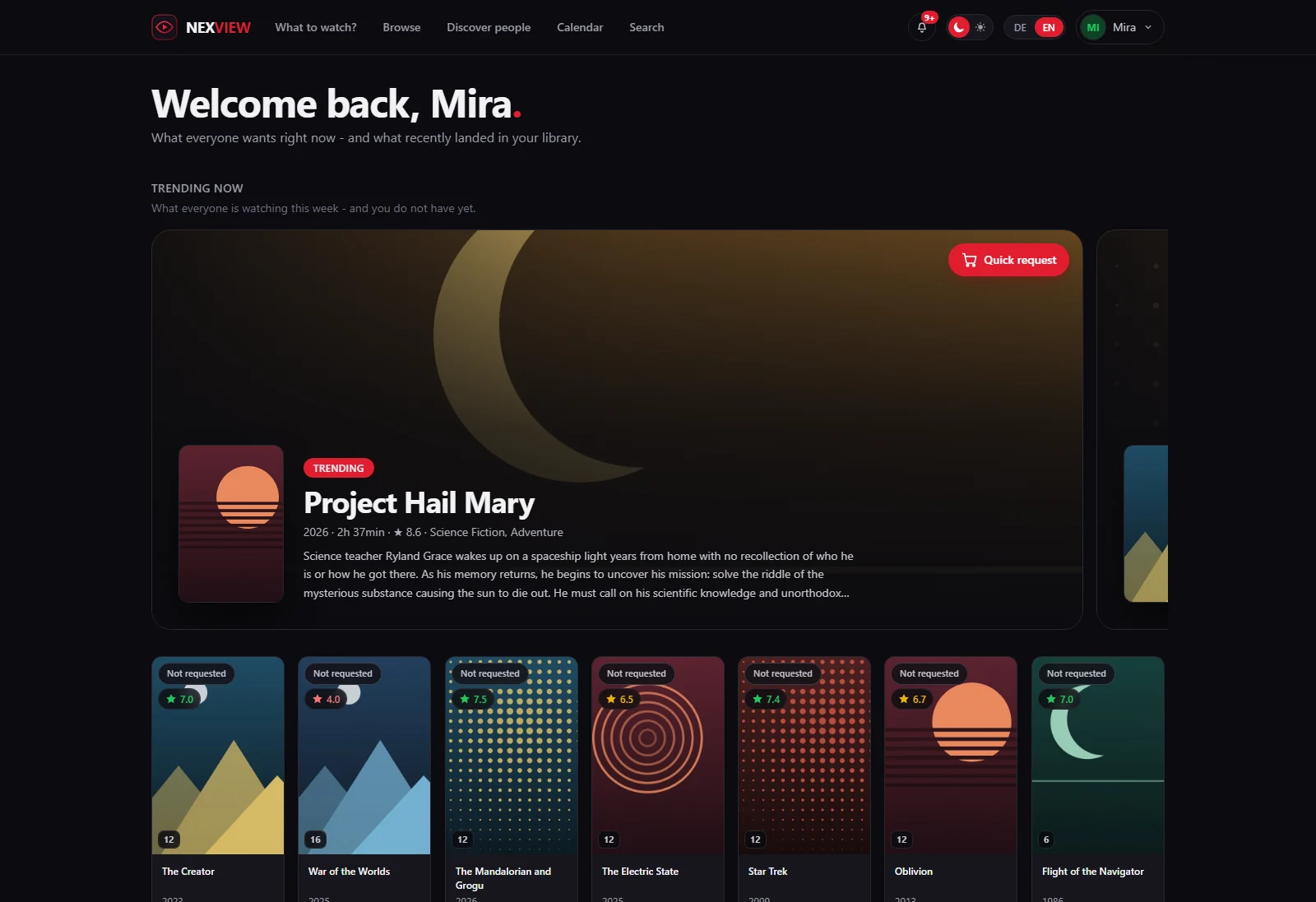
The home page. What each person marks as a favourite shapes what they get suggested.
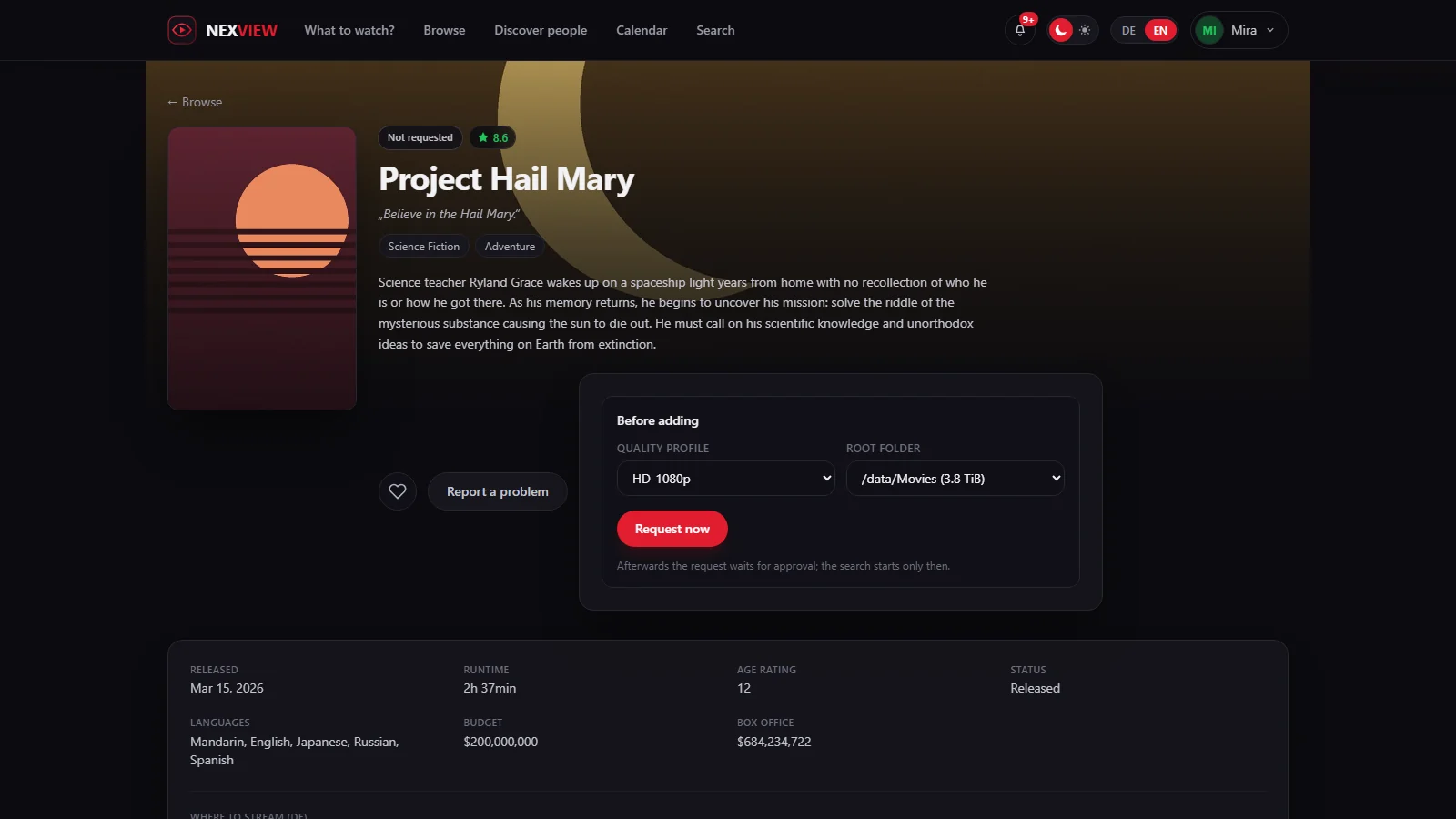
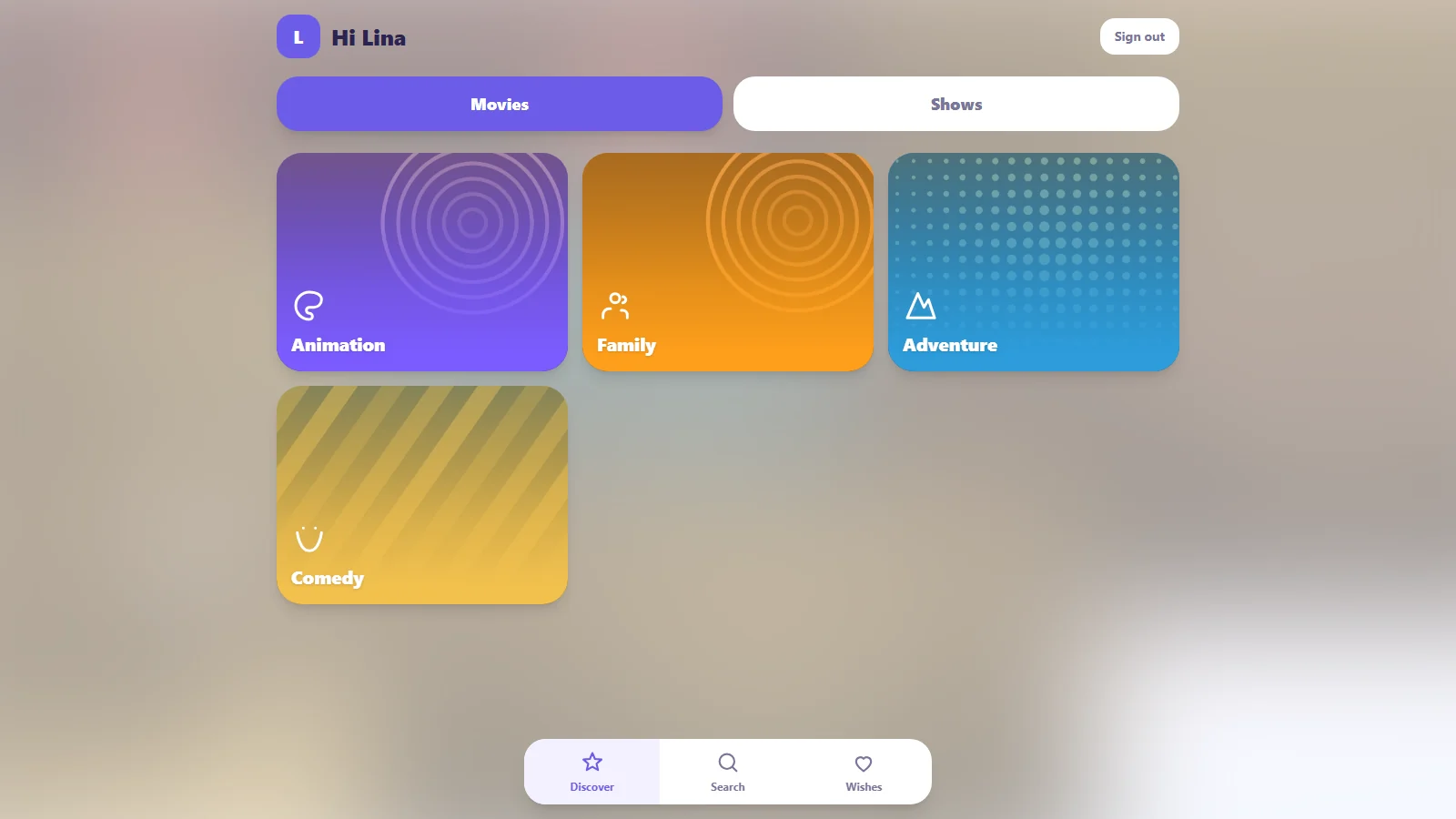
Requesting a title, and the same installation seen by a child.
What it does
Finding something
- Separate areas for movies and shows, each with its own logic
- Filter by period, language, region, genre, rating and studio; cards or list
- Detail pages with cast photos, directing and writing credits, studios, keywords, similar titles and the trailer in a window
- Ratings from IMDb, Rotten Tomatoes and Metacritic on the title itself
- Where a title is currently streaming in your region, split into subscription, free, rent and buy (data from JustWatch)
- Browse people — actors, directors, writers — and mark them as favourites; your favourites, titles and people alike, shape what gets suggested on your home page
- A release calendar, one week at a time: your own titles kept apart from new releases, with cinema and digital dates read for your region
Requesting
- Pick quality profile and target folder, or let the approver pick them instead
- Request whole shows or single seasons, optionally following future ones
- With nexcrate there is one connection instead of four, and quality profiles, naming, folders and the recycle bin live over there. Nexview then shows what it keeps: the versions of a title, why something has not arrived yet, and what can be restored
- Optionally a second Radarr and Sonarr instance for 4K: the same title once in 1080p and once in 4K, with separate folders, profiles and per-user permissions
- The state sits on the poster — not requested, requested, searching, already downloaded, in library, blocked — and updates itself as Radarr and Sonarr work
Who may do what
- Three roles: administrator, approver, user. An approver decides on requests without ever getting near your API keys
- Approve automatically or by hand, set separately for movies, shows and 4K
- Rules decide before that setting applies: an ordered list where every rule is a handful of conditions joined by AND and one consequence, approve at once or decline. The first rule that matches wins; if none does, the account setting decides as it always did. Conditions read the type, genre, rating, number of votes, year, runtime, original language, age rating, the requested tier, and whether the title is already here in the other tier. Approving may book it to house stock, where it counts against nobody's storage quota
- A decline is not a shrug: the request is created in the declined state, carries the reason you wrote and names the rule that decided. Per rule the requester may send it to an approver anyway, once, and never past a decision a person made. Nothing overrides the age filter, a parent's decision or the requester's own quota, and administrators and approvers are exempt from rules altogether
- Quotas per day, week or month — or, instead of counting titles, by disk space in gigabytes, which is the thing that actually runs out
- Child accounts: a parent creates a login for their child, with an age, a set of categories and a language. The child gets a separate, simpler app and does not request but wishes — nothing happens until the parent approves, and the request then runs in the parent's name
- A block list for titles that should stay out: visible, but not requestable
- Sign in through Authentik, Keycloak, Pocket ID, Authelia, Zitadel, Google or any other OpenID Connect provider, several side by side, with authentik set up in one step and Microsoft Entra ID for several tenants. Roles and quotas stay in Nexview; no group from the provider changes them
- One account owns the installation: no other administrator can switch it off, delete it, demote it or set its password. Handed on by its holder alone
With a media server
Plex is optional. Connect one and four things arrive:
- Sign in with a Plex account, checked against your server — no second password
- Titles already in the library are recognised even if they never came through Radarr or Sonarr, and cannot be requested twice
- Your Plex watchlist appears inside the catalogue, requestable with one click. Nothing happens on its own; every title takes a click
- What each person has already watched carries a marker. Everyone sees their own; an administrator sees who watched what, under Statistics & analysis → Watching
- Live playback across every connected server: who is watching what, on which device, and whether the server is transcoding the video for it — the one that costs CPU
Staying informed
- A bell in the app, and per-event e-mail if you want it
- Web push to your own phone, tablet and laptop, with the same per-event switches as e-mail: encrypted end to end, signed with a key Nexview generates once, arriving even while Nexview is closed. On iPhone and iPad via the Home Screen; needs https
- Seven notification channels for the installation as a whole: ntfy, Gotify, Telegram, Discord, a plain webhook, Apprise and e-mail. Each inbox picks its own events, language and urgency
- A ticket centre where people report problems and get an answer, with state and history
- Statistics and an error log for the administrator
- A Home Assistant integration: everybody enters their own key and gets their own figures and their own notifications, requests can be decided from a phone, and every Radarr, Sonarr and media server turns up as its own device
Running it
- An admin dashboard: twenty background checks across services, disk, supply, library, source reconciliation and Nexview itself. Every finding says what follows from it, and its button lands on the page that fixes it
- Statistics & analysis in six tabs — including where Radarr, the media server and Nexview's own books disagree, which is where the errors nobody looks for live
- A tile for Homepage or Homarr: one call, ready-made snippets
- House rules you write yourself, with images: reachable through a § button and the footer, tickable, and an overview of who accepted, declined or has not decided
And
- German and English throughout, including titles and descriptions
- A dark interface that works on a phone
Built with
- Frontend: React 19, Vite, Tailwind CSS 4
- Backend: Python, FastAPI
- Database: SQLite — accounts, settings and requests only, never media files
- Sessions: JWT, passwords hashed with bcrypt
- Deployment: a single Docker container serving both the API and the interface
Running with Docker
Nexview runs as one container: FastAPI serves the API and the built interface together. No extra web server is needed.
The image is on the GitHub Container Registry and is built for Intel/AMD and ARM, so nothing has to be compiled:
docker compose up -d
Nexview is then reachable at http://<your-server>:5173.
To build from source instead, replace image: ghcr.io/derkezorm/nexview:latest in
docker-compose.yml with build: . and add --build when starting.
What to back up
Everything that matters lives in the directory mapped to /data:
| File | Contents |
|---|---|
nexview.db | accounts, requests, feedback, settings |
secret.key | the key your stored API keys are encrypted with |
avatars/ | profile pictures |
trash/ | the fetched TRaSH guides your quality profiles were built against |
hausordnung/ | the images used in the house rules |
logs/ | error log |
secret.key belongs with the database. Without it the stored TMDB, Radarr, Sonarr
and SMTP credentials cannot be decrypted. Back both up together — and never put that
backup in a public repository.
trash/ matters for a subtler reason: each quality profile records which TRaSH snapshot
it was written against. Restore a database without it and Nexview measures those profiles
against a different snapshot, reporting drift on profiles nobody touched.
hausordnung/ has the same catch on a smaller scale: the database holds only the name
of each image in the house rules, never the file. Restore without the folder and the text
survives with holes in it.
Nexview's own backups (Settings → System → Backups) already contain all of this: database, key, avatars, TRaSH snapshot and house-rules images. The list above is for backing up the directory by hand.
Only the download is encrypted. The copies Nexview keeps for itself, the automatic
one before every schema change and anything you create with Back up now, sit in
sicherungen/ inside the data directory as plain SQLite files. Whoever can read that
directory can read every account out of them, and out of every older state still being
kept. The password you type when downloading protects the archive you take away, not the
copies that stay behind. If that gap matters in your setup, the answer is to protect the
directory, not the file: a backup that Nexview could decrypt on its own would have to keep
the key next to it, which protects nobody.
secret.key is created with mode 0600 and tightened to it on every start, so an older
installation gets there too. That is hardening, not a wall: it helps when the database
travels somewhere without the directory around it.
On a Synology
In Container Manager under Project → Create, pick the project folder and use the
docker-compose.yml. Two adjustments are worth making:
    ports:
      - "5173:8000"        # change the left number if 5173 is taken
    volumes:
      - /volume1/docker/nexview/data:/data
A fixed path instead of ./data makes backing up through Hyper Backup easier.
On host networking
With network_mode: host there is no port mapping — the port inside the container is
the port on your server, and if something already sits on 8000, Nexview will not come up.
NEXVIEW_PORT moves it:
    network_mode: host
    environment:
      NEXVIEW_PORT: 8123
Everyone else can ignore this. Without the variable Nexview listens on 8000 as before, and
the left number in ports: is what you reach it at.
You do not need to sort out permissions on that folder — the container sets them on
start. If you want the files to belong to a particular user, put their numbers in
PUID/PGID (find them over SSH with id username).
Updating
docker compose pull
docker compose up -d
The database is kept. Nexview brings it up to date itself on start: missing tables,
columns and indexes are added. Before anything is changed it writes a copy to
/data/sicherungen/, keeping the five most recent — so if something does go wrong, the
previous state is still there. The latest copy taken before an update is never rotated
out: it is the way back to the version you came from.
Going back to an older version
Do not simply start the older image on the updated data directory. An older Nexview cannot read what a newer one has written, and it changes data without saying so: it cancels open requests, drops 4K rights and rebuilds storage entries. From 1.0.0 on, Nexview guards against the worst of it:
- An older 1.x refuses to start, before it changes anything.
- A version older than 1.0.0 starts, but cannot write to accounts and their rights, requests and storage entries. Signing in fails, and its log says why.
That guard is deliberately narrow. Everything else can still change under a version older than 1.0.0: favourites, settings, invitations, tickets, the blocklist, children's wishes. A session that was already open keeps working there too. So if a version older than 1.0.0 was started on the updated database, even briefly, always go back with the backup below instead of carrying on with that database.
The way back is the backup taken before the update. It sits in sicherungen/ inside the
data directory and carries the comment Before update to … in its name, for example
nexview-automatisch-0.35.2-or-later-2026-09-26_091050-before-update-to-1-0-0.db. The
version in the name is the one the data came from; before 1.0.0 no version wrote itself
into the database, so for those it is the oldest it can be ("or later"). The start log of
the update names the exact file.
⚠️ Take that file, not a newer one. An older version started on the updated database
writes a backup of its own first, for example nexview-automatisch-0.35.2-….db without
the comment. It already holds the new data and does not take you back.
Going back works by swapping the file while Nexview is stopped, not through Restore in the settings:
- Stop the container:
docker compose down. - In the data directory, copy that backup over
nexview.db. - Delete
nexview.db-walandnexview.db-shmif they exist. They belong to the newer database and would be replayed onto the old one. - Set the image to the older version (for example
ghcr.io/derkezorm/nexview:0.35.2) and start it:docker compose up -d.
Everything done since the update (new requests, changed settings, new accounts) is not in that backup and is gone on the old version. Updating again later starts from the restored state and runs the update once more.
Image tags
Nexview follows the usual MAJOR.MINOR.PATCH numbering:
| Image | Contents |
|---|---|
ghcr.io/derkezorm/nexview:latest | the latest released version — the recommendation |
ghcr.io/derkezorm/nexview:0.20.0 | exactly that one version, never changes |
ghcr.io/derkezorm/nexview:main | the current development state, may be broken |
The running version is in the footer and in detail under About Nexview, which also reports when a newer one exists. For that it asks GitHub at most once a day. The check sends nothing out of Nexview and can be switched off on the same page.
The full README is on GitHub: https://github.com/DerKezorm/nexview#readme
Tag summary
Content type
Image
Digest
sha256:a35f746d9…
Size
80.6 MB
Last updated
1 day ago
docker pull derkezorm/nexview