devil77c/stash-vr-webxr
Self-hosted Stash WebXR library and VR player with multi-user accounts and live TCode controls.
2.3K
devil77c/stash-vr-webxr repository overview
Stash VR WebXR · 1.5.17

Stable Release · Aktive Entwicklung · Active development · Desarrollo activo Wir bauen den Player ständig weiter. New VR formats, controller features and TCode improvements are added continuously. Seguimos ampliando el reproductor de forma continua.
Initialer Administrator · Initial administrator · Administrador inicial
Benutzername / Username / Usuario:player-admin· Temporäres Passwort / Temporary password / Contraseña temporal:admin
Nach dem ersten Login sofort ändern. Change it immediately after the first login. Cámbiala inmediatamente después del primer acceso.
Deutsch
Stash VR WebXR ist eine selbst gehostete, immersive Mediathek mit VR-Videoplayer für die eigene Stash-Instanz. Aufbau und Bedienung kommen den bekannten Abläufen von SexLikeReal (SLR) und DeoVR sehr nahe; das Projekt bleibt dabei unabhängig, selbst gehostet und direkt mit Stash verbunden.
Mediathek und Player
- scharfe rote WebXR-Mediathek mit einer übersichtlichen 4 × 3 Filmwand
- Suche nach Titel, Tag, Studio und Darsteller sowie vertikale Ergebnisvorschau
- Filter, Tag-Browser, Zufallsauswahl, Verlauf, Fortsetzen, Favoriten und frei benennbare Watchlisten
- Cover, Metadaten, Beschreibungen, Darsteller, Marker und originale Funscript-Heatmap direkt aus Stash
- Flat, 180°/190°/360° ERP sowie Fisheye 180°/190°/200°/220°
- Mono, SBS/LR und Top/Bottom mit automatischer Erkennung und Live-Änderung während der Wiedergabe
- Timeline, Sprungmarker, drei direkt startbare Folgefilme, Recenter, Exit und Controller-Kurzbefehle
- Filmstart blendet die Mediathek vollständig aus; X kehrt an dieselbe Stelle der Mediathek zurück
TCode
- sechs sichtbare Achsen
L0,L1,L2,R0,R1undR2 - jede Achse besitzt getrennte LOW-/HIGH-Griffe sowie eine verschiebbare Mitte für den gesamten Bereich
- L0 bietet zusätzlich Live-Intensität und Richtungsumkehr
- im Normalmodus liegt LOW links und HIGH rechts
- Änderungen an Bereichen, L0-Intensität und Richtung wirken bereits beim Ziehen und werden automatisch im Benutzerprofil gespeichert
- originale farbige Aktivitäts-Heatmap, optionaler Sprung zur ersten TCode-Aktivität und sofortiger TCode-Stopp im Player
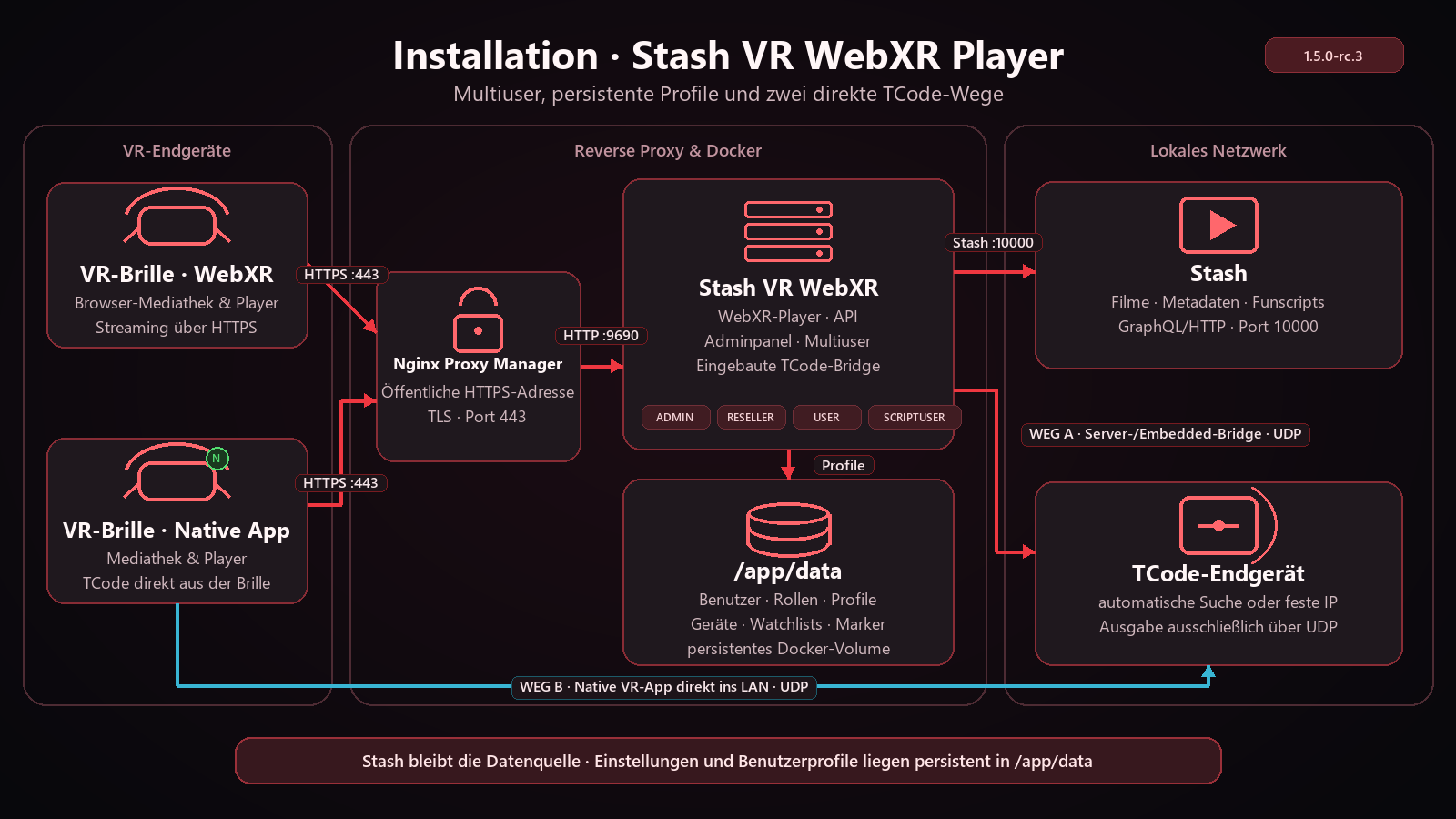
- externer oder optional eingebauter TCode-Bridge-Dienst mit UDP-Gerätesuche; eine kompatible native VR-App kann TCode auch direkt aus dem lokalen Netz der VR-Brille senden
Mehrbenutzerbetrieb
Die Rollen admin, reseller, user und scriptuser trennen Verwaltung und Funscript-Zugriff. Jeder Benutzer erhält eigene Watchlisten, Favoriten, Verlauf, Wiedergabemarker, Videoformate, TCode-Profile und Endgeräte. user erhält keine Funscript-/TCode-Daten; scriptuser, reseller und admin können diese Funktionen verwenden.
Das normale Browser-Adminpanel unter /admin-panel verwaltet Konten sowie die zentrale Stash-Adresse und den API-Key. Der Stash-Key bleibt serverseitig und wird verschlüsselt im persistenten Datenspeicher abgelegt. Beim Wechsel der Stash-Adresse muss der zugehörige API-Key erneut eingegeben werden.
Installationsschema
English
Stash VR WebXR is a self-hosted immersive media library and VR video player for your own Stash instance. Its layout and interaction model come close to familiar SexLikeReal (SLR) and DeoVR workflows while remaining independent, self-hosted, and directly connected to Stash.
Library and player
- sharp red WebXR library with a clear 4 × 3 movie wall
- title, tag, studio, and performer search with a vertical result preview
- filters, tag browser, random selection, history, Continue Watching, Favorites, and freely named watchlists
- artwork, metadata, descriptions, performers, markers, and the original Funscript heatmap directly from Stash
- Flat, 180°/190°/360° ERP, and Fisheye 180°/190°/200°/220°
- Mono, SBS/LR, and Top/Bottom with automatic detection and live changes during playback
- timeline, jump markers, three directly playable next movies, recenter, exit, and controller shortcuts
- starting a movie completely hides the library; X returns to the same library position
TCode
- six visible axes:
L0,L1,L2,R0,R1, andR2 - every axis has independent LOW/HIGH handles plus a draggable middle section for moving the complete range
- L0 additionally provides live intensity and direction inversion
- normal mode places LOW on the left and HIGH on the right
- range, L0 intensity, and direction changes are sent while dragging and saved automatically to the user profile
- original color activity heatmap, optional jump to the first TCode activity, and an immediate TCode stop control in the player
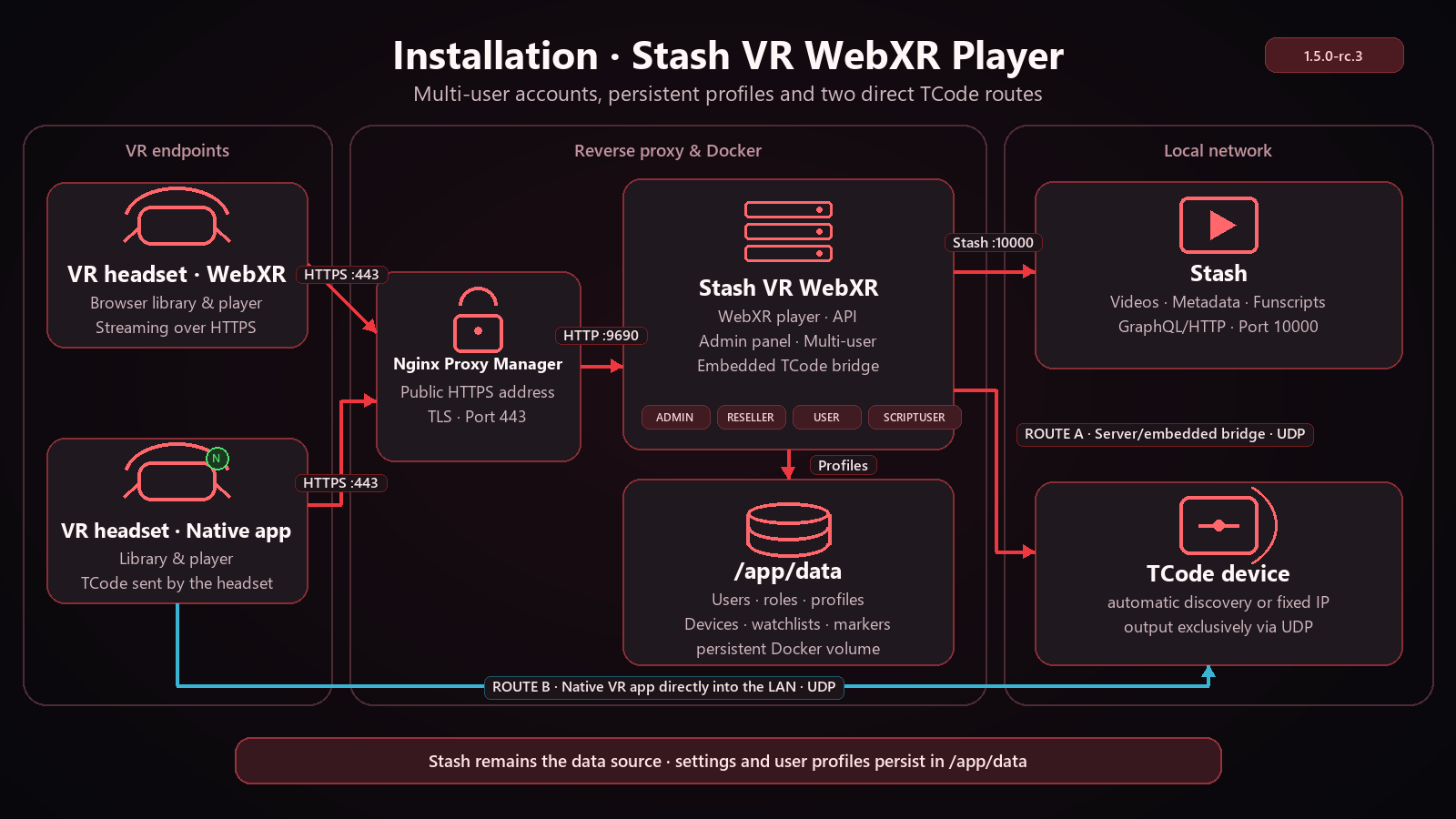
- external or optional embedded TCode bridge with UDP device discovery; a compatible native VR app can also send TCode from the headset's local network
Multi-user operation
The roles admin, reseller, user, and scriptuser separate administration from Funscript access. Every account has its own watchlists, favorites, history, playback markers, video layouts, TCode profiles, and endpoints. user receives no Funscript/TCode data; scriptuser, reseller, and admin retain those features.
The conventional browser admin panel at /admin-panel manages accounts and the central Stash endpoint/API key. The Stash key remains server-side and is encrypted in persistent storage. Changing the Stash endpoint requires entering its API key again.
Installation diagram
Español
Stash VR WebXR es una mediateca inmersiva autoalojada con reproductor de vídeo VR para tu propia instancia de Stash. Su diseño y su manejo se acercan a los flujos conocidos de SexLikeReal (SLR) y DeoVR, pero el proyecto es independiente, autoalojado y se conecta directamente con Stash.
Mediateca y reproductor
- mediateca WebXR roja y nítida con una cuadrícula clara de 4 × 3 películas
- búsqueda por título, etiqueta, estudio e intérprete con vista previa vertical de resultados
- filtros, etiquetas, selección aleatoria, historial, Continuar, Favoritos y listas con nombres libres
- imágenes, metadatos, descripciones, intérpretes, marcadores y el mapa de calor Funscript original directamente desde Stash
- Flat, ERP 180°/190°/360° y Fisheye 180°/190°/200°/220°
- Mono, SBS/LR y Top/Bottom con detección automática y cambios durante la reproducción
- línea de tiempo, marcadores de salto, tres películas siguientes, recentrado, salida y atajos del mando
- al iniciar una película la mediateca desaparece por completo; X vuelve a la misma posición
TCode
- seis ejes visibles:
L0,L1,L2,R0,R1yR2 - cada eje tiene controles LOW/HIGH independientes y una zona central desplazable para mover todo el rango
- L0 ofrece además intensidad en directo e inversión de dirección
- en modo normal LOW queda a la izquierda y HIGH a la derecha
- los cambios de rango, intensidad L0 y dirección se transmiten mientras se arrastra y se guardan automáticamente en el perfil
- mapa de calor de actividad con los colores originales, salto opcional a la primera actividad TCode y parada inmediata de TCode en el reproductor
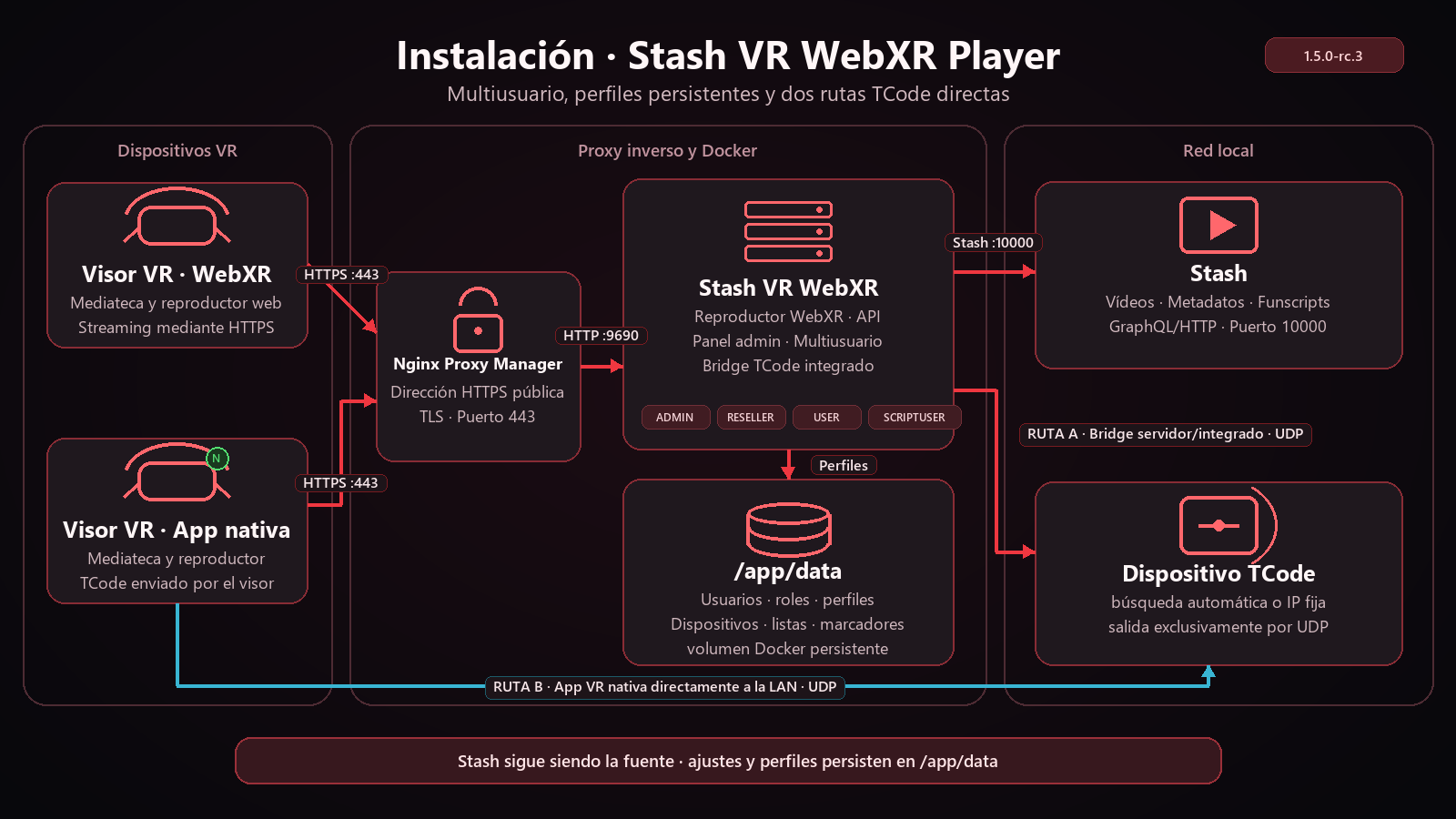
- bridge TCode externo o integrado opcional con detección UDP; una aplicación VR nativa compatible también puede enviar TCode desde la red local del visor
Multiusuario
Los roles admin, reseller, user y scriptuser separan la administración del acceso a Funscript. Cada cuenta dispone de sus propias listas, favoritos, historial, marcadores, formatos de vídeo, perfiles TCode y dispositivos. user no recibe datos Funscript/TCode; scriptuser, reseller y admin conservan esas funciones.
El panel de administración convencional del navegador en /admin-panel gestiona las cuentas, la dirección central de Stash y su clave API. La clave permanece en el servidor y se guarda cifrada en el almacenamiento persistente. Al cambiar la dirección de Stash es necesario volver a introducir su clave API.
Esquema de instalación
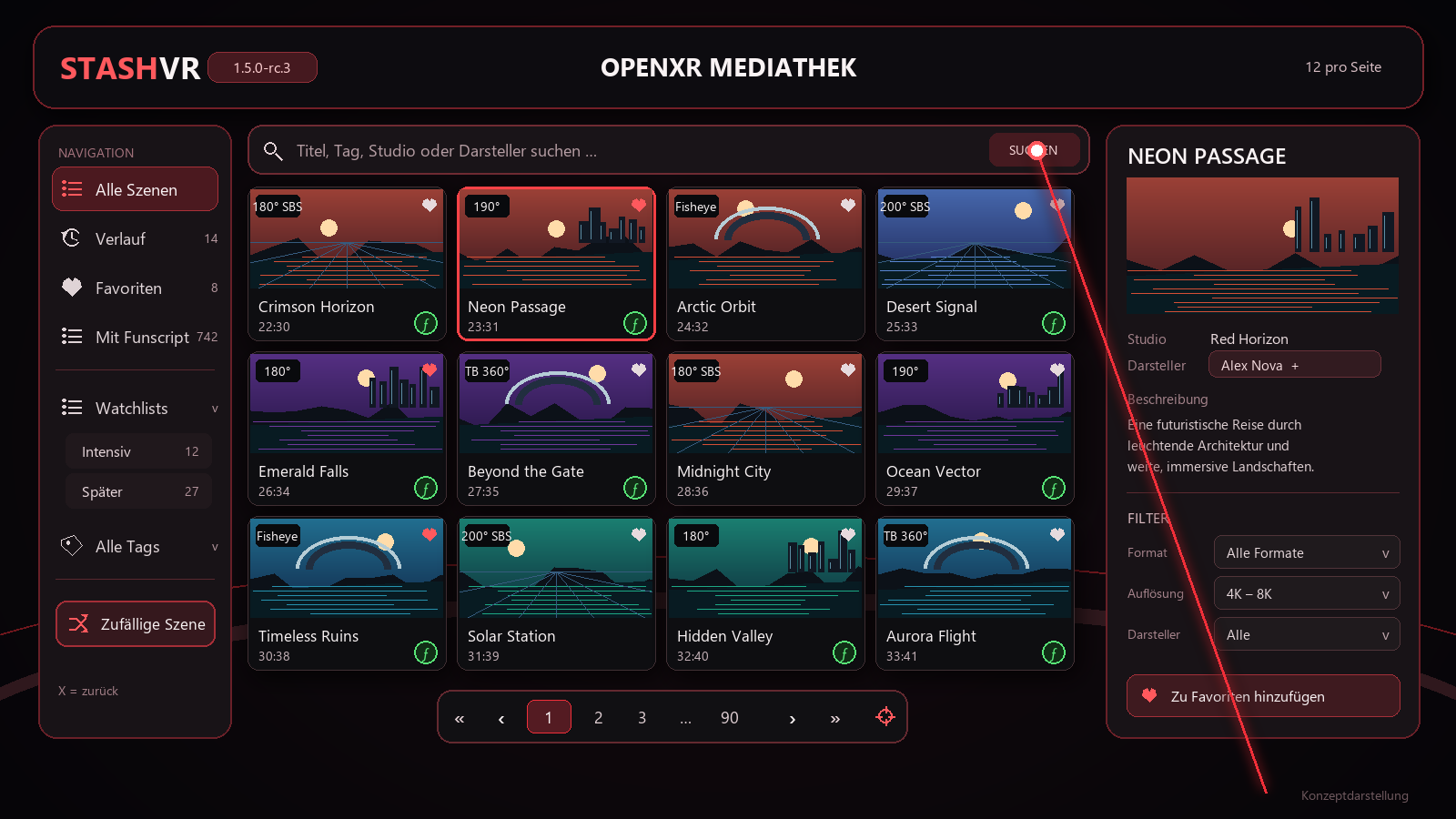
OpenXR UI preview · Vorschau · Vista previa
Mediathek · Library · Mediateca
Player · Reproductor
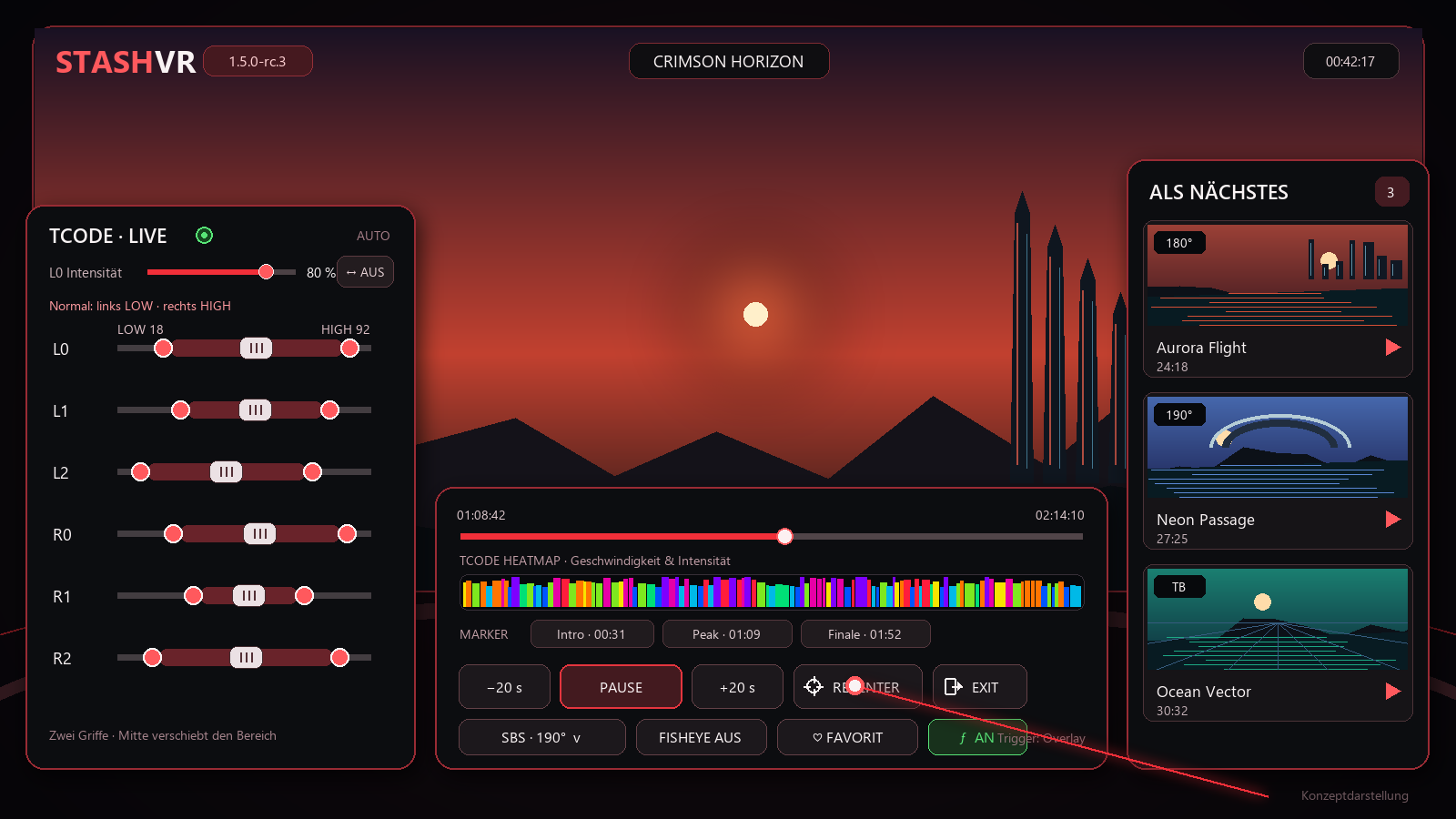
The UI images are representative concept views of the immersive headset layout. Exact spacing can vary with the WebXR runtime and headset.
Apps & APK downloads · App-Downloads · Descargas
Native VR apps, current APK files, checksums, and installation notes are available at rcskynet.de/vrplayer.
Docker quick start · Schnellstart · Inicio rápido
Current stable release: 1.5.17 for linux/amd64.
latest tag: 1.5.17.
docker run -d \
  --name stash-vr-webxr \
  --restart unless-stopped \
  -p 9690:9690 \
  -v stash-vr-data:/app/data \
  -e STASH_ORIGIN=http://YOUR-STASH-HOST:9999 \
  -e STASH_API_KEY=YOUR_STASH_API_KEY \
  devil77c/stash-vr-webxr:1.5.17
Open the service through an authenticated HTTPS reverse proxy. WebXR normally requires a secure origin.
The Stash endpoint and API key can be supplied with environment variables or entered by an administrator in /admin-panel. Mount /app/data persistently; it stores accounts, encrypted central configuration, user settings, histories, watchlists, layouts, device endpoints, and bridge state.
Docker Compose installation
Create a directory containing this compose.yaml:
name: stash-vr-webxr

services:
  player:
    image: devil77c/stash-vr-webxr:1.5.17
    container_name: stash-vr-webxr
    pull_policy: always
    restart: unless-stopped
    ports:
      - "${STASH_VR_BIND_ADDRESS:-127.0.0.1}:${STASH_VR_PORT:-9690}:9690"
    environment:
      STASH_ORIGIN: "${STASH_ORIGIN}"
      STASH_API_KEY: "${STASH_API_KEY}"
      TCODE_BRIDGE_URL: "${TCODE_BRIDGE_URL:-}"
      TCODE_BRIDGE_TOKEN: "${TCODE_BRIDGE_TOKEN:-}"
      TCODE_EMBEDDED_BRIDGE_ENABLED: "${TCODE_EMBEDDED_BRIDGE_ENABLED:-0}"
      TCODE_HOST: "${TCODE_HOST:-}"
      TCODE_PORT: "${TCODE_PORT:-8000}"
      SCAN_CIDRS: "${SCAN_CIDRS:-}"
    volumes:
      - stash-vr-data:/app/data
    read_only: true
    tmpfs:
      - /tmp:size=64m,mode=1777
    cap_drop:
      - ALL
    security_opt:
      - no-new-privileges:true

volumes:
  stash-vr-data:
Create .env beside it:
STASH_VR_BIND_ADDRESS=127.0.0.1
STASH_VR_PORT=9690
STASH_ORIGIN=http://192.168.1.14:9999
STASH_API_KEY=YOUR_STASH_API_KEY

TCODE_BRIDGE_URL=
TCODE_BRIDGE_TOKEN=
TCODE_EMBEDDED_BRIDGE_ENABLED=0
TCODE_HOST=
TCODE_PORT=8000
SCAN_CIDRS=
STASH_ORIGIN must be reachable from inside the container and must contain
only the Stash origin, without /graphql. Start and verify:
docker compose pull
docker compose up -d
docker compose ps
curl http://127.0.0.1:9690/api/health
Deutsch: Öffne danach https://deine-player-domain/login, melde dich mit den
oben genannten Initialdaten an, ändere das temporäre Passwort und prüfe unter
/admin-panel die Stash-Verbindung. English: open the same /login URL,
change the temporary password, and verify Stash in /admin-panel. Español:
abre /login, cambia la contraseña temporal y comprueba Stash en
/admin-panel.
Nginx Proxy Manager
WebXR requires HTTPS. Create one Proxy Host with these values:
| Setting | Value |
|---|---|
| Domain Names | player domain, for example player.example.com |
| Scheme | http |
| Forward Hostname / IP | container name on a shared Docker network, or the Docker host IP |
| Forward Port | 9690 |
| Websockets Support | On |
| Block Common Exploits | On |
| Cache Assets | Off |
Use path / without a Custom Location or rewrite. Under SSL, select or request a valid certificate, then enable Force SSL and HTTP/2. Enable HSTS only after HTTPS works correctly. Leave Advanced empty.
If Nginx Proxy Manager is not on the same Docker network, set STASH_VR_BIND_ADDRESS=0.0.0.0 and restrict port 9690 to the reverse-proxy host with a firewall. Never use 127.0.0.1 as the forwarding target from a different container.
TCode connection
External bridge
TCODE_BRIDGE_URL=http://BRIDGE-HOST:9680/api/webxr
TCODE_BRIDGE_TOKEN=AT_LEAST_32_RANDOM_URL_SAFE_CHARACTERS
Optional embedded bridge
TCODE_EMBEDDED_BRIDGE_ENABLED=1
TCODE_HOST=192.168.1.40
TCODE_PORT=8000
The embedded bridge creates and persists its own internal token when none is supplied. UDP LAN discovery can find compatible devices automatically; SCAN_CIDRS=192.168.1.0/24 remains available as an explicit override. Docker host networking may be required when the bridge must discover devices on the host's physical LAN.
Never publish the Stash API key or TCode bridge token in client-side code. Protect public installations with HTTPS, strong account passwords, and a suitable access policy.
Independent community project for use with Stash. Not affiliated with or endorsed by Stash, Pico, SexLikeReal, or DeoVR.
Tag summary
Content type
Image
Digest
sha256:e8330108e…
Size
110 MB
Last updated
about 2 months ago
docker pull devil77c/stash-vr-webxr