devonwarren/mattermost-notify
Jinja2 Template based Mattermost (or Slack) notification docker image for use in CI steps
3.8K
devonwarren/mattermost-notify repository overview
mattermost-notify
A template based Mattermost (or Slack) notification docker image for use in CI steps
This project was created so our company could load in json files as needed and parse them using Jinja2 and then dump output into Mattermost using Gitlab CI. For example if you have a code scanning tool you can extract a json result from, simply put that file into /app/json-input and it will be available to display as you wish into mattermost such as the example below:
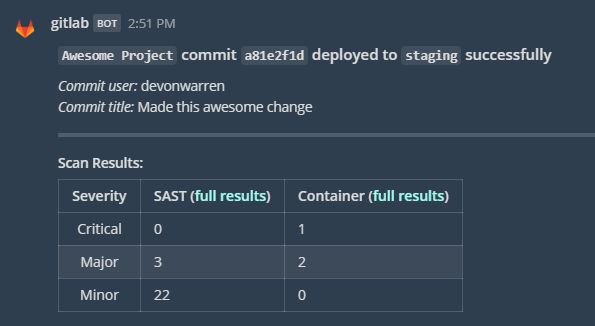
Available Variables
These variables can be set when running the docker image to customize the functionality
| Variable | Default | Description |
|---|---|---|
| MESSAGE_TEXT | Test Mattermost Notification | A value that will be sent to Mattermost after rendering through Jinja |
| MATTERMOST_HOOK_URL | https://google.com | The full url that the HTTP POST request will go to (usually requires the incoming hook token in it) |
| DEBUG | False | If set to True will enable additional output including a dump of all the variables run against Jinja |
| TEMPLATE_FILE | default.jinja | A file inside /app/templates that will rendered against to post the message. If Using MESSAGE_TEXT this will dump into the default.jinja file automatically |
| CARD_TEMPLATE_FILE | A template file inside /app/templates that will be rendered and sent as the info card content if it's not empty | |
| CHANNEL | The channel to put notification into. If not set will use the default set up for incoming hook | |
| PREPROCESS_PYTHON | If set will run this python script prior to running the notification script. Allows you to add more advanced functionality if needed |
Directories
| Directory | Description |
|---|---|
| /app/templates | Jinja files for you to render against, use in conjunction with TEMPLATE_FILE variable |
| /app/json-input | Place .json files in here to be automatically read in as the data variable in jinja |
Parsing
JSON
Files put in the /json-input will be available as data under the filename (minus extension) on render so a file of /app/json-input/example-file.json with the contents {'test':'sample_text'} will be available as {{ data['example-file']['test] }}
Environment Vars
You can pass in simple data using environment variables to the docker image. This will be available when rendering under the env jinja variable. So something like Commit: {{ env['CI_COMMIT_SHORT_SHA'] }} will render something like Commit: a82b1ac7 (in this case using the built-in Gitlab CI variable)
Jinja Templates
If you just want a single line displayed you can use the MESSAGE_TEXT variable and it will render whatever jinja in that, else you will likely want copy/mount the files in /app/templates to be run against with the filename being specified using TEMPLATE_FILE (or CARD_TEMPLATE_FILE for card info)
Advanced Functionality
You can introduce a preprocess python script if you need to do more advanced functionality. This will run standalone before the regular script is called so you can process or import whatever json objects you need. You need to pass in the full path to a python3 compatible script.
Tag summary
Content type
Image
Digest
Size
48.2 MB
Last updated
almost 6 years ago
docker pull devonwarren/mattermost-notify