devprincekumar/pi-fleet-spawner
Spawn, scale and validate a simulated Raspberry Pi fleet in Docker. Real SSH + Node-RED per node.
1.1K
devprincekumar/pi-fleet-spawner repository overview
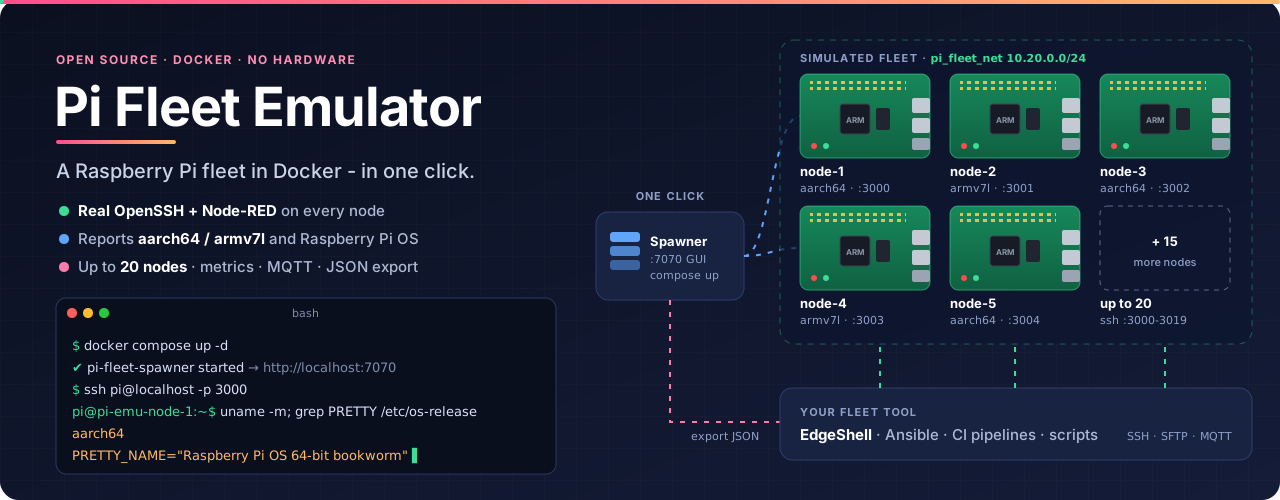
Pi Fleet Emulator · Spawner
Spawn, scale and validate a simulated Raspberry Pi fleet in Docker. Every node runs real OpenSSH and Node-RED, reports aarch64 / armv7l and Raspberry Pi OS, and is reachable from any SSH-based tool. No hardware required.
GitHub · Docs · Node image · MIT or Apache-2.0
Tags
| Tag | Platforms |
|---|---|
1.1.0, 1.1, 1, latest | linux/amd64, linux/arm64 |
Pin 1.1.0 for reproducible setups. Images carry OCI labels, SBOM and provenance attestations.
Quick start
docker-compose.yml
services:
  pi-fleet-spawner:
    image: devprincekumar/pi-fleet-spawner:1.1.0
    container_name: pi-fleet-spawner
    restart: unless-stopped
    ports:
      - "127.0.0.1:7070:7070"                       # web GUI (localhost only)
    volumes:
      - /var/run/docker.sock:/var/run/docker.sock   # creates the Pi nodes
      - pi_fleet_data:/data                         # fleet config persists here
    environment:
      PFE_NODE_IMAGE: devprincekumar/pi-fleet-node:1.1.0
      PFE_PERSIST_HOME: "1"                         # each node keeps its /home/pi
      PFE_BIND_ADDR: "127.0.0.1"                    # node ports: this machine only
      PFE_NODE_PASSWORD: "raspberry"                # pi login on every node

volumes:
  pi_fleet_data:
    name: pi_fleet_data
docker compose up -d
docker exec pi-fleet-spawner pfe spawn 3 --validate   # 3 nodes, checked
ssh pi@localhost -p 3000                              # password: raspberry
GUI: http://localhost:7070 · Node-RED: http://localhost:4000, :4001, ...
CLI
docker exec pi-fleet-spawner pfe <command>
| Command | |
|---|---|
spawn N | New fleet of N nodes (1-20), alternating 64/32-bit |
scale N | Grow or shrink live; running nodes untouched |
validate | PASS/FAIL per node: arch, OS, SSH, Node-RED, metrics, MQTT |
status | Nodes and host ports |
stop / reset --yes | Stop (keep data) / remove everything |
Data
| Volume | Holds |
|---|---|
pi_fleet_data | Fleet config (spawner /data) |
pi-fleet_pi-emu-<name>-home | Each node's /home/pi, incl. Node-RED flows |
Survives restarts, upgrades and reboots. pfe reset --yes deletes node data.
Environment
| Variable | Default | |
|---|---|---|
PFE_NODE_IMAGE | - | Node image to run (set as above) |
PFE_PERSIST_HOME | 1 | 0 = throwaway nodes |
PFE_BIND_ADDR | 127.0.0.1 | 0.0.0.0 = expose node ports to the LAN |
PFE_NODE_PASSWORD | raspberry | pi login on every node |
PFE_ALLOWED_HOSTS | localhost,127.0.0.1,::1 | Hostnames the GUI answers to |
PFE_PROJECT | pi-fleet | Unique per spawner if you run several on one host |
Security
Local test bed. The spawner holds the Docker socket, so its GUI stays on 127.0.0.1 and refuses cross-site and DNS-rebinding requests. Nodes are localhost-only by default with unique SSH host keys; set PFE_NODE_PASSWORD before exposing them with PFE_BIND_ADDR=0.0.0.0. Security policy
Tag summary
Content type
Image
Digest
sha256:b651e90a4…
Size
86.2 MB
Last updated
7 days ago
docker pull devprincekumar/pi-fleet-spawner