dhlavaty/webdavhere
Small docker image with WebDAV server based on Alpine linux.
2.0K
dhlavaty/webdavhere repository overview
WebDAV server Docker Image
Description
Small docker image with WebDAV server based on Alpine linux.
Used to share current directory over anonymous WebDAV on port 80. It is maybe even a simplest / quickest way, how to transfer files between Windows and Mac on your local network.
This image was inspired by great Docker for Pentesters article.
Usage
To serve files from your current directory over WebDAV on port 80 run:
$ docker run --rm -it -p 80:80 -v "${PWD}:/srv/data/share" dhlavaty/webdavhere
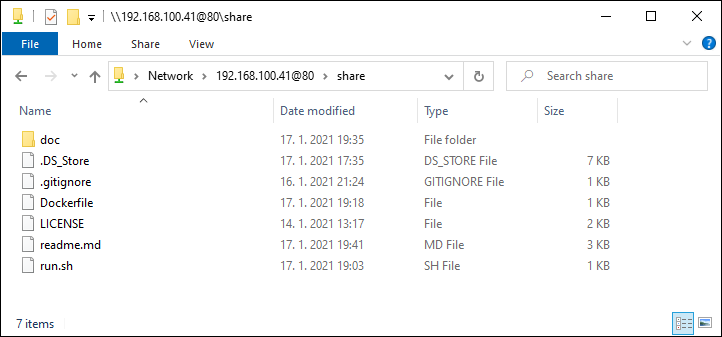
And now, from Windows, you can browse to the WebDAV share in File Explorer by a UNC path: \\192.168.100.41@80\share:
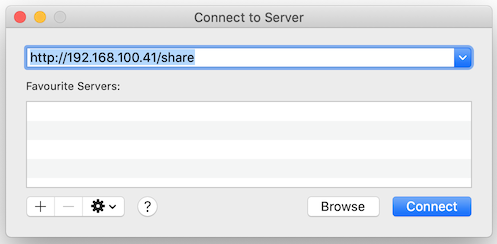
On a Mac, you can Connect to Server [CMD+K] directly from Finder. Use address http://192.168.100.41/share:
Convenient usage using alias
Use webdavhere alias (in your zsh.rc for example):
alias webdavhere='docker run --rm -it -p 80:80 -v "${PWD}:/srv/data/share" dhlavaty/webdavhere'
And now it couldn't be simpler:
$ cd /Users/myname/subdir
$ httpshere

# done
Docker build
Build multi-arch image:
$ docker buildx create --name mybuilder
$ docker buildx use mybuilder

# (Optional) check your builder
$ docker buildx inspect

$ docker buildx build --platform linux/amd64,linux/arm64 --tag dhlavaty/webdavhere . --push

# (Optional) Inspect your image
$ docker buildx imagetools inspect dhlavaty/webdavhere
Lint dockerfile:
$ docker run --rm -i hadolint/hadolint < Dockerfile
License
This project is licensed under MIT - http://opensource.org/licenses/MIT
Tag summary
Content type
Image
Digest
sha256:e903ee601…
Size
28.6 MB
Last updated
almost 4 years ago
docker pull dhlavaty/webdavhere