dimagoltsman/camgrid
Self-hosted multiview for IP cameras
Image
0
1.0K
dimagoltsman/camgrid repository overview
CamGrid
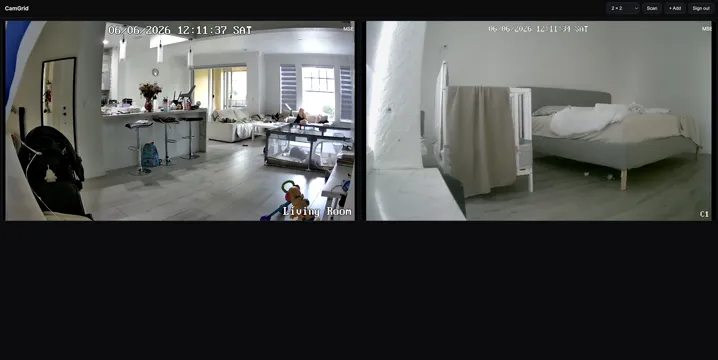
Self-hosted multiview for IP cameras. Runs in Docker on your camera network, pulls each camera's stream directly, and serves a browser UI you can reach from anywhere.
- Add by IP (Reolink probe + login) or by stream URL (
rtsp://,http://,rtmp://, …) - Layout presets — Auto, 2×2, 3×3, 4×4, or 1 + small
- SD ⇄ HD toggle, PTZ, rename, NVR channel enumeration
- Live video via go2rtc (WebRTC ~0.5s latency, MSE fallback)
- Built-in login (HMAC session cookies + per-IP lockout); single exposed port
Source & full docs: https://github.com/dimagoltsman/CamGrid
Quick start (docker-compose)
services:
  camgrid:
    image: dimagoltsman/camgrid:latest
    container_name: camgrid
    restart: unless-stopped
    # Linux: host networking lets it scan the LAN and reach cameras directly.
    network_mode: host
    environment:
      - PORT=3000                                   # web UI port — change to taste
      - AUTH_USER=admin
      - AUTH_PASS=change-me-to-a-strong-password   # if empty, the UI is OPEN
      # Optional:
      # - SESSION_DAYS=30
      # - LOCKOUT_ATTEMPTS=5
      # - LOCKOUT_MINUTES=15
      # - TRUST_PROXY=1
    volumes:
      # cameras.json (IPs + passwords), go2rtc.yaml, session.secret — keep private!
      - ./data:/data
docker compose up -d
Then open http://<host-ip>:3000, sign in, and Scan / + Add a camera.
Docker Desktop (macOS / Windows)
Host networking isn't supported there — use a published port instead (subnet scan won't work in bridge mode, so add cameras by IP/URL manually):
services:
  camgrid:
    image: dimagoltsman/camgrid:latest
    container_name: camgrid
    restart: unless-stopped
    environment:
      - PORT=3000                  # web UI port (also map it below)
      - AUTH_USER=admin
      - AUTH_PASS=change-me-to-a-strong-password
    ports:
      - "3000:3000"                # host:container — for a different port set PORT above and match it, e.g. PORT=8080 + "8080:8080"
    volumes:
      - ./data:/data
Run without compose
docker run -d --name camgrid \
  --network host \
  -e PORT=3000 \
  -e AUTH_USER=admin -e AUTH_PASS=change-me \
  -v "$PWD/data:/data" \
  dimagoltsman/camgrid:latest
Tags
latest— newest build1.0.3— pinned version
Multi-arch: linux/amd64, linux/arm64.
Tag summary
Content type
Image
Digest
sha256:0c92592c1…
Size
244.5 MB
Last updated
4 months ago
docker pull dimagoltsman/camgrid