dlimkin/ssh-tunnel-dropbear
Minimal Docker setup to run a Dropbear SSH server for reverse SSH tunneling.
Image
Networking
Developer tools
Web servers
0
1.1K
dlimkin/ssh-tunnel-dropbear repository overview
SSH Tunnel Proxy Server
Minimal Docker setup to run a SSH Tunnel Proxy Server with Dropbear for reverse SSH tunneling.
It allows your local machine to expose a local service (e.g., localhost:80)
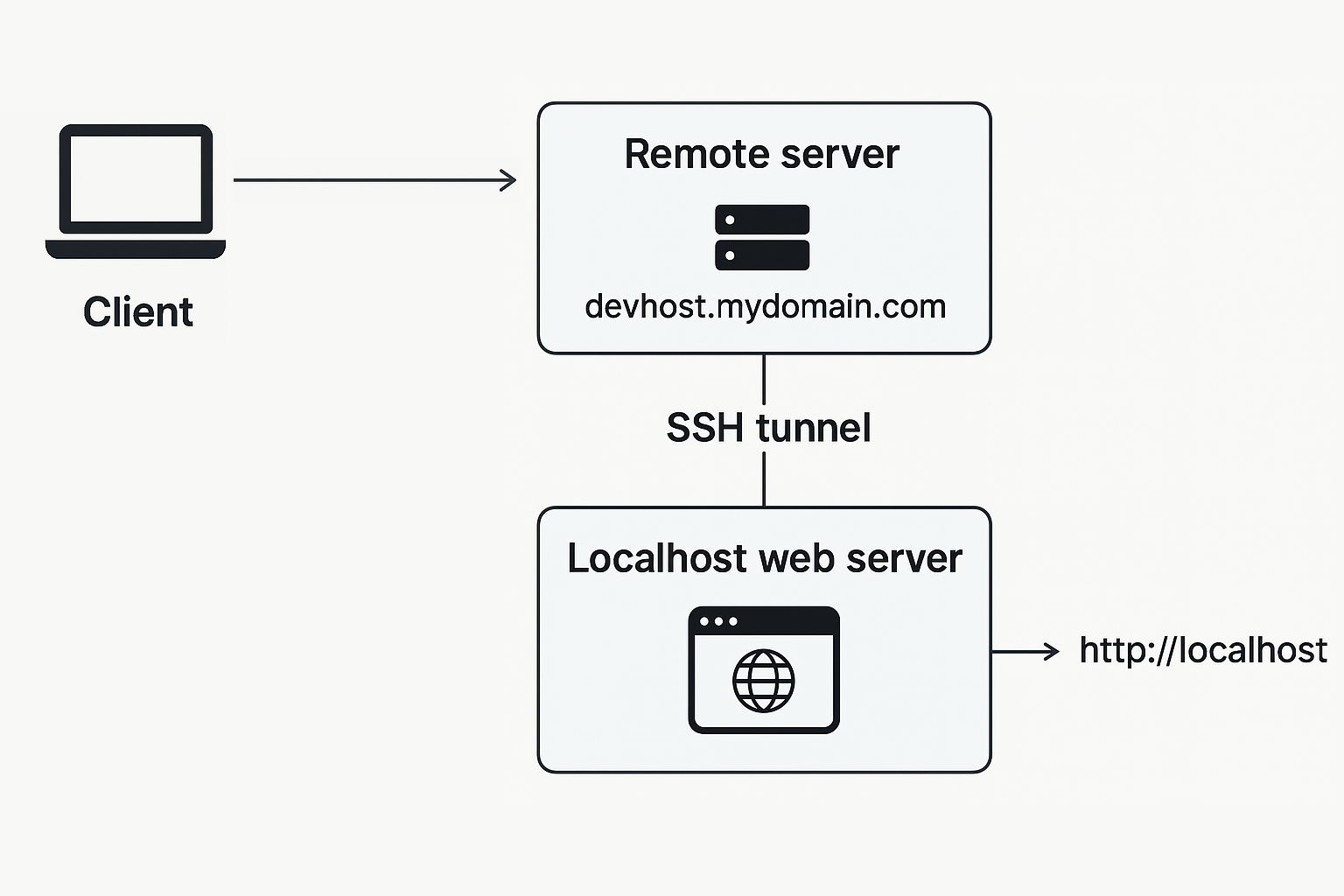
💰 Funding
If you find this project useful, consider supporting its development through cryptocurrency donations:
- BTC:
bc1qsrl63vcuqnmp6drl3f6uhcvnky2t5vqlg2r2jqQR code - ETH or (ERC-20):
0xd1ce59aD3615cdbFCc8cc2C496E9CB0E10CD543BQR code - TRON or (TRC-20):
TZ84vr4XcuKcQZAsEJUdyvq5FT6LG66NjXQR code - SOLANA:
BE3hxHZfbk7qpgPtG7hARXJrGJjpwbd1eu9geYtUZNobQR code
⚡ Features
- Lightweight Dropbear SSH server on Alpine Linux
- Configurable environment variable
- Exposes SSH and HTTP ports (configurable, default
22for SSH,8080for HTTP) - Works in Docker, Compose, and Swarm
🔗 Environment Variables
The following environment variables can be used to configured:
| Variable | Default | Description |
|---|---|---|
USER_NAME | tunnel | The username for SSH access. If not set, defaults to tunnel. |
SSH_PUBLIC_KEY_FILE | empty | Path to the public SSH key file. If provided, the key will be copied to the user's ~/.ssh/authorized_keys. |
USER_PASS | random (when SSH_PUBLIC_KEY_FILE is empty) | The password for the user. If not set, a random password will be generated and printed to the console. |
Notes:
- If
SSH_PUBLIC_KEY_FILEis provided and valid orauthorized_keysare mounted via volume, password authentication will be disabled. - If no key is provided, use
USER_PASSto set a password or a random password will be generated and printed to the console.
1️⃣ Docker Example
Run container
docker run -e USER_NAME=tunnel \
  -p 2022:22 \
  -p 8080:80 \
  -v /path/to/authorized_keys:/home/tunnel/.ssh/authorized_keys:ro \
  dlimkin/ssh-tunnel-dropbear
Connect from local machine
ssh -p <docker-port> -N -R 8080:127.0.0.1:80 tunnel@<docker-host>
Notes:
2022is the exposed SSH port on the Docker host8080is the exposed port on the Docker host that will forward to your local machine's port127.0.0.1:80is the local service you want to expose (change as needed)tunnelis the username (change if you set a differentUSER_NAME)<docker-host>is the IP or hostname of your Docker host<docker-port>is the SSH port you exposed (e.g.,2022)
2️⃣ Docker Compose Example
docker-compose.yml (optional Traefik labels)
version: "3.9"

services:
  tunnel-server:
    image: dlimkin/ssh-tunnel-dropbear
    environment:
      - USER_NAME=mycustomuser # optional, default is 'tunnel', and change in volume target below
    ports:
      - "2022:22"
      - "8080:8080"
    volumes:
        - /path/to/authorized_keys:/home/mycustomuser/.ssh/authorized_keys:ro
    labels:
      - "traefik.enable=true"
      - "traefik.http.routers.tunnel-server.rule=Host(`devhost.mydomain.com`)"
      - "traefik.http.services.tunnel-server.loadbalancer.server.port=8080"
3️⃣ Docker Swarm Stack Example
docker-stack.yml (optional Traefik labels)
version: "3.9"

services:
  tunnel-server:
    image: dlimkin/ssh-tunnel-dropbear
    environment:
      - USER_NAME=mycustomuser # optional, default is 'tunnel'
      - SSH_PUBLIC_KEY_FILE=/run/secrets/ssh_pub_key # optional, use docker swarm secret
    ports:
      - "2022:22"
      - "8080:8080"
    secrets:
      - ssh_pub_key
    deploy:
      replicas: 1
    labels:
      - "traefik.enable=true"
      - "traefik.http.routers.tunnel-server.rule=Host(`devhost.mydomain.com`)"
      - "traefik.http.services.tunnel-server.loadbalancer.server.port=8080"

secrets:
  ssh_pub_key:
    external: true
Tag summary
Content type
Image
Digest
sha256:f8ad1ebf9…
Size
4.7 MB
Last updated
about 1 year ago
docker pull dlimkin/ssh-tunnel-dropbear