dobbs/apparatus
Containerized graphics programming environment: https://aprt.us
240
dobbs/apparatus repository overview
Apparatus
Apparatus is a hybrid graphics editor / programming environment for creating interactive diagrams.
An interactive diagram can be an effective way to communicate a mental model, because it can convey a way of seeing a problem or system. Currently, to create an interactive diagram one must write code to procedurally draw the diagram and respond appropriately to user input. Writing this code can take hours or days. Apparatus aims to reduce the time to create an interactive diagram from hours to minutes.
The Apparatus editor runs in the browser. You can play with it, see examples, and watch tutorials on the Apparatus homepage.
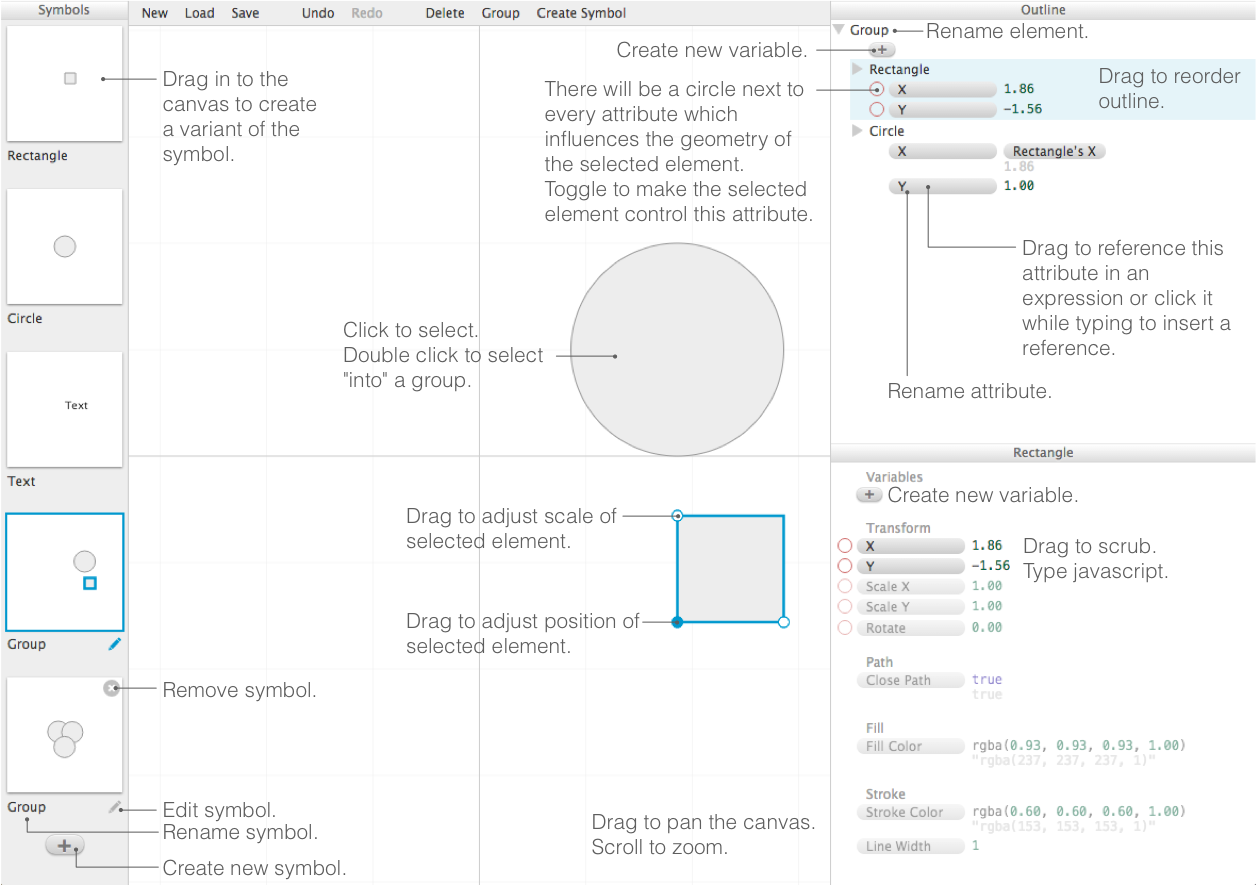
Building the project
First run npm install, which will install all the dependencies for building Apparatus.
Then run npm run start, which starts up a webpack dev server. This will watch for changes to src/ and style/, compile them automatically, and host the resulting app at http://localhost:8080. Even better, http://localhost:8080/webpack-dev-server will automatically reload your browser when files change and keep you informed of the build status along the way.
To build a static version of Apparatus, run npm run build. This will compile the coffeescript files in src/ into dist/apparatus.js and the stylus files in style/ into dist/apparatus.css. Now you can open index.html in a browser to run the Apparatus editor.
(If you ever want compiled JS/CSS really fast, you can run npm run build-dev. Compilation will be much faster, though the output will not be as optimized.)
You can run npm run test to run all the tests in test/.
See all of the commands you can run in the scripts section of package.json.
Containerized static version of Apparatus
Build
docker build --tag dobbs/apparatus .
Run
docker run \
  -d \
  --name apparatus \
  -v $HOME/apparatus-saves:/src/saves \
  -p 2015:2015 dobbs/apparatus
Then point your browser at http://localhost:2015 to load the local
editor. If you save your work in $HOME/apparatus-saves you will
be able to re-load it from http://localhost:2015/?load=saves/filename.json
Compiling the icon font
If you add an icon to the icon font (by putting an svg into the icons folder), you'll need to rebuild the icon font (the stuff in dist/font including dist/font/icons.css).
To do this you'll need to install fontcustom. Then in the terminal run:
fontcustom compile
Directory structure
distcontains the built javascript and CSS thatnpm run buildwill build.doccontains some additional pictures and documentation on Apparatus.iconscontains SVG icons which are built into an icon font using fontcustom.srccontains the coffeescript source code for Apparatus.stylecontains the stylus source code which is built into CSS.testcontains some tests for the model code. Run the tests withnpm run test.thirdpartycontains some third party javascript libraries that are used by Apparatus.
Tag summary
Content type
Image
Digest
Size
19.4 MB
Last updated
about 9 years ago
docker pull dobbs/apparatus