dodoooh/brother_ql_app
A web interface and REST API for Brother QL label printers
10K+
dodoooh/brother_ql_app repository overview

Brother QL Printer App







A web interface and REST API for Brother QL label printers. Compose a label in the browser or send it from a script. The app renders it, queues it and prints it over the network, over USB, or through a Linux device node.

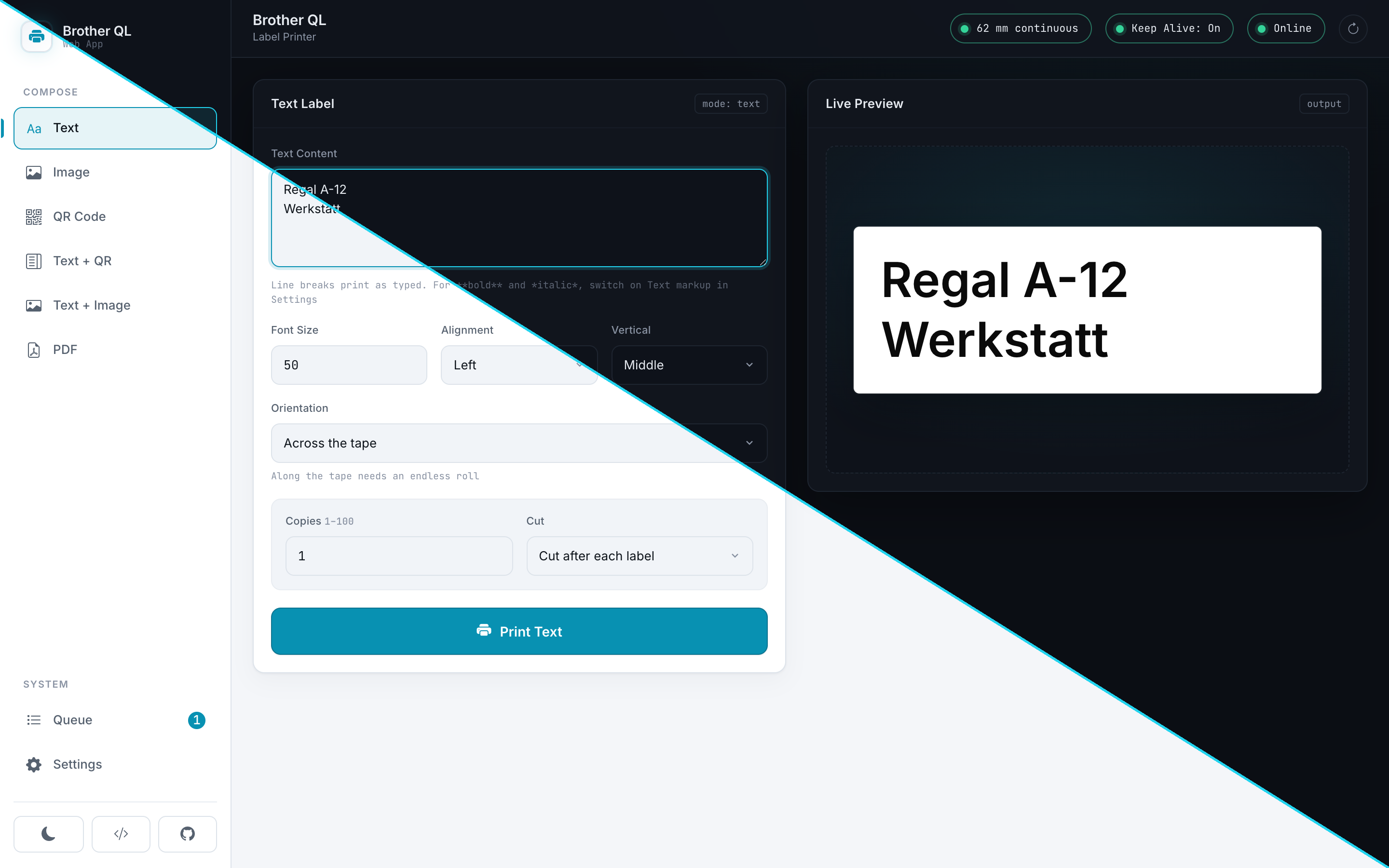
Open the demo. It is the real interface with a simulated printer behind it, runs entirely in your browser, and prints nothing.
Features
- Text, images, QR codes and PDFs, plus combined layouts (text with a QR code or an image beside it)
- A live preview rendered by the same code that drives the printer
- A print queue with per-job status, reprint and cancel
- Media detection: the app can read which roll is loaded and follow it
- Print alignment calibration per label type, with an optional bleed
- Round die-cut labels, and text that runs lengthwise along continuous tape
- Optional mains power control through a relay
- Keep-alive for network printers that fall asleep
- A documented REST API with a Swagger UI, for Home Assistant, Apple Shortcuts or a shell script
Quick start
# docker-compose.yml
services:
  brother_ql_app:
    image: dodoooh/brother_ql_app:dev
    container_name: brother_ql_app
    ports:
      - "5000:5000"
    volumes:
      - ./data:/app/data
    restart: unless-stopped
    environment:
      - PYTHONPATH=/app
      - FLASK_ENV=production
docker compose up -d
The interface is then at http://<host>:5000 and the API documentation at
http://<host>:5000/api/v1/ui/. Set your printer address under Settings or with
PUT /api/v1/settings.
The image is published for linux/amd64 and linux/arm64, which covers a
64-bit Raspberry Pi, a NAS and an ordinary server. There is no 32-bit build:
Pillow ships no armv7 wheel, so it would have to be compiled, and this image
deliberately carries no compiler. On a 32-bit system, build it yourself with
docker build.
The API is open to whoever can reach the port. That matches what it drives: a
label printer accepts a raster on port 9100 from anyone on the same network, with
or without this app in front of it. Give it a network you trust, or a reverse
proxy, and see API_KEY below if you run it without the interface.
Printing from a script
curl -X POST http://<host>:5000/api/v1/text/print \
  -H 'Content-Type: application/json' \
  -d '{
        "text": "Shelf A-12",
        "settings": { "label_size": "62", "font_size": 50 }
      }'
The call returns a job id straight away. Poll GET /api/v1/jobs/{id} if you need
the result. Add -H 'X-API-Key: ...' if you set that variable. Image and PDF
upload, QR codes, combined layouts, printer status and queue control work the
same way and are documented in the Swagger UI, which is generated from the
specification the server routes on. The demo carries the same reference as a
static page, for reading it
without installing anything.
Print queue
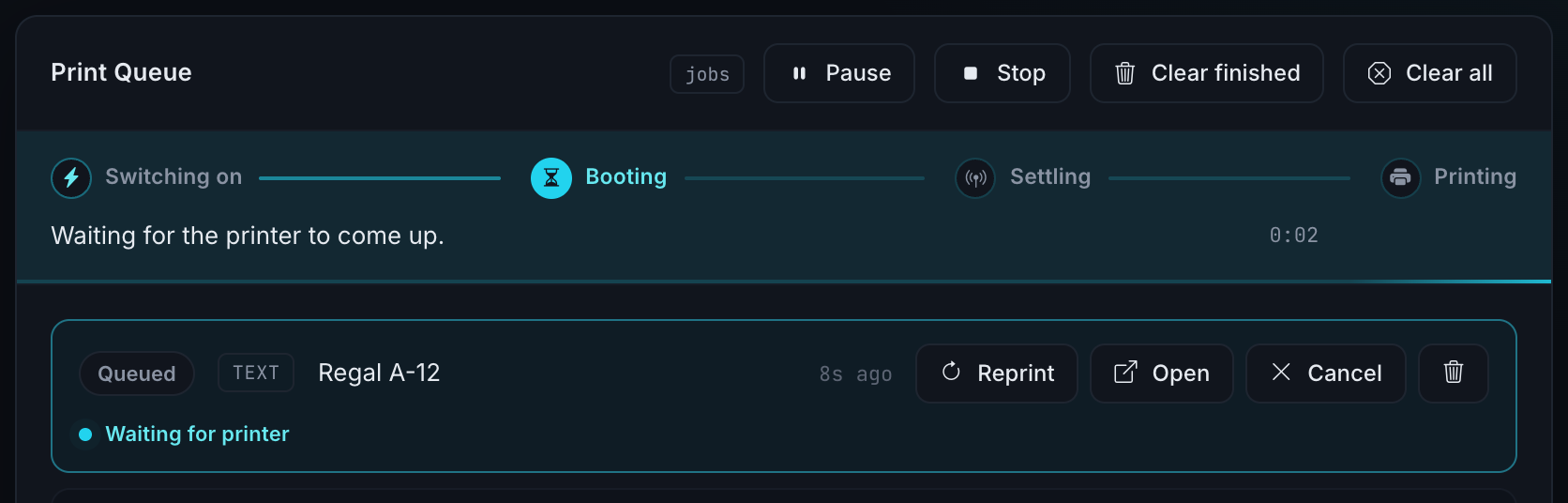
Jobs are printed one at a time, because the printer accepts one connection at a time. The queue shows what each job is doing, including the phases a job passes through while it waits for a printer to become available.
Mains power control
A Brother QL starts up on its own as soon as mains power returns, at least the QL-820NWB this was built against. That makes a relay in front of it a remote power switch: cutting the supply switches the printer off, restoring it switches the printer on, and nobody has to walk over and press the button.
The relay is anything that can be driven by a webhook: a Shelly, a Tasmota plug, an ESPHome switch, or a Node-RED flow in front of one. The app closes it when a job arrives at a printer that is not answering, and opens it again once the configured window has passed.
A printer that has just been switched on needs time. The app waits for it, holding the job in the queue instead of failing it, and retries the print a few times while the device settles. The waiting times come from watching a QL-820NWB boot, so they are one printer's numbers for now.
The feature is off by default, and switching the printer off again is a
separate setting. printer_auto_power_off_minutes should match what the
printer's own menu shows, since the app subtracts it from the keep-alive window
and has no way to read it from the device.
Configuration
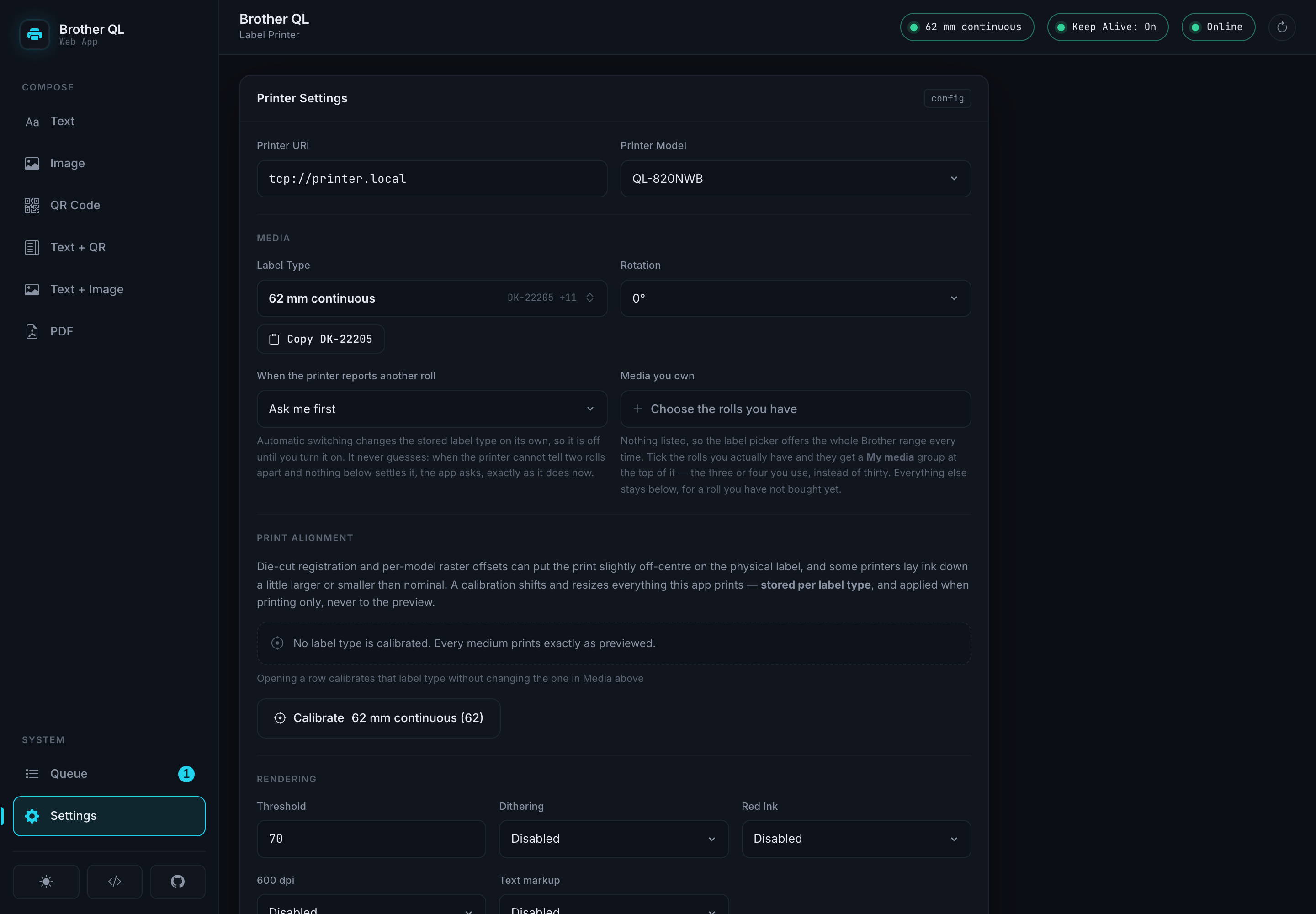
Settings live in data/settings.json. Edit them in the interface or with
PUT /api/v1/settings. Any of them can also be sent with a single print request
under settings, where they override the stored value for that job only.
Printer
| Setting | Default | What it does |
|---|---|---|
printer_uri | tcp://192.168.1.100 | Also usb://0x04f9:0x209b or file:///dev/usb/lp0 |
printer_model | QL-800 | For example QL-820NWB |
label_size | 62 | The loaded media, for example 62, 62red or d24 |
ipp_port | 631 | Port used for status, media detection and the printer clock |
printers | one entry | A list of printers to choose from. The fields above are the default one |
Layout and rendering
| Setting | Default | What it does |
|---|---|---|
font_size | 50 | Starting size. Shrinks further if the text does not fit |
alignment | left | left, center or right |
vertical_alignment | middle | top, middle or bottom, where the medium leaves room |
orientation | across | lengthwise runs the text along continuous tape |
text_markup | false | Honour **bold** and *italic*. Sets the base text lighter |
rotate | 0 | Rotates the finished label by 0, 90, 180 or 270 |
threshold | 70.0 | Where grey turns into black, in percent |
dither | false | Dither instead of thresholding. Better for photographs |
red | false | Two-colour printing on red media such as 62red |
dpi_600, hq | false, true | Higher resolution and quality mode, where the model supports it |
compress | false | Compresses the raster on the way to the printer |
copies, cut_mode | 1, each | Number of labels and when to cut: each, end or none |
calibration | {} | Per label type: offset in millimetres and a size correction |
bleed_mm | {} | Per label type: prints into the unprintable margin. Experimental |
Media detection
| Setting | Default | What it does |
|---|---|---|
media_auto_switch | false | Adopt the roll the printer reports as loaded |
owned_media | [] | The media you actually have. Narrows an ambiguous roll to one |
media_preference | {} | Which variant wins where a roll stays ambiguous |
media_memory | {} | What was last used on each medium. Maintained by the app |
Keep-alive and mains power
| Setting | Default | What it does |
|---|---|---|
keep_alive_enabled | false | Keeps a network printer from falling asleep |
keep_alive_interval | 60 | Seconds between heartbeats |
keep_alive_mode | forever | timed stops after the window below |
keep_alive_duration_seconds | 7200 | Length of that window, measured from the last print |
relay_webhook_enabled | false | Mains power control, see above |
relay_webhook_turn_on_url | empty | POSTed to switch the printer on |
relay_webhook_turn_off_url | empty | Empty means the turn-on URL is reused |
relay_webhook_turn_off_enabled | false | Opt in separately to switching off |
relay_webhook_turn_off_delay_minutes | 5 | Grace period after the keep-alive window closes |
printer_auto_power_off_minutes | 10 | The printer's own timer. Subtracted from the window above |
Environment variables:
| Variable | Default | Purpose |
|---|---|---|
API_KEY | unset | Requires X-API-Key on /api/v1. The bundled interface does not send it and stops working, so this suits API-only installations |
CORS_ORIGINS | same-origin | Comma-separated list of allowed origins |
UPLOAD_FOLDER | src/uploads | Where rendered labels and uploads are staged |
MAX_UPLOAD_IMAGE_PIXELS | 50000000 | Larger images are refused before they are decoded |
MAX_PDF_PAGES | 20 | Larger page selections are refused before rendering |
JOB_FILE_TTL_SECONDS | 86400 | How long job files are kept |
RELAY_WEBHOOK_AUTHORIZATION | unset | Sent as the relay webhook's Authorization header |
LOG_LEVEL | INFO | Python logging level |
The relay credential is an environment variable and not a setting, because
GET /settings returns the configuration to any client that can read it.
Tested printers and media
What has actually been printed, rather than what the label catalogue says is possible. The app knows about far more media than this table lists; these are the combinations somebody has held in their hand.
| Printer | Media | Tested by | Date | Version |
|---|---|---|---|---|
| QL-820NWB | 62 mm continuous (62) | Dodoooh | 2026-08-04 | 4.0.0-rc.1 |
| QL-820NWB | 12 mm continuous (12) | Dodoooh | 2026-08-04 | 4.0.0-rc.1 |
| QL-820NWB | 24 mm round die-cut (d24) | Dodoooh | 2026-08-04 | 4.0.0-rc.1 |
If you print on something that is not in the table, a line here is welcome: printer, media, and whether anything needed calibration.
On a phone
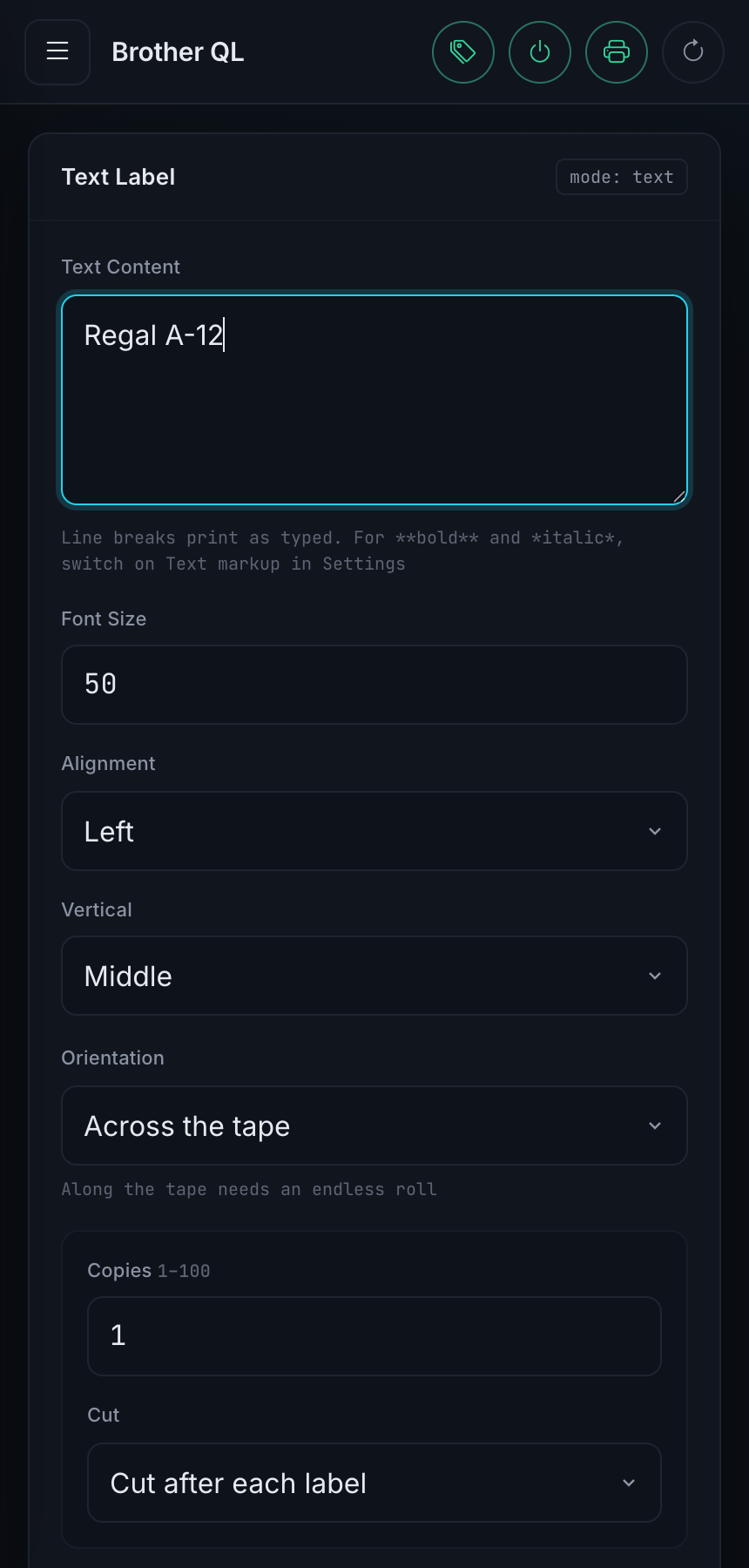
The interface works on one, and POST /api/v1/share accepts a file from the iOS
share sheet or an Android HTTP Shortcut and hands it to the print form.
Development
python3 -m venv venv && source venv/bin/activate
pip install -r requirements-dev.txt
python src/app.py
Python 3.11 is required. The test suite needs a TrueType font installed
(fonts-dejavu); without one, about a third of it skips.
pytest
src/api/openapi.yaml is the source of truth for routing. An endpoint changes
there and in its controller, or it does not change.
AI assistance
Yes, this project is built with AI assistance. It belongs to the toolchain like anything else here, and what comes out of it is reviewed and tested by a human before it lands. Keeping a project this size moving, mostly alone and in spare time, would not otherwise be realistic.
Contributing
Contributions are welcome. Open an issue or send a pull request. Reports from printers and media that are not in the table above are useful too.
Acknowledgments
- DL6ER for support for additional printer models and label types, and for USB printing
- MSanteler for finding and diagnosing the hardcoded label width, which meant every roll narrower than 62 mm printed at the wrong scale
Changelog
Licence
CC BY-NC-SA 4.0. See LICENSE.
Tag summary
Content type
Image
Digest
sha256:0493f350c…
Size
70.6 MB
Last updated
about 2 months ago
docker pull dodoooh/brother_ql_app