domochip/gardena2mqtt
Gateway to control GARDENA Smart system devices through MQTT
9.1K
domochip/gardena2mqtt repository overview
Prerequisites
You need one or more Garden Smart system devices : https://www.gardena.com/int/products/smart/
A developper application to access gardena API : https://developer.husqvarnagroup.cloud/docs/getting-started
This application needs to be connected to Authentication API AND GARDENA smart system API like this :
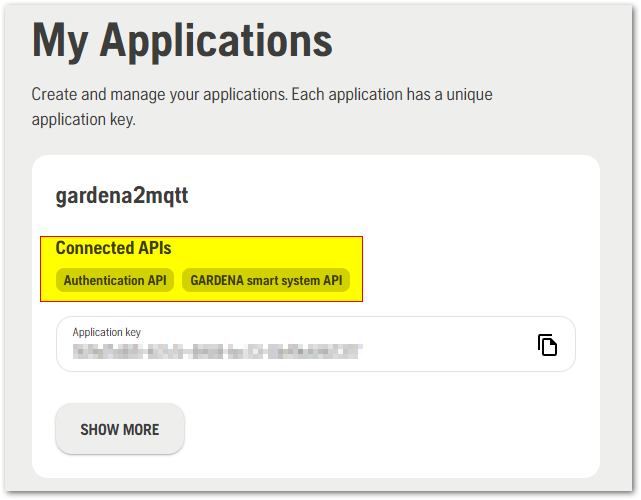
("Create application" button -> Fill In Name only -> "Create" button -> "+Connect new API" button -> Add both API)
This image uses the new Gardena API which allows to be informed immediately when an event occurs on any Smart System device.
How does it work

How-to
Install
For Docker, run it by executing the following commmand:
docker run \
    -d \
    --name gardena2mqtt \
    --restart=always \
    -e GARDENA_USER="GardenaUserName" \
    -e GARDENA_PASSWORD="GardenaPassword" \
    -e GARDENA_APIKEY="GardenaApiKey" \
    -e HOST="192.168.1.x" \
    -e PORT=1883 \
    -e PREFIX="gardena2mqtt" \
    -e CLIENTID="gardena2mqttclid" \
    -e USER="usr" \
    -e PASSWORD="pass" \
    domochip/gardena2mqtt
For Docker-Compose, use the following yaml:
version: '3'
services:
  gardena2mqtt:
    container_name: gardena2mqtt
    image: domochip/gardena2mqtt
    devices:
    - /dev/serial/by-id/usb-HUAWEI_HUAWEI_Mobile-if00-port0:/dev/mobile
    environment:
    - GARDENA_USER=GardenaUserName
    - GARDENA_PASSWORD=GardenaPassword
    - GARDENA_APIKEY=GardenaApiKey
    - HOST=192.168.1.x
    - PORT=1883
    - PREFIX=gardena2mqtt
    - CLIENTID=gardena2mqttclid
    - USER=mqtt_username
    - PASSWORD=mqtt_password
    restart: always
Configure
Parameters explanation
Environment variables
GARDENA_USER: Gardena username (it's an email address)GARDENA_PASSWORD: Gardena passwordGARDENA_APIKEY: Gardena Application key you got at https://developer.husqvarnagroup.cloud/appsHOST: IP address or hostname of your MQTT brokerPORT: Optional, port of your MQTT brokerPREFIX: Optional, prefix used in topics for subscribe/publishCLIENTID: Optional, MQTT client id to useUSER: Optional, MQTT usernamePASSWORD: Optional, MQTT password
Topics
gardena2mqtt status
Status of gardena2mqtt is published to the topic gardena2mqtt/connected using the following payload:
0: disconnected1: connected to MQTT only2: connected to MQTT AND to Gardena Smart System Cloud
Devices state
Devices informations and state are published to individual topics following this scheme: gardena2mqtt/Location/Device
ex : gardena2mqtt/MyGarden/MySileno
Devices informations are published when:
- gardena2mqtt starts
- reconnects to Gardena or to the MQTT broker
- whenever an update is sent by Gardena
Device control
You can control your Gardena devices by sending command (JSON format) to the control topic of each device: gardena2mqtt/Location/Device/control And receive command execution result on: gardena2mqtt/Location/Device/result
ex : gardena2mqtt/MyGarden/MySileno/control gardena2mqtt/MyGarden/MySileno/result
Mower
{"command":"start_seconds_to_override", "duration":3600}: Manual operation (duration is seconds and must be positive multiple of 60){"command":"start_dont_override", "duration":3600}: Automatic operation.{"command":"park_until_next_task"}: Cancel the current operation and return to charging station.{"command":"park_until_further_notice"}: Cancel the current operation, return to charging station, ignore schedule.
Power Socket
{"command":"start_seconds_to_override", "duration":3600}: Manual operation (duration is seconds and must be positive multiple of 60){"command":"start_override"}: Manual'on'{"command":"stop_until_next_task"}: Immediately switch 'off', continue with the schedule.{"command":"pause"}: Skip automatic operation until specified time. The currently active operation will NOT be cancelled.{"command":"unpause"}: Restore automatic operation if it was paused.
Smart Irrigation Control (Valve Set)
{"command":"start_seconds_to_override", "duration":3600, "valve_id":"id"}: Manual operation (duration is seconds and must be positive multiple of 60){"command":"stop_until_next_task", "valve_id":"id"}: Cancel the current watering, continue with the schedule.{"command":"pause", "valve_id":"id"}: Skip automatic operation until specified time. The currently active operation might or might not be cancelled (depends on device model).{"command":"unpause", "valve_id":"id"}: Restore automatic operation if it was paused.
Water Control (Valve)
{"command":"start_seconds_to_override", "duration":3600}: Manual operation (duration is seconds and must be positive multiple of 60){"command":"stop_until_next_task"}: Cancel the current watering, continue with the schedule.{"command":"pause"}: Skip automatic operation until specified time. The currently active operation might or might not be cancelled (depends on device model).{"command":"unpause"}: Restore automatic operation if it was paused.
Troubleshoot
Logs
You need to have a look at logs using :
docker logs gardena2mqtt
Updating
To update to the latest Docker image:
docker stop gardena2mqtt
docker rm gardena2mqtt
docker rmi domochip/gardena2mqtt
# Now run the container again, Docker will automatically pull the latest image.
Ref/Thanks
Many thanks to py-smart-gardena which the library used to build this project : https://github.com/py-smart-gardena/py-smart-gardena
Tag summary
Content type
Image
Digest
sha256:e9b3f0277…
Size
30.7 MB
Last updated
about 2 years ago
docker pull domochip/gardena2mqtt