dozer47528/api-blueprint-docker
Api Blueprint Docker
2.0K
dozer47528/api-blueprint-docker repository overview
Api Blueprint Docker




How to use?
docker run --name test -e "repository=https://github.com/dozer47528/api-blueprint-test.git" -p 80:80 -p 8080:8080 -p 3000:3000 -d dozer47528/api-blueprint-docker
Replace the https://github.com/dozer47528/api-blueprint-test.git with your own repository.
How change aglio parameter
Add this parameter like this:-e "aglio=--theme-template triple"
Full command like this:
docker run --name test -e "aglio=--theme-template triple" -e "repository=https://github.com/dozer47528/api-blueprint-test.git" -p 80:80 -p 8080:8080 -p 3000:3000 -d dozer47528/api-blueprint-docker
aglio document: https://github.com/danielgtaylor/aglio#executable
How to support private repositiry?
Create ssh keys in your host and add parameter like this:-v ~/.ssh:/root/.ssh
Full command like this:
docker run --name test -v ~/.ssh:/root/.ssh -e "repository=https://github.com/dozer47528/api-blueprint-test.git" -p 80:80 -p 8080:8080 -p 3000:3000 -d dozer47528/api-blueprint-docker
Ports explain:
80: document server3000: mock server8080: webhook server
How does it work?
When you first run or call the webhook:
- use
aglioconvert all file like*.apibto*.html. - copy all the files (include origin html file in the repository) to
nginxroot. - restart
nginx(auto reload). - restart
drakov(by script).
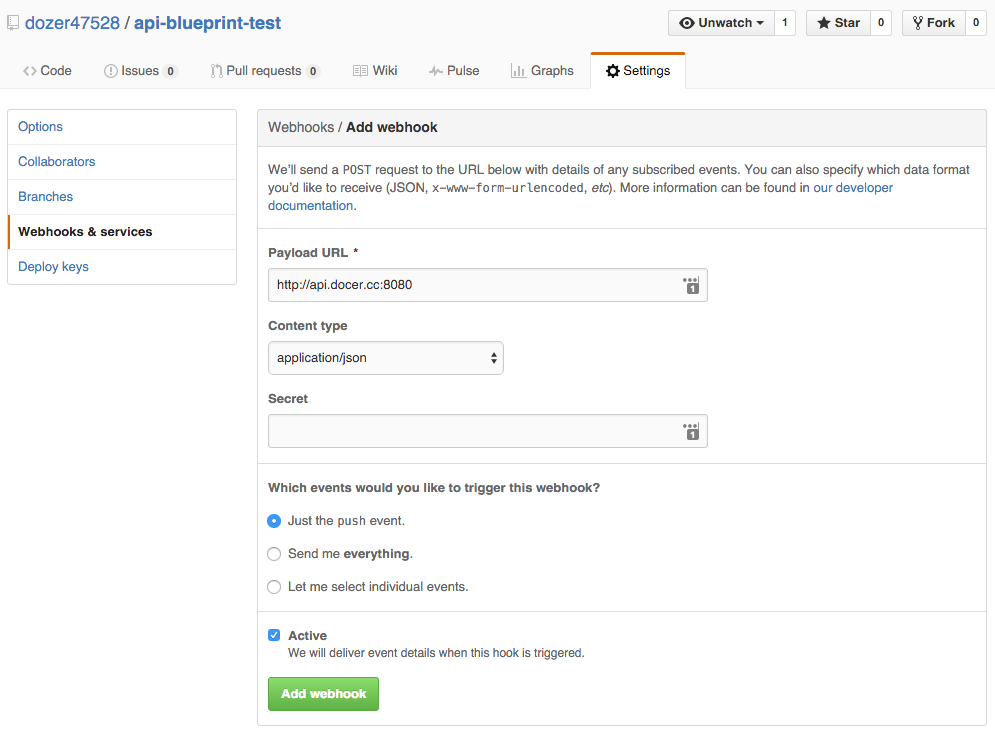
How to config auto deploy
The server will auto reload every 5 minutes.
And you can add webhook in your repository settings.
Tag summary
Content type
Image
Digest
Size
236.8 MB
Last updated
over 10 years ago
docker pull dozer47528/api-blueprint-docker