drarox/proxydash
A lightweight, self-hosted dashboard for visualising your Nginx reverse-proxy configuration.
570
drarox/proxydash repository overview
ProxyDash



A lightweight, self-hosted dashboard that gives you a clear view of your Nginx reverse proxy setup.
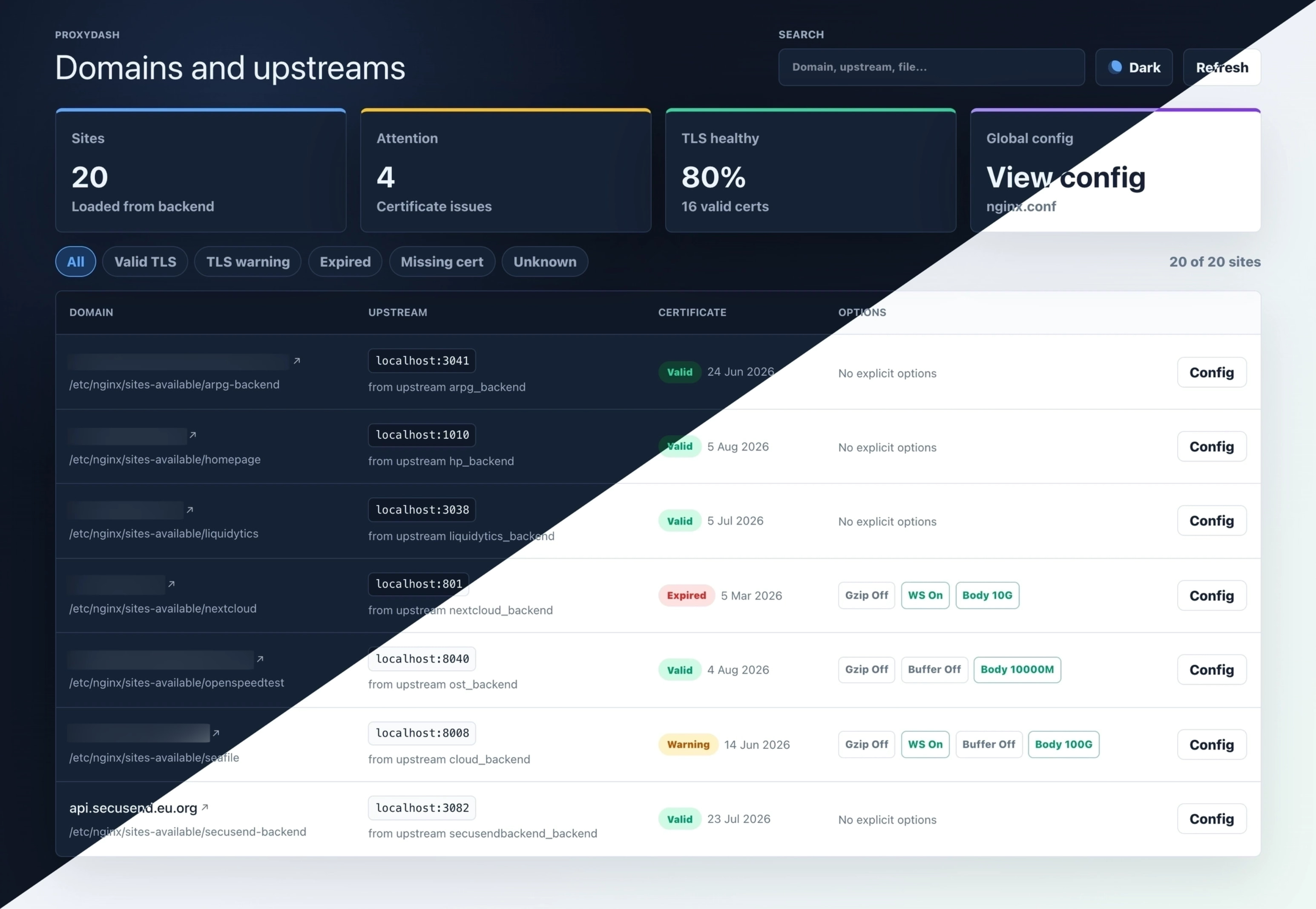
ProxyDash reads your config files directly and turns them into an easy-to-scan interface, showing all your proxied services, domains, and SSL status in one place. No digging through configs, just a straightforward overview of what’s running and how it’s exposed.
Everything runs in a single service, so it’s simple to deploy and stays out of your way.
Features
- Parses
nginx.confand every file insites-available(orconf.d) - Displays domains, proxy targets, SSL/TLS certificate expiry, and proxy options
- Certificate status is cached on startup and refreshed automatically every hour
- Single-binary deployment: one container, one port
- Zero runtime dependencies beyond Bun
- Clean and simple user interface with Light and Dark mode
Quick start
Docker run
docker run -d \
  --name proxydash \
  -p 3000:3000 \
  -v /etc/nginx/nginx.conf:/etc/nginx/nginx.conf:ro \
  -v /etc/nginx/sites-available:/etc/nginx/sites-available:ro \
  drarox/proxydash:latest
Then open http://localhost:3000.
Docker Compose (recommended)
services:
  proxydash:
    image: drarox/proxydash:latest
    container_name: proxydash
    restart: unless-stopped
    ports:
      - "3000:3000"
    volumes:
      # Volume 1 – main Nginx config file (read-only)
      - /etc/nginx/nginx.conf:/etc/nginx/nginx.conf:ro
      # Volume 2 – sites-available directory (read-only)
      - /etc/nginx/sites-available:/etc/nginx/sites-available:ro
    environment:
      # Optional – override the paths if your Nginx layout differs
      # NGINX_CONFIG_PATH: /etc/nginx/nginx.conf
      # NGINX_SITES_AVAILABLE_DIR: /etc/nginx/conf.d
      # CERT_REFRESH_CRON: 0 * * * *
      # PORT: 3000
Save as docker-compose.yml and run:
docker compose up -d
Volume reference
| Volume (host → container) | Purpose | Required |
|---|---|---|
/etc/nginx/nginx.conf → /etc/nginx/nginx.conf | Main Nginx configuration file | Yes (unless overridden via env) |
/etc/nginx/sites-available → /etc/nginx/sites-available | Directory containing per-site config files | Yes (unless overridden via env) |
Both mounts are read-only (:ro). ProxyDash never writes to your Nginx files.
Environment variables
| Variable | Default | Description |
|---|---|---|
PORT | 3000 | Port the server listens on |
NGINX_CONFIG_PATH | /etc/nginx/nginx.conf | Absolute path to the main Nginx config file inside the container |
NGINX_SITES_AVAILABLE_DIR | /etc/nginx/sites-available | Absolute path to the directory containing per-site config files inside the container |
CERT_REFRESH_CRON | 0 * * * * | Cron pattern for automatic cert refresh (every hour by default) |
If your Nginx installation uses non-standard paths (e.g. /usr/local/nginx/conf), adjust both the volume mount destination and the corresponding environment variable.
API endpoints
The backend exposes a small REST API under /api:
| Method | Path | Description |
|---|---|---|
GET | /api | Service info and endpoint index |
GET | /api/health | Health check + resolved config paths |
GET | /api/nginx/config | Raw content of nginx.conf |
GET | /api/nginx/config-files | Raw content of every file in sites-available |
GET | /api/nginx/sites | Parsed proxy site list with cached cert status |
GET | /api/stats | Stats summary (sites count, certs needing attention, TLS health %) |
POST | /api/nginx/cert-cache/refresh | Trigger an immediate cert cache refresh |
Homepage widget
ProxyDash exposes a /api/stats endpoint designed for the Homepage dashboard using the Custom API widget.
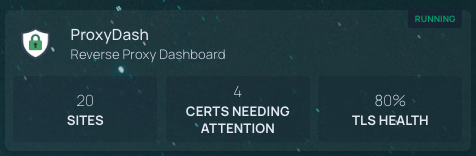
Add the following to your services.yaml in Homepage:
- ProxyDash:
    href: http://your-proxydash-host:3000
    description: Reverse Proxy Dashboard
    widget:
      type: customapi
      url: http://your-proxydash-host:3000/api/stats
      refreshInterval: 60000
      mappings:
        - field: sites
          label: Sites
          format: number
        - field: certsNeedingAttention
          label: Certs needing attention
          format: number
        - field: tlsHealthPercent
          label: TLS health
          format: percent
Replace your-proxydash-host:3000 with the actual host and port where ProxyDash is running.
Building locally
Requirements: Bun ≥ 1.x and Docker.
# Clone
git clone https://github.com/drarox/proxydash.git
cd proxydash

# Build the image
docker build -t proxydash:local .

# Run against your local Nginx
docker run -d \
  -p 3000:3000 \
  -v /etc/nginx/nginx.conf:/etc/nginx/nginx.conf:ro \
  -v /etc/nginx/sites-available:/etc/nginx/sites-available:ro \
  proxydash:local
Frontend dev server
cd front
bun install
bun run dev        # Vite dev server on http://localhost:5173
Backend dev server
cd back
bun install
bun run dev        # Hono server with hot-reload on http://localhost:3000
Project structure
proxydash/
├── front/               # Vue 3 + Vite + Tailwind CSS frontend
│   └── src/
│       ├── components/  # Dashboard UI components
│       ├── composables/ # useProxySites composable
│       ├── services/    # API client
│       └── types/       # Shared TypeScript types
├── back/                # Bun + Hono backend
│   └── src/
│       ├── index.ts     # Entry point – serves API + static files
│       ├── nginx/       # Nginx config parser & service layer
│       ├── cache/       # In-memory cert cache (read/write/refresh)
│       ├── crons/       # Scheduled jobs (cert refresh via croner)
│       └── utils/       # Low-level TLS certificate check
├── Dockerfile           # Multi-stage production build
└── .dockerignore
License
Tag summary
Content type
Image
Digest
sha256:202ef4fbe…
Size
41.2 MB
Last updated
4 months ago
docker pull drarox/proxydash