dustalov/ballcone
Ballcone is a fast and lightweight server-side Web analytics solution.
2.0K
dustalov/ballcone repository overview
Ballcone
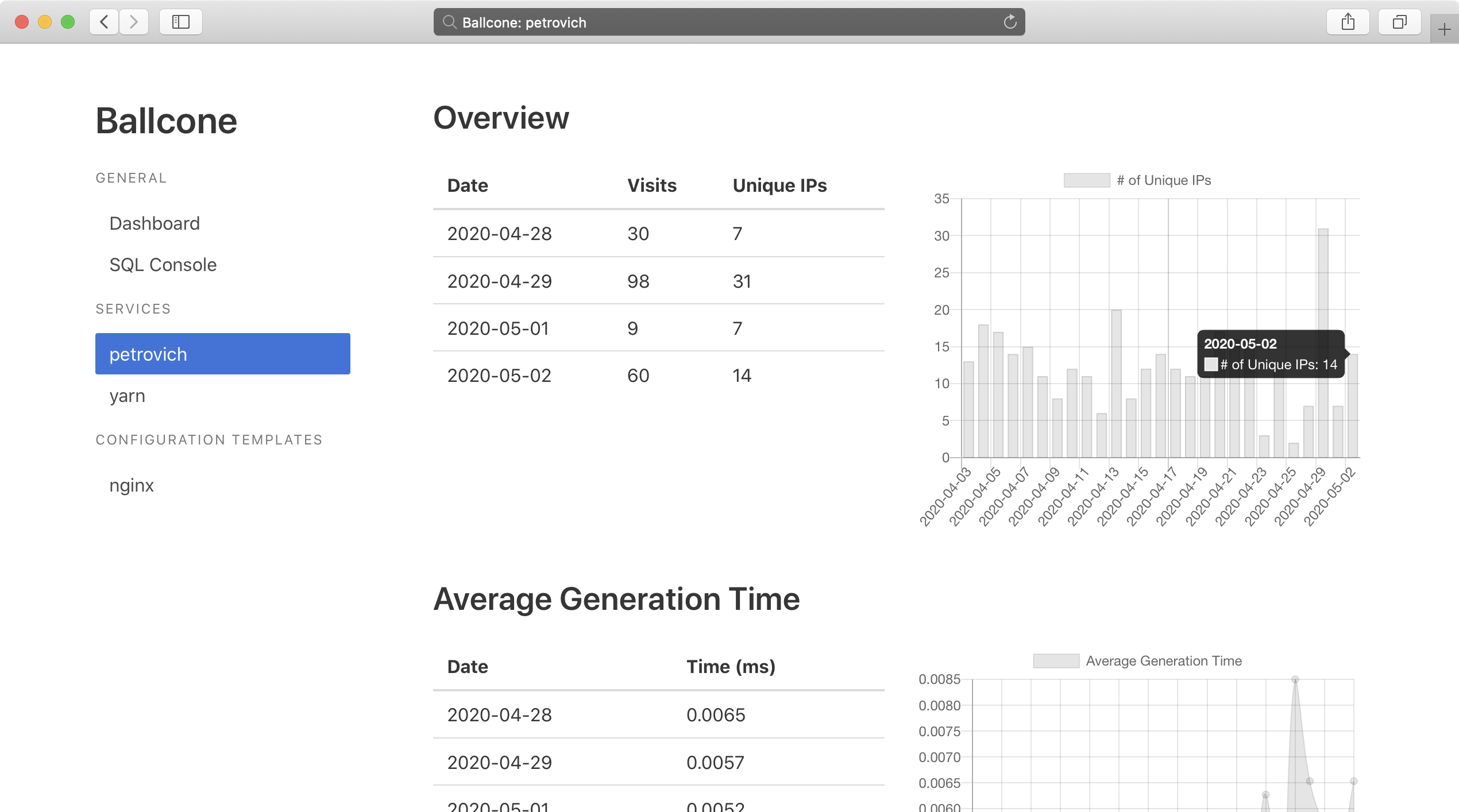
Ballcone is a fast and lightweight server-side Web analytics solution. It requires no JavaScript on your website.


Screenshots

Design Goals
- Simplicity. Ballcone requires almost zero set-up as it prefers convention over configuration
- Efficiency. Ballcone performs lightning-fast analytic queries over data thanks to the underlying columnar database
- Specificity. Ballcone aims at providing visual insights on the HTTP access logs with no bloat
Features
- No JavaScript snippets required
- GeoIP mapping with the GeoLite2 database
- Extraction of platform and browser information from User-Agent
Architecture
Ballcone captures the access_log entries exported in JSON by nginx via the bundled syslog logger (65140/udp). These entries are stored in the embedded DuckDB database. Ballcone uses it to perform data manipulation and analytic queries. Also, Ballcone provides a convenient Web interface (8080/tcp) for accessing and observing the gathered data.
          +-----------+            +------------+
   HTTP   |           |   syslog   |            |   HTTP
<-------->+   nginx   +----------->+  Ballcone  +<-------->
          |           |    JSON    |            |
          +-----------+            +------------+
                                   |   DuckDB   |
                                   +------------+
For better performance, Ballcone inserts data in batches, committing them to DuckDB every few seconds (five seconds by default).
Requirements
Demo
This repository contains an example configuration of nginx and Ballcone. Just run the container from Docker Hub or build it locally. nginx will be available at http://127.0.0.1:8888/ and Ballcone will be available at http://127.0.0.1:8080/.
docker-compose up
# or
docker run --rm -p '127.0.0.1:8888:80' -p '127.0.0.1:8080:8080' dustalov/ballcone:demo
Naming and Meaning
Ballcone has two meanings.
First, it is the romanization of the Russian word балкон that means a balcony. You go to the balcony to breath some fresh air and look down at the things outside.
Second, if a ball is inscribed in a cone, it resembles the all-seeing eye (help wanted: dustalov/ballcone#8).
Regardless of the meaning you prefer, Ballcone helps you to watch your websites.
Installation
The simplest way to get started is to run make pipenv after cloning the repository. Just make sure Pipenv is installed.
Getting Ballcone
Running the Docker image is the simplest way to get started. Docker Hub contains automated builds of the Ballcone source code from GitHub: https://hub.docker.com/r/dustalov/ballcone. The following command runs Ballcone on 127.0.0.1: the syslog protocol will be available via 65140/udp, the Web interface will be available via 8080/tcp, and the data will be stored in the /var/lib/ballcone directory on the host machine.
docker run -p '127.0.0.1:8080:8080' -p '127.0.0.1:65140:65140/udp' -v '/var/lib/ballcone:/usr/src/app/duckdb' --restart=unless-stopped dustalov/ballcone ballcone -sh '0.0.0.0' -wh '0.0.0.0' -d 'duckdb/ballcone.duckdb'
However, Docker is not the only option. Alternatively, Ballcone can be packaged into a standalone executable using PyInstaller and runned as a systemd service (see ballcone.service as an example):
make pyinstaller
sudo make install-systemd
sudo systemctl start ballcone
Finally, Ballcone can be installed directly on the host machine for manual runs:
pip3 install -e git+https://github.com/dustalov/ballcone@master#egg=ballcone
Note that ballcone without arguments creates the ballcone.duckdb database file inside the current directory.
Configuring nginx
You need to define the JSON-compatible log format for your service in the nginx configuration file. Let us call it ballcone_json_example. This format is similar to the one used in Matomo (see matomo-log-analytics). It should be put before the server context.
log_format ballcone_json_example escape=json
    '{'
    '"service": "example", '
    '"ip": "$remote_addr", '
    '"host": "$host", '
    '"path": "$request_uri", '
    '"status": "$status", '
    '"referrer": "$http_referer", '
    '"user_agent": "$http_user_agent", '
    '"length": $bytes_sent, '
    '"generation_time_milli": $request_time, '
    '"date": "$time_iso8601"'
    '}';
Then, you should put this access_log directive inside the server context to transfer logs via the syslog protocol.
access_log syslog:server=127.0.0.1:65140 ballcone_json_example;
Please look at the complete example of nginx configuration in demo/nginx.conf.
Roadmap
Roadmap is available at https://github.com/dustalov/ballcone/issues.
Alternatives
- Web analytics solutions: Matomo, Google Analytics, Yandex.Metrica, etc.
- Columnar data storages: ClickHouse, Citus, MariaDB ColumnStore, etc.
- Log management: Graylog, Fluentd, Elasticsearch, etc.
Copyright
Copyright © 2020–2023 Dmitry Ustalov. See LICENSE for details.
Tag summary
Content type
Image
Digest
sha256:eeeabf030…
Size
576.2 MB
Last updated
over 2 years ago
docker pull dustalov/ballcone