dustynv/local_llm
https://github.com/dusty-nv/jetson-containers/packages/llm/local_llm
5.7K
dustynv/local_llm repository overview
local_llm
Note
This source outgrew being hosted within jetson-containers and moved to: * Repo - [`github.com/dusty-nv/NanoLLM`](https://github.com/dusty-nv/NanoLLM) * Docs - [`dusty-nv.github.io/NanoLLM`](https://dusty-nv.github.io/NanoLLM) * Jetson AI Lab - [Live Llava](https://www.jetson-ai-lab.com/tutorial_live-llava.html), [NanoVLM](https://www.jetson-ai-lab.com/tutorial_nano-vlm.html), [SLM](https://www.jetson-ai-lab.com/tutorial_slm.html)It will remain here for backwards compatability, but future updates will be made to NanoLLM.
ARCHIVED DOCUMENTATION
- Optimized LLM inference engine with support for AWQ and MLC quantization, multimodal agents, and live ASR/TTS.
- Web UI server using Flask, WebSockets, WebAudio, HTML5, Bootstrap5.
- Modes to run: Text Chat, Multimodal Chat, Voice Chat, Live Llava
Note
Tested models: * [`meta-llama/Llama-2-7b-chat-hf`](https://huggingface.co/meta-llama/Llama-2-7b-chat-hf) * [`meta-llama/Llama-2-13b-chat-hf`](https://huggingface.co/meta-llama/Llama-2-13b-chat-hf) * [`meta-llama/Llama-2-70b-chat-hf`](https://huggingface.co/meta-llama/Llama-2-70b-chat-hf)Small Language Models (SLMs)
stabilityai/stablelm-2-zephyr-1_6bstabilityai/stablelm-zephyr-3bNousResearch/Nous-Capybara-3B-V1.9TinyLlama/TinyLlama-1.1B-Chat-v1.0princeton-nlp/Sheared-LLaMA-2.7B-ShareGPTgoogle/gemma-2b-itmicrosoft/phi-2Vision Language Models (VLMs)
liuhaotian/llava-v1.5-7bliuhaotian/llava-v1.5-13bliuhaotian/llava-v1.6-vicuna-7bliuhaotian/llava-v1.6-vicuna-13bEfficient-Large-Model/VILA-2.7bEfficient-Large-Model/VILA-7bEfficient-Large-Model/VILA-13bNousResearch/Obsidian-3B-V0.5For Llama-2 models, see here to request your access token from HuggingFace.
Text Chat
As an initial example, first test the console-based chat demo from chat/__main__.py
./run.sh --env HUGGINGFACE_TOKEN=<YOUR-ACCESS-TOKEN> \
  $(./autotag local_llm) \
    python3 -m local_llm.chat --api=mlc \
      --model=meta-llama/Llama-2-7b-chat-hf
The model will automatically be quantized the first time it's loaded (in this case, with MLC and 4-bit). Other fine-tuned versions of Llama that have the same architecture (or are supported by the quantization API you have selected) should be compatible - see here for MLC.
Command-Line Options
Some of the noteworthy command-line options can be found in utils/args.py
| Models | |
--model | The repo/name of the original unquantized model from HuggingFace Hub (or local path) |
--quant | Either the API-specific quantization method to use, or path to quantized model |
--api | The LLM model and quantization backend to use (mlc, awq, auto_gptq, hf) |
| Prompts | |
--prompt | Run this query (can be text, or a path to .txt file, and can be specified multiple times) |
--system-prompt | Sets the system instruction used at the beginning of the chat sequence |
--chat-template | Manually set the chat template (llama-2, llava-1, vicuna-v1) |
| Generation | |
--max-context-len | The maximum chat history context length (in tokens), lower to reduce memory usage |
--max-new-tokens | The maximum number of output tokens to generate for each response (default: 128) |
--min-new-tokens | The minimum number of output tokens to generate (default: -1, disabled) |
--do-sample | Use token sampling during output with --temperature and --top-p settings |
--temperature | Controls randomness of output with --do-sample (lower is less random, default: 0.7) |
--top-p | Controls determinism/diversity of output with --do-sample (default: 0.95) |
--repetition-penalty | Applies a penalty for repetitive outputs (default: 1.0, disabled) |
Automated Prompts
During testing, you can specify prompts on the command-line that will run sequentially:
./run.sh --env HUGGINGFACE_TOKEN=<YOUR-ACCESS-TOKEN> \
  $(./autotag local_llm) \
    python3 -m local_llm.chat --api=mlc \
      --model=meta-llama/Llama-2-7b-chat-hf \
      --prompt 'hi, how are you?' \
      --prompt 'whats the square root of 900?' \
      --prompt 'whats the previous answer times 4?' \
      --prompt 'can I get a recipie for french onion soup?'
You can also load JSON files containing prompt sequences, like from /data/prompts/qa.json
Multimodal Chat
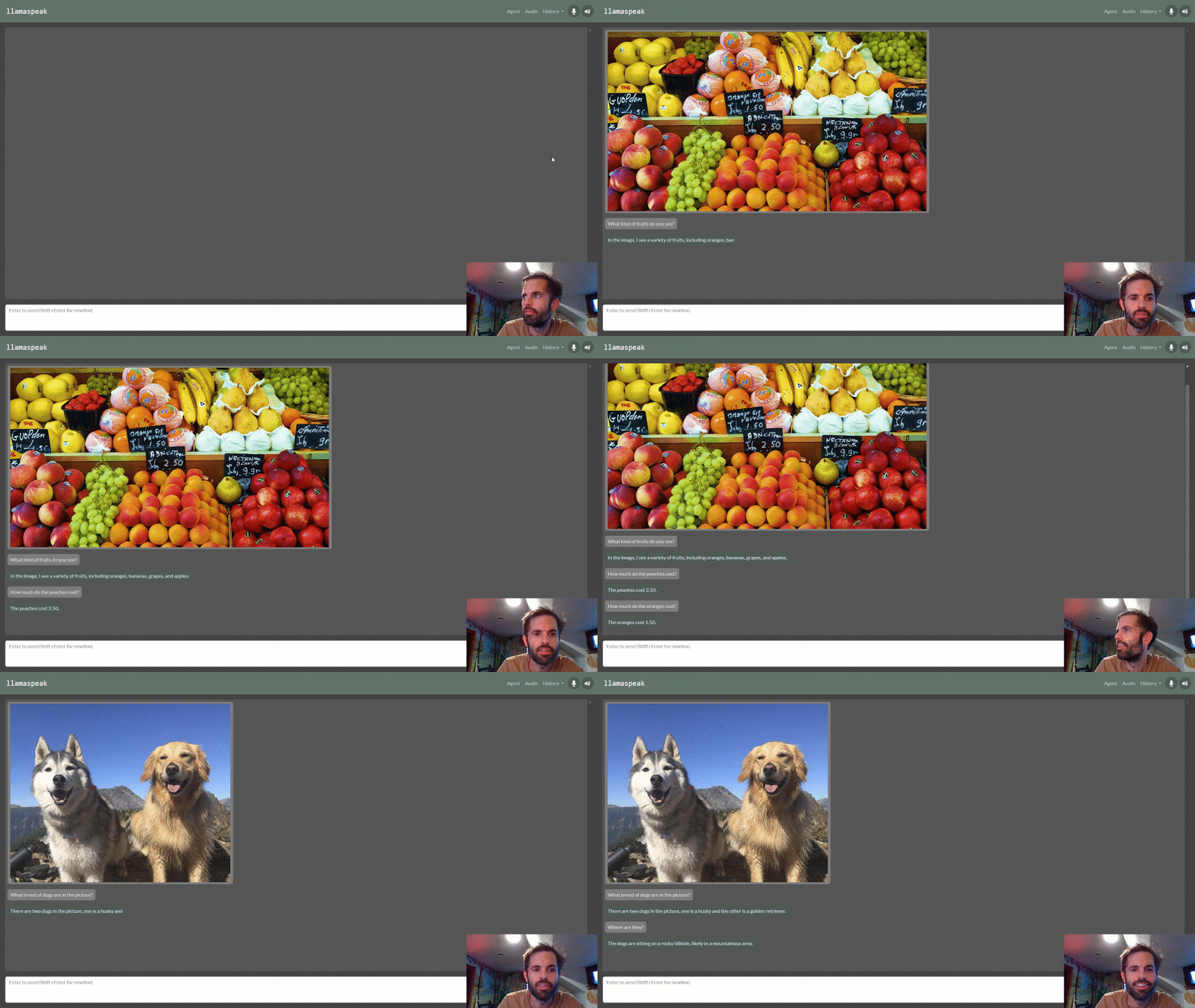
If you load a Llava vision-language model, you can enter image files into the prompt, followed by questions about them:
./run.sh $(./autotag local_llm) \
  python3 -m local_llm.chat --api=mlc \
    --model=liuhaotian/llava-v1.5-13b \
    --prompt '/data/images/fruit.jpg' \
    --prompt 'what kind of fruits do you see?' \
    --prompt 'reset' \
    --prompt '/data/images/dogs.jpg' \
    --prompt 'what breed of dogs are in the image?' \
    --prompt 'reset' \
    --prompt '/data/images/path.jpg' \
    --prompt 'what does the sign say?'
Llava was trained to converse about one image at a time, hence the chat history is reset between images (otherwise the model tends to combine the features of all the images in the chat so far). Multiple questions can be asked about each image though.
By omitting --prompt, you can chat interactively from the terminal. If you enter an image filename, it will load that image, and then asking you for the prompt. Entering clear or reset will reset the chat history.
Voice Chat
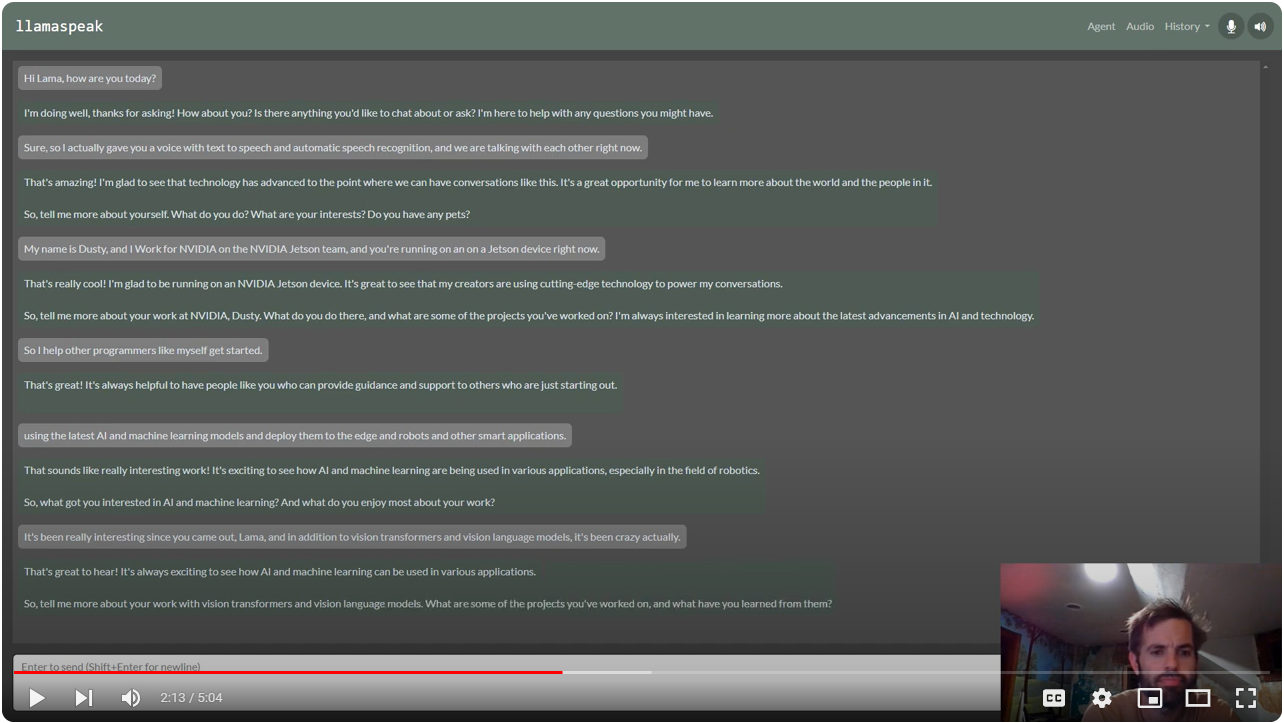
To enable the web UI and ASR/TTS for live conversations, follow the steps below.
Start Riva Server
The ASR and TTS services use NVIDIA Riva with audio transformers and TensorRT. The Riva server runs locally in it's own container. Follow the steps from the riva-client:python package to run and test the Riva server on your Jetson.
- Start the Riva server on your Jetson by following
riva_quickstart_arm64 - Run some of the Riva ASR examples to confirm that ASR is working: https://github.com/nvidia-riva/python-clients#asr
- Run some of the Riva TTS examples to confirm that TTS is working: https://github.com/nvidia-riva/python-clients#tts
You can also see this helpful video and guide from JetsonHacks for setting up Riva: Speech AI on Jetson Tutorial
Enabling HTTPS/SSL
Browsers require HTTPS in order to access the client's microphone. A self-signed SSL certificate was built into the container like this:
openssl req -x509 -newkey rsa:4096 -keyout key.pem -out cert.pem -sha256 -days 365 -nodes -subj '/CN=localhost'
The container's certificate is found under /etc/ssl/private and is automatically used, so HTTPS/SSL is enabled by default for these web UI's (you can change the PEM certificate/key used by setting the SSL_KEY and SSL_CERT environment variables). When you first navigate your browser to a page that uses these self-signed certificates, it will issue you a warning since they don't originate from a trusted authority:

You can choose to override this, and it won't re-appear again until you change certificates or your device's hostname/IP changes.
Start Web Agent
./run.sh \
  --env HUGGINGFACE_TOKEN=<YOUR-ACCESS-TOKEN> \
  $(./autotag local_llm) \
    python3 -m local_llm.agents.web_chat --api=mlc \
      --model meta-llama/Llama-2-7b-chat-hf
You can then navigate your web browser to https://HOSTNAME:8050 and unmute your microphone.
- The default port is 8050, but can be changed with
--web-port(and--ws-portfor the websocket port) - To debug issues with client/server communication, use
--web-traceto print incoming/outgoing websocket messages. - During bot replies, the TTS model will pause output if you speak a few words in the mic to interrupt it.
- If you loaded a multimodal Llava model instead, you can drag-and-drop images from the client.
Live Llava
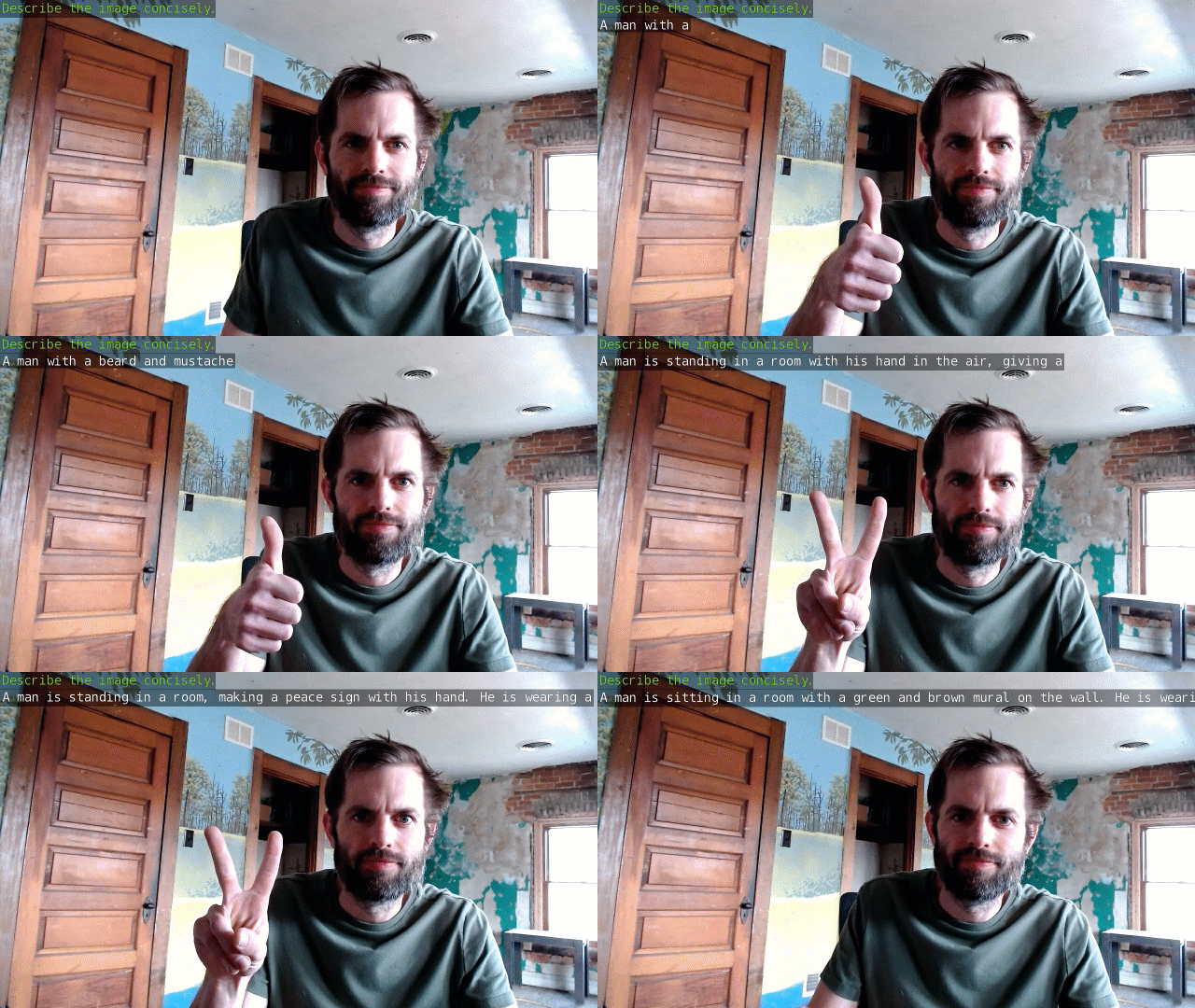
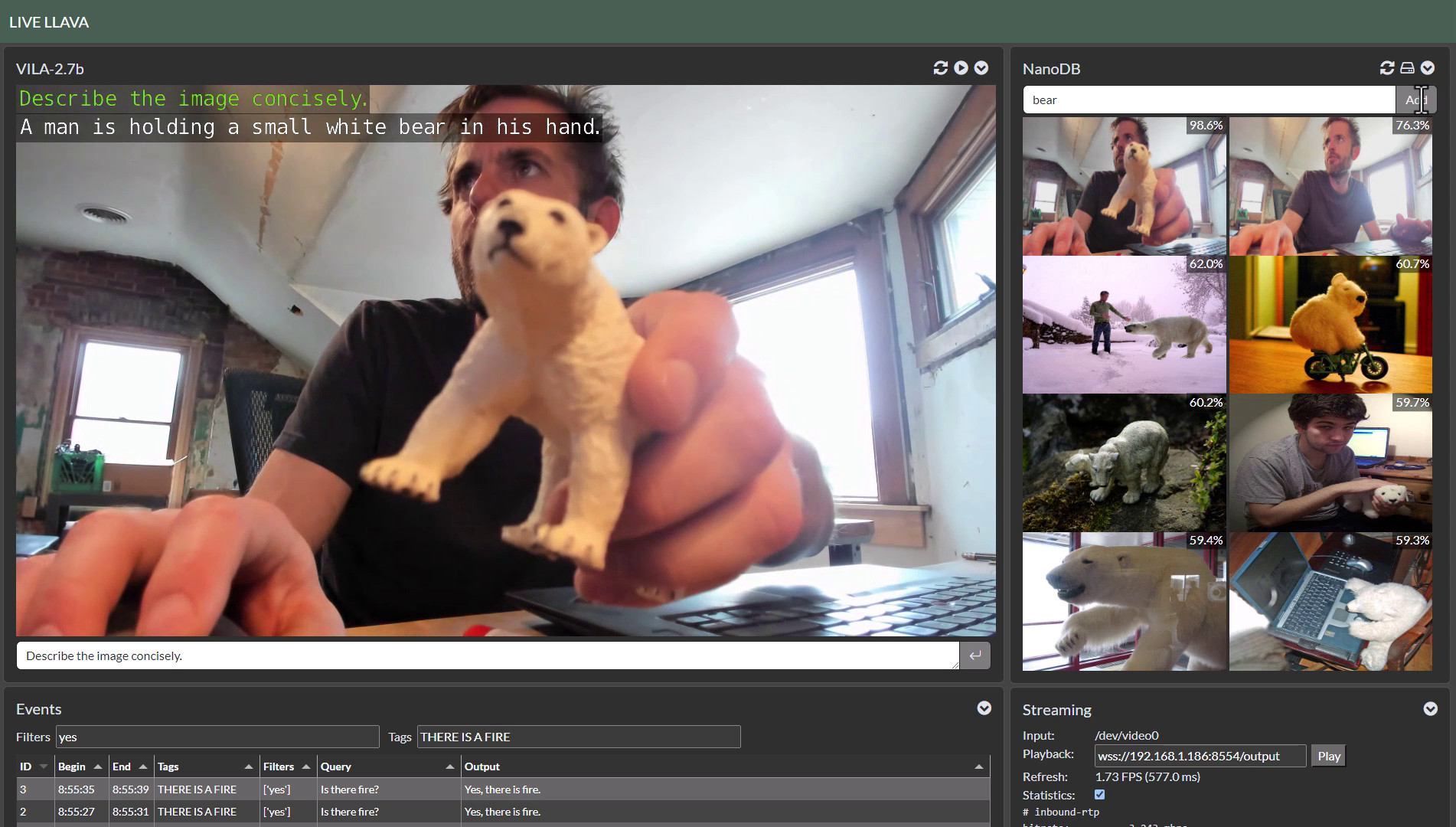
The VideoQuery agent processes an incoming camera or video feed on prompts in a closed loop with Llava. Navigate your browser to https://<IP_ADDRESS>:8050 after launching it, proceed past the SSL warning, and see this demo walkthrough video on using the web UI.
./run.sh $(./autotag local_llm) \
  python3 -m local_llm.agents.video_query --api=mlc \
    --model Efficient-Large-Model/VILA-2.7b \
    --max-context-len 768 \
    --max-new-tokens 32 \
    --video-input /dev/video0 \
    --video-output webrtc://@:8554/output
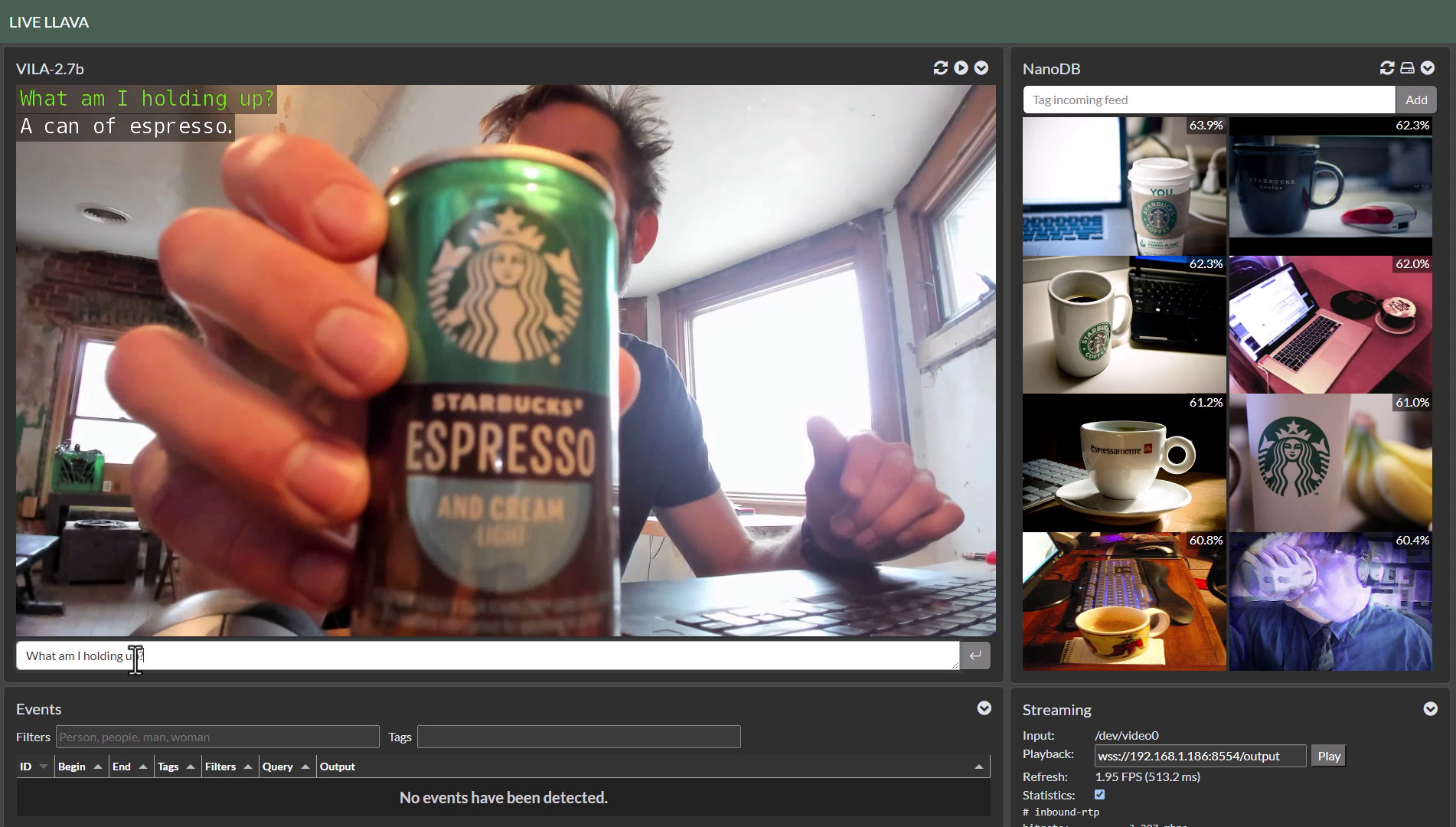
This uses jetson_utils for video I/O, and for options related to protocols and file formats, see Camera Streaming and Multimedia. In the example above, it captures a V4L2 USB webcam connected to the Jetson (under the device /dev/video0) and outputs a WebRTC stream.
Processing a Video File or Stream
The example above was running on a live camera, but you can also read and write a video file or stream by substituting the path or URL to the --video-input and --video-output command-line arguments like this:
./run.sh \
  -v /path/to/your/videos:/mount
  $(./autotag local_llm) \
    python3 -m local_llm.agents.video_query --api=mlc \
      --model Efficient-Large-Model/VILA-2.7b \
      --max-context-len 768 \
      --max-new-tokens 32 \
      --video-input /mount/my_video.mp4 \
      --video-output /mount/output.mp4 \
      --prompt "What does the weather look like?"
This example processes and pre-recorded video (in MP4, MKV, AVI, FLV formats with H.264/H.265 encoding), but it also can input/output live network streams like RTP, RTSP, and WebRTC using Jetson's hardware-accelerated video codecs.
NanoDB Integration
If you launch the VideoQuery agent with the --nanodb flag along with a path to your NanoDB database, it will perform reverse-image search on the incoming feed against the database by re-using the CLIP embeddings generated by the VLM.
To enable this mode, first follow the NanoDB tutorial to download, index, and test the database. Then launch VideoQuery like this:
./run.sh $(./autotag local_llm) \
  python3 -m local_llm.agents.video_query --api=mlc \
    --model Efficient-Large-Model/VILA-2.7b \
    --max-context-len 768 \
    --max-new-tokens 32 \
    --video-input /dev/video0 \
    --video-output webrtc://@:8554/output \
    --nanodb /data/nanodb/coco/2017
You can also tag incoming images and add them to the database using the panel in the web UI:
CONTAINERS
local_llm | |
|---|---|
| Builds |   |
| Requires | L4T ['>=34.1.0'] |
| Dependencies | build-essential cuda:11.4 cudnn python numpy cmake onnx pytorch:2.2 cuda-python faiss faiss_lite torchvision huggingface_hub rust transformers tensorrt torch2trt nanodb mlc riva-client:python opencv gstreamer jetson-inference onnxruntime |
| Dockerfile | Dockerfile |
| Images | dustynv/local_llm:dev-r36.2.0 (2024-03-03, 10.3GB)dustynv/local_llm:r35.2.1 (2024-02-22, 8.8GB)dustynv/local_llm:r35.3.1 (2024-02-22, 8.8GB)dustynv/local_llm:r35.4.1 (2024-04-10, 8.3GB)dustynv/local_llm:r36.2.0 (2024-04-10, 9.7GB)dustynv/local_llm:r36.2.0-20240127 (2024-03-07, 11.3GB)dustynv/local_llm:r36.2.0-20240303 (2024-03-07, 10.3GB)dustynv/local_llm:r36.2.0-20240309 (2024-03-11, 10.5GB)dustynv/local_llm:r36.2.0-20240315 (2024-03-16, 11.3GB) |
CONTAINER IMAGES
| Repository/Tag | Date | Arch | Size |
|---|---|---|---|
dustynv/local_llm:dev-r36.2.0 | 2024-03-03 | arm64 | 10.3GB |
dustynv/local_llm:r35.2.1 | 2024-02-22 | arm64 | 8.8GB |
dustynv/local_llm:r35.3.1 | 2024-02-22 | arm64 | 8.8GB |
dustynv/local_llm:r35.4.1 | 2024-04-10 | arm64 | 8.3GB |
dustynv/local_llm:r36.2.0 | 2024-04-10 | arm64 | 9.7GB |
dustynv/local_llm:r36.2.0-20240127 | 2024-03-07 | arm64 | 11.3GB |
dustynv/local_llm:r36.2.0-20240303 | 2024-03-07 | arm64 | 10.3GB |
dustynv/local_llm:r36.2.0-20240309 | 2024-03-11 | arm64 | 10.5GB |
dustynv/local_llm:r36.2.0-20240315 | 2024-03-16 | arm64 | 11.3GB |
Container images are compatible with other minor versions of JetPack/L4T:
• L4T R32.7 containers can run on other versions of L4T R32.7 (JetPack 4.6+)
• L4T R35.x containers can run on other versions of L4T R35.x (JetPack 5.1+)
RUN CONTAINER
To start the container, you can use jetson-containers run and autotag, or manually put together a docker run command:
# automatically pull or build a compatible container image
jetson-containers run $(autotag local_llm)

# or explicitly specify one of the container images above
jetson-containers run dustynv/local_llm:r35.4.1

# or if using 'docker run' (specify image and mounts/ect)
sudo docker run --runtime nvidia -it --rm --network=host dustynv/local_llm:r35.4.1
jetson-containers run forwards arguments todocker run with some defaults added (like--runtime nvidia, mounts a/datacache, and detects devices)
autotag finds a container image that's compatible with your version of JetPack/L4T - either locally, pulled from a registry, or by building it.
To mount your own directories into the container, use the -v or --volume flags:
jetson-containers run -v /path/on/host:/path/in/container $(autotag local_llm)
To launch the container running a command, as opposed to an interactive shell:
jetson-containers run $(autotag local_llm) my_app --abc xyz
You can pass any options to it that you would to docker run, and it'll print out the full command that it constructs before executing it.
BUILD CONTAINER
If you use autotag as shown above, it'll ask to build the container for you if needed. To manually build it, first do the system setup, then run:
jetson-containers build local_llm
The dependencies from above will be built into the container, and it'll be tested during. Run it with --help for build options.
Tag summary
Content type
Image
Digest
sha256:ff65d42b0…
Size
8.3 GB
Last updated
over 2 years ago
docker pull dustynv/local_llm:r35.4.1