dyonr/magnetico-environment
This Docker runs a magnetico environment; magneticow and magneticod. A DHT crawler / DHT indexer.
50K+
dyonr/magnetico-environment repository overview


magnetico Docker environment
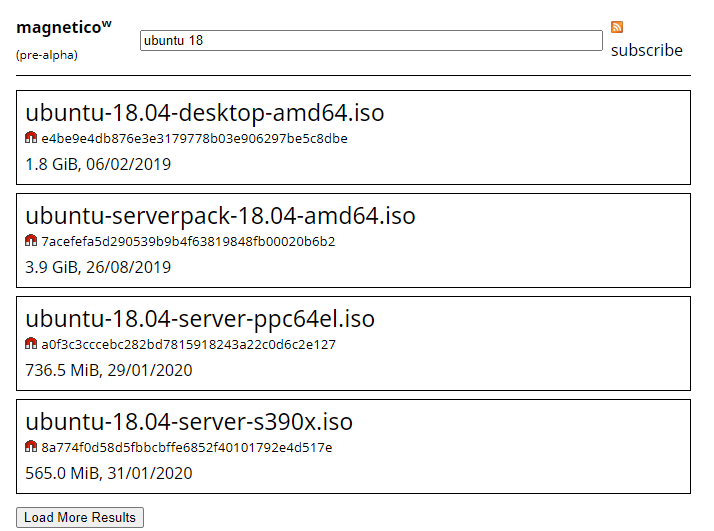
"magnetico is an autonomous (self-hosted) BitTorrent DHT search engine suite."
This Docker runs a basic magnetico environment; magneticow, the webserver and magneticod, the DHT crawler / DHT indexer.
Docker Features
- Base: Debian 10
- Latest magneticow and magneticod
- All magnetico settings adjustable via environment variables.
- Created with Unraid in mind
Run container from Docker registry
The container is available from the Docker registry and this is the simplest way to get it.
To run the container use this command:
$ docker run  -d \
              -v /your/database/path/:/root/.local/share/magneticod \
              -e "USERNAME=magnetico" \
              -e "PASSWORD=magnetico" \
              -e "PUID=99" \
              -e "PGID=100" \
              -p 8556:8080/tcp \
              dyonr/magnetico-environment
Variables, Volumes, and Ports
Environment Variables
| Variable | Required | Description | Example | Default |
|---|---|---|---|---|
| magneticow | ||||
MAGNETICOW_USERNAME | No* | Username used to access the magneticow web interface | MAGNETICOW_USERNAME=magnetico | |
MAGNETICOW_PASSWORD | No* | Password used to access the magneticow web interface | MAGNETICOW_USERNAME=magnetico | |
MAGNETICOW_ADDRESS | No | Host address of magneticow | MAGNETICOW_ADDRESS=0.0.0.0 | 0.0.0.0 |
MAGNETICOW_VERBOSE | No | If set to 1, true or yes, magneticow will run verbose | MAGNETICOW_VERBOSE=yes | |
| magneticod | ||||
MAGNETICOD_ADDRESS | No | IP-address used by magneticod for indexing on the DHT network | MAGNETICOD_ADDRESS=0.0.0.0 | 0.0.0.0 |
MAGNETICOD_PORT | No | Port used by magneticod for indexing on the DHT network | MAGNETICOD_PORT=54231 | 0 |
MAGNETICOD_INTERVAL | No | The indexing interval in seconds | MAGNETICOD_INTERVAL=30 | 1 |
MAGNETICOD_NEIGHBORS | No | The maximum numbers of neighbors of an indexer | MAGNETICOD_NEIGHBORS=500 | 1000 |
MAGNETICOD_LEECHES | No | The maximum numbers of leeches | MAGNETICOD_LEECHES=25 | 50 |
MAGNETICOD_VERBOSE | No | If set to 1, true or yes, magneticod will run verbose | MAGNETICOD_VERBOSE=yes | |
PUID | Yes | The PUID that will be set on the magneticod database folder | PUID=1000 | 99 |
PGID | Yes | The PGID that will be set on the magneticod database folder | PGID=100 | 100 |
* Username and password are not required if both aren't defined. It's either both empty, or both filled in.
Volumes
| Volume | Required | Description | Example |
|---|---|---|---|
config | Yes | The path where magneticod will store its database | /your/database/path/:/root/.local/share/magneticod |
Ports
| Port | Proto | Required | Description | Example |
|---|---|---|---|---|
8080 | TCP | Yes | The port that you will access magneticow webinterface on | 8556:8080 |
Access the magnetico web interface
Access http://IPADDRESS:PORT from a browser on the same network (for example: http://192.168.0.90:8556).
Issues
If you are having issues with this container please submit an issue on GitHub.
Please provide logs, Docker version and other information that can simplify reproducing the issue.
Using the latest stable verison of Docker is always recommended. Support for older version is on a best-effort basis.
If the issue is related to magneticow or magneticod, please sumbit an issue on their GitHub.
Warnings from the creator of magnetico
-
magnetico currently does NOT have any filtering system NOR it allows individual torrents to be removed from the database, and BitTorrent DHT network is full of the materials that are considered illegal in many countries (violence, pornography, copyright infringing content, and even child-pornography). If you are afraid of the legal consequences, or simply morally against (indirectly) assisting those content to spread around, follow the magneticow installation instructions carefully to password-protect the web-interface from others.
-
magneticow uses HTTP Basic Authentication, meaning that your username and password will be transmitted in plain-text for every request. Configuring magneticow to serve behind a web-server with HTTPS enabled is strongly recommended, but unfortunately not described here. You can use Let's Encrypt to get a certificate for free.
-
magneticow is NOT designed to scale, and will fail miserably if you try to use it like a public torrent website. This is a deliberate technical decision, not a bug or something to be fixed; another web interface with more features to support such use cases and scalability might be developed, but magneticow will NEVER be the case.
Tag summary
Content type
Image
Digest
Size
70.2 MB
Last updated
over 5 years ago
docker pull dyonr/magnetico-environment