edwardhsing/novatalk
NovaTalk — Real-time communication for the next frontier.
284
edwardhsing/novatalk repository overview
NovaTalk
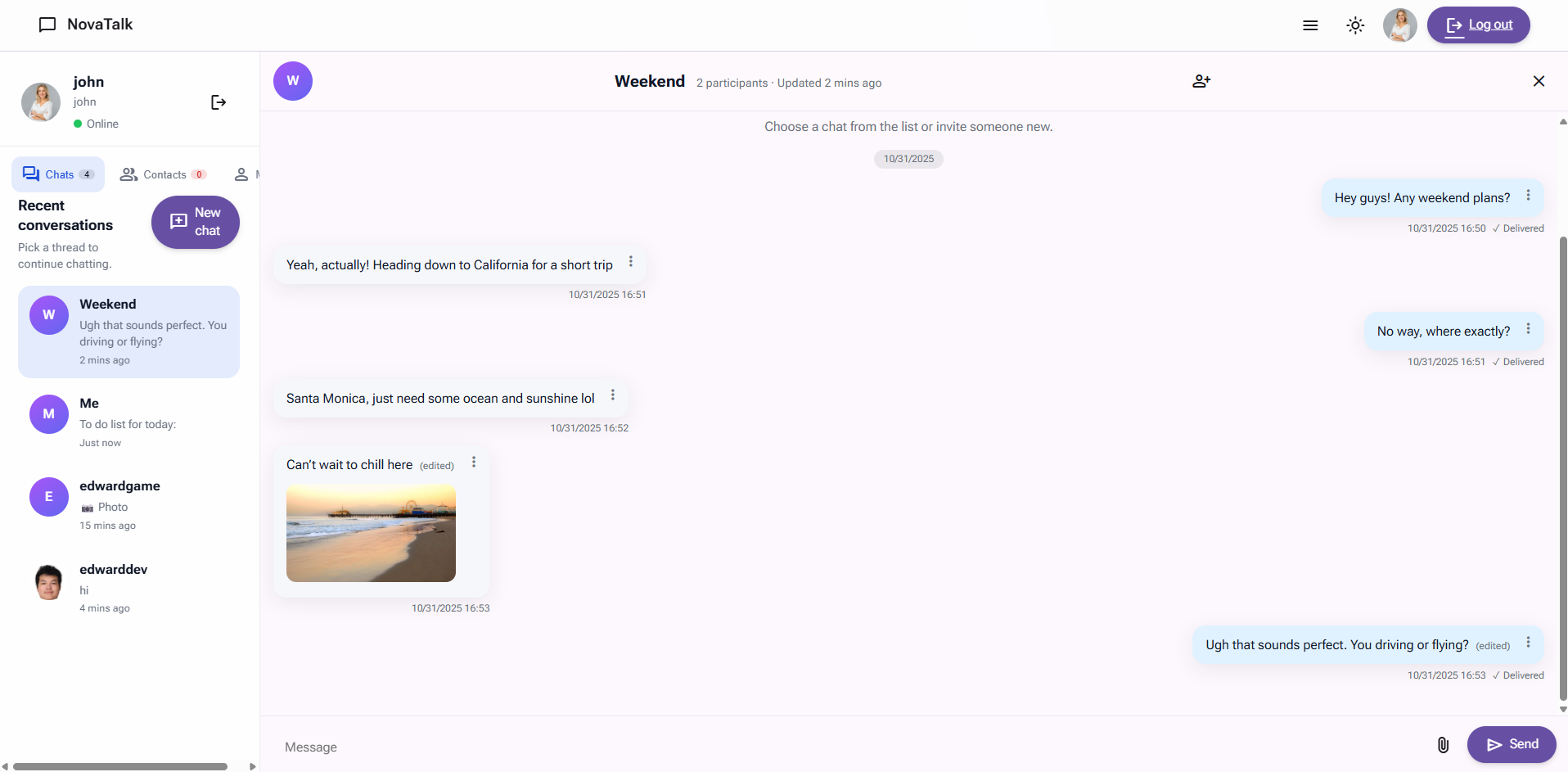
NovaTalk is a lightweight, self-hosted chat platform built with Flask, SQLAlchemy, and Flask-SocketIO.
It’s designed to feel familiar yet modern — offering a clean Material Design 3 interface, smooth animations, and full support for group chats (with roles and permissions), direct messaging, friends and contacts management, themes, customizable profiles, message editing, deletion, and more.
Features
- Material Design 3 interface with light/dark themes that adapt smoothly
- Real-time messaging using Socket.IO (works for DMs and group chats)
- Avatar uploads with live crop preview + image attachments in chat
- Friend system — requests, blocking, and public profile pages
- CSRF-safe everywhere (forms + AJAX included)
- Command-line admin tools for creating and managing users directly
Getting Started
Docker
You can pull the latest image directly from Docker Hub:
docker pull edwardhsing/novatalk:latest
Quick Start with Docker Compose
Deploy NovaTalk together with a MySQL database using the following docker-compose.yml:
services:
  db:
    image: mysql:8.0
    restart: always
    environment:
      MYSQL_ROOT_PASSWORD: root              # Change this in production
      MYSQL_DATABASE: novatalk
      MYSQL_USER: novatalk
      MYSQL_PASSWORD: novatalk
    volumes:
      - db_data:/var/lib/mysql               # Persist MySQL data

  web:
    image: edwardhsing/novatalk:latest
    restart: always
    depends_on:
      - db
    ports:
      - "5000:5000"                          # Expose port 5000
    environment:
      DATABASE_URL: mysql+pymysql://novatalk:novatalk@db:3306/novatalk
      ADMIN_USERNAME: admin                  # Initial admin username
      ADMIN_EMAIL: [email protected]         # Initial admin email
      ADMIN_PASSWORD: admin123               # Initial admin password
      ADMIN_DISPLAY_NAME: "Administrator"    # Admin User Display name
      SECRET_KEY: supersecret                # Replace with a secure random string
      UPLOAD_FOLDER: /uploads
    volumes:
      - ./uploads:/uploads                   # Mount local uploads directory

volumes:
  db_data:
💡 Tip: Update all credentials (
MYSQL_ROOT_PASSWORD,ADMIN_PASSWORD,SECRET_KEY, etc.) before deployment. For production, consider using environment files (.env) and secrets management.
Start the stack in detached mode:
docker compose up -d
Once the containers are running, open your browser at: 👉 http://0.0.0.0:5000
Production Server
1. Install dependencies
python -m venv .venv
source .venv/bin/activate
pip install -r requirements.txt
2. Run the setup wizard
python setup.py
Provide your MySQL connection details, an uploads directory, and the credentials for the first administrator account. The wizard creates a .env file and initialises the database schema.
3. Start Production Server
gunicorn -k eventlet -w 1 "app:create_app()" -b 0.0.0.0:5000
The application defaults to http://localhost:5000.
(Only works on Linux)
Development Server
1. Launch Development Server
python app.py
The application defaults to http://localhost:5000.
(Works on both Windows & Linux)
Administrative CLI
NovaTalk ships with a Click-based management tool for user administration.
Create a user:
python cli.py add-user --username alice --email [email protected] --password S3cureP@ss --display-name "Alice Johnson"
Reset a password:
python cli.py set-password --username alice --password N3wSecret!
All commands run inside the Flask application context and persist changes via SQLAlchemy with Werkzeug-secured hashes.
For more CLI usages, please refer to CLI Documents.
Environment variables
-
SECRET_KEY– Flask secret key (generated during setup) -
DATABASE_URL– SQLAlchemy connection string, e.g.mysql+pymysql://user:password@localhost:3306/novatalk -
UPLOAD_FOLDER– Absolute path where avatars and message images will be stored(Check .env file)
Development Notes
-
Uses Material Web typography, elevation, and ripple effects, customized with NovaTalk’s own CSS.
-
File uploads are validated for type and size before being saved under
UPLOAD_FOLDER. -
Run database migrations with:
export FLASK_APP=app:create_app
flask db init
flask db migrate
flask db upgrade
License
This project is licensed under the AGPL-V3 License. See LICENSE for details.

Tag summary
Content type
Image
Digest
sha256:4c58735d3…
Size
196.5 MB
Last updated
11 months ago
docker pull edwardhsing/novatalk