eecsb/labequipmentcontroller-web
Discover and control SCPI lab instruments from a browser
1.4K
eecsb/labequipmentcontroller-web repository overview
Lab Equipment Controller — web version
Discover and control lab instruments from a browser, over SCPI: oscilloscopes, function generators, multimeters, power supplies, loads, SMUs and spectrum analyzers, on Ethernet or RS-232. Scan the bench, connect to several instruments at once, and drive each from a console, instrument-aware quick-command buttons, or a script.
This image is the browser build of Lab Equipment Controller — a Blazor WebAssembly client and the ASP.NET Core server that owns every socket. A browser cannot open a TCP connection to port 5025 and never will, so all instrument traffic happens in this container; the page only asks it to.
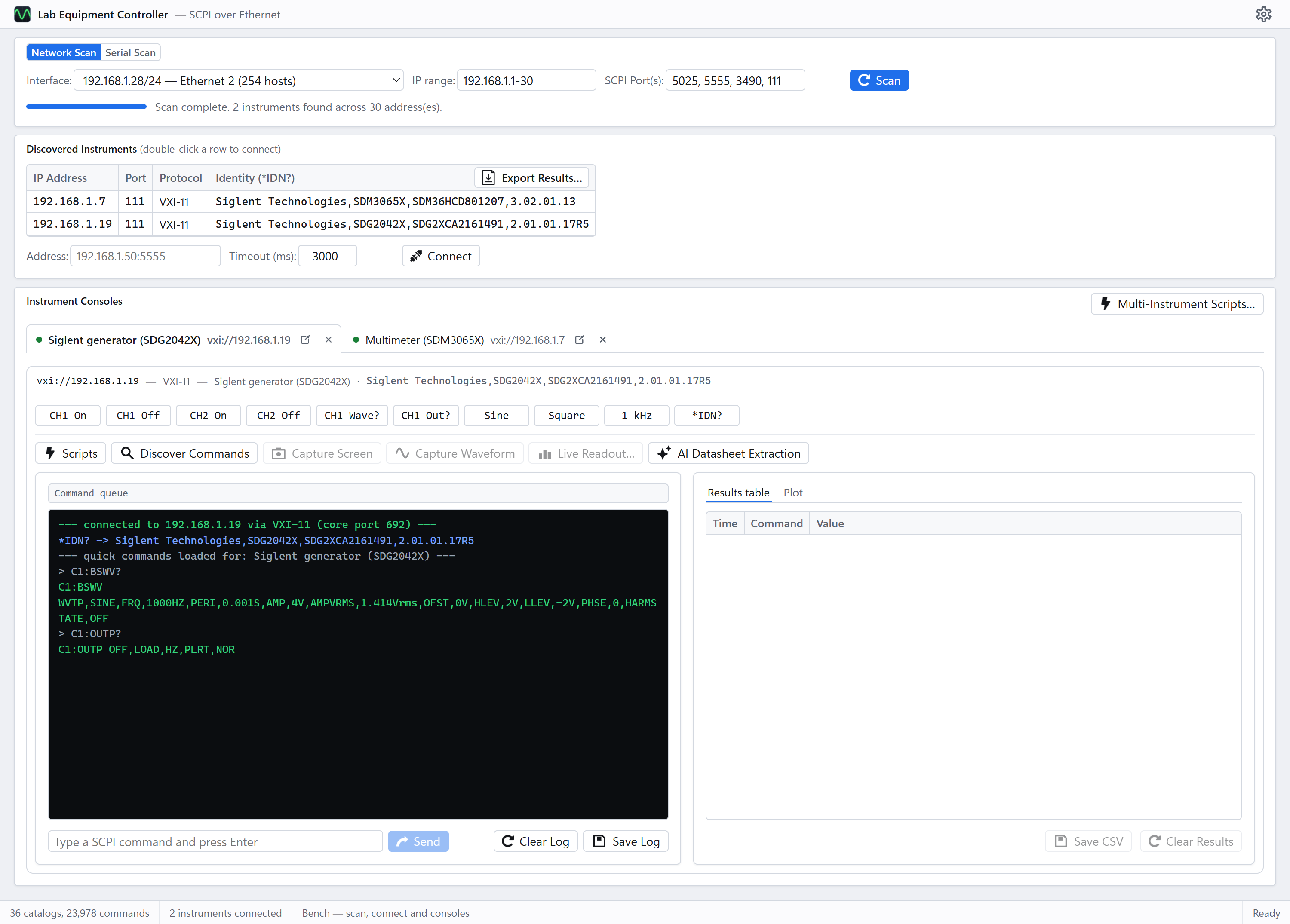
A real session against the bench this is developed on — a Rigol DS2202, a Siglent SDG2042X and a Siglent SDM3065X. Nothing here is mocked up.
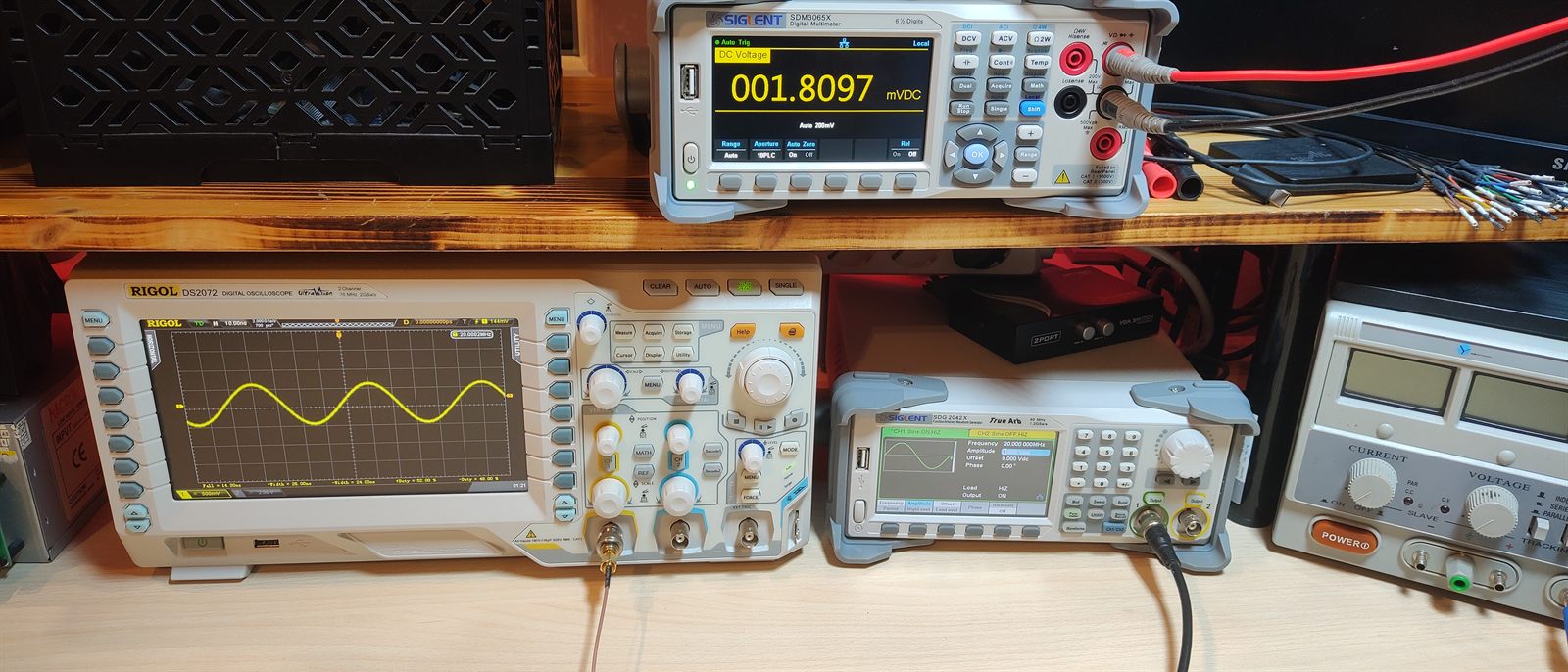
And that bench. Left to right: the oscilloscope, the generator and, on the shelf above, the multimeter — the three instruments answering in the screenshot above.
Read this before you pull it
Discovery needs the container on your bench's network, and that means Linux.
The scan sweeps a subnet. On Docker's default bridge network the container sits on its own
private 172.17.x.x network, so it would sweep that, find nothing, and show you an empty
bench with no hint as to why. --network host fixes it — and --network host behaves as
advertised only on Linux.
On Docker Desktop for Windows or macOS the engine runs inside a VM, so "host" is the
VM's network and not your machine's. The scan will come back empty and no instrument address
will connect. That is not a bug in the image and no flag fixes it. On those machines, either
run the server directly from source, or use the
desktop app or the
lec command line,
which talk to the bench natively. A macvlan network giving the container its own address on
the bench VLAN also works if you would rather stay in Docker.
The same applies to serial: a container starts with no serial ports, and host networking does not carry them. See Serial instruments below.
Run it
docker run -d --name lec-web --network host \
  -v lec-data:/data \
  eecsb/labequipmentcontroller-web:latest
Then open http://localhost:8080.
Or with compose — the docker-compose.yml in the repository is commented for a real bench and is the better starting point:
services:
  web:
    image: eecsb/labequipmentcontroller-web:latest
    container_name: lec-web
    restart: unless-stopped
    network_mode: host
    volumes:
      - lec-data:/data

volumes:
  lec-data:
Serial instruments
Pass the device node through explicitly, mapped to the same name on both sides:
docker run -d --name lec-web --network host \
  --device=/dev/ttyUSB0:/dev/ttyUSB0 \
  -v lec-data:/data \
  eecsb/labequipmentcontroller-web:latest
The address typed into the page is the container's name for the port —
serial:///dev/ttyUSB0 — which is why the mapping keeps both sides identical. ls /dev/ttyUSB* /dev/ttyACM* on the host says which node the adapter came up as; docker exec lec-web lec ports says what actually arrived. Linux only, for the same reason host
networking is.
Switching the scan card's heading to Serial lists those ports and, on Scan, asks the
ones you choose for an identity at the baud rates you name. Listing opens nothing; scanning
opens only what you picked, and asserts DTR and RTS on the way in, which resets some boards.
Optional: the AI features
Unset, the AI pages simply say they are not configured.
-e Ai__ApiKey=… -e Ai__Provider=Gemini
It is one key shared by everyone who can reach the page — there is no per-user credential store in a Linux container. Fine on a bench LAN, wrong on a public one.
What persists
AI connections, catalogs extracted from a datasheet, and uploaded programming guides are
written under LEC_DATA (/data). Mount a volume there or replacing the container throws
them away.
Tags
| Tag | What it is |
|---|---|
latest | The newest release |
1.2.3 | That exact release |
1.2, 1 | The newest patch / minor within that line |
sha-abc1234 | The exact commit, for pinning something reproducible |
Architectures: linux/amd64 and linux/arm64 — the second so a Raspberry Pi can sit on
the bench VLAN and be the thing that runs it.
What it can do
Scan and discovery, a console per instrument with that family's quick commands — detachable into its own browser tab — the results table and plot, waveform and screen capture, the live meter readout, single- and multi-instrument script runners with live output, the command library with the vendor's guide beside it, and the script-language reference.
Behind it: 36 curated command catalogs, 23,978 commands, covering Rohde & Schwarz, Rigol, Siglent, Keysight, Chroma, B&K Precision, GW Instek, Keithley, Tektronix and Fluke. Every one is transcribed from a vendor programming guide — never a forum, never a guess — and each carries the document it came from and whether it has been confirmed against real hardware.
Two things differ from the desktop app by necessity, and the UI says both rather than leaving them to be discovered: connections belong to the server rather than to a browser tab, so a sweep survives a refresh and two people with the page open are driving one bench; and the AI key is server configuration rather than per-user.
Further reading
- The repository — the desktop app, the CLI, the library, and screenshots of all of it against a real bench
- Web/README.md — this build in detail, including the host-networking and serial constraints above
- docs/SPEC.md — what every part does and why
Licence
MIT. The catalogs are transcriptions of publicly downloadable vendor programming guides; the guides themselves are not redistributed in this image, and each catalog names the document it came from so you can check it against your own copy.
Tag summary
Content type
Image
Digest
sha256:d6e23e7fd…
Size
121.3 MB
Last updated
about 2 months ago
docker pull eecsb/labequipmentcontroller-web