ehenoma/jsheets
Run Java snippets in your browser https://jsheets.dev
Image
0
1.2K
ehenoma/jsheets repository overview

JSheets
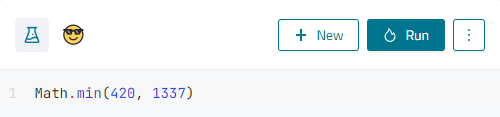
Jsheet lets you create and share Java snippets, ranging from single expressions to complex classes, methods and even Markdown comments.
Deployment & Configuration
Deploy Via Docker
The best way to deploy JSheets is to use this image.
Run the following for a minimal deployment:
docker run -d -p 8080:8080 --name jsheets ehenoma/jsheets
A minimal installation can be deployed using Docker Compose
version: '3.7'
services:
  server:
    image: ehenoma/jsheets:latest
    environment:
      JSHEETS_SERVER_PORT: 8080
      JSHEETS_MONGODB_URI: mongodb://root:root@document-store/jsheets
    ports:
      - "8080:8080"
    networks:
      - database
  document-store:
    container_name: document-store
    image: mongo:latest
    environment:
      MONGO_INITDB_ROOT_USERNAME: root
      MONGO_INITDB_ROOT_PASSWORD: root
    networks:
      - database

networks:
  database:
Looks at the Advanced Deployment file for production deployments
Environment Configuration
The application is configured using environment variables.
| Field | Default | Description |
|---|---|---|
JSHEETS_SERVER_PORT | 8080 | Port that the Server listens on |
JSHEETS_MONGODB_URI | - | MongoDB Connection String |
JSHEETS_SERVER_CACHE_STATIC_FILES | false | If enabled, the server caches static files in memory |
Tag summary
Content type
Image
Digest
sha256:276ea9ada…
Size
78.3 MB
Last updated
over 4 years ago
docker pull ehenoma/jsheets