eliastik/hacklol-modifier repository overview

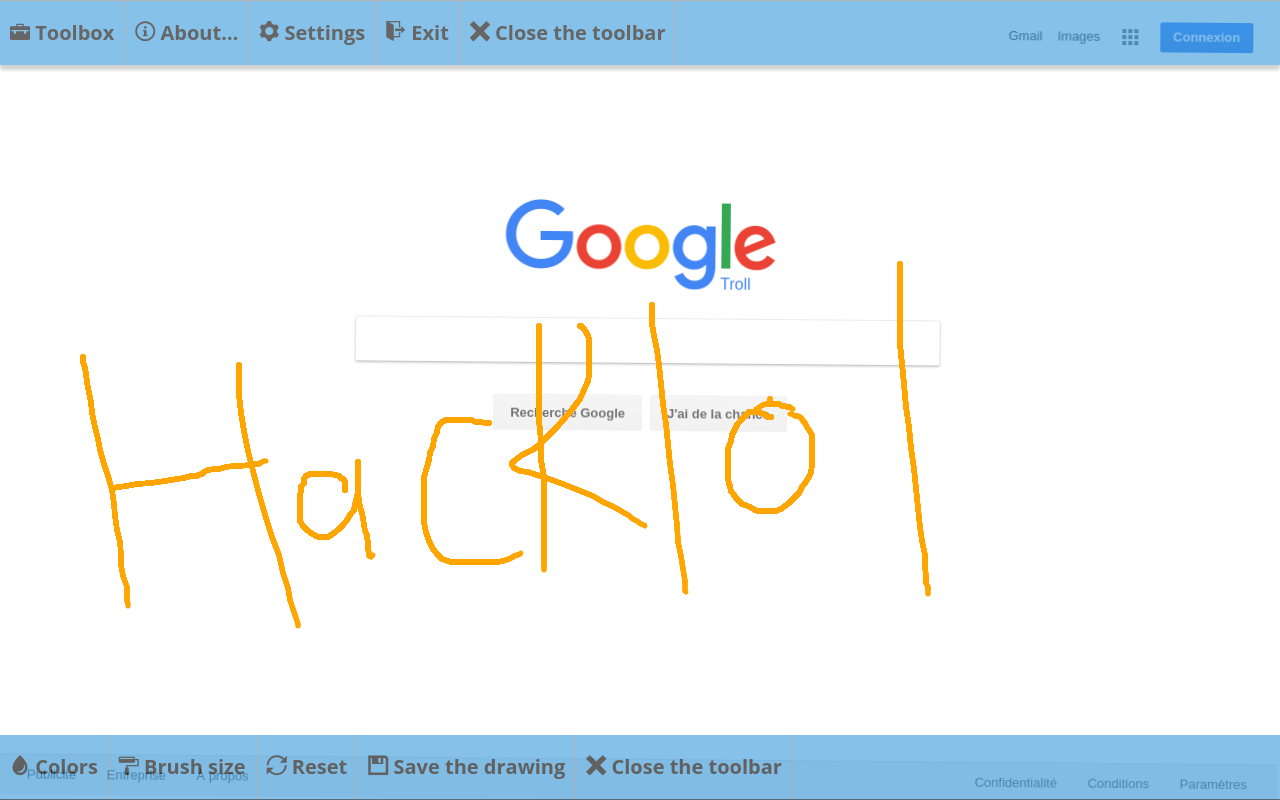
Français :
Hacklol Modifier est une application disponible sur navigateur web qui permet de modifier des sites Internet, en simulant un hack de celui-ci. Elle dispose de nombreux outils, comme la possibilité de modifier les textes d'une page, de dessiner dessus, de la faire exploser, et bien plus. L'application est disponible en français et en anglais.
- Version en ligne : http://hacklol.eliastiksofts.com
A propos de l'application
- By Eliastik ( http://www.eliastiksofts.com )
- Langages : HTML, CSS, Javascript, PHP
- Version actuelle : 1.4.1 REV6 (19/07/2026)
- Dépôt Github : https://github.com/Eliastik/hacklol-modifier
- Licence : GNU GPL 3.0
Installation
Docker
Vous pouvez lancer l'image Docker d'Hacklol Modifier simplement, en vous basant sur le docker-compose.yml fourni sur le dépôt. L'image est déjà buildée et disponible sur Docker Hub.
Une fois configuré, lancez la commande suivante pour démarrer le serveur d'Hacklol Modifier :
docker compose up -d
Il écoutera sur le port paramétré sur le docker-compose.yml (par défaut 80/443 si pas modifié).
Lancer l'appli avec Electron
Il est possible de lancer l'application avec un serveur PHP encapsulé dans une application Electron.
Pour cela, il faut suivre les instructions suivantes qui diffèrent selon l'OS :
Linux
Vous devez avoir installé NodeJS, npm et Docker sur votre système pour que cela puisse fonctionner.
Tout d'abord, installez les dépendances NPM :
npm install
Il est possible que vous ayiez à autoriser l'exécution du script :
chmod +x build-static-php-linux.sh
Si vous souhaitez simplement lancer l'application Electron sans la builder, il faut d'abord builder PHP en mode statique avec StaticPHP. Cela ne doit être fait qu'une seule fois.
Pour cela, lancer la commande suivante :
npm run build-static-php-linux
Ensuite, lancez la commande suivante pour lancer l'appli en mode Electron :
npm run start
Cela démarrera automatiquement le serveur PHP puis lancera une fenêtre avec l'interface d'Hacklol Modifier.
Builder l'appli avec Electron
Pour builder l'application pour qu'elle puisse être distribuée, suivre ces étapes qui diffèrent selon l'OS cible.
Linux
Vous devez avoir installé NodeJS, npm et Docker sur votre système pour que cela puisse fonctionner.
Tout d'abord, installez les dépendances NPM :
npm install
Il est possible que vous ayiez à autoriser l'exécution des scripts :
chmod +x build-electron-linux.sh
chmod +x build-static-php-linux.sh
Lancez ensuite la commande suivante qui se chargera de tout (build via StaticPHP d'un binaire PHP, construction de l'AppImage) :
npm run build-linux
Une fois OK, l'application sera buildée et disponible dans le dossier build/electron/hacklol-modifier-xxx.AppImage.
Bare metal
L'application nécessite un serveur PHP pour fonctionner, et les extensions suivantes : curl, gettext, intl, session et filter.
Pour l'installer sur votre serveur, téléchargez l'archive du dépôt ici et extrayez le dossier www tout simplement sur votre serveur : https://github.com/Eliastik/hacklol-modifier/archive/master.zip
Ou faites un git clone et copiez le dossier www :
git clone https://github.com/Eliastik/hacklol-modifier.git
Normalement, l'application devrait fonctionner sans modifications particulières.
Vous pouvez la configurer en modifiant le fichier config.php dans le dossier www.
Mettre à jour certains fichiers
Vous pouvez recompiler les fichiers d'Hacklol Modifier en lançant ces commandes (nécessite node.js et gulp) :
npm install
npm run build
Pour mettre à jour les paquets NPM :
npm update
Pour mettre à jour PHP-Proxy (nécessite composer) :
cd www/hacklol-modifier/page_loader
composer update
Pour mettre à jour le template de traduction (uniquement sur Linux, rendre le fichier exécutable) :
./translations_update.sh
Fonctionnement
L'application inclus un formulaire basique pour lancer Hacklol Modifier. Pour lancer l'application, il suffit d'entrer l'adresse du site que l'on souhaite modifier. Google ReCaptcha v2 est également inclus dans le formulaire (activable en modifiant le fichier config.php). Le site est chargé sur le serveur via un proxy, PHP-Proxy ( https://github.com/Athlon1600/php-proxy-app ), et envoyé à l'utilisateur via une iframe. Cette fonction est désactivable dans les options.
PHP-Proxy est installé à l'aide de composer dans www/hacklol-modifier/page_loader. Les seuls fichiers modifiés/ajoutés sont /plugins/ProtectPlugin.php, /plugins/ban_ip.php, /templates/main.php et /templates/url_form.php.
Le nom de l'application est modifiable en éditant le fichier www/config.php et www/hacklol-modifier/assets/src/js/main.js.
Journal des mises à jour
-
Version 1.4.1 REV6 (19/07/2026) :
- Mise en place du packaging sous forme d'une application hybride Electron-PHP (via StaticPHP), pour permettre de lancer Hacklol Modifier avec juste un seul exécutable selon la plateforme (installateur/exécutable portable sur Windows, exécutable appimage sous Linux)
- Pas encore disponible pour MacOS
- Amélioration de la page d'accueil du formulaire Hacklol Modifier :
- Ajout d'un mode sombre
- Ajout d'un indicateur de chargement
- Mise à jour de la méthode de vérification des mises à jour
- Mise à jour de Boostrap
- Mise en place du packaging sous forme d'une application hybride Electron-PHP (via StaticPHP), pour permettre de lancer Hacklol Modifier avec juste un seul exécutable selon la plateforme (installateur/exécutable portable sur Windows, exécutable appimage sous Linux)
-
Version 1.4.1 REV5 (06/06/2026) :
- Mise à jour de l'image Docker, passage à Alpine Linux, support du HTTPS, correction de la configuration PHP
-
Version 1.4.1 REV4 (23/04/2020) :
- Mise à jour des dépendences (PHP-Proxy, etc.)
-
Version 1.4.1 REV3 (25/01/2019) :
- Correction d'un bug de sécurité (CVE-2018-19246) de PHP-Proxy 5.1.0 (sur lequel est basé Hacklol Page Loader) - Cette mise à jour est donc vivement recommandée ! ;
- Sécurité renforcée pour Hacklol Modifier et Hacklol Page Loader (meilleure vérification des adresses URL, autres corrections) ;
- Ajout de la possibilité de bloquer les utilisateurs par leurs adresses IP et de bloquer des sites web spécifiques (fichiers blacklistedWebsites.php et ban_ip.php à la racine) ;
- Mise à jour de l'URL de vérification de la mise à jour ;
- Mise à jour des dépendences de npm et bower ;
- Corrections des textes et autres corrections mineures.
-
Version 1.4.1 REV2 (2/08/2018) :
- Mise à jour de PHP-Proxy (Hacklol Page Loader) et autres corrections mineures (pas de montée de version).
-
Version 1.4.1 REV1 (03/01/2018) :
- Correction de bugs mineurs (pas de montée de version).
-
Version 1.4.1 (23/10/2017) :
- Ajout de deux nouveaux Easter Eggs, à vous de les trouver !
- Corrections de bugs et ajustements (Hacklol Modifier) :
- Ajout de la possibilité de désactiver par défaut Hacklol Page Loader ;
- Amélioration de la fonction de sauvegarde de la fonction Dessiner sur la page (permet de télécharger le dessin directement dans l'appareil) ;
- Correction d'un bug avec le moteur de traduction et Internet Explorer (compatibilité à partir de la version 9) ;
- Correction d'un son (Easter Egg) et d'un des effets d'explosion (animation) ;
- Corrections et optimisations du code (réduction de certaines parties du code à quelques lignes) ;
- Corrections des textes (anglais et français) ;
- Lors du changement de site depuis l'interface d'Hacklol Modifier, l'URL du nouveau site choisi est affichée dans la fenêtre A propos ;
- Correction de la détection des nouvelles versions d'Hacklol Modifier ;
- Ajout d'un effet d'ombre sur la barre d'outils de la fonction Dessiner sur la page ;
- Correction d'un bug de PHP-Proxy ;
- Mise à jour de certaines bibliothèques logicielles (i18next, CodeMirror) et de PHP-Proxy ;
- Autres corrections et ajustements mineurs.
- Corrections de bugs et ajustements (formulaire) :
- Correction du moteur de traduction et de la traduction du formulaire permettant d'accéder à Hacklol Modifier ;
- Ajout d'une détection des mises à jour.
- Ajout de la commande "gulp build-page-loader" permettant de créer un build de Hacklol Page Loader.
-
Version 1.4 (4/07/2017) :
- Release initiale pour Github ;
- Amélioration de l'architecture générale de l'application ;
- Mise à jour de l'architecture de traduction de l'application (via i18next) ;
- Amélioration de l'écran de chargement (barre de chargement ajoutée, etc) ;
- Mise à jour de PHP-Proxy ;
- Mise à jour des librairies ;
- Ajout du jeu de la chasse aux Easter Eggs dans l'outil Defacer la page et ajout de nouveaux Easter Eggs (4) ;
- Ajout d'un formulaire qui permet de changer de site internet lancé sans quitter l'application (dans la fenêtre A propos...) ;
- Changement du thème de couleur du navigateur Chrome pour Android en fonction de la couleur des barres d'outils choisie ;
- Les boutons d'ouverture des barres d'outils peuvent désormais être déplacés ;
- L'outil Dessiner sur la page est désactivé lorsque l'outil Modifier la page est activé ;
- Corrections de bugs et ajustements :
- Ajustement de la fenêtre A propos... ;
- Ajout d'une couleur pour les liens ;
- Correction d'un bug avec l'outil Secouer la page ;
- Correction d'un bug avec la fonction d'ouverture/fermeture des barres d'outils ;
- Correction d'un bug avec les cases à cocher de la fenêtre Paramètres ;
- Délai avant le chargement des données au démarrage ;
- Simplification de certains parties du code ;
- Autres corrections mineures.
-
Anciens journaux des changements ici : http://hacklol.eliastiksofts.com/news/
To-do list
Choses qui sont planifiées pour être ajoutées à l'application (peut-être) :
- Outil "Gravity", comme Google Gravity : http://mrdoob.com/projects/chromeexperiments/google-gravity/ ;
- Outil "DDOS", simulation d'un DDOS sur le site.
Librairies/crédits
- Jquery (Licence MIT), Jquery UI (Licence MIT) et jQuery UI Touch Punch (GPL 2.0 - http://touchpunch.furf.com/ ) ;
- Magnific Popup (Licence MIT - https://github.com/dimsemenov/Magnific-Popup/blob/master/LICENSE ) ;
- jStorage (The Unlicense - https://github.com/andris9/jStorage/blob/master/LICENSE ) ;
- IcoMoon Free (GPL/CC BY 4.0) ;
- Open Sans (Apache License 2.0 - https://fonts.google.com/specimen/Open+Sans ) ;
- colpick Color Picker (GPL 2.0 - https://github.com/mrgrain/colpick/blob/master/LICENSE ) ;
- Mini paint HTML5 (https://www.vincent-rousseau.net/paint-html5-canvas/ ) ;
- Matrix Effect HTML5+Javascript (http://www.arungudelli.com/html5/matrix-effect-using-html5-and-javascript/ ) ;
- FakeBSOD (GPL 3.0 - https://github.com/mohammadg/FakeBSOD.com/blob/master/LICENSE ) ;
- CodeMirror (Licence MIT - https://github.com/codemirror/CodeMirror/blob/master/LICENSE ) ;
- CSSHake (Licence MIT - https://github.com/elrumordelaluz/csshake/blob/master/LICENSE ) ;
- PHP-Proxy (Licence MIT - https://github.com/Athlon1600/php-proxy-app/blob/master/LICENSE ) ;
- i18next (Licence MIT - https://github.com/i18next/i18next ).
Licence
Copyright (C) 2014-2026 Eliastik (eliastiksofts.com)
Ce programme est un logiciel libre ; vous pouvez le redistribuer ou le modifier suivant les termes de la GNU General Public License telle que publiée par la Free Software Foundation ; soit la version 3 de la licence, soit (à votre gré) toute version ultérieure.
Ce programme est distribué dans l'espoir qu'il sera utile, mais SANS AUCUNE GARANTIE ; sans même la garantie tacite de QUALITÉ MARCHANDE ou d'ADÉQUATION à UN BUT PARTICULIER. Consultez la GNU General Public License pour plus de détails.
Vous devez avoir reçu une copie de la GNU General Public License en même temps que ce programme ; si ce n'est pas le cas, consultez http://www.gnu.org/licenses.
English
Hacklol Modifier is an app available on web browsers which allows to modify websites, simulating a hack of it. It has many tools, including the ability to edit text on a page, draw on it, explode it, and more. The app is available in english and in french.
- Online version: http://hacklol.eliastiksofts.com
About the app
- By Eliastik ( http://www.eliastiksofts.com )
- Languages : HTML, CSS, Javascript, PHP
- Current version: 1.4.1 REV6 (7/19/2026)
- Github repository: https://github.com/Eliastik/hacklol-modifier
- License: GNU GPL 3.0
Installation
Docker
You can run the Hacklol Modifier Docker image simply by using the docker-compose.yml file provided in the repository. The image is already built and available on Docker Hub.
Once configured, run the following command to start the Hacklol Modifier server:
docker compose up -d
It will listen on the port specified in docker-compose.yml (by default 80/443 if not modified).
Launch the app with Electron
You can launch the application using a PHP server encapsulated within an Electron application.
To do this, follow the instructions below, which vary depending on your OS:
Linux
You must have NodeJS, npm, and Docker installed on your system for this to work.
First, install the NPM dependencies:
npm install
You may need to make the script executable:
chmod +x build-static-php-linux.sh
If you simply want to run the Electron app without building it, you must first build PHP in static mode using StaticPHP. This only needs to be done once.
To do this, run the following command:
npm run build-static-php-linux
Then, run the following command to launch the app in Electron mode:
npm run start
This will automatically start the PHP server and then open a window with the Hacklol Modifier interface.
Building the app with Electron
To build the application so it can be distributed, follow these steps, which vary depending on the target OS.
Linux
You must have NodeJS, npm, and Docker installed on your system for this to work.
First, install the NPM dependencies:
npm install
You may need to make the scripts executable:
chmod +x build-electron-linux.sh
chmod +x build-static-php-linux.sh
Then run the following command, which will handle everything (building a PHP binary using StaticPHP, creating the AppImage):
npm run build-linux
Once complete, the application will be built and available in the build/electron/hacklol-modifier-xxx.AppImage folder.
Bare metal
The application requires a PHP server to run, as well as the following extensions: curl, gettext, intl, session, and filter.
To install it on your server, download the repository archive here and extract the www directory it on your server: https://github.com/Eliastik/hacklol-modifier/archive/master.zip
Or clone the repository and copy the www directory on your server:
git clone https://github.com/Eliastik/hacklol-modifier.git
Normally, the application should work without special modifications.
You can configure it by editing the config.php file at the www directory of the project.
Update files
You can recompile the Hacklol Modifier files by launching these commands (require node.js and gulp):
npm install
npm run build
To update the NPM packages:
npm update
To update PHP-Proxy (require composer):
cd www/hacklol-modifier/page_loader
composer update
To update the translation template (only on Linux, don't forget to render the file executable):
./translations_update.sh
How the app works
The application includes a basic form to launch Hacklol Modifier. To launch the app, it is required to enter a website address. Google ReCaptcha v2 is also included (can be activated by modifying the config.php file). The website is loaded via a proxy, PHP-Proxy ( https://github.com/Athlon1600/php-proxy-app ), and returned to the user via an iframe. This function can be disabled via the Hacklol Modifier settings.
PHP-Proxy is installed via composer in the folder www/hacklol-modifier/page_loader. The only files edited/added are /plugins/ProtectPlugin.php, /plugins/ban_ip.php, /templates/main.php and /templates/url_form.php.
The app name is editable by modifying the files www/config.php and www/hacklol-modifier/assets/src/js/main.js.
Changelog
-
Version 1.4.1 REV6 (07/19/2026):
- Implemented packaging as a hybrid Electron-PHP application (via StaticPHP), allowing Hacklol Modifier to be launched with a single executable depending on the platform (installer/portable executable on Windows, AppImage executable on Linux)
- Not yet available for macOS
- Improvements to the Hacklol Modifier form’s home page:
- Added a dark mode
- Added a loading indicator
- Updated the method for checking for updates
- Updated Bootstrap
- Implemented packaging as a hybrid Electron-PHP application (via StaticPHP), allowing Hacklol Modifier to be launched with a single executable depending on the platform (installer/portable executable on Windows, AppImage executable on Linux)
-
Version 1.4.1 REV5 (06/06/2026):
- Updated the Docker image, switched to Alpine Linux, added HTTPS support, and fixed the PHP configuration
-
Version 1.4.1 REV4 (23/04/2020) :
- Updated dependencies (PHP-Proxy, etc.)
-
Version 1.4.1 REV3 (25/01/2019) :
- Fixed a security bug (CVE-2018-19246) of PHP-Proxy 5.1.0 (on which Hacklol Page Loader is based) - This update is therefore highly recommended! ;
- Enhanced security for Hacklol Modifier and Hacklol Page Loader (better checking URLs, other fixes);
- Added the ability to block users by their IP addresses and block specific websites (blacklistedWebsites.php and ban_ip.php files in the root directory);
- Updated update check URL;
- Update dependencies of npm and bower;
- Text corrections and other minor corrections.
-
Version 1.4.1 REV2 (2/08/2018) :
- Update of PHP-Proxy (Hacklol Page Loader) and others minor fixes (no version upgrade).
-
Version 1.4.1 REV1 (03/01/2018) :
- Minor bug fixes (no version upgrade).
-
Version 1.4.1 (23/10/2017) :
- Added two new Easter Eggs, it's up to you to find them!
- Bugs fixes and adjustments (Hacklol Modifier) :
- Added the ability to disable Hacklol Page Loader by default;
- Improvement of the save function of the tool Draw on the page (allows to download the drawing directly into the device);
- Fixed a bug with the translation engine and Internet Explorer (compatibility from version 9);
- Fixed a sound (Easter Egg) and an explosion effect (animation);
- Corrections and optimizations of the code (reduction of some parts of the code to a few lines);
- Corrections of the texts (English and French);
- When changing websites with the Hacklol Modifier interface, the URL of the new selected website is displayed in the About window;
- Fixed the detection of new versions of Hacklol Modifier;
- Added a shadow effect on the toolbar of the Draw on the page function;
- Fixed a PHP-Proxy bug;
- Update of some software libraries (i18next, CodeMirror) and PHP-Proxy;
- Other minor corrections and adjustments.
- Bug fixes and adjustments (form):
- Correction of the translation engine and of the texts of the form;
- Added detection of updates.
- Added the command "gulp build-page-loader" to create a build of Hacklol Page Loader.
-
Version 1.4 (4/07/2017):
- Initial release for Github
- Enhanced the overall application architecture
- Updated the translation architecture of the application (via i18next)
- Enhanced the loading screen (loading bar added, etc)
- Updated PHP-Proxy
- Updated libraries
- Added the Easter Eggs hunt game in the Deface the website tool and added new Easter Eggs (4)
- Added a form to change of website without leaving the application (in the About... window)
- Changed the color theme of Chrome for Android based on the selected color of the toolbars
- The toolbar opening buttons can now be moved
- The tool Draw on the page is disabled when the tool Edit the page is enabled
- Bug fixes and minor adjustments:
- Adjustments of the About... window
- Added a link color
- Fixed a bug with the tool Shake the page
- Fixed a bug with the open/close toolbar buttons
- Fixed a bug with the checkboxes of the Settings window
- Delay before the loading of data at application startup
- Simplification of certain parts of the code
- Other minor adjustments.
-
Old changelog here (FR): http://hacklol.eliastiksofts.com/news/
To-do list
Things that are planned to be added to the application (maybe):
- "Gravity" tool, like Google Gravity: http://mrdoob.com/projects/chromeexperiments/google-gravity/ ;
- "DDOS" tool, to simulate a DDOS of the website.
Libraries/credits
- Jquery (MIT license), Jquery UI (MIT license) and jQuery UI Touch Punch (GPL 2.0 - http://touchpunch.furf.com/ ) ;
- Magnific Popup (MIT license - https://github.com/dimsemenov/Magnific-Popup/blob/master/LICENSE ) ;
- jStorage (The Unlicense - https://github.com/andris9/jStorage/blob/master/LICENSE ) ;
- IcoMoon Free (GPL/CC BY 4.0) ;
- Open Sans (Apache License 2.0 - https://fonts.google.com/specimen/Open+Sans ) ;
- colpick Color Picker (GPL 2.0 - https://github.com/mrgrain/colpick/blob/master/LICENSE ) ;
- Mini paint HTML5 (https://www.vincent-rousseau.net/paint-html5-canvas/ ) ;
- Matrix Effect HTML5+Javascript (http://www.arungudelli.com/html5/matrix-effect-using-html5-and-javascript/ ) ;
- FakeBSOD (GPL 3.0 - https://github.com/mohammadg/FakeBSOD.com/blob/master/LICENSE ) ;
- CodeMirror (MIT license - https://github.com/codemirror/CodeMirror/blob/master/LICENSE ) ;
- CSSHake (MIT license - https://github.com/elrumordelaluz/csshake/blob/master/LICENSE ) ;
- PHP-Proxy (MIT license - https://github.com/Athlon1600/php-proxy-app/blob/master/LICENSE ) ;
- i18next (MIT license - https://github.com/i18next/i18next ).
License
Copyright (C) 2014-2026 Eliastik (eliastiksofts.com)
This program is free software: you can redistribute it and/or modify it under the terms of the GNU General Public License as published by the Free Software Foundation, either version 3 of the License, or (at your option) any later version.
This program is distributed in the hope that it will be useful, but WITHOUT ANY WARRANTY; without even the implied warranty of MERCHANTABILITY or FITNESS FOR A PARTICULAR PURPOSE. See the GNU General Public License for more details.
You should have received a copy of the GNU General Public License along with this program. If not, see http://www.gnu.org/licenses/.
Tag summary
Content type
Image
Digest
sha256:4551d8d3e…
Size
90.5 MB
Last updated
about 2 hours ago
docker pull eliastik/hacklol-modifier