emonteroe/ttlock-docker
A restful API for TT lock for home assistant integration; handles access tokens and dates.stevendodd
1.1K
emonteroe/ttlock-docker repository overview
IMPORTANT: All credit to the creator Stevendodd, I just cloned the repo, rebuilt it to ARM arch's, and add some more information to the readme guide with my experience configuring TTLock with Home Assistant. Original Work by stevendodd: https://hub.docker.com/r/stevendodd/ttlock
A restful API for TT lock for home assistant integration; handles access tokens and dates.
1.- Create an application https://open.ttlock.com/manager
2.- Register a user in the application - returns a prefixed user that you can add to your lock
curl --location -g --request POST 'https://api.ttlock.com/v3/user/register' \
--header 'Content-Type: application/x-www-form-urlencoded' \
--data-urlencode 'clientId=your id' \
--data-urlencode 'clientSecret=your secret' \
--data-urlencode 'username=lockuser' \
--data-urlencode 'password=your application users password md5 hashed' \
--data-urlencode 'date=1650909361599'
Note: Get the current date at https://currentmillis.com
''echo "password" | md5sum - md5 hash password
3.- Add your new prefixed user to your lock in the TT lock app.
4.- Create a Docker container:
-e CLIENTID='your id' \
-e CLIENTSECRET='your secret' \
-e LOCKID='your lock id' \
-e USER='your prefixed application user' \
-e PASSWORD='your application users password md5 hashed' \
-p 5000:5000 emonteroe/ttlock-docker
If you want to use Docker Compose:
services:
  ttlock:
    container_name: 'Container Name'
    image: emonteroe/ttlock-docker
    environment:
      - CLIENTID='your id
      - CLIENTSECRET='your secret'
      - LOCKID='your lock id'
      - USER='your prefixed application user'
      - PASSWORD='your application users password md5 hashed'
    ports:
      - 5000:5000
    restart: always
    network_mode: host
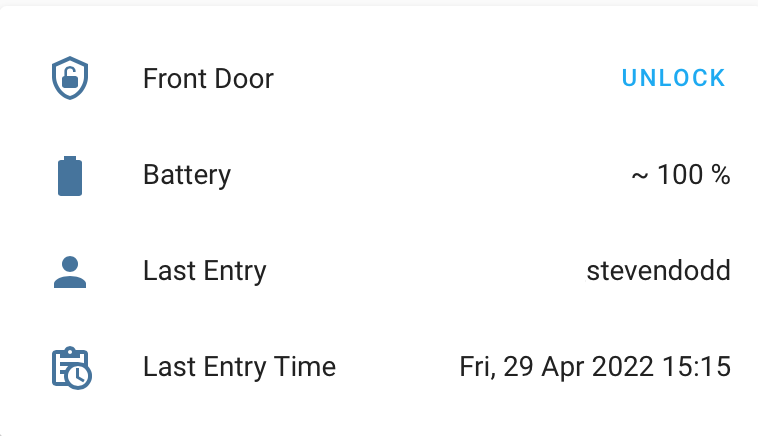
5.- Add the following sensor and rest command to configuration.yaml in home assistant:
  - scan_interval: 60
    resource: http://192.168.1.XXX:[PORT]/[YourLockID]
    sensor:
      - name: "Front Door TTLock"
        value_template: "OK"
        unique_id: frontdoor_ttlock
        json_attributes:
          - "lockFlagPos"
          - "autoLockTime"
          - "electricQuantity"
          - "firmwareRevision"
          - "hardwareRevision"
          - "lockAlias"
          - "modelNum"
          - "passageMode"
          - "passageModeAutoUnlock"
          - "soundVolume"
          - "tamperAlert"
  - scan_interval: 60
    resource: http://192.168.1.XXX:[PORT]/[YourLockID]/getstatus
    sensor:
      - name: "Front Door Status"
        value_template: "{{ value_json.state }}"
        unique_id: front_ttlock_status
        json_attributes:
          - "sensorState"
          - "state"
  - scan_interval: 5
    resource_template: http://192.168.1.XXX:[PORT]/[YourLockID]/users
    sensor:
      - name: "Front Door unlock name"
        value_template: '{{ value_json.list[0].username }}'
      - name: "Front Door unlock date"
        value_template: '{{ (value_json.list[0].lockDate | int / 1000) | timestamp_custom("%a, %d %b %Y %H:%M") }}'

rest_command:
  unlock_frontdoor:
    url: "http://192.168.1.XXX:[PORT]/[YourLockID]/unlock"
    method: get
  lock_frontdoor:
    url: "http://192.168.1.XXX:[PORT]/[YourLockID]/lock"
    method: get
lock:
    - platform: template
      name: Front Door Lock
      value_template: "{{ state_attr('sensor.front_door_status', 'state') | int != 1 }}"
      optimistic: true
      lock:
      - service: rest_command.lock_frontdoor
      unlock:
      - service: rest_command.unlock_frontdoor

sensor:
       - platform: template
         sensors:
             ttlock_frontdoor_battery:
               friendly_name: "TTLock Front Door Battery"
               value_template:  '{{ states.sensor.front_door_ttlock.attributes.electricQuantity|float }}'
               unit_of_measurement: '%'
               device_class: battery
https://community.home-assistant.io/t/ttlock-integration-with-ha/211244/26
Tag summary
Content type
Image
Digest
sha256:7a59f699b…
Size
46.6 MB
Last updated
almost 4 years ago
docker pull emonteroe/ttlock-docker