ethnexus/smnrpx repository overview
Secure Multifunctional Nginx Reverse Proxy eXtended version
The Secure Multifuctional Nginx Reverse Proxy eXtended version (SMNRP) is a reverse proxy based on nginx.

Migration
To migrate from smnrp to smnrpx you basically need to convert the environment variables to a yaml file. The mapping should be straight forward. The functionality stays the same, except:
- bypass is no longer supported as a certificate provider
- analytics is no longer supported
Migration example
SMNRP_DOMAINS=dom.org,www.dom.org
SMNRP_UPSTREAMS=api!api:5000
SMNRP_LOCATIONS=/api/!http://api/api/,/static/!/vol/web/static!t,/goto/!https://dom2.org!r
is migrated to
domains:
  dom.org:
    sans:
      - www.dom.org
    upstreams:
      api:
        - api:5000
    locations:
      - proxy:
          uri: /api/
          proto: http
          upstream: api
          path: /api/
      - alias:
          uri: /static/
          path: /vol/web/static
          try_files: true
      - redirect:
          uri: /goto/
          url: https://dom2.org
Features
HTTPS Certificates
- Automatic generation and renewal of https certificates (using Let's Encrypt
- Automatic generation of a
self-signedcertificate - Usage of custom (
own) certificates
Usage options
- Reverse proxy to a web application
- Load balancer to different locations
Security features
- High baseline security
- Customizable
Content-Security-Policy - OCSP stapling ℹ️
- Basic authentication to specific locations
Additional features
Getting started
SMNRPX can be configured using a yaml configuration file. All possible configuration options are described in this readme.
To integrate the SMNRPX into your web application you just need to configure the yaml file (e.g. smnrp.yml).
Alternatively you can assign the yml configuration to the environment variable SMNRP.
SMNRP="
<yaml file content>
"
Let's start with a full examples.
domains:
  # The name of the domain (used as *cn* in the certificate)
  dom.org:
    # If not defined, the certificate will be requested from Let's Encrypt
    # cert: self-signed
    # Subject alternative names (SAN) (other names for the **same** domain)
    sans:
      - www.dom.org
    # Redirect www.dom.org to dom.org and include www.dom.org in the certificate
    redirect_www: true
    # Former domains of this vhost, redirected to dom.org and included in the certificate
    redirect_from:
      - old.dom.org
    # Upstreams
    upstreams:
      # Name of the upstream (freely eligible)
      api:
        # List of host:port combinations to define the upstream servers
        - echo:80
    # Ports to listen on (one for http and one for https traffic)
    ports:
      http: 80
      https: 8443
      exposed_https: 8443
    # The Content Security Policy for this domain
    csp: default-src 'self' http: https: data: blob: 'unsafe-inline'
    # Hardening parameters (please read the details below)
    server_tokens: off
    proxy_buffer_size: 32k
    client_max_body_size: 1m
    client_body_buffer_size: 1k
    large_client_header_buffers: 2 1k
    allow_tls1.2: true
    disable_ocsp_stapling: true

  search.7f000001.nip.io:
    # The certificate is created as a self-signed one by SMNRPX,
    # if set to 'own' you need to map you own certificates to the right path
    cert: self-signed
    sans:
      - www.search.7f000001.nip.io
    upstreams:
      google:
        - google.com:443
    # Locations defined by type (proxy, alias, redirect)
    locations:
        # A proxy location defines what uri is proxied to what target (basically an upstream)
      - proxy:
          # Set headers to disable browser cache (helpful while developing web apps)
          disable_cache: true
          # What uri to proxy,
          uri: /search
          # over which protocol,
          proto: https
          # to what upstream,
          upstream: google
          # and what path
          path: /
          # The location should be password protected (by basic authentication),
          auth:
              # with this user,
            - user: admin
              # and this password
              password: secret
          # Optional auth_request middleware:
          # use an internal URI (same nginx) or an absolute URL
          auth_request: /auth/check/
          # Only allow access to this location from the listed networks
          whitelist:
            - 127.0.0.1/32
          # Add custom configuration lines to this location (e.g. additional proxy headers)
          custom:
            - proxy_set_header Host $http_host
        # The alias location maps a uri to a local filesystem path
      - alias:
          # The uri to map,
          uri: /media
          # to what local filesystem path
          path: /usr/local/media
          # Add internal clause to the location
          internal: true
          # Add try_files clause to the location
          try_files: true
          # The location should be password protected (by basic authentication),
          auth:
              # with this user,
            - user: user
              # and this password
              password: user
        # The redirect location redirects all traffic to a different url with a 301 HTTP status code
      - redirect:
          # The uri to redirect,
          uri: /redir
          # to this new location, trowing a 301 HTTP status code
          url: http://google.com
We follow with some additional minimal examples.
Examples
Simple reverse proxy
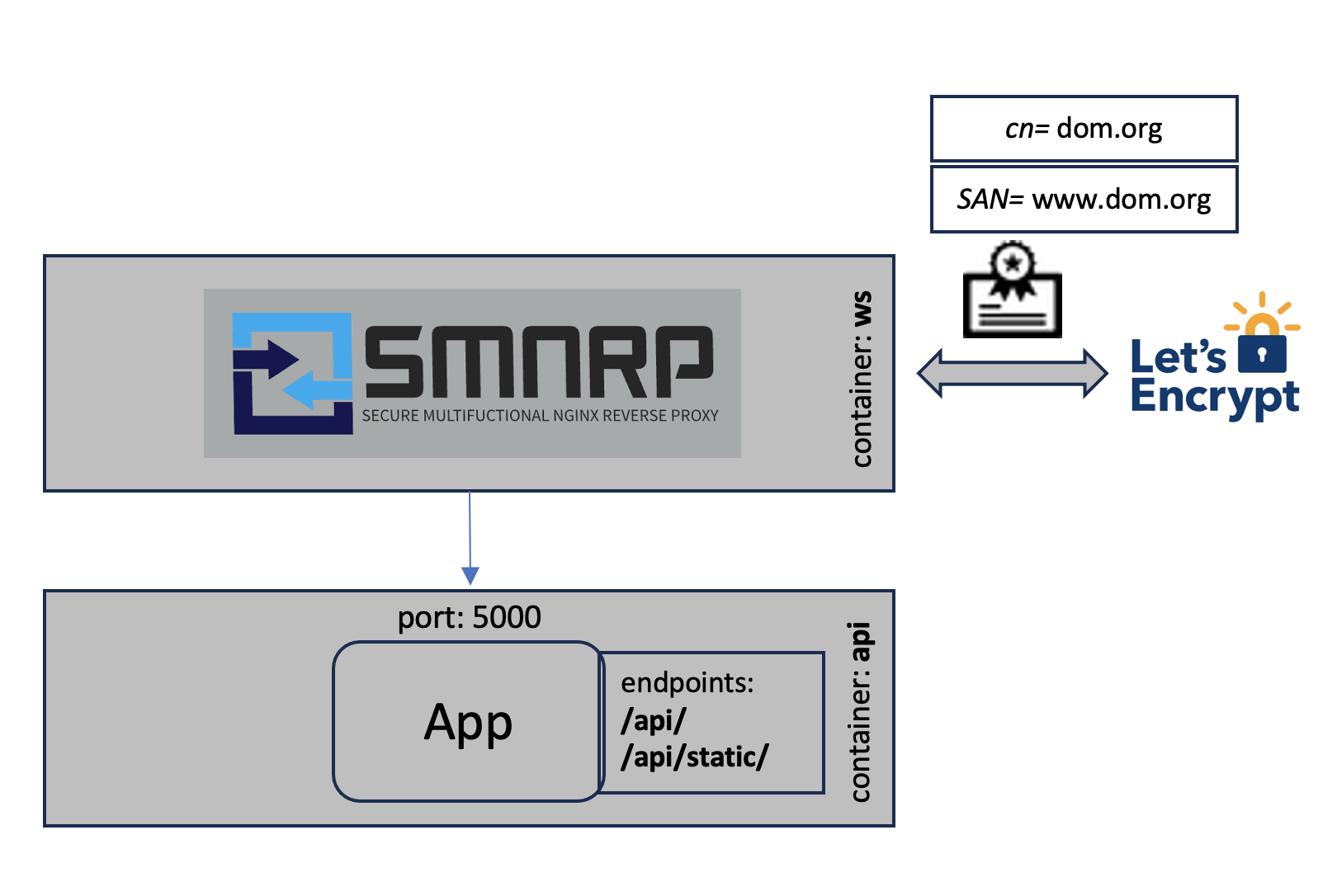
To start with the most basic configuration to use SMNRPX as a reverse proxy to a web application while requesting the certificates automatically from Let's Encrypt.
domains:
  dom.org:
    sans:
      - www.dom.org
  upstreams:
    api:
      - api:5000
  locations:
    - proxy:
        uri: /api/
        proto: http
        upstream: api
        path: /api/
    - alias:
        uri: /api/static
        path: /vol/web/static
In this example the domain dom.org is configured.
The domain name is taken as the default domain name and ends up as the common name (cn) in the certificate.
The domain names under sans are additional domain names for the same domain and end up as Subject Alternative Names (SAN) in the certificate.
The upstream api points to the host api and port 5000. This is often a container service name where the web applications REST API is running, but can be
any hostname:port combination reachable from smnrp.
There are different location types. In this case we use a proxy location to proxy the requests to a service running in a different container or even a different
host and an alias location to
configure an alias for local path. The proxy location defines what uri is proxied to what proto, what upstream and what path. The alias location
defines what uri is aliased by what local path.
This leads to the following behavior:
dom.org/api/       --       proxy         --> http://api:5000/api/
dom.org/api/static --aliased to local path--> /usr/local/static
Simple load balancing
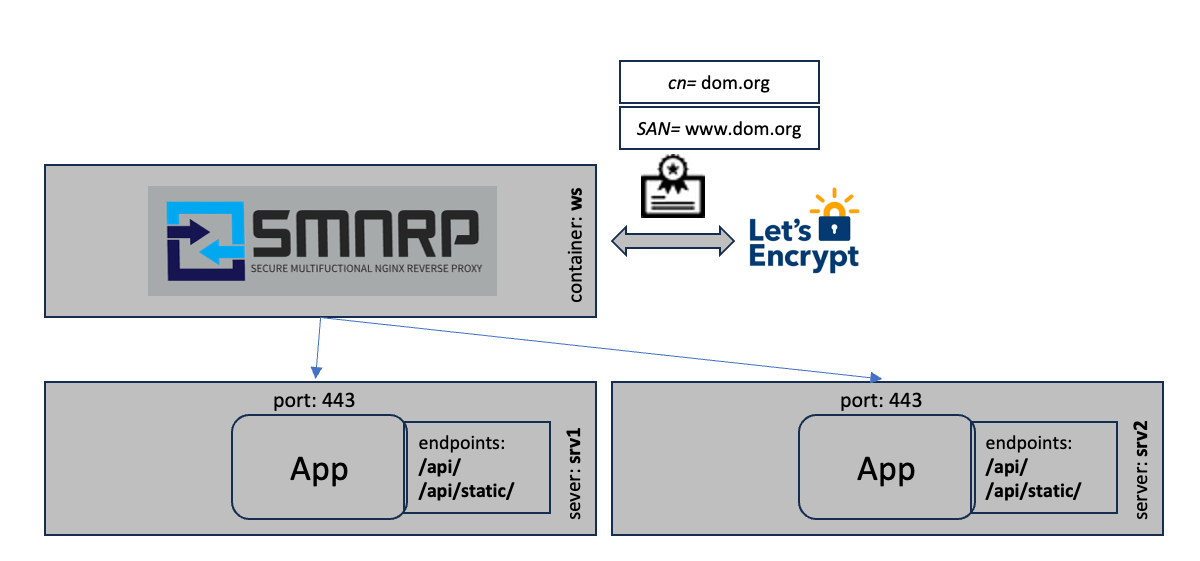
The following example shows the load balancing mode.
domains:
  dom.org:
    sans:
      - www.dom.org
    upstreams:
      loadbalancer:
        - srv1.dom.org:443
        - srv2.dom.org:443
    locations:
      proxy:
        uri: /
        proto: http
        upstream: loadbalancer
        path: /
In this scenario the certificates are requested from Let's Encrypt as in the first example. The traffic is then load balanced to
two servers srv1.dom.org and srv2.dom.org. The load balancing is internally configured as:
upstream loadbalancer {
  server srv1.dom.org:443 max_fails=3 fail_timeout=10s;
  keepalive 32;
  server srv2.dom.org:443 max_fails=3 fail_timeout=10s;
  keepalive 32;
}
The requests are equally distributed to the two servers. If one fails, the others are used. This mechanism can only be used for high availability scenarios without shared storage or shared state.
Virtual host support
Each domain becomes a virtual host in SMNRPX. Just configure multiple domains with different names.
Configuration
domains
Each domain has a name (domain_name), the common name (cn) and optionally sans, the Subject Alternative Names.
The default root folder for each domain is located at /web_root/<domain_name>.
A domain contains different upstreams, locations and additional configuration parameters:
cert: Can have the valuesself-signed,own,letsencryptor not defined, to define how the certificate is generated. Default is through Let's Encrypt.csp: The default Content Security Policy for this domain. If omitted, SMNRPX does not add aContent-Security-Policyheader.proxy_buffer_size: The proxy buffer size.client_max_body_size: The client max body size.client_body_buffer_size: The client body buffer size.large_client_header_buffers: The large client header buffers setting.absolute_redirect: true or false, to set nginxabsolute_redirect on|offat server level. If omitted, nginx default behavior applies (on).redirect_www: true or false, to redirectwww.<domain_name>to<domain_name>. When enabled, SMNRPX also includeswww.<domain_name>in the certificate SANs.redirect_from: List of host names that are answered with a301to<domain_name>, keeping path and query. Typically former domains after a migration. Likeredirect_www, these names are served by the same vhost, so SMNRPX adds them to the certificate SANs (withcert: ownyour mounted certificate needs to cover them). Entries equal to<domain_name>are ignored.allow_tls1.2: true or false, if you want to support also tls1.2. Default only supports tls1.3disable_ocsp_stapling: true or false, if you want to disable ocsp stapling. Default is false.oauth_url: Optional oauth2-proxy base URL (for examplehttps://proxy.auth.nexus.ethz.ch/oauth2/). If set, allproxyandaliaslocations get an auth check against<oauth_url>/auth. On401, requests are redirected to/oauth2/start?rd=<original_url>. The oauth2-proxyredirect_urlmust point back to the protected domain, for examplehttps://app.example.org/oauth2/callback, and that exact callback URL must be allowed by the OAuth provider.
upstreams
Upstreams list all upstreams that can be referenced in the locations configuration as a list of hosts:port combinations.
locations
Locations are the core part of the configuration. Here you configure different types of locations to define what uri is handled how:
If you configure oauth_url on a domain, the oauth auth check is applied to all proxy and alias locations in that domain.
domains:
  app.example.org:
    oauth_url: https://proxy.auth.nexus.ethz.ch/oauth2/
    locations:
      - proxy:
          uri: /
          proto: http
          upstream: app
          path: /
proxy location
The proxy location forwards the traffic arriving at the defined uri to proto://upstream/path. You can configure additional configuration parameters:
disable_cache: true or false, to add headers to this location to disable the browser cache. Default is false.auth: To enable basic_authentication for this location. If configured you must add a list ofuser,passwordcombinations.auth_request: Optional URL/URI for nginxauth_requestmiddleware. If you configure an internal URI (for example/auth/check/), nginx will use it directly. If you configure an absolute URL (for examplehttps://auth.example.org/check), SMNRPX creates an internal helper location that proxies the auth subrequest to that URL. Responses401and403are treated as denied access.whitelist: To only allow a configured list of network segments to access this location.custom: To add custom configuration entries such as additional or different proxy headers.csp: Optional Content Security Policy for this proxy location. If configured, it replaces the domain-levelcspfor this location.
locations:
  - proxy:
      disable_cache: true
      uri: /api/
      proto: http
      upstream: api
      path: /api/
      auth:
        - user: admin
          password: admin
        - user: user
          password: secret
      auth_request: https://auth.example.org/check
      whitelist:
        - 127.0.0.1
      custom:
        - proxy_set_header Host $http_host
You can use a restrictive domain CSP and make a specific proxy location more permissive:
domains:
  app.example.org:
    csp: default-src 'self'
    locations:
      - proxy:
          uri: /app/
          proto: http
          upstream: app
          path: /
          csp: default-src 'self' https: data: blob: 'unsafe-inline'
alias location
The alias location is to serve files from a defined local path. For example if you have static files in the local path /usr/local/static that
you want to serve if the uri /api/static is requested. There are additional configuration settings you can add:
internal: true or false, adds theinternalclause to an alias location. This can be used to protect the file in this location from public access. Such files are only accessible by setting theX-Accel-Redirectheader.try_files: adds atry_filesclause to thealiaslocation.auth: same as in theproxylocationauth_request: same behavior as in theproxylocation
locations:
  - alias:
      uri: /api/static
      path: /usr/local/static
      internal: true
      try_files: true
      auth:
        - user: user
          password: user
redirect location
The redirect location is used to redirect a location to another one, returning a 301 HTTP status code (permanent redirect). For example if you want to
redirect the uri /redir to the url https://google.com. There are no additional configuration parameters available.
locations:
  - redirect:
      uri: /redir
      url: https://google.com
Example
upstreams:
  postman:
    - postman-echo.com:443
locations:
  - alias:
      uri: /
      path: /web_root/dom.org/
      try_files: true
      auth:
        user: admin
        password: admin
  - proxy:
      uri: /api/
      proto: https
      upstream: postman
      path: /get/
  - redirect:
      uri: /redirect/
      url: /other-location/
This example
- aliases (nginx:
alias) the/path to/web_root/dom.org/, - adds a
try_filesclause as well as aauth_basicclause to the location section. - The
/api/path is proxied (nginx:proxy_pass) tohttps://postman-echo.com/get/.
Translation to nginx config
Basically the translation inside the nginx config is
- for an
alias:
location <path> {
  alias <alias>;
  try_files $uri $uri/ /index.html;      <--[Only if try_files is true]
}
- for a
proxy:
location <path> {
  proxy_pass <proxy_url>;
}
- for
auth_basic, only if flagauthis configured:
location <path> {
  auth_basic "Authorization Required";
  auth_basic_user_file <path_to_user_pw_list>;   <--[Derived from user/password configurations]
}
- for whitelisting, only if
whitelistis configured:
location <path> {
  allow <network-1>      <--[Networks are derived from 'whitelist']
  allow <network-2>
  deny all;              <--[All other IPs are denied]
}
- for permanent redirect, only if location type is
redirect:
location <path> {
  return 301 <alias|proxy_url>;
}
If you want to redirect to another container you need to use the service name of the particular service as the host name.
If you only want to proxy to the configured upstreams, just don't configure locations.
- for
internal, only ifinternalistrue:
location <path> {
  internal;
  alias <alias>;
}
custom proxy location configurations
You can define additional nginx configuration lines for a proxy location.
custom:
  - proxy_set_header Host $http_host
  - proxy_set_header X-Forwarded-Host $http_host
This example adds two custom config lines to the location block location /api/:
location /api/ {
  ...
  proxy_set_header Host $http_host
  proxy_set_header X-Forwarded-Host $http_host
  ...
}
Hint: Please be aware that the SMNRPX default proxy config is included in the location BEFORE the custom configs. If
disable_default_headersis set tofalseno default headers are added to the location block.
cert
If set to self-signed SMNRP is generating self signed certificates instead of gathering it from Let's Encrypt.
If set to own SMNRP will not create any certificate but it requires the following two files to be mapped into the container (i.e. as docker read-only volume):
/etc/letsencrypt/live/${domain}/fullchain.pem/etc/letsencrypt/live/${domain}/privkey.pem
Here is an example:
  ...
  ws:
    image: ethnexus/smnrpx
    volumes:
      ...
      - /path/to/dom.org.fullchain.pem:/etc/letsencrypt/live/dom.org/fullchain.pem:ro
      - /path/to/dom.org.key.pem:/etc/letsencrypt/live/dom.org/privkey.pem:ro
csp
You can define the default Content-Security-Policy header for a domain. If this is not defined, none is used. A proxy location can define its own csp to replace the domain default for that location. The following example shows the most secure one:
csp: default-src 'self' http: https: data: blob: 'unsafe-inline'
disable_https
If set to true, SMNRPX will completely ignore https for communication and only listen on the http port to serve the resources.
Configure the listening ports
To configure on which ports the nginx is listening on internally you can use the following environment variables:
domain:
  ports:
    http: 80
    https: 443
    exposed_https: 8443
With the http you can configure the http server port of nginx. Default is 80.
With the https you can configure the ssl server port nginx is listening on. Default is 443.
With the exposed_https you can configure the exposed ssl server port SMNRPX is listening on. Default is 443.
Configure SMNRPX using environment variables
You can add ${env-var} in the config to replace values and mapping keys with environment variables.
If a value is exactly ${env-var}, SMNRPX parses the environment value as YAML so booleans/lists/maps can be injected (for example true or ["a.example.org"]).
domains:
  7f000001.nip.io:
    cert: ${SMNRP_CERT}
  ...
in the .env file you can now define
SMNRP_CERT=self-signed
to replace the ${SMNRP_CERT} in the config.
Optional domains
A domain block whose name does not resolve to a domain is skipped, so blocks can be switched on and off with a single environment variable:
domains:
  dom.org: ...
  ${SMNRP_OLD_DOMAIN}:
    cert: own
    locations:
      - redirect:
          uri: /
          url: https://dom.org$request_uri
The block above is used as soon as SMNRP_OLD_DOMAIN holds a domain name. It is
skipped while the variable is unset (the name stays ${SMNRP_OLD_DOMAIN}) or set to
an empty value, both of which would otherwise end up as a broken nginx server_name.
SMNRPX logs every skipped block and fails if no domain is left.
Note that a redirect like the one above needs its own certificate for the old domain.
If one certificate can cover both names, prefer redirect_from on the primary domain.
Apply custom configurations
SMNRPX also loads *.nginx files in the directory /etc/nginx/conf.d/custom/<domain_name>/*.nginx. You can bind mount or copy a local directory
including your custom configs to /etc/nginx/conf.d/custom/<domain_name>.
services:
  ws:
    image: ethnexus/smnrpx
    volumes: ...
      - ./custom:/etc/nginx/conf.d/custom
Integration into docker-compose
To integrate SMNRPX into docker compose to setup a reverse proxy to the application, you need to add the following part into you docker-compose.yml:
volumes:
  web_root:
  smnrp_data:
  log_data:
configs:
  smnrp:
    file: ./smnrp.yml
services:
  ws:
    image: ethnexus/smnrpx
    volumes:
      - web_root:/web_root/<domain_name>
      - smnrp_data:/etc/letsencrypt
    ports:
      - 80:80
      - 443:443
    configs:
      - source: smnrp
        target: /run/configs/smnrp.yml
    # Optional if you want to paste the configuration using the
    # 'SMNRP' environment variable
    # env_file: .env
    restart: unless-stopped
    depends_on:
      - ui
      - api
  ui:
    ...
    volumes:
      - "web_root:/path/to/webapp"
    ...
  api:
    ...
Your web application files need to be generated into the docker volume web_root that needs to be mapped to /web_root/<domain_name>.
Essential is the smnrp_data volume. It should always bind mounted to /etc/letsencrypt, otherwise SMNRP may create too many requests to Let's Encrypt and gets blocked for about 24h to request certificates.
If you are using a local directory to bind mount /etc/letsencrypt (i.e. smnrp_data:/etc/letsencrypt).
Integration into docker-compose while chaining SMNRPX instances
In case you want to chain SMNRPX instances on the same host you need to configure the
network_modetohost- omit the
portsconfiguration and - use the
-net-bindimage variant, which grants nginx theCAP_NET_BIND_SERVICEfile capability
Every versioned release publishes a matching variant, for example
ethnexus/smnrpx:3 and ethnexus/smnrpx:3-net-bind.
volumes:
  smnrp_data:
  log_data:
services:
  ws:
    image: ethnexus/smnrpx:3-net-bind
    volumes:
      - smnrp_data:/etc/letsencrypt
    ...
    network_mode: host
Maintenance mode
To enable the maintenance mode you need to touch the file .maintenance into the folder /web_root/<domain_name>.
As long as the file exists SMNRPX will return 503 Service unavailable and displays a nice maintenance page.
Change the maintenance page
To add a custom maintenance page you need to overwrite the file /usr/share/nginx/html/error/maintenance.html.
---
volumes:
  - ./my-maintenance.html:/usr/share/nginx/html/error/maintenance.html
Script to enable, disable the maintenance mode
Here is a script that you could use to enable, disable the maintenance mode with one command (maint.sh):
#!/usr/bin/env bash

DC_EXEC="docker-compose -f docker-compose.yml -f docker-compose.prod.yml exec ws"

if [[ "$1" == "on" ]]; then
    ${DC_EXEC} sh -c 'touch /web_root/.maintenance'
elif [[ "$1" == "off" ]]; then
    ${DC_EXEC} sh -c 'rm -f /web_root/.maintenance'
else
    echo "Please specify 'on' or 'off'"
    exit 1
fi
Change the Authorization Required page
To add a custom Authorization Required page you need to overwrite the file /usr/share/nginx/html/error/auth_required.html.
---
volumes:
  - ./my-auth_required.html:/usr/share/nginx/html/error/auth_required.html
Reset smnrp
If you went into troubles because of too many different configuration changes, you may want to reset smnrp:
docker exec <smnrp-container> /smnrp_reset
docker restart <smnrp-container>
This will basically remove already downloaded certificates and forces SMNRPX to request a new certificate after the container restart.
Configure hardening parameters
ℹ️ The default values are the most secure ones.
client_max_body_size
Set the client_max_body_size, default is 1m. This must be set to support large file uploads through SMNRP.
client_max_body_size: 1m
server_tokens
Set the server_tokens parameter for this server, default is off.
server_tokens: off
client_body_buffer_size
Set the client_body_buffer_size parameter for this server, default is 1k. Nginx default would be 8k|16k
client_body_buffer_size: 1k
large_client_header_buffers
Set the large_client_header_buffers parameter for this server, default is 2 1k. Nginx default would be 4 8k.
large_client_header_buffers: 2 1k
proxy_buffer_size
Set the proxy_buffer_size parameter for this server, default is 32k. Nginx default would be 8k
proxy_buffer_size: 32k
Tag summary
Content type
Image
Digest
sha256:7af38eae1…
Size
93.6 MB
Last updated
1 day ago
docker pull ethnexus/smnrpx