evanqu/foliopath
Self-hosted photo and video browser with local AI, read-only by default.
8.3K
evanqu/foliopath repository overview
FolioPath
把已有照片目录变成图库,用画面、文字、标签和人物找照片。
A self-hosted photo and video browser with local AI. Browse existing folders and ZIP/7z image sets, with folder covers and automatic loading as you scroll. Browsing stays read-only; original-file deletion is explicitly opt-in.
简体中文 · English · GitHub · 文档 / Docs
简体中文
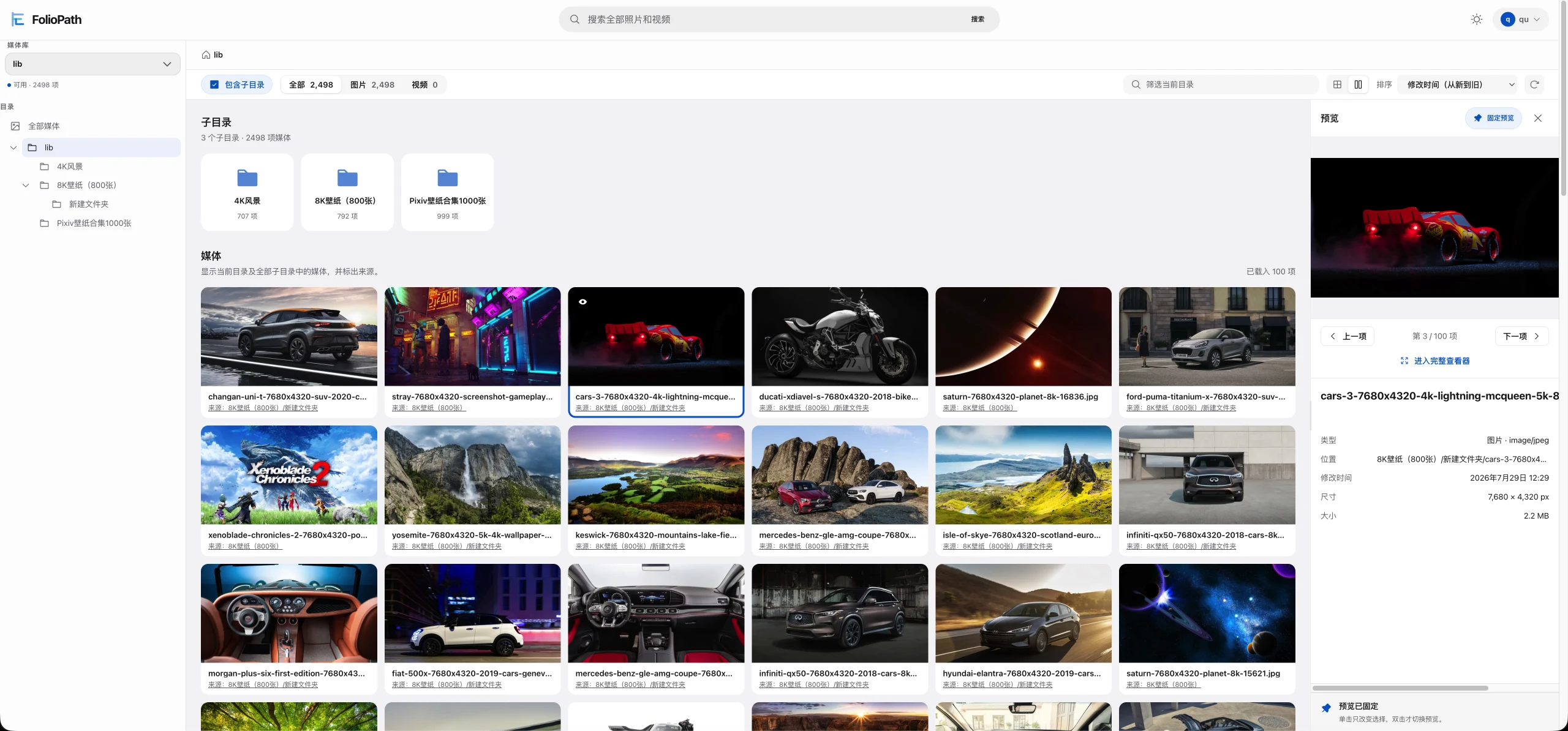
FolioPath 直接读取你已经整理好的目录,适合 NAS、家庭影像、摄影归档和套图收藏。文件夹和子目录可以一起浏览,浏览、扫描和分析默认只读,无需重新上传或调整目录。
可以做什么
| 功能 | 使用方式 |
|---|---|
| ZIP / 7z 图集浏览 | 直接打开未加密单卷图集,保留内部目录、封面与图片数量,连续看图 |
| 文件夹封面与滚动加载 | 普通文件夹也显示已有缩略图;目录树、展开后的子目录和媒体列表向下滚动自动加载 |
| 目录操作与删除 | 顶部菜单/桌面右键展开、收起或删除目录;右侧选择批量永久删除,消息中心通知结果,需显式启用 |
| 文件夹穿透浏览 | 查看当前目录及全部子目录,保留来源路径 |
| 网格与瀑布流 | 自适应网格、瀑布流,以及零间距的无缝套图浏览;无缝模式下滑收起顶部、上滑恢复 |
| 智能搜索 | 用中文或英文描述画面,结合文件名、路径和图片文字查找 |
| 图片文字搜索 | 搜索已识别的中英文文字,在预览中查看匹配原文 |
| 自动标签 | 153 类图片标签,保留手动标签和已移除标签的选择 |
| 人物整理 | 将相似人脸分组,人工命名并调整照片归类 |
| 本地处理 | 按媒体库开启 AI,查看进度、补齐缺失、取消或重试 |
| 图片与视频查看 | 缩放、平移、1:1、全屏、前后切换和视频播放 |
关于页提供项目介绍、支持格式与限额、文档和反馈入口,并在页内展示版本记录;检查更新失败时保留已有记录。
原文件删除
默认只读且删除关闭;需要时使用删除覆盖配置,保留现有 AI/数据配置并把覆盖放在最后,再在 管理中心 → 文件管理 → 删除设置 开启。一次弹窗确认后后台永久删除,没有回收站,目录内隐藏和非媒体文件也包括在内。消息中心显示结果并进入文件任务;刷新、返回首页和重新登录保留选中的媒体库。删除期间其他程序不要移动同一目录或其父目录。开启与升级说明。
ZIP 图集
把 ZIP 放进已有媒体库并扫描,即可像文件夹一样浏览包内图片,也可搜索文件名、收藏和手动标记。原 ZIP 保持只读,无需提前解压。
支持 UTF-8 文件名、Store/Deflate 压缩的未加密单卷 ZIP,包内图片为 JPEG、PNG、WebP、GIF;最多 10,000 个条目,单张图片最多 64 MiB。暂不支持 ZIP64、分卷/加密包、包内视频或嵌套包,ZIP 图片不参与 AI 分析。首次生成缩略图后刷新目录即可看到封面。完整支持范围。
7z 图集
支持未加密单卷 .7z,包含固实与非固实包;只临时保存请求的图片,不整体解压到磁盘。沿用10,000条目、展开合计4 GiB、单图64 MiB;不支持密码、分卷、自解压、嵌套包、包内视频或AI。大字典或解码超过时间/内存额度的包无法浏览,当前不支持50 GB大包。
已知问题
自动发现增量更新失败后可能反复触发完整扫描,历史显示为“定时任务”。出现时可暂时关闭自动发现,改用手动或定时完整扫描;本次尚未修复该循环。说明与调查。
快速部署(带 AI)
需要 Linux amd64 或 arm64、Docker 和 Docker Compose v2。主应用与 AI 共两个容器,无需编写程序,也无需必填 .env。
将以下内容保存为 compose.yaml,把 /mnt/photos 替换成你的照片根目录:
services:
  foliopath:
    image: evanqu/foliopath:latest
    restart: unless-stopped
    ports:
      - "8080:8080"
    environment:
      TZ: Asia/Shanghai
      FOLIOPATH_AI_PROFILE: standard-v1
    volumes:
      - /mnt/photos:/library:ro
      - ./data:/app/data

  machine-learning:
    image: evanqu/foliopath:latest-ai
    restart: unless-stopped
    volumes:
      - ./models/cache:/cache
      - ./models/ocr:/ocr-cache
      - ./models/scratch:/verified-cache
docker compose up -d
打开 http://服务器IP:8080,创建管理员账户,在 管理中心 → 媒体库 添加目录。
首次启动自动下载约 3.5 GB 模型,准备期间仍可浏览照片。在 智能分析 → 服务与模型 查看状态,就绪后按库开启所需功能。建议为 AI 预留约 6 GiB 内存,为模型和工作副本预留至少 8 GiB 磁盘。
只需普通浏览时,可使用单容器基础配置。
模型下载代理与日志
需要代理时,在 machine-learning 服务中加入以下配置,再执行 docker compose up -d:
    environment:
      FOLIOPATH_MODEL_DOWNLOAD_PROXY: http://代理服务器IP:7890
使用无需认证的 HTTP 代理。此变量只影响 AI 模型下载,不读取通用 HTTP_PROXY、HTTPS_PROXY;主应用界面的旧模型代理设置也不控制 AI 容器。
docker compose logs -f machine-learning
日志显示当前文件、下载进度、缓存校验、加载状态,以及超时、HTTP 状态码或校验失败等原因;失败后每 60 秒重试。
更新
升级到支持 ZIP 的版本前,请停止应用并完整备份应用数据;回退须配合对应的升级前备份,不能只切换旧镜像。升级与恢复流程。
latest 是主程序,latest-ai 是配套 AI 镜像。请一起拉取、更新:
docker compose pull
docker compose up -d
目录映射
| 宿主机目录 | 容器路径 | 内容 |
|---|---|---|
/mnt/photos | /library:ro | 原始照片与视频,只读 |
./data | /app/data | 数据库、账户、设置、收藏、标签、任务和缩略图 |
./models/cache | /cache | 语义搜索、人脸、自动标签模型 |
./models/ocr | /ocr-cache | 图片文字识别模型 |
./models/scratch | /verified-cache | AI 运行时使用的已校验模型工作副本 |
媒体根目录只挂载一次;在界面里添加其下多个互不重叠的目录作为媒体库。/library 内不支持嵌套挂载。普通浏览、扫描和分析不修改原始媒体;永久删除须按上述方式显式启用。媒体库离线、扫描失败或中断时保留最后可靠索引。data 请使用本地磁盘,勿放在 SMB/NFS 上。
支持格式与访问
- 图片: JPEG、PNG、WebP、GIF。
- ZIP / 7z 图集: 上述图片格式,须符合前述各格式范围。
- 视频: MP4、MOV、MKV、AVI。不转码,播放取决于浏览器对视频编码的支持。
- 暂不支持 SVG、HEIC/HEIF、AVIF、RAW。
容器以 root 运行。直接 HTTP 适用于受信局域网,公网访问请使用 HTTPS 反向代理。部署、备份与恢复见部署指南和安全说明。Docker Desktop 的数据卷要求也请参阅部署指南。
English
FolioPath turns your existing directory tree into a photo and video library. Browse a folder and all its descendants together, with source paths preserved. Browsing is read-only by default; permanent deletion requires explicit opt-in.
Features
- Browse ZIP and 7z image sets as read-only folders, preserving internal directories, covers, and image counts.
- Folder cards reuse media thumbnails; directory and media lists load more automatically as you scroll.
- Adaptive grid, masonry, and seamless photo-set browsing.
- Opt-in permanent deletion, directory action/context menus, background tasks, and results in the notification bell. Your selected library is remembered.
- Describe scenes in Chinese or English; search across filenames, paths, visual content, and recognized text.
- Search Chinese and English text inside processed images and preview matching lines.
- Automatic tags from 153 categories, with manual edits and removal choices preserved.
- Group similar faces, name people, and correct photo assignments.
- Enable AI per library; track progress, process missing results, cancel, and retry.
- Zoom, pan, view at 1:1, use fullscreen, and play videos.
The About page includes project details, supported formats and limits, documentation and support links, and inline release notes. Seamless masonry hides the top controls as you scroll down and restores them as you scroll up.
ZIP image sets
Add ZIP files to an existing library and scan it. Browse images with the existing viewer, filename search, favorites, and manual tags; originals stay untouched. Supports unencrypted, single-volume ZIPs with UTF-8 names, Store/Deflate compression, and JPEG/PNG/WebP/GIF images, up to 10,000 entries and 64 MiB per image. ZIP64, split/encrypted archives, nested archives, video members, and AI processing of ZIP images are unsupported. Refresh the directory after the first thumbnail is generated to see its cover. See the complete limits.
7z image sets and known issue
Unencrypted single-volume solid and non-solid .7z archives use the image browser. Limits are 10,000 entries, 4 GiB expanded total and 64 MiB per image, with bounded decoder memory/time. Passwords, split/self-extracting/nested archives, archived video and AI are unsupported; 50 GB archives are unsupported.
Automatic discovery can repeatedly fall back to full scans after incremental errors. These runs appear as “Scheduled”. If affected, temporarily disable automatic discovery and use manual or scheduled scans; this release does not fix the loop. See the investigation.
Deploy with local AI
Requires Linux amd64 or arm64, Docker, and Docker Compose v2. Save the two-service configuration above as compose.yaml, replacing /mnt/photos with your media root, then run:
docker compose up -d
Open http://<server-IP>:8080, create your administrator account, and add directories under Administration → Libraries. No required .env or setup program. For browsing alone, use the single-container configuration.
The AI container downloads about 3.5 GB of models on first startup. Check AI Analysis → Service and models, then enable features per library once ready. Ordinary browsing stays available during preparation. Reserve about 6 GiB of AI memory and at least 8 GiB of model/workspace disk space.
If needed, add FOLIOPATH_MODEL_DOWNLOAD_PROXY: http://proxy-host:7890 under the AI service's environment. Only an unauthenticated HTTP proxy is supported; generic proxy environment variables and the main application's legacy proxy settings do not control these downloads. Use docker compose logs -f machine-learning to see progress and specific failure reasons. Preparation retries every 60 seconds after failure.
Images, storage, and upgrades
| Image | Role |
|---|---|
evanqu/foliopath:latest | Main application |
evanqu/foliopath:latest-ai | Local AI service |
This release adds database migrations 49–50. Before upgrading, stop the application and back up all application data. Rollback requires restoring the matching pre-upgrade backup with the old image. See the upgrade and rollback guide.
Update both together with docker compose pull followed by docker compose up -d.
Mount originals once at /library:ro; nested mounts are rejected. Keep persistent application data, curation, and thumbnails in /app/data on local storage. AI models use /cache and /ocr-cache; verified working copies use /verified-cache. An offline library or interrupted scan preserves the last reliable index. Browsing and analysis never modify original media. Permanent deletion requires an explicitly writable deployment and administrator opt-in, uses one confirmation dialog, and has no recycle bin. Folder deletion includes hidden and non-media files; other programs must not move its target or ancestors during deletion. See the enablement guide.
Images: JPEG, PNG, WebP, GIF. Video: MP4, MOV, MKV, AVI. Videos are not transcoded; playback depends on browser codec support. SVG, HEIC/HEIF, AVIF, and RAW are unsupported.
The container runs as root. Direct HTTP is for a trusted LAN; use an external HTTPS reverse proxy for public access. See the deployment guide for permissions, Docker Desktop data volumes, backups, and upgrades, and the security model for exposure requirements.
Links
GitHub · 中文说明 · English README · Issues · AGPL-3.0-or-later
⭐ 喜欢 FolioPath?你的 Star 能帮助更多人发现这个项目。
⭐ Enjoying FolioPath? Your stars help more people discover the project.


Tag summary
Content type
Image
Digest
sha256:3d7623b7d…
Size
33.5 MB
Last updated
5 days ago
docker pull evanqu/foliopath