fatihemre/pgcontrol repository overview
PgControl




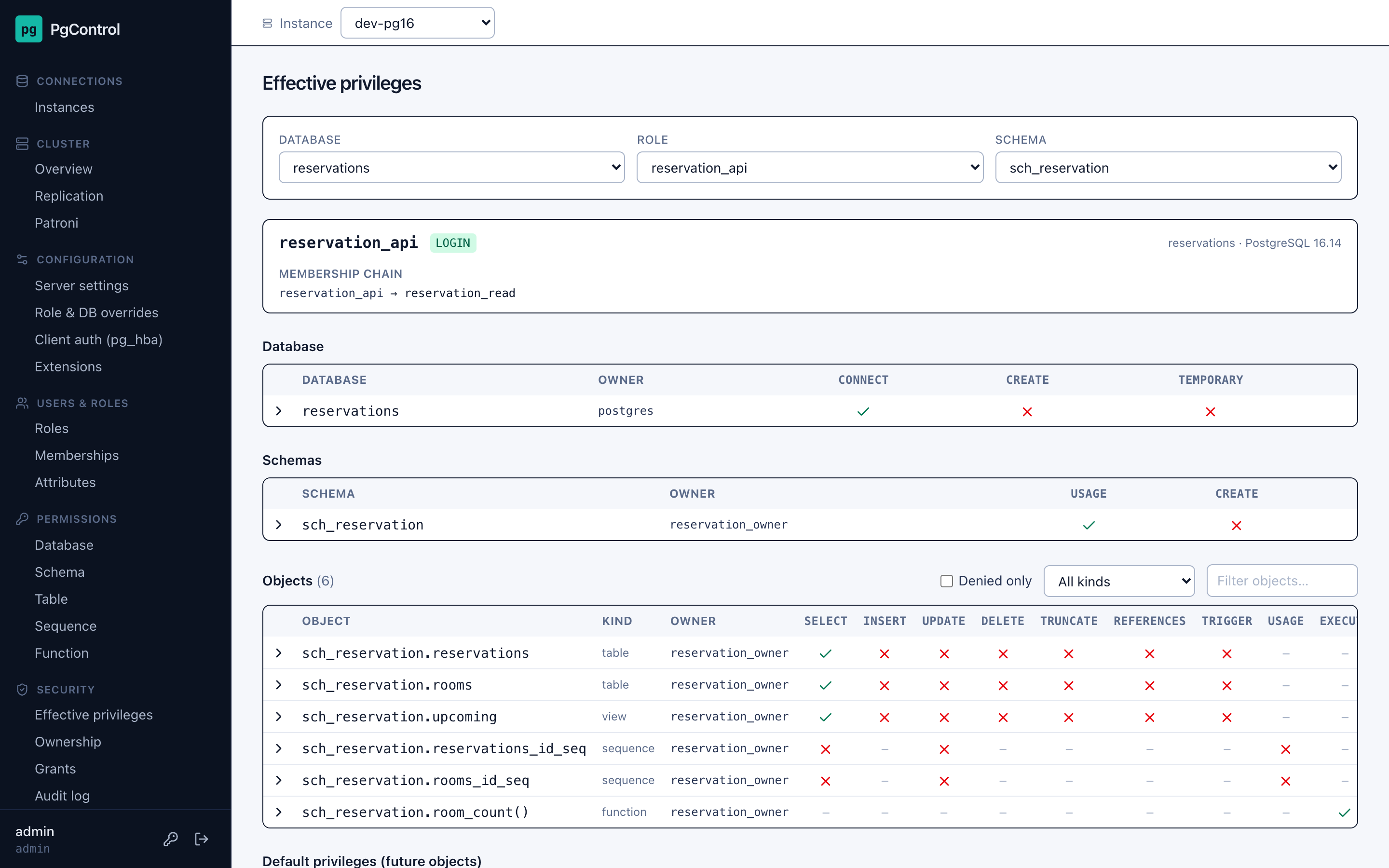
Self-hosted governance panel for PostgreSQL. Not a query tool — PgControl answers
questions like "why can't reservation_api insert into sch_reservation.reservations?"
by showing the full chain: role membership → inherited privileges → schema → object → final access.
- Users & roles — roles, memberships (PG 16
INHERIT/SETaware), attributes, ownership. - Effective privileges — the real answer from
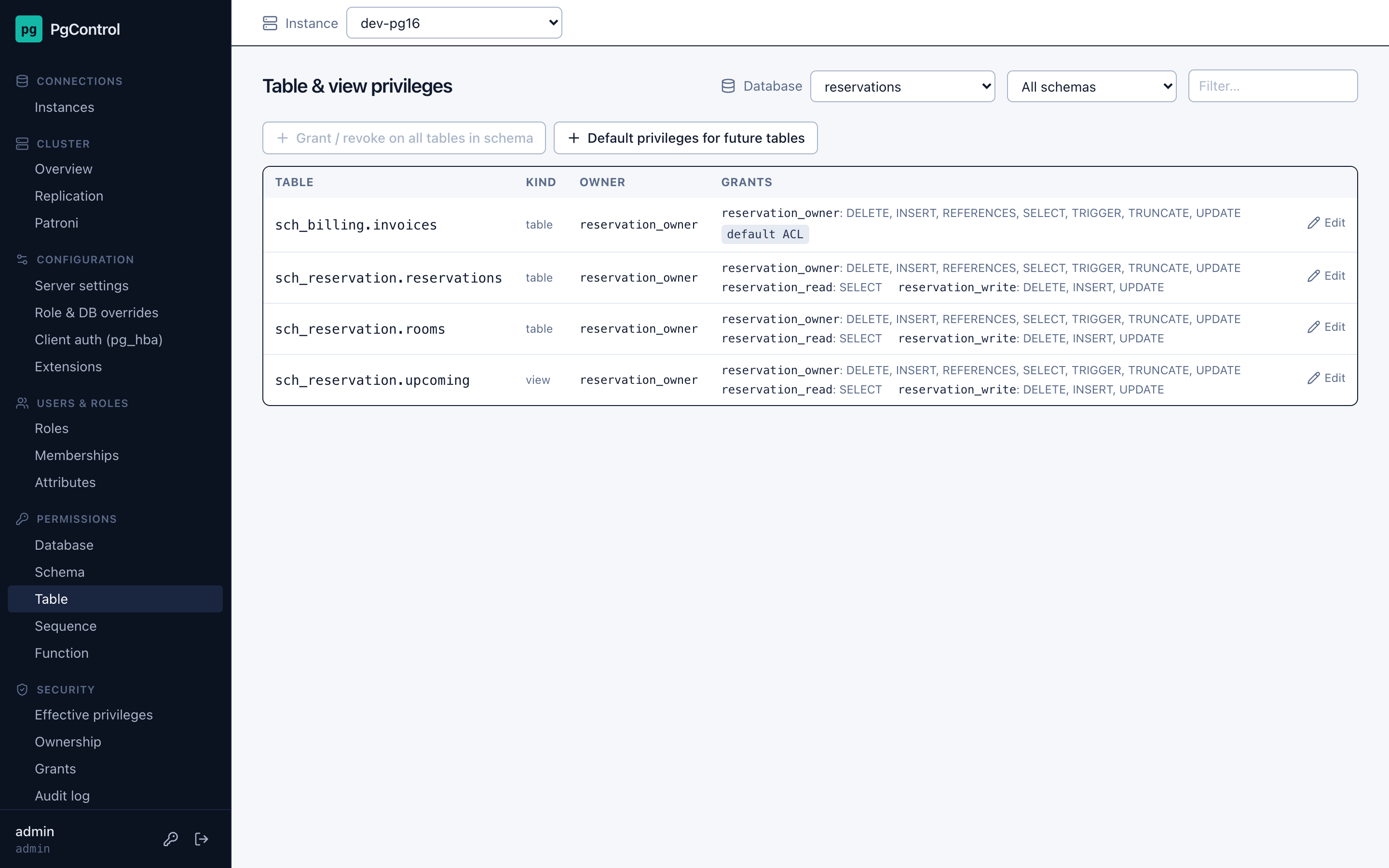
has_*_privilege(), explained step by step. - Permissions editors — database, schema, table/view, sequence, function and default privileges. Every change is planned, shown as SQL, applied on confirmation and audited.
- Configuration — server settings, role/database overrides,
pg_hba.conf, extensions. - Performance — activity,
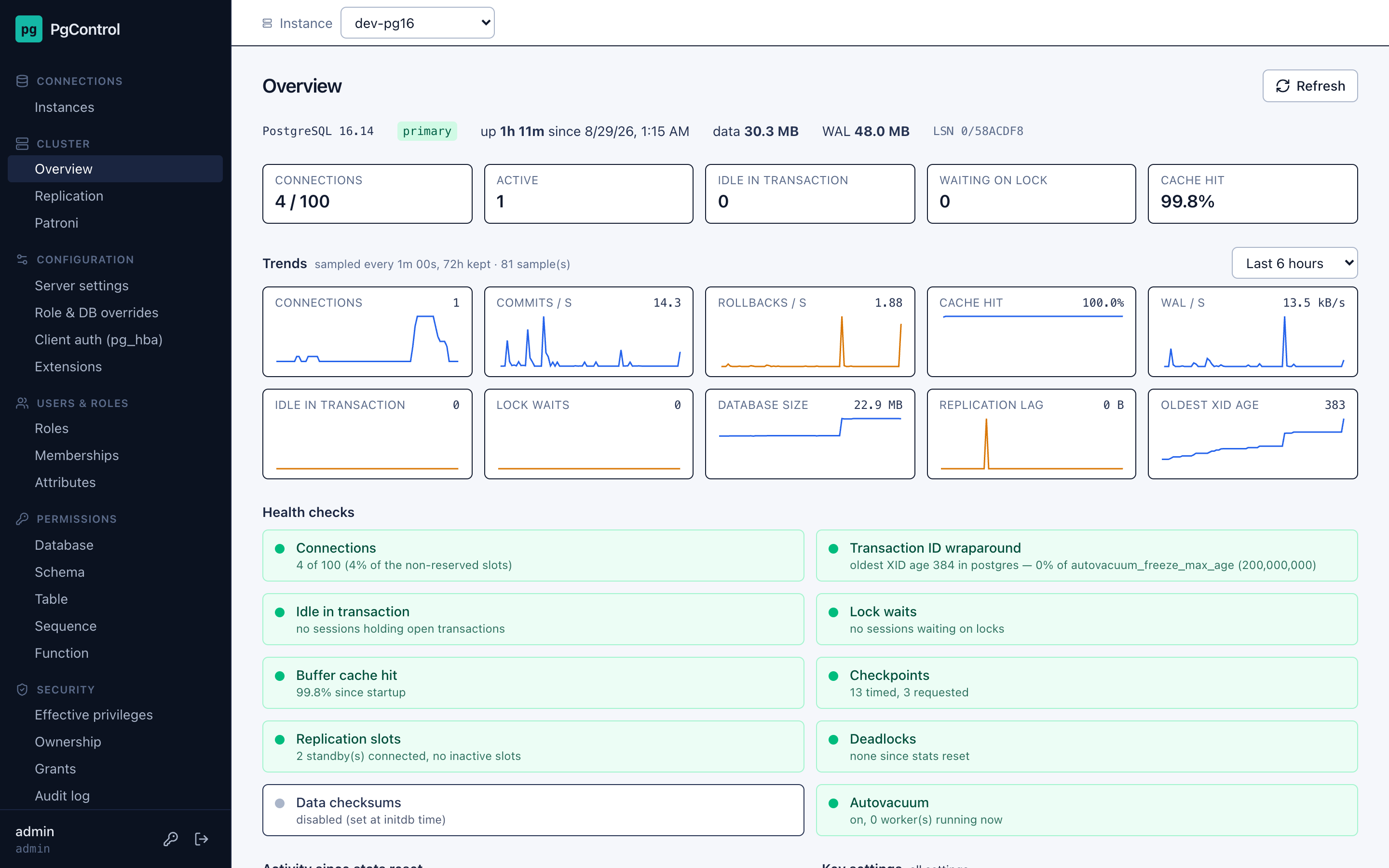
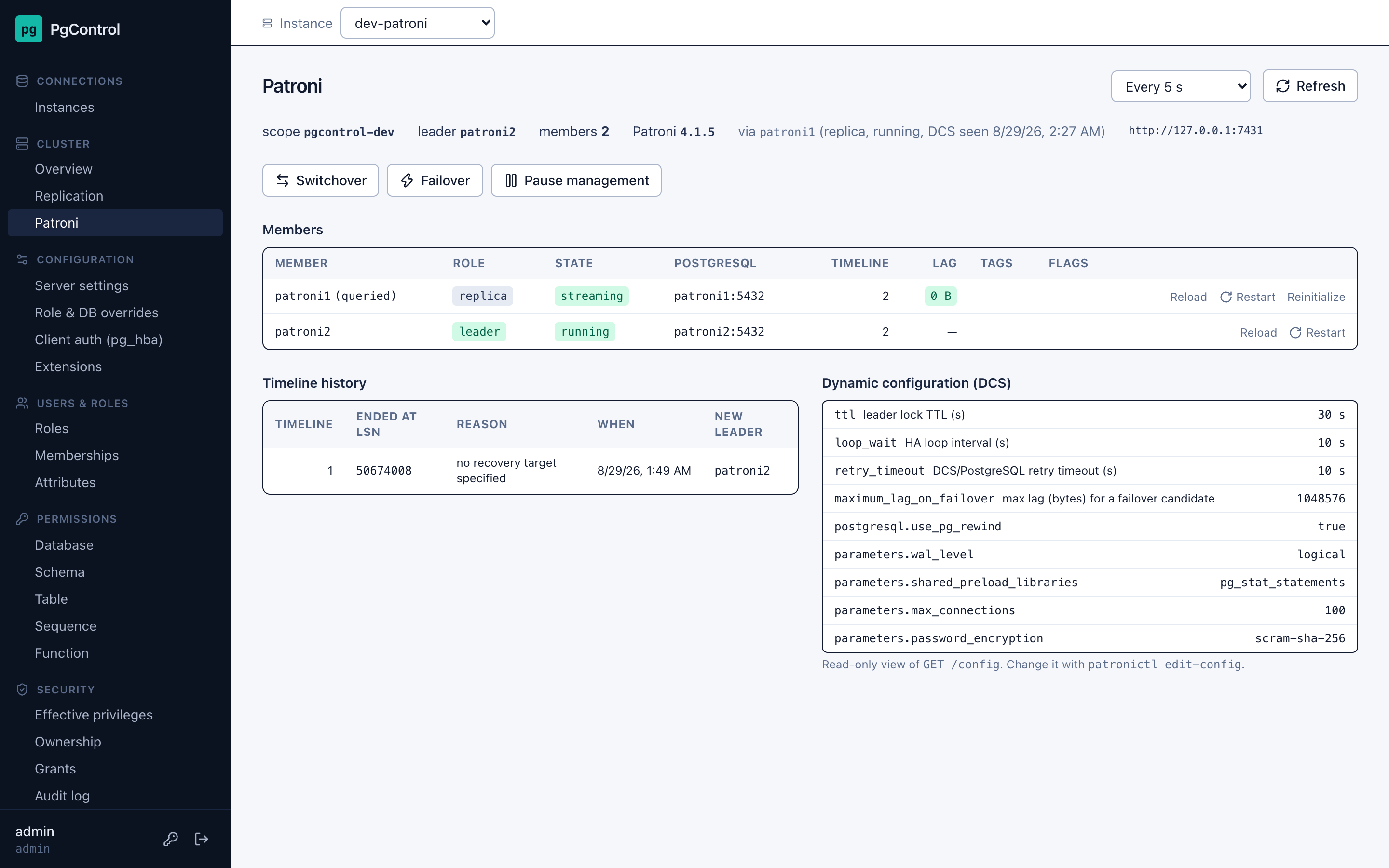
pg_stat_statements, table and database statistics. - Cluster — health checks with metric trends, replication (standbys, slots, publications/subscriptions) and Patroni (switchover, failover, restart, reinitialize …).
- Operations-ready — many instances per install,
viewer/operator/adminaccounts, OpenID Connect SSO, audit log, SQLite or PostgreSQL metadata store, one Docker image.
Supports PostgreSQL 14 through 18.
Screenshots
| Effective privileges | Table privileges |
|---|---|
 |  |
| Cluster overview | Patroni |
|---|---|
 |  |
Quick start
docker run -d --name pgcontrol -p 7420:7420 \
  -e PGCONTROL_SECRET_KEY="$(openssl rand -base64 32)" \
  -v pgcontrol-data:/data \
  fatihemre/pgcontrol:latest
docker logs pgcontrol | grep password   # initial admin password (or set PGCONTROL_ADMIN_PASSWORD)
open http://localhost:7420
Or with Compose, which also lets you build from source:
git clone https://github.com/fatihemre/pg-control.git && cd pg-control
cp .env.example .env            # set PGCONTROL_SECRET_KEY (openssl rand -base64 32)
docker compose up -d            # add --build to build the image locally
Then log in as admin, open Connections → Instances, add a PostgreSQL instance and
start exploring. Images are published to
Docker Hub (fatihemre/pgcontrol) and
GHCR (ghcr.io/fatihemre/pg-control) for linux/amd64 and linux/arm64.
Keep PGCONTROL_SECRET_KEY safe: stored PostgreSQL passwords are encrypted with a key
derived from it, and the /data volume holds PgControl's own metadata (accounts,
connection profiles, audit log). All settings are listed in
docs/configuration.md.
Ports
PgControl uses the 74xx range to avoid clashing with common defaults:
| Port | Service |
|---|---|
| 7420 | PgControl UI + API |
| 7421 | Vite dev server (development only) |
| 7414–7418 | Development PostgreSQL 14–18 (docker-compose.dev.yml) |
| 7419 | Development streaming replica of PG 16 (pg16-replica) |
| 7431–7432 | Development Patroni REST API (patroni1, patroni2) |
| 7433–7434 | Development Patroni PostgreSQL 16 nodes (patroni1, patroni2) |
Metadata database
PgControl keeps its own data (accounts, connection profiles, audit log, metric history)
separate from the instances it manages. By default that is a SQLite file in
PGCONTROL_DATA_DIR (/data in the container — keep it on a volume). Set
PGCONTROL_DATABASE_URL=postgresql://user:password@host:5432/pgcontrol to use a
PostgreSQL database instead; the schema is created and migrated automatically at startup.
pgcontrol db current                 # show the migration revision
pgcontrol db upgrade                 # apply pending migrations (also done at startup)
pgcontrol db backup [FILE] [--keep N]  # online-safe copy of the SQLite file (default: data/backups/)
pgcontrol db restore FILE            # replace the SQLite file with a backup (stop PgControl first)
In Docker: docker exec pgcontrol /app/.venv/bin/pgcontrol db backup. With PostgreSQL as
the metadata database use pg_dump / pg_restore as usual.
Metrics history
A background task samples every registered instance (connections, transaction and WAL
rates, cache hit, database size, replication lag, XID age) and keeps the history in the
metadata database. Tune with PGCONTROL_METRICS_INTERVAL_SECONDS (default 60, 0
disables) and PGCONTROL_METRICS_RETENTION_HOURS (default 72).
PgControl accounts
Administration → Users lets an admin create local accounts, change roles (viewer,
operator, admin), reset passwords and delete accounts; the last admin cannot be
demoted or removed. Every user can change their own password from the sidebar. Single
sign-on accounts have no local password and keep the role mapped from the identity
provider.
Patroni
Tick "Managed by Patroni" on a connection and enter the REST API URL of any node
(e.g. http://patroni1:8008) plus the restapi.authentication credentials if the
cluster requires them. Cluster → Patroni then shows the members (role, state, timeline,
replication lag, tags, pending restarts), the timeline history and the DCS configuration,
and offers switchover (immediate or scheduled), failover, pause/resume, and per-member
reload, restart, and reinitialize. Every operation is confirmed in the UI, sent to the
node addresses Patroni itself reports, and recorded in the audit log as patroni /
patroni_failed. Read-only connections and viewer accounts can only look.
Security notes
- Passwords are hashed with Argon2id; connection and Patroni passwords are encrypted with
PGCONTROL_SECRET_KEY(losing the key means re-entering them). - Login is rate limited: after
PGCONTROL_LOGIN_MAX_ATTEMPTS(5) failures for a client IP or a username withinPGCONTROL_LOGIN_WINDOW_SECONDS(300), further attempts are refused forPGCONTROL_LOGIN_LOCKOUT_SECONDS(300) and alogin_lockedaudit entry is written. Set the attempts to0to disable. - Sessions are HttpOnly, SameSite=Lax cookies that expire after
PGCONTROL_SESSION_TTL_HOURS(12). Cross-site requests are rejected, responses carryX-Frame-Options, a strictContent-Security-PolicyandCache-Control: no-storeon the API. - Roles:
viewerreads everything,operatormay apply changes and run Patroni operations,adminalso manages PgControl accounts.
Running behind a reverse proxy (HTTPS)
Terminate TLS in your proxy (Caddy, nginx, Traefik, …) and forward to port 7420, then set
PGCONTROL_SECURE_COOKIES=true     # cookies only over HTTPS
PGCONTROL_PROXY_HEADERS=true      # trust X-Forwarded-For / X-Forwarded-Proto …
PGCONTROL_FORWARDED_ALLOW_IPS=*   # … from these proxy addresses ("*" = any)
PROXY_HEADERS makes login rate limiting see the real client address and lets the OIDC
callback URL be derived correctly. Without a proxy PgControl serves plain HTTP; do not
expose it to the internet like that.
Single sign-on (OpenID Connect)
Set PGCONTROL_OIDC_ISSUER and PGCONTROL_OIDC_CLIENT_ID (plus _CLIENT_SECRET for
confidential clients) and the login page offers "Continue with …". The authorization
code flow with PKCE is used; ID tokens are verified against the provider's JWKS. Users
are created on first login (PGCONTROL_OIDC_AUTO_CREATE) and their PgControl role comes
from PGCONTROL_OIDC_ROLE_CLAIM + PGCONTROL_OIDC_ROLE_MAP
(e.g. groups and pgcontrol-admins:admin,pgcontrol-operators:operator), falling back
to PGCONTROL_OIDC_DEFAULT_ROLE. Register https://<host>/api/auth/oidc/callback as
the redirect URI (PGCONTROL_OIDC_REDIRECT_URL when running behind a proxy). Local
accounts keep working alongside SSO.
Development
docker compose -f docker-compose.dev.yml up -d   # PostgreSQL 14–18 + pg16 replica + 2-node Patroni cluster, user postgres/postgres, seeded sample data
uv sync
cp .env.example .env && $EDITOR .env
uv run pgcontrol serve --reload                  # API on :7420
cd frontend && npm install && npm run dev        # UI on :7421, proxies /api to :7420
Tests and lint:
uv run pytest
uv run ruff check src tests alembic && uv run ruff format --check src tests alembic
cd frontend && npm run lint && npm run build
PGCONTROL_TEST_DATABASE_URL=postgresql://postgres:[email protected]:7416/pgcontrol_test uv run pytest
runs the same suite with PostgreSQL as the metadata database (the database is created and
wiped for each run). tests/test_catalog_integration.py runs against the dev containers
when they are up and is skipped otherwise.
Connect PgControl to a dev instance with host 127.0.0.1, port 7416 (PG 16), user
postgres, password postgres. The reservations database contains the sample roles
(reservation_api, reservation_read, reservation_write, …) used throughout development.
The Patroni cluster (patroni1, patroni2, etcd) exposes PostgreSQL on 7433/7434 and
its REST API on http://127.0.0.1:7431 / 7432, REST credentials patroni / patroni.
See CONTRIBUTING.md for the project rules (PG 14–18 compatibility, identifier quoting, Plan → Apply for writes) and the pull request checklist.
Layout
src/pgcontrol/      FastAPI application
  api/              HTTP routers and schemas
  db/               metadata DB (SQLAlchemy models, Alembic runner)
  pg/               connections to managed PostgreSQL instances (psycopg 3)
  security/         password hashing, secret encryption, sessions
alembic/            metadata DB migrations
frontend/           Vite + React + TypeScript UI
docker/dev-init/    sample data for the dev PostgreSQL instances
docker/dev-patroni/ image and config for the dev Patroni cluster
Contributing and support
- Bugs and feature requests: GitHub issues
- Questions and ideas: GitHub Discussions
- Security issues: see SECURITY.md — please report privately
- Release notes: CHANGELOG.md
License
PgControl is free software, licensed under the GNU Affero General Public License v3.0 or later. Running it, modifying it and redistributing it are all allowed; if you distribute a modified version, or offer a modified version to others over a network, you have to make your changes available under the same license. Copyright © 2026 Fatih Emre.
Tag summary
Content type
Image
Digest
sha256:277ecd17b…
Size
116.2 MB
Last updated
8 days ago
docker pull fatihemre/pgcontrol