fluential/hitcounter
Docker for https://github.com/brentvollebregt/hit-counter/
198
fluential/hitcounter repository overview
Hit Counter
Easily count hits on a website by requesting a SVG that displays a hit count.

Live demo hosted at: hitcounter.pythonanywhere.com
What is This?
This is a server that allows a client to request for an SVG file that displays views for a URL. This URL can either be passed as a query parameter or the referrer (or referer) value in the header will be used.
A small method to help prevent the count increasing after short consecutive page loads is included which uses cookies to check if the user has made the request recently.
This makes it very easy to keep track of views on static sites like Github Pages. It can also be used on non-static sites as a general counter.
How Can I Use it?
Getting an SVG
To get an image for the current URL (for example is image is being requested by www.example.com), simply get the image as you normally would:
<img src="https://hitcounter.pythonanywhere.com/count/tag.svg" alt="Hits">
In this example, a hit would be added to the websites count on the server. To stop this from occurring but still get the SVG file, use:
<img src="https://hitcounter.pythonanywhere.com/nocount/tag.svg" alt="Hits">
Getting the Count Raw
If you don't want the SVG file but still want the count to use in something else, you can do a GET request to /count or as before, /nocount to not add a count. For Example:
let xmlHttp = new XMLHttpRequest();
xmlHttp.open('GET', 'https://hitcounter.pythonanywhere.com/count', false);
xmlHttp.send(null);
count = xmlHttp.responseText;
Using Ajax
let targetUrl = window.location.href;
$.ajax('https://hitcounter.pythonanywhere.com/count',{
    data:{url: targetUrl},
}).then(count => console.log('Count:' + count));
Do not use
data: {url: encodeURIComponent(targetUrl)}as Ajax will encode the string (url) for you. Doing this will encode the url twice which will then only be decoded on the server once (this can lead to broken tags in the future).
Getting a Count For a Site That Isn't Me
There may be circumstances that the referrer may not be sent or you may want to request an SVG or count for another site. To do this, set url to the URL you want to get (make sure to encoded the value).
For example, getting an SVG:
<img src="https://hitcounter.pythonanywhere.com/nocount/tag.svg?url=www.example.com" alt="Hits">
And if you want to get the count:
let targetUrl = 'www.example.com';
let query = '?url=' + encodeURIComponent(targetUrl);
let xmlHttp = new XMLHttpRequest();
xmlHttp.open('GET', 'https://hitcounter.pythonanywhere.com/nocount' + query, false);
xmlHttp.send(null);
count = xmlHttp.responseText;
There are also some situations where a client will not send the Referer in the header. This is a simple solution to the server not being able to find where the request came from.
Generating Links With A Tool Hosted By The Server
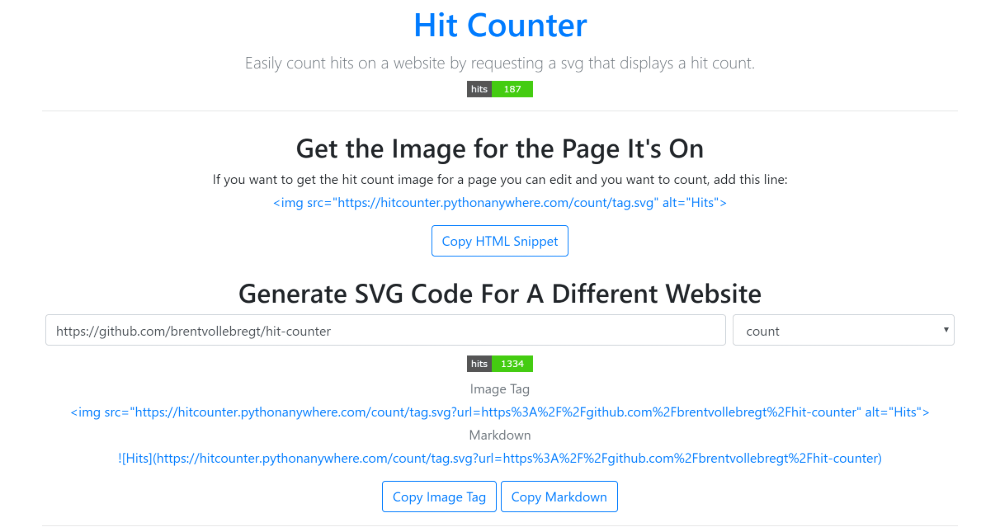
Going to the location / on the server, you will be served with an HTML page that contains a tool to create the image tag or markdown element and search up a websites count.
Hosting Your Own Server
- Clone the repo:
git clone https://github.com/brentvollebregt/hit-counter.git - cd into the repo:
cd hit-counter - Install requirements:
python -m pip install -r requirements.txt - Run the server:
python server.py
I host this on pythonanywhere.com; to do this make sure you have cloned the repo into the filesystem and then create a new project. Modify the "WSGI configuration file" under the "Code" header in the "Web" tab. Change line 16 to import your script and restart the application using the green button at the top.
from server import app as application
If you want to enable HTTPS on pythonaywhere, set config.ENABLE_SSL in
config.pyto True.
Server Configuration
- Enable SSL: Set an environment variable
ENABLE_SSLtotrue. - Change Database location: Set an environment variable
DATABASE_FILE_PATHto the file path of the database.
Alternatively these config values can be manually set in
config.py.
Domain whitelisting
You can configure the server to only count hits to domains matching a certain pattern. To do so, add regular expression entries to URL_WHITELIST_RE in config.py, e.g. r'github\.com'.
Docker
Build
docker build -t hitcounter .
Run
By default container sets VOLUME to /app/data, to expose it locally you could run
docker run --rm -ti-v $PWD/data:/app/data -p 80:80 hitcounter
Persistent Docker volume
docker create --name hitcounter-data hitcounter
docker run --rm -ti --volumes-from hitcounter-data -p 80:80 hitcounter
Persistent SQLite Storage to S3 & Docker
There is an option for container to have persisten storage on a S3 compatible probider.
Demo comes with wasabi example endpoints, provide custom config / db via additional args
-v $PWD/.aws:/root/.aws
-v $PWD/data.db:/app/data.db
-e BKPINTERVAL=900 # DB Backup to S3 interval in seconds
Backup sqlite db file in & out S3 compatible storage provider:
- Restore from S3 upon startup of container
- Periodic backup from inside conainer into S3
S3 backup based on docker-sqlite-to-s3
Demo Log
Auto restore on startup
Checking for script in /app/prestart.sh
Running script /app/prestart.sh
[2020-07-11T05:59:23+0000] (): ==> AWS CREDS DETECTED

Downloading latest backup from S3
download: s3://sqlite/latest.bak to ./data.db.bak
Downloaded
Running restore
Successfully restored
Done

*** Starting uWSGI 2.0.18 (64bit) on [Sat Jul 11 05:59:25 2020] ***
Auto backup from within container
# supervisorctl tail sqlbackup

[2020-07-10T18:13:35+0000] (sqlitebackup.sh): Initial 30s delay...
[2020-07-10T18:14:05+0000] (sqlitebackup.sh): Starting backup

Backing up /app/data.db to /app/data.db.bak
Sending file to S3
delete: s3://sqlite/latest.bak
Removed latest backup from S3
Completed 128 Bytes/128 Bytes (1.2 KiB/s) with 1 file(s) remaining
upload: ./data.db.bak to s3://sqlite/latest.bak
Backup file copied to s3://sqlite/latest.bak
{
    "CopyObjectResult": {
        "ETag": "\"a36e15e4ca4956c9eb102ed0b17ab570\"",
        "LastModified": "2020-07-10T18:14:08.000Z"
    }
}
Backup file copied to s3://sqlite/20200710181405.bak
Done
[2020-07-10T18:14:07+0000] (sqlitebackup.sh): DONE.
[2020-07-10T18:14:07+0000] (sqlitebackup.sh): Next backup in 900 seconds...
Inspiration
This project was inspired by github.com/dwyl/hits which is a "General purpose hits (page views) counter" which unfortunately will count GitHub repo views. This was my idea to expand on this and add some features with also making it compatible with any site.
Why Does The Anti-Refresh System Not Work?
On sites like github.com, images are cached. Even though I declare no-cache in the header, GitHub will load the image on their side first which will cause an increase in the count no matter what as it isn't passing back the cookie it got previously (and if it did there would be a timeout for everyone).
The cookie system implemented to help reduce count increases after consecutive requests will only work if the cookies that were received are sent back to the server in the consecutive requests. No cookie means this no longer works.
Tag summary
Content type
Image
Digest
Size
84.4 MB
Last updated
over 6 years ago
docker pull fluential/hitcounter