flyto2/flow
Visual workflows, local execution, and MCP tools for AI agents.
1.6K
flyto2/flow repository overview

Flyto2 Flow
Build visual workflows locally, expose them as typed MCP tools, and audit every agent run.
Flyto2 Flow is a source-available, self-hosted workflow builder for browser
automation, HTTP APIs, files, data processing, AI operations, and control
flow. The release image bundles the Flow web application, flyto-core,
Playwright, and Chromium. It starts without an account and does not depend on a
hidden Flyto2 cloud runtime.
Start Locally
docker pull docker.io/flyto2/flow:0.1.1
docker run --detach \
  --name flyto-flow \
  --init \
  --restart unless-stopped \
  --shm-size=1g \
  --publish 127.0.0.1:9000:9000 \
  --volume flyto-flow-data:/data/flyto \
  docker.io/flyto2/flow:0.1.1
Open http://127.0.0.1:9000. The service is bound to
loopback and stores workflows, executions, evidence, and local configuration
in the flyto-flow-data volume.
Build and Debug Visually
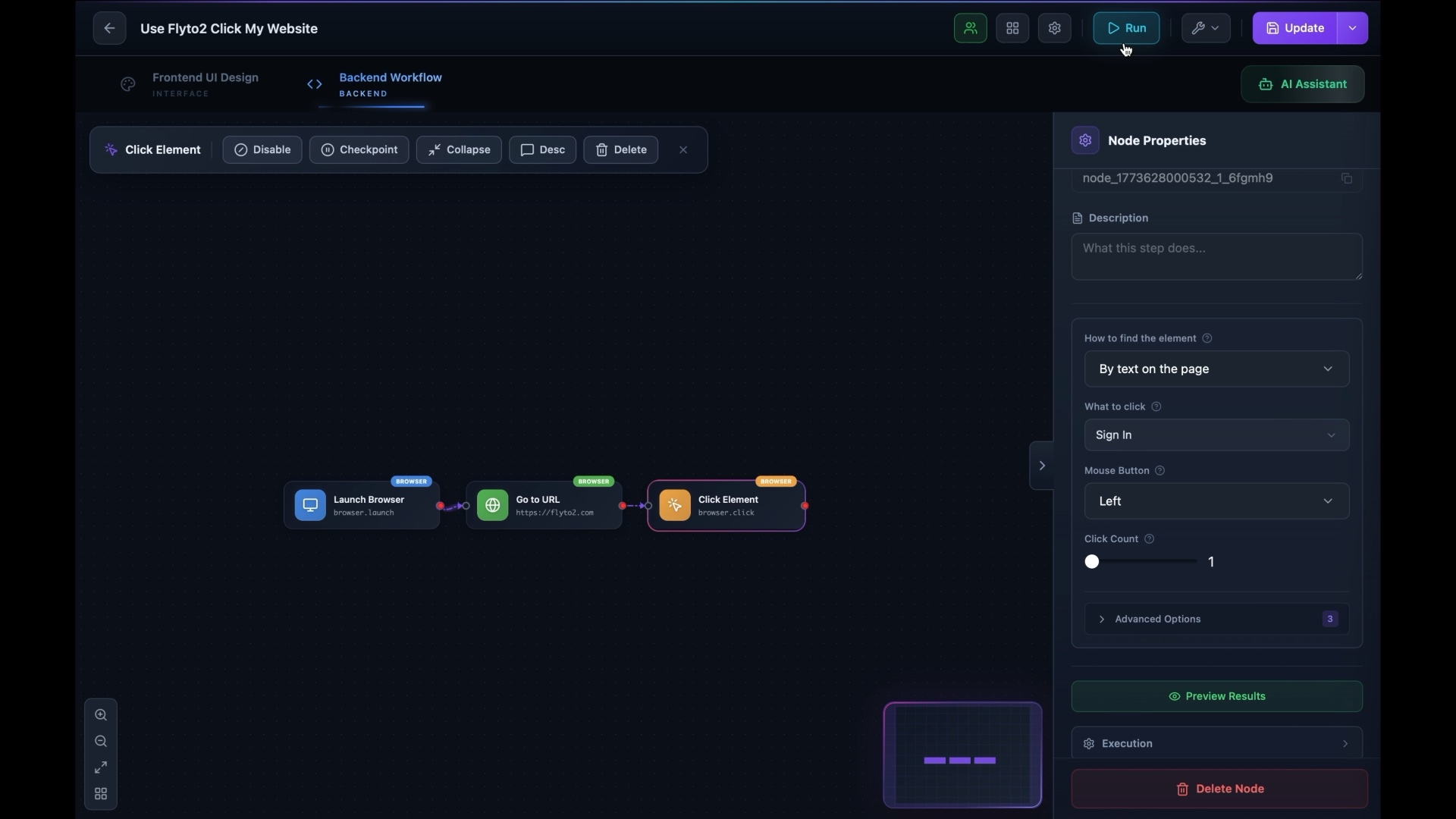
Compose browser automation, APIs, files, data transformations, AI operations, and control flow on one canvas. Test the workflow locally, inspect each step, pause at approval checkpoints, and retain evidence for the result.
Turn Workflows into MCP Tools
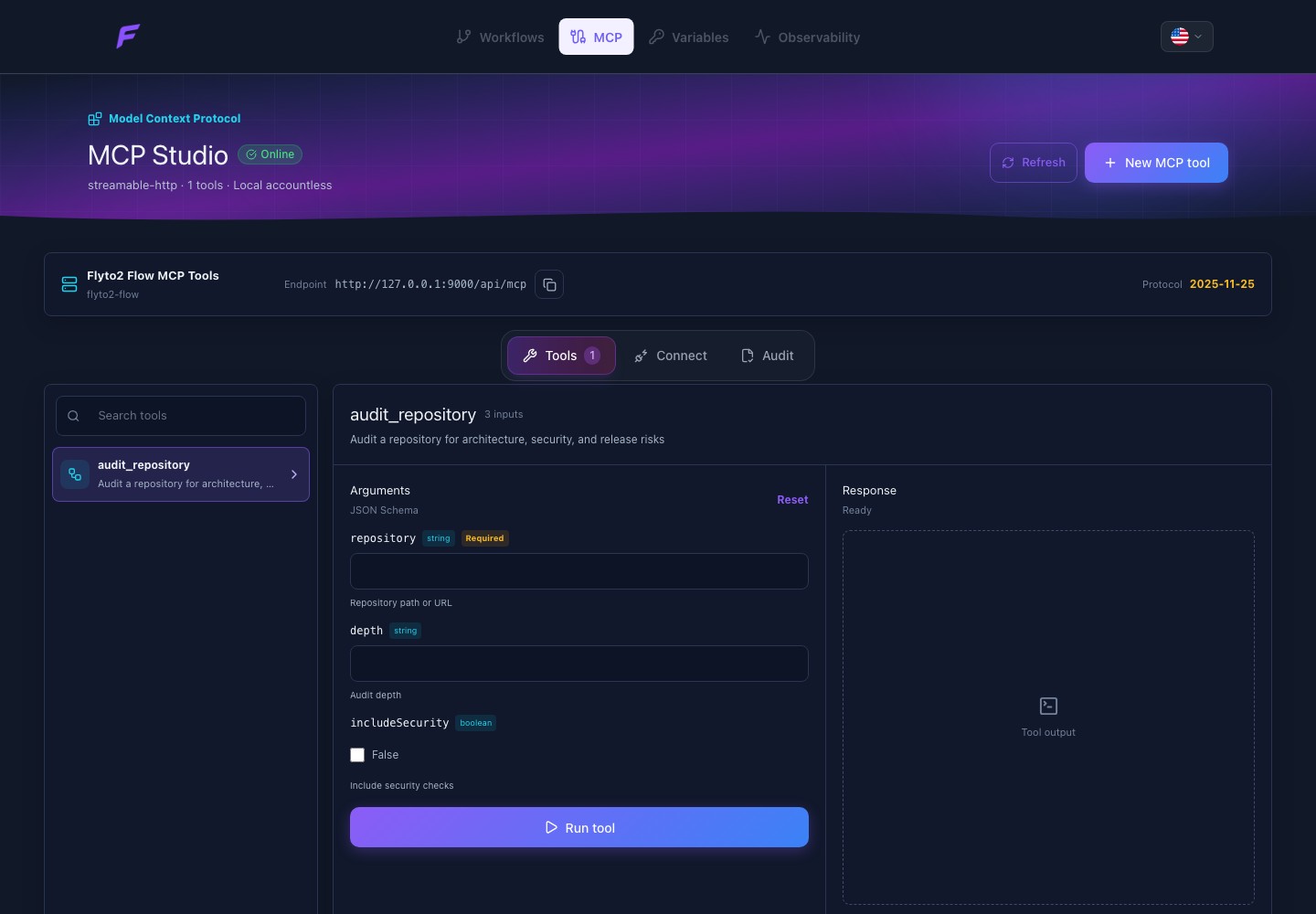
MCP Studio generates a typed tool contract directly from the workflow trigger and input fields. It provides a local test surface and connection settings for:
- Codex
- Claude Code
- desktop MCP clients
- Streamable HTTP clients
An agent sees a focused tool schema instead of a generic workflow endpoint. Operators can inspect the source workflow, deterministic fingerprint, risk, approval policy, execution history, lineage, and evidence.
Included in the Image
| Component | Purpose |
|---|---|
| Vue visual builder | Design workflows, templates, triggers, and MCP tools |
| FastAPI local gateway | Serve the UI, workflow APIs, history, and MCP transport |
flyto-core | Execute browser, API, file, data, AI, and control-flow steps |
| Playwright and Chromium | Run browser automation without a startup download |
| Local SQLite storage | Persist the workspace without Firebase or a hosted database |
| MCP Studio | Test, connect, inspect, and audit workflow-backed agent tools |
Deployment Contract
- Platforms:
linux/amd64,linux/arm64 - Application port:
9000 - Health endpoint:
/api/health - Persistent data:
/data/flyto - Default network exposure:
127.0.0.1:9000 - Runtime user: non-root
- Application telemetry: none
For remote access, place Flow behind an operator-controlled reverse proxy with TLS, authentication, origin policy, request limits, and network restrictions. Do not expose the container port directly to the public internet.
Release Integrity
Images are published only from GitHub tags matching vMAJOR.MINOR.PATCH. The
release workflow builds and starts a candidate image, verifies its health,
blocks on high or critical Trivy findings, and then publishes versioned tags
with an SBOM and provenance attestations.
Use the exact version for normal deployments:
docker.io/flyto2/flow:0.1.1
Use the digest reported by the GitHub release workflow when an environment requires an immutable deployment reference.
Documentation
Tag summary
Content type
Image
Digest
sha256:b4229c3fa…
Size
580.8 MB
Last updated
4 months ago
docker pull flyto2/flow