fmadsen/dropbox
Dropbox backend with a simple web control GUI.
10K+
fmadsen/dropbox repository overview
Dropbox with web Control-gui
Background
Dropbox can be a challenge to install on a linux system, in my case on a Centos server. This is especially true if you are in a country that uses multibyte characters in file names. At least I had some fun before I succeeded.
I started of with the great images that is provided by janeczku, which can be found here https://github.com/janeczku/docker-dropbox , but ran into problems with multibyte file names and I'am also to convenient to use the dropbox command line when I exclude and include folders from synchronization.
This is the result of my learning process. And it works for me in the Nordic countries, but should work anywhere with the correct setting. Linux host Requirements
Dropbox requires you to have your local Dropbox storage on an ext4 file system, some distributions will by default use another Types. Eg. centos will by default create xfs file systems which will not work. So please fix the file system first. Your can find your current file system type using the following command:
df -T
If you need to change there is a lot of great help to get out there. Just search for something like 'lvm change file system'. But be careful not to lose your data. Usage
The start script below will pull and start a container with named 'dropbox' with dropbox and a Nginx+php-fpm server running.
- -p 127.0.0.1:9001 will expose the control gui on your local post 9001 (you can choose any free port). You can omit the 127.0.0.1 and just use -p 9001:80, but then you might make the gui accessible from browsers on other computer on your network, and it might be what you want.
- -p 17500:17500 will expose the LAN-SYNC port. If you run more than one instance of this dropbox image on one computer, this feature can for obvious reason only be exposed for one instance.
- --restart=unless-stopped will make sure your container will restart whenever stopped or reboot of your computer.
- -e DBOX_UID and -e DBOX_GID will make sure that all files synchronized by dropbox will get your own user/group permissions set.
- ** -e LOCALE**, to be able to handle filenames that include multibyte characters the container must be able to handle them, to do so, the right "locales" must be installed and enabled in the container. That is done using the -e LOCALE. When specified the locale will be configured on the fly when the container starts up. -e LOCALE=sv_SE (Swdish) will select the sv_SE.UTF-8 locale.
- -v ~/.dropbox:/dbox/.dropbox:z and -v ~/Dropbox:/dbox/Dropbox:z will map the configuration folder and the storage folder to folder in your HOME directory. You can choose others, but if not specified you will lose all every time you restarts the container. As mentioned earlier these folders MUST reside on an EXT4 file system.
LAN-SYNC Is a great Dropbox feature that enables more dropbox instances on the same local network to syncronice over the LAN rather than transfer the files over internet. As Lan-Sync is exposed on a specific port (17500), only one instance on a computer can use it at a time.
More than one Dropbox on the same computer? Yes you can, you can have several instances running. But you need to name them unique using the --name tag in the start script. You also need to assign different port numbers -p 9001, -p 9002 etc for the control GUI.
Each instance also need to be connected to Dropbox accounts separately.
Startup script to start your container
#!/bin/bash
docker run -d \
-p 127.0.0.1:9001:80 \
-p 17500:17500 \
--name=dropbox \
--restart=unless-stopped \
-e DBOX_UID=`id -u $USER` \
-e DBOX_GID=`id -g $USER` \
-e LOCALE=sv_SE \
-v ~/.dropbox:/dbox/.dropbox:z \
-v ~/Dropbox:/dbox/Dropbox:z \
fmadsen/dropbox
View output from the container
docker logs dropbox -f
First startup
When you start the first time you must follow these steps:
- Create the Dropbox and .dropbox folder and make sure the owner and group match the ones you specify in DBOX_UID and DBOX_GID. If you use the -v settings above you should create them in your HOME riectory.
- Execute the startup script.
- The .dropbox directory will be empty at first startup so dropbox will automatically configure it for you. In the end dropbox will ask you to connect this instance to your dropbox account. To find the connect string that dropbox needs you need to "View output from the container". Just cut/paste the link you see there into a browser.
- After a while you should see some welcome message from dropbox in the container output, and YOU ARE UP AND GOING :-)
- Now you van start the control GUI in a browser using "http://localhost:9001 (or whatever port you specified at startup.
Control GUI
The GUI is just a front-end that execute dropbox-cli commands. So infact it has nothing to do with the Dropbox software. , so please don't blame Dropbox if it doesn't work.
The gui is very simple and so is the code. Its even a little messy :-). My intention is that it will stay simple in this standard version, but keep it is open for expansion for your personal needs.
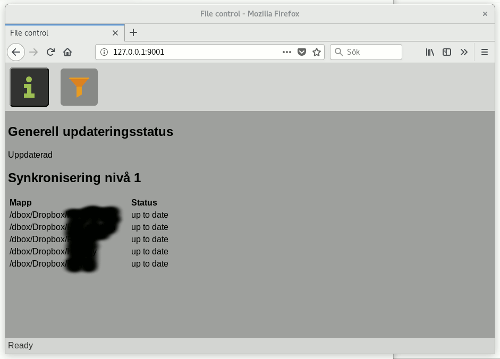

Control GUI - Do it yourself.
You can extract the php scripts for the Control GUI by the following command.
docker cp dropbox:/dbox/dcontrol dcontrol
After you have made your changes, you can run your own Control GUI by attaching your own code in the start command for the container, this will overwrite the standard GUI:
-v ~/dcontrol:/dbox/dcontrol:z
Acknowledgements
The following open source code are used
- Base image debian:buster https://hub.docker.com/_/debian/
- Dropbox open source https://www.dropbox.com/download
- Dumb-init from https://github.com/Yelp/dumb-init
- python 3.6 (debian repositoty)
- Nginx web server (debian repositoty)
- Php 7.3 (debian repositoty)
Tag summary
Content type
Image
Digest
Size
899.6 MB
Last updated
over 6 years ago
docker pull fmadsen/dropbox