forestscribe/git-cdn repository overview
git-cdn
a CDN for git
A git+http(s) proxy for optimising git server usage.

-
Fully stateless for horizontal scalability
-
Supports BasicAuth authentication (auth check is made by forcing a call to upstream, by reusing the BasicAuth creds)
-
List of refs is always re-fetched from upstream (first step of the git+http(s) protocol)
- with gitlab and gitaly, this should not be a problem as gitaly is supposed to cache that result.
-
git-uploadpack part is always tried locally first, which greatly reduce the load on upstream, as uploadpack is typically not cacheable.
-
Only supports http(s) and basicAuth. Doing similar proxy with ssh is much harder, because of the authentication check. SSH is not allowing MITM auth.
-
Push (aka receive-pack) operations are implemented as a simple proxy, they will just forward to upstream server, without any smarts. This simplifies the git-config, avoiding to configure pushInsteadOf and http_proxy
-
Tested with gitlab-ce 11.2, but should work with any BasicAuth git+http(s) server
-
Supports git-LFS for big files.
Deploy
It is recommended to put an nginx frontend for the SSL encyption Please follow recommended state of the art configuration: https://mozilla.github.io/server-side-tls/ssl-config-generator/
server {
    [...SSL configuration as per Mozilla best practice]

    location / {
        proxy_pass http://localhost:8000;

        proxy_set_header Host $host;
        proxy_set_header X-Real-IP $remote_addr;
        proxy_set_header X-Forwarded-For $proxy_add_x_forwarded_for;

        # make sure we don't buffer and timeout after longer time
        client_max_body_size 1G;
        client_body_buffer_size 1m;
        proxy_intercept_errors off;
        proxy_buffering off;
        proxy_read_timeout 300;
    }

}
Run via docker
docker run -v /path/to/mirror/repos:/workdir -p localhost:8000:8000 -e MAX_CONNECTIONS=100 -e GITSERVER_UPSTREAM=https://gitlab.mycompany.com/ -e WORKING_DIRECTORY=/workdir forestscribe/git-cdn
Run via pyinstaller binary
The pyinstaller binaries should work on any distro. Only debian has been tested, via the docker image. After downloading the git repository or archive from github:
export GITSERVER_UPSTREAM=https://gitlab.example.com/
export WORKING_DIRECTORY=/var/lib/git-cdn
export MAX_CONNECTIONS=100
dist/gitcdn/gitcdn
Configuring systemd service is left as the reader exercice.
How users use it?
Tell you users to configure HTTPS authentication for their git server (depends on the server) Then insert following snippet in users ~/.gitconfig
[url "https://gitcdn.intra.example.com/"]
insteadOf = [email protected]:
insteadOf = https://gitlab.example.com/
Then users can just use the git clone commands provided by the git server.
How it works
Git HTTP protocol is divided into two phases.
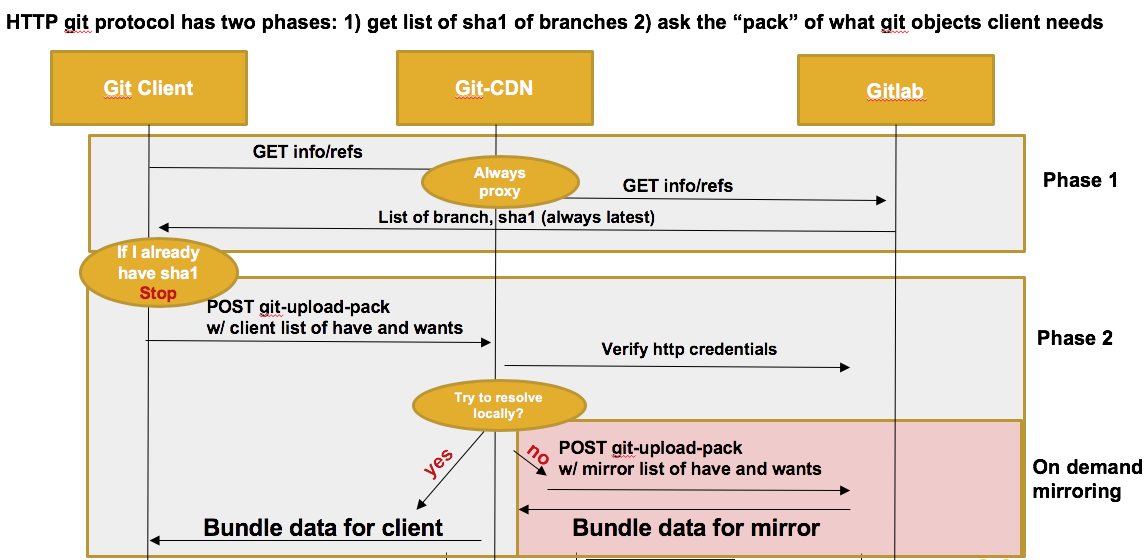
During the first phase (GET), the client verify that the server is implementing RPC, and ask the list of refs that the server has for that repository. For that phase, git-cdn acts as a simple proxy, it does not interfer in anyway with the results, nor uses any cached data. This allow to ensure that the client always has the latest commit.
Then, for the next phase, the client sends a POST message with the list of object that he has, and the list of object that he wants. The server is supposed to send him only the bare minimum of object in order to reconstruct the branch that is needed. During that phase, git-CDN acts as a smart caching proxy, he sends the list of HAVE and WANTS to a local git process, and tries to resolve the client needs locally. If that does not work, then it will try to fetch new data from the upstream server and then retry to resolve the client needs. Git-cdn always use local git in order to fetch new data, in order to optimistically fetch all the new data from server.
Retry States
If the local cache fails to address the upload-pack request, several retries are made, and
- If the directory does not exist, directly go to state 3
- state 1: Retry after taking the write lock. Taking the write lock means a parallel request may have updated the database in parallel. We retry without talking to upstream
- state 2: Retry after fetching every branches of upstream
- state 3: Assuming the repository is corrupted, we remove the directory and clone from scratch
- state 4: Failed to answer to the request, give up and forward the error
Locking
Multiple reader, exclusive writer lock is used perc p repository, on top of git own locking mechanism. This ensures that only one client is triggering the refresh of a repository copy. If the repository does not require refresh, several client can build a pack in parallel.
LFS
Git-cdn supports git-lfs.
-
Object upload is just forwarded without any smarts.
-
Object download batch commands are hooked, so that the client request on git-cdn host instead of original lfs server.
-
Other LFS commands (e.g locks) are just forwarded
-
Objects are mirrored during the download batch. (see git-lfs doc for details) The batch command does not end until all the files of the batch have been downloaded
-
Then when a client request an LFS file, the file is directly served from the FS as it should already have been mirrored via the batch command.
-
For performance reasons, the LFS file requests are not authenticated. We use the fact that if the user knows the oid (sha256), it has already authenticated to git repository. sha256 is considered large enough to be resistent to brute force. LFS objects could be served directly by nginx (as long as directory listing is disabled), but this has not been tested yet.
Log and Trace
Git-cdn uses structured logging methodology to have context based structured logging. As git-cdn is massively parallel using asyncio, this is necessary in order to follow any problematic request.
The main logic upload_pack.py is using contextual logging, and allow to follow the update of a repository, triggered by a user access logs are also output as structured logging.
In order to enable structure logging you need to configure a GELF server and GELF port as environment variables
GELF_SERVER=graylog.example.com:12201
Graylog is easy to setup logserver supporting gelf, and allowing to process and filter those logs.
contextual data is send with each log trace:
extra.ctx._id: an unique ID for the upload-pack process. You can filter with this ID, in order to follow a transaction.extra.ctx.input: The input data of upload-packextra.ctx.upstream_url: The full URL of the git project that is being mirroredextra.state: The current state of retries for this request (wasextra.num_try)
If GELF_SERVER is not set, logs are output to stderr in human readable form
License
MIT
Source Code
TBD
Tag summary
Content type
Image
Digest
Size
59.9 MB
Last updated
about 8 years ago
docker pull forestscribe/git-cdn