franklycai/nginx-debugger
For more details, see https://github.com/FranklyCai/nginx-debugger
260
franklycai/nginx-debugger repository overview

🚀 NGINX Debugger: The Ultimate Time-Saver for Lightning-Fast Configuration Fixes! 🔧
Table of Contents
- The Origin of NGINX Debugger
- Problems Solved by NGINX Debugger
- How to Use
- Reference Configuration
- Technical Details
- Comparison with Other Tools
- License
The Origin of NGINX Debugger
As a front-end engineer, dealing with NGINX is part of my daily routine. But the more I work with NGINX, the more I feel that writing NGINX configuration files is a time-consuming and extremely error-prone task (︶︹︶). Although NGINX is powerful, its configuration directives are numerous and complex, and even a small change can bring about drastic differences. Therefore, we must be extremely cautious when writing NGINX configuration files! Among the many NGINX configuration options, the configuration of the location block is a nightmare within a nightmare for me 😭:
-
Firstly,
locationsupports multiple matching methods, such as prefix matching, exact matching and regex matching. Different matching methods have different priorities, which can easily cause confusion and lead to configuration errors. -
Secondly, within the
location, you can use other directives like rewrite, try_files, proxy_pass, etc. These can make NGINX exhibit different behaviors: for example, rewrite can modify the URL, causing the request to internally redirect within NGINX and match other rules; try_files has a similar effect; while proxy_pass can modify the request's upstream, forwarding it to another endpoint.
Under such circumstances, when debugging NGINX configurations, we may encounter some "inexplicable bugs" — for example, we clearly expect a request to hit locationA, but it behaves as if it hit locationB; or we hope that after a request is forwarded, the complete path is hostname:port/aaa/bbb/ccc, but in fact, it is forwarded as hostname:port/bbb/ccc.
These annoying "bugs" are actually because the request may be internally redirected within NGINX. When the request initially hits locationA, due to the presence of the rewrite directive in locationA, the rewritten request happens to match locationB. Additionally, NGINX uses Perl's regular expression engine for matching location, which many people are not familiar with. Furthermore, when the proxy_pass directive forwards the request to the upstream, the way it concatenates the upstream URI varies in many cases, and the paths concatenated under different circumstances are completely different. Therefore, debugging these issues is quite troublesome and may sometimes take up most of the day 😞.
I have consulted various resources hoping to find a good solution, but to no avail 😞. So, I decided to develop a tool myself to help me efficiently solve all the above problems — NGINX Debugger came into being 🥳
Problems Solved by NGINX Debugger
NGINX Debugger attempts to solve all the above problems in the simplest and most efficient way, adhering to best practices. After much thought, I decided to register two new variables in access.log: $upstream_uri and $matched_locations. They have the following purposes:
-
$upstream_uri: NGINX supports multiple upstreams, including
proxy_pass,fastcgi_pass,uwsgi_pass, andscgi_pass, etc. No matter which upstream you use,$upstream_urican display the final complete address that NGINX has concatenated. -
$matched_locations: If the
locationblock uses therewritedirective, the request may be internally redirected within NGINX, and redirected multiple times. Using$matched_locationscan display this process in a visual form likelocationA -> locationB -> locationC, so we can clearly grasp the flow of each request within NGINX, thereby eliminating strange bugs like "it should have hit locationA, but it hit locationB".
How to Use
NGINX Debugger can be used in three environments: Windows, Linux, and Docker.
Windows
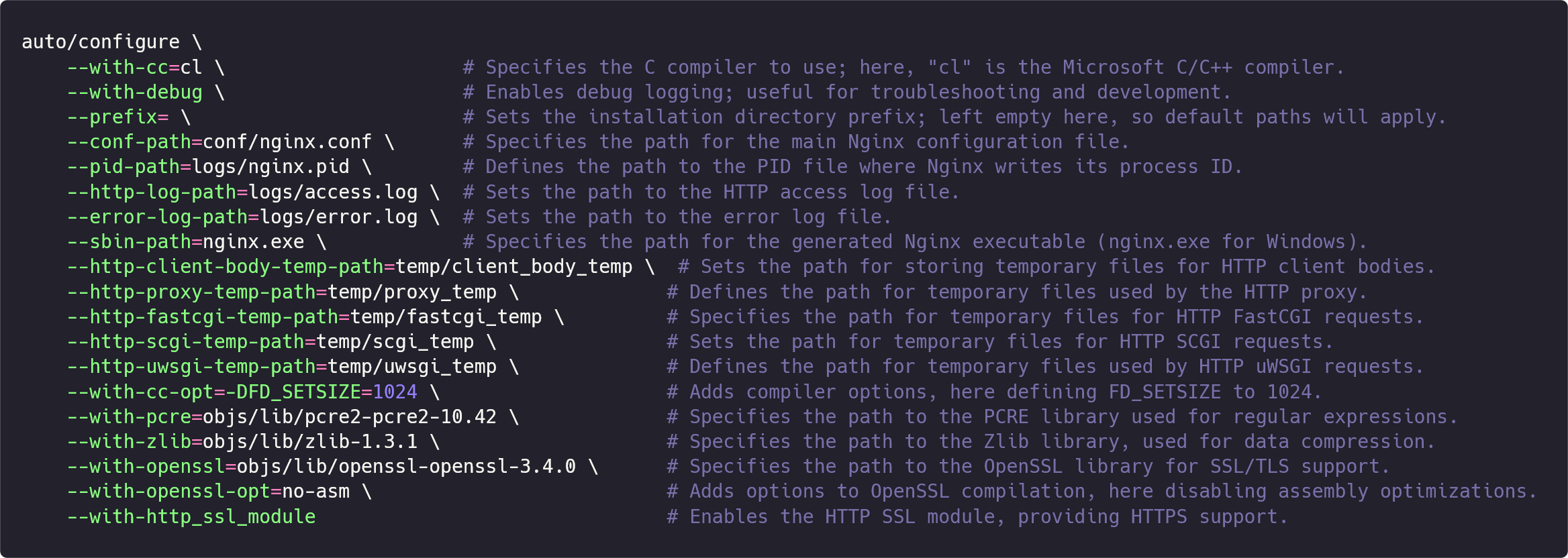
Below are the commands to compile the NGINX Debugger on Windows (configuration reference link: https://nginx.org/en/docs/howto_build_on_win32.html):
-
Method 1 (Fresh Installation): Download the
nginx.exefrom this repository to your local machine, and create the corresponding files and folders in the same directory, such asconf/nginx.conf,logs/access.log,logs/error.log, etc. -
Method 2 (Replacement Installation): Download the
nginx.exefrom this repository and replace your locally installednginx.exewith it.
Linux
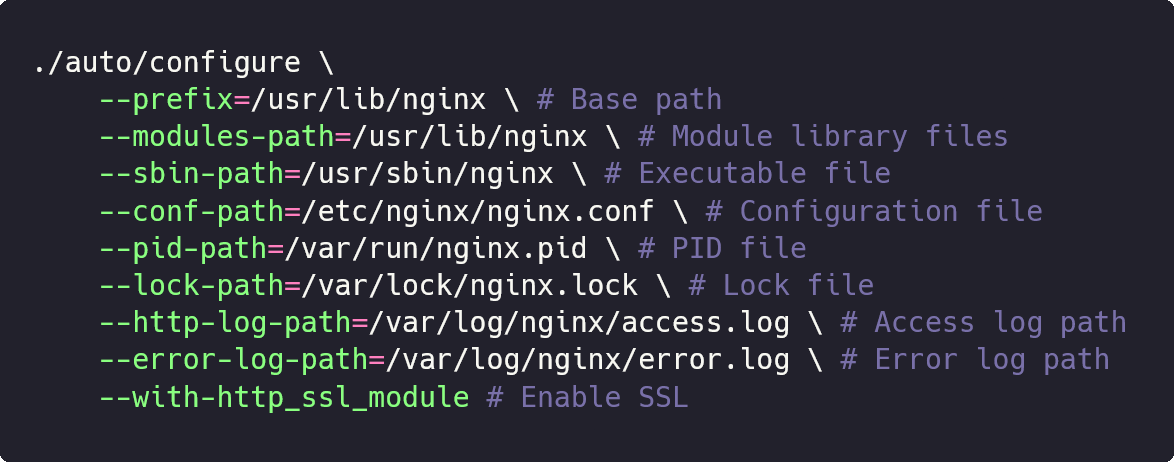
Below are the commands to compile the NGINX Debugger on Linux (configuration reference link: https://nginx.org/en/docs/configure.html):
-
Method 1 (Fresh Installation): Download the
nginxbinary from this repository to/usr/lib/nginx, and create the corresponding files and folders, such as/etc/nginx/nginx.conf,/var/log/nginx/access.log,/var/log/nginx/error.log, etc. -
Method 2 (Replacement Installation): Download the
nginxbinary from this repository and replace your locally installed/usr/sbin/nginxwith it.
-
FAQ
If you are using Method 2 and encounter a console error indicating a module version mismatch when starting the
NGINX Debugger:nginx: [emerg] module "/usr/lib/nginx/modules/ngx_http_geoip2_module.so" version 1018000 instead of 1027003 in /etc/nginx/modules-enabled/50-mod-http-geoip2.conf:1This is because NGINX Debugger is compiled based on the latest version 🏷️1.27.2, and the Nginx installed on your local machine may be older, resulting in module mismatches. You only need to comment out the statements in nginx.conf that include
modules-enabled(if you don't need these modules).
Docker
The Docker version is the simplest to use. You only need to run the following command to pull the image:
docker pull franklycai/nginx-debugger
It is built based on ubuntu/nginx.
Reference Configuration
You can refer to the following configuration to enable support for upstream_uri and matched_locations in nginx.conf (for reference only; you can configure as needed):

Technical Details
NGINX Debugger is a recreation based on NGINX's latest version 🏷️1.27.2: it adds an array property ngx_array_t *matched_locations to the ngx_http_request_s structure to store the process of NGINX matching location; it also registers two variables in ngx_http_upstream.c — upstream_uri and matched_locations, allowing us to obtain NGINX's complete upstream address and the complete matching process of location in access.log via $upstream_uri and $matched_locations. Besides that, the code hasn't been changed at all, and the overall framework remains the same. Therefore, you don't have to worry about any changes in NGINX's working mode, nor about the authenticity and accuracy of the variable values, because they are just simple concatenations and mappings of NGINX's internal variables.
Comparison with Other Tools
Fiddler
Debugging and Troubleshooting Made Simple
- Advantages: Fiddler is a powerful network debugging proxy tool, mainly used to capture, analyze, and debug HTTP and HTTPS network requests. It has a user-friendly interface and is easy to get started with, making it the first network debugging tool that most people encounter.
- Disadvantages: It cannot capture requests forwarded by NGINX acting as a proxy. Therefore, you cannot see where NGINX has forwarded your request or what the specific request path is. Another minor inconvenience is that every time you want to debug, you have to reopen Fiddler and filter out the data you want from a large number of HTTP and HTTPS requests it captures (unless you configure Filters).
Wireshark
The world's most popular network protocol analyzer
- Advantages: Wireshark is a network protocol analysis tool that operates at the lowest levels. It can capture and analyze all data from the link layer to the application layer and supports almost all network protocols.
- Disadvantages: Its powerful features mean it's challenging to master. Compared to Fiddler, Wireshark has a much steeper learning curve, and many beginners don't even know how to start capturing requests 😂. Additionally, because it supports almost all protocols (including HTTP, FTP, SMTP, etc.), you have to sift through even more data to find what you need, making the task significantly harder! Most importantly, for HTTPS requests forwarded by NGINX, you cannot find them in Wireshark (because HTTPS encrypts the traffic, and Wireshark doesn't use a man-in-the-middle proxy technique like Fiddler, so it cannot view the encrypted content).
error.log
NGINX's official error log
- Advantages: Built-in and can display a lot of debugging information.
- Disadvantages: Under normal circumstances, it only displays critical errors. If you need more information, you have to explicitly enable the
debugoption in the configuration file and restart NGINX. For a specific request, its debugging information spans multiple lines, interleaved with unrelated information; you need to carefully identify and correlate them. There's no clear separation between requests, making it easy to confuse information from one request with another 😒. Lastly, even if you enable the debug option, you still cannot find out where NGINX has forwarded the request or what the complete path is from the log file, because NGINX doesn't record this information.
Summary
| Debugging Tool | Supports Viewing Upstream | Supports Viewing location Matching Process | Simple and Efficient |
|---|---|---|---|
| NGINX Debugger | Yes | Yes | ⭐⭐⭐⭐⭐ |
| Fiddler | Not for NGINX-forwarded requests | No | ⭐⭐⭐☆☆ |
| Wireshark | Supports HTTP, not HTTPS | No | ⭐⭐⭐☆☆ |
| error.log | No | Yes | ⭐⭐⭐☆☆ |
NGINX Debugger was born to solve these problems! If you've been troubled by NGINX configurations like I have, give this tool a try; it might open up a whole new perspective for you!
License
Tag summary
Content type
Image
Digest
sha256:b00fd6e03…
Size
62.4 MB
Last updated
almost 2 years ago
docker pull franklycai/nginx-debugger