fredfeng033/vortex-tsdb
Lightweight distributed time series database for real-time metrics
232
fredfeng033/vortex-tsdb repository overview
Vortex TSDB
Lightweight. Replicated. Real-time.
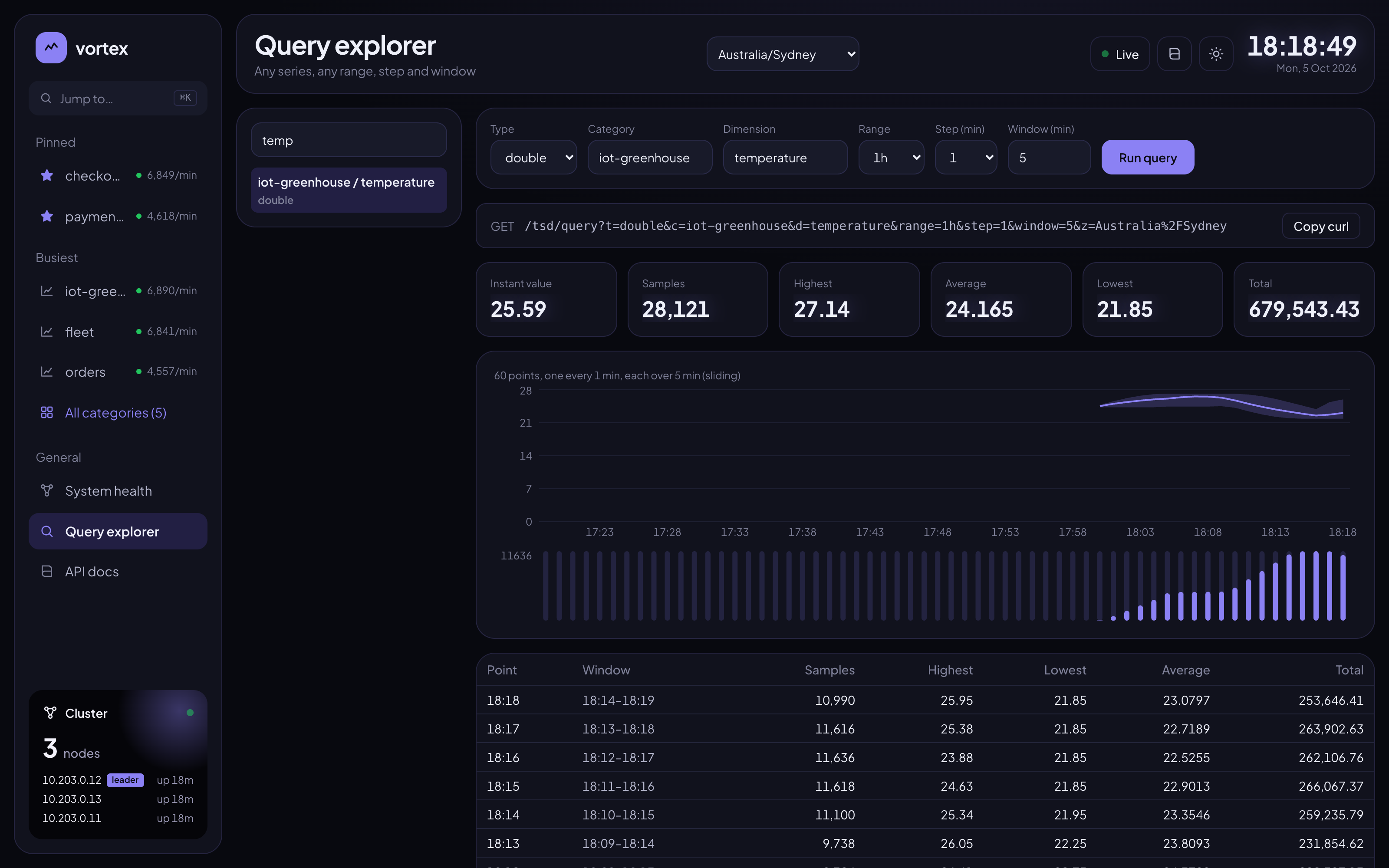
A lightweight distributed time series database for real-time metrics. Write numeric samples over HTTP; read per-minute aggregates (count, highest, lowest, total, average), the latest value of every series, and tumbling or sliding windows over any range. Every node holds a full replica in memory; the nodes elect a leader, replicate and snapshot by themselves.
| Source | https://github.com/paganini2008/vortex |
| Website | https://paganini2008.github.io/vortex/ |
| Web console image | fredfeng033/vortex-tsdb-web |
| Platforms | linux/amd64, linux/arm64 |
| License | Apache 2.0 |
Tags
| Tag | Meaning |
|---|---|
latest | The newest build. Use this one |
X.Y.Z, X.Y.Z-rcN | One build, e.g. 1.0.0 or 1.0.0-rc1, to pin a version |
X.Y | The newest release of a minor version, e.g. 1.0 |
Quick start: a 3-node cluster
The compose file starts 3 nodes, the web console and a Traefik gateway:
curl -fsSLO https://raw.githubusercontent.com/paganini2008/vortex/main/deploy/docker-compose.yml
docker compose up -d
| Entry point | URL |
|---|---|
| HTTP API, load balanced across healthy nodes | http://localhost:9080/tsd/... |
| Swagger UI | http://localhost:9080/swagger-ui.html |
| Web console | http://localhost:9080/ |
| Traefik dashboard | http://localhost:9081/dashboard/ |
curl -X POST 'http://localhost:9080/tsd/push?t=long&c=car&d=speed&v=44'
curl 'http://localhost:9080/tsd/last?t=long&c=car&d=speed'
# {"code":1,"msg":"ok","data":{"value":44,"timestamp":1791176481490}, ...}
curl 'http://localhost:9080/tsd/query?t=long&c=car&d=speed&range=6h&step=5&window=15'
docker compose down keeps the data in volumes; docker compose down -v deletes it.
Using your own Redis (optional)
Each node keeps at most VORTEX_CACHE_MAX_KEYS keys (10,000 by default) in memory. Without Redis
the least recently used beyond that are deleted; with Redis they move there and are read back
on demand (only the leader writes to Redis). No Redis is started for you.
| Variable | Default | Description |
|---|---|---|
VORTEX_REDIS_HOST | blank | Redis address. Blank: no overflow |
VORTEX_REDIS_PORT | 6379 | |
VORTEX_REDIS_PASSWORD | blank | |
VORTEX_REDIS_DATABASE | 0 | |
VORTEX_REDIS_KEY_PREFIX | vortex:cache: | Prefix of every key Vortex writes |
With the compose file, set them in the environment or in a .env file beside it:
# Redis on the Docker host. host.docker.internal works on Docker Desktop, Rancher Desktop and
# OrbStack; on Linux, uncomment extra_hosts in the compose file first
VORTEX_REDIS_HOST=host.docker.internal VORTEX_REDIS_PASSWORD=secret docker compose up -d

# Or any reachable Redis, with more keys kept in memory
cat > .env <<EOF
VORTEX_REDIS_HOST=redis.internal.example
VORTEX_REDIS_PASSWORD=secret
VORTEX_CACHE_MAX_KEYS=50000
EOF
docker compose up -d
Reading a key that moved to Redis costs a network round trip, so size VORTEX_CACHE_MAX_KEYS to
keep the series you query in memory. One series at 1-minute buckets and 24-hour retention is up
to 1,440 keys.
A single node
docker run -d --name vortex-tsdb -p 30080:30080 -v vortex-data:/data fredfeng033/vortex-tsdb
curl 'http://localhost:30080/tsd/cluster'
Running a cluster yourself
Each node needs to know where its peers are and the address they reach it at:
| Variable | Set to |
|---|---|
VORTEX_CLUSTER_PEERS | Every node's address, comma separated, the same on all nodes |
VORTEX_ADVERTISE_HOST | This node's own address, as the other nodes reach it |
VORTEX_CLUSTER_NAME | The same on every node; the only isolation between clusters |
Give each node a fixed address (the compose file uses a subnet with static IPs). Membership is fixed at start: to change the number of nodes, restart all of them.
Configuration
| Variable | Default | Description |
|---|---|---|
VORTEX_RETENTION | 24h | How long data is kept |
VORTEX_SPAN_MINUTES | 1 | Bucket width in minutes; must divide 60 |
VORTEX_TIME_ZONE | UTC | Zone used when a request has no z |
VORTEX_CACHE_MAX_KEYS | 10000 | Keys per node in memory |
VORTEX_REDIS_HOST and related | blank | Optional overflow Redis; see above |
VORTEX_SNAPSHOT_INTERVAL | 5m | How often each node writes its snapshot; 0 for shutdown only |
VORTEX_DATA_DIR | /data | Where the snapshot is written; mount a volume here |
VORTEX_CLUSTER_PORT | 22000 | Port the nodes talk to each other on |
VORTEX_CORS_ORIGINS | http://localhost:3000 | Origins that may call the API from a browser directly |
JAVA_TOOL_OPTIONS | -XX:MaxRAMPercentage=75 | JVM options |
Ports, volumes and health
30080 | HTTP API, Swagger UI, /actuator/health |
22000 and work ports | Between nodes only; do not publish them |
/data | Snapshot written at shutdown and every VORTEX_SNAPSHOT_INTERVAL |
| Health check | Built in (/actuator/health). Give containers a 60 s stop grace period so the snapshot is written |
Limits
- Writes are serialised on the leader: about 1,000 samples/s sustained, 1,500 at peak (4 CPUs).
- Data lives in memory; if every node is killed at once, data after the last snapshot is lost.
- Writes in flight when the leader crashes fail and should be retried by the client.
- No query language, alerting or authentication: put it behind your own network controls.
Tag summary
Content type
Image
Digest
sha256:ead82475d…
Size
150 MB
Last updated
23 days ago
docker pull fredfeng033/vortex-tsdb