fxerkan/my_network_scanner
See every device on your home network - including the Zigbee, Z-Wave, Matter and BLE ones an IP scan
10K+
fxerkan/my_network_scanner repository overview
MyNeS — My Network Scanner




See every device on your home network — including the ones an IP scan cannot find.
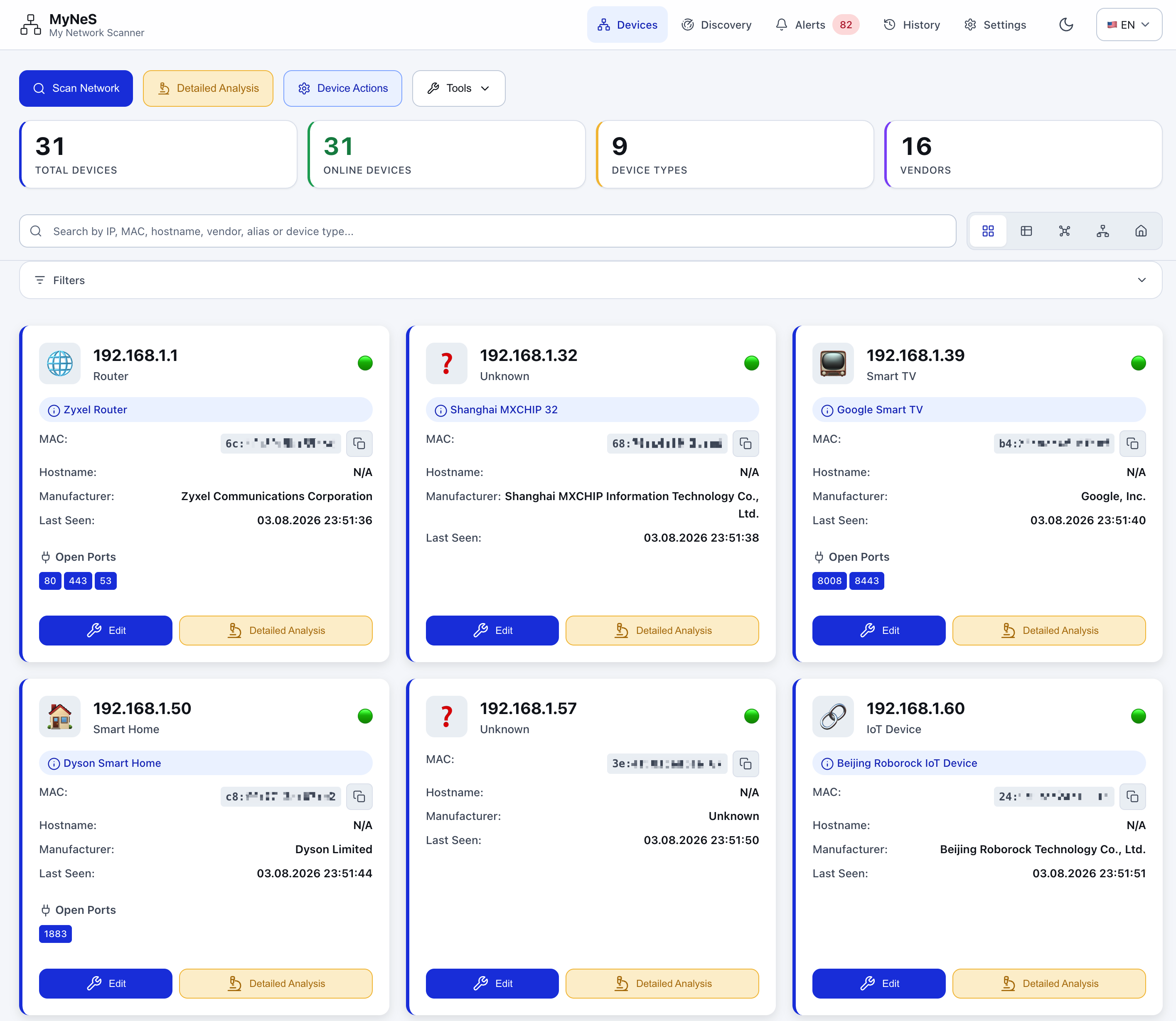
An IP scan of my LAN found 29 devices. There were about 60. Everything on Zigbee and Z-Wave has no IP address, so an IP scan is blind to it — and the inventory was never real.
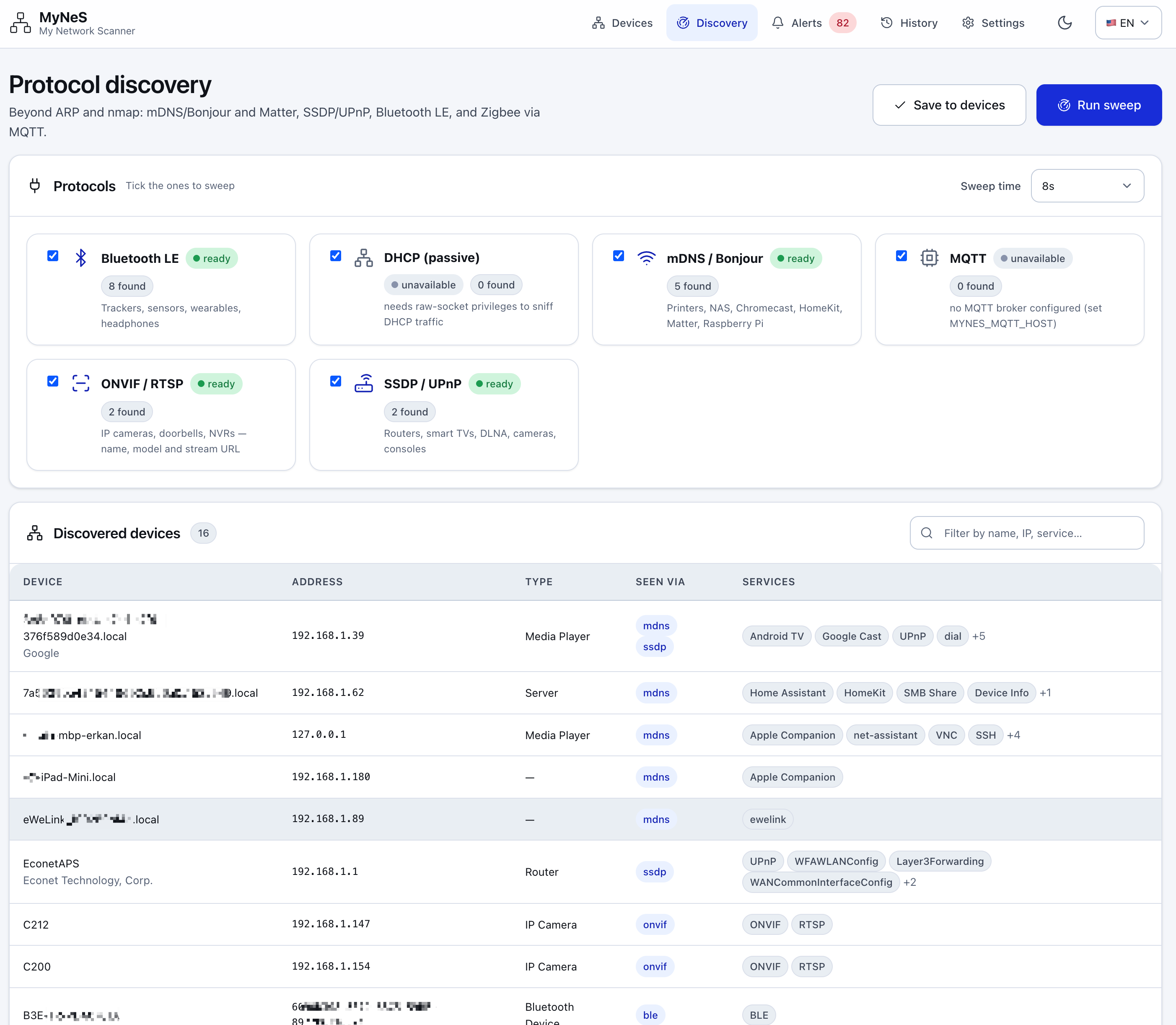
MyNeS discovers devices over ARP, mDNS/Bonjour, SSDP/UPnP, Matter, Bluetooth LE and MQTT. That last one is the trick: reading retained Zigbee2MQTT / Z-Wave JS / Tasmota / Home Assistant discovery topics is the only way to see a radio device that has no IP at all. Everything lands in one inventory.
No cloud, no account, no telemetry. Everything stays on your LAN.
Start in 60 seconds
1. Save this as docker-compose.yml:
services:
  mynes:
    image: fxerkan/my_network_scanner:latest
    container_name: mynes
    # Host networking is what lets it actually see the LAN. See the note below.
    network_mode: host
    cap_add:
      - NET_ADMIN
      - NET_RAW
    volumes:
      - ./data:/app/data
      - ./config:/app/config
      # Optional, Linux only — turns on Bluetooth LE discovery.
      - /run/dbus/system_bus_socket:/run/dbus/system_bus_socket
    environment:
      MYNES_PORT: 5883
      MYNES_PASSWORD: ""        # auto-generated on first start if empty
      MYNES_MQTT_HOST: ""       # optional — reveals Zigbee / Z-Wave / Tasmota devices
      HA_URL: ""          # optional — Home Assistant integration
      HA_TOKEN: ""
    restart: unless-stopped
2. Start it:
docker compose up -d
3. Open http://<your-server-ip>:5883 and press Scan Network.
That's it — no account, no setup wizard. The first scan takes a minute or two on a busy LAN.
Prefer a single docker run?
docker run -d \
  --name mynes \
  --network host \
  --cap-add=NET_ADMIN \
  --cap-add=NET_RAW \
  -v "$(pwd)/data:/app/data" \
  -v "$(pwd)/config:/app/config" \
  -e MYNES_PORT=5883 \
  --restart unless-stopped \
  fxerkan/my_network_scanner:latest
What you get
| 🔎 Finds what IP scans miss | ARP, mDNS/Bonjour, SSDP/UPnP, Matter, Bluetooth LE, MQTT. Zigbee bulbs behind Zigbee2MQTT and Z-Wave sensors behind Z-Wave JS appear next to your laptops. |
| 🏷️ Names them for you | 1000+ entry OUI vendor database, hostname patterns, port signatures, automatic device types (router, NAS, camera, console, smart plug…). Rules are editable in the UI. |
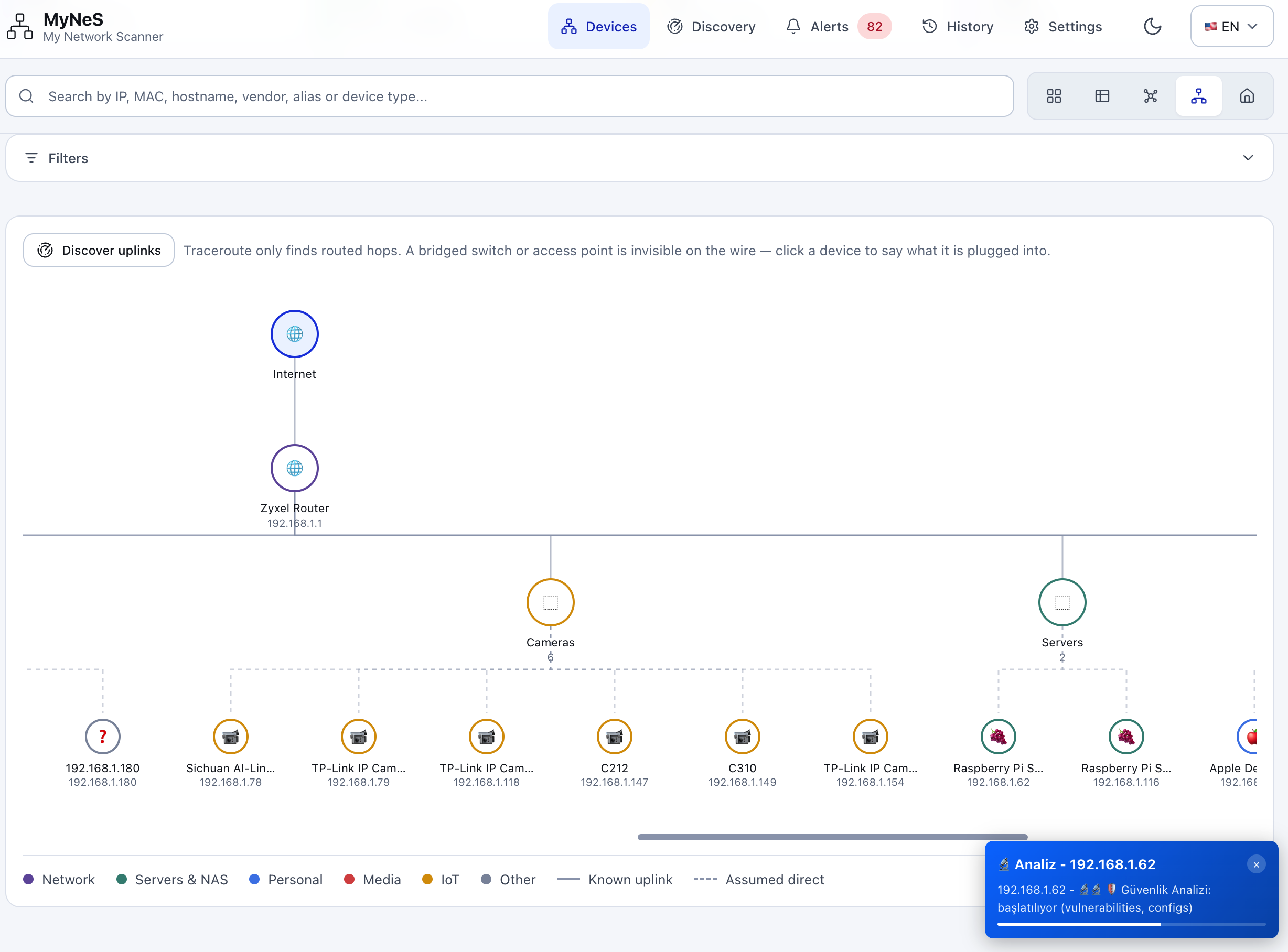
| 🗺️ Five ways to look | Card grid, table, network topology, force-directed graph, and a floor plan you can pin devices onto. |
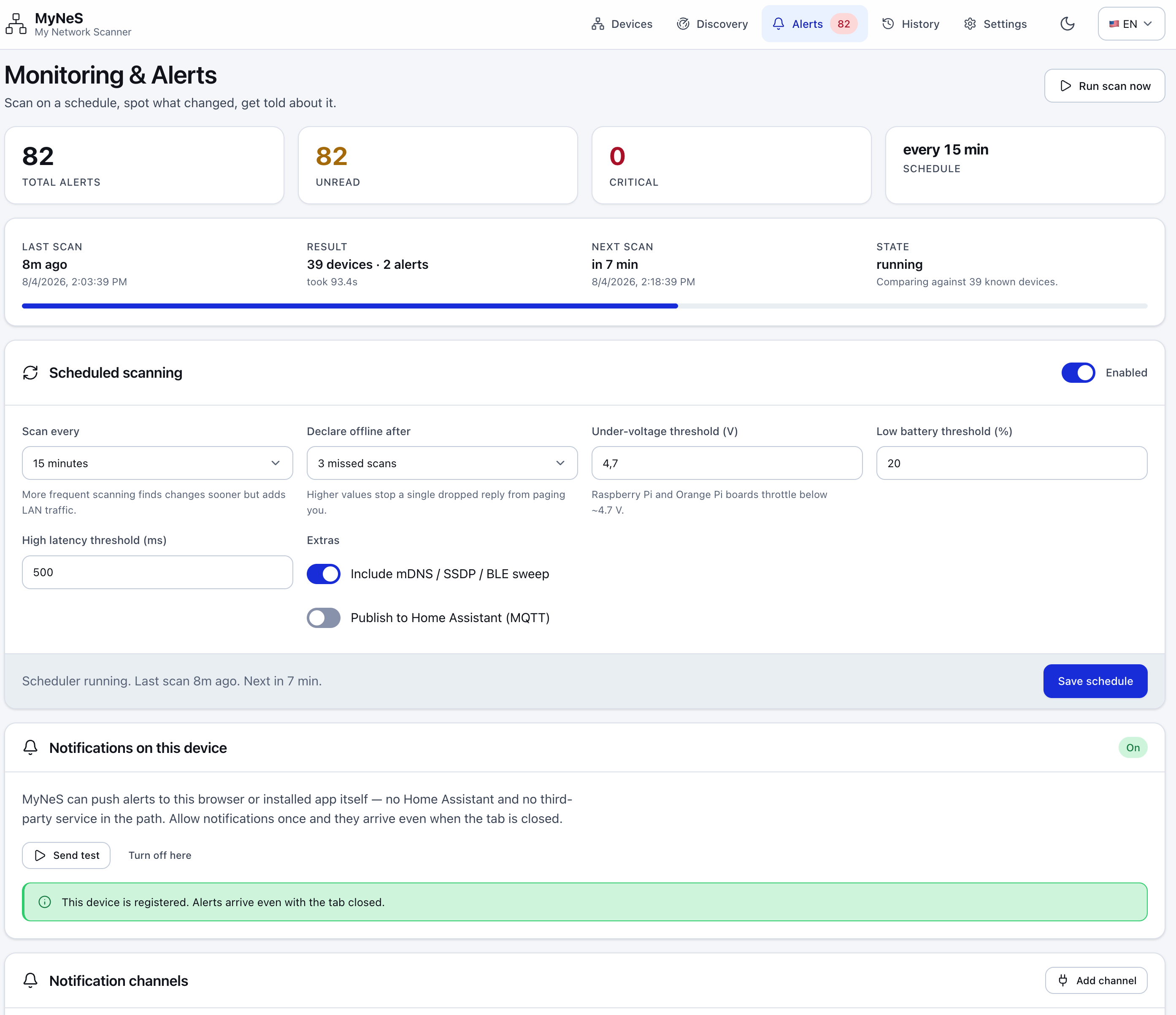
| 🔔 Tells you when things change | Rule-based alerts on new, missing or changed devices — Web Push (self-hosted, no relay), webhook, e-mail or Home Assistant. |
| 🏠 Two-way Home Assistant | MQTT Discovery pushes every device in as an entity; the REST/WebSocket side pulls HA's registry back and diffs it against what is actually on the wire. |
| 🔬 Optional deep dive | nmap port/service detection, SSH/SNMP interrogation with credentials stored encrypted (Fernet + PBKDF2-HMAC-SHA256, 100k iterations). |
| 🌍 Turkish and English | Light and dark themes, installable as a PWA on your phone. |
Optional pieces degrade gracefully: a missing Bluetooth adapter or an unreachable MQTT broker disables that one source, never the scan.
Why host networking and NET_RAW?
MyNeS sends raw ARP frames and listens for mDNS/SSDP multicast. Both require the host network namespace — from a bridge network it can only see the bridge, not the LAN.
NET_RAWlets it build ARP frames.NET_ADMINlets it read interface state.- It does not run as root (
USER scanner, uid 1000) and it is notprivileged. - Without these capabilities it does not fail: it degrades to a ping sweep plus the OS ARP cache and finds fewer devices.
MyNeS is a scanner. Only scan networks you own.
Something not working?
| Symptom | What to do |
|---|---|
| Far fewer devices than expected | Open GET /api/capabilities — it lists exactly which protocol backends and privileges are missing, and why. That is the first thing to read, always. |
| Running Docker Desktop (macOS/Windows) | Host networking is not fully supported there. Drop network_mode: host, use ports: ["5883:5883"], and accept reduced discovery. |
| No Zigbee / Z-Wave devices | Set MYNES_MQTT_HOST (plus username/password) to your broker. Those devices have no IP; MQTT is the only way to see them. |
| No Bluetooth LE devices | Mount /run/dbus/system_bus_socket into the container and make sure bluetoothd is running on the host. MyNeS scans BLE through the host's BlueZ, so it needs no USB passthrough and no privileged mode — but without that socket it cannot reach the adapter, and /api/capabilities will say so. Linux only: Docker Desktop VMs have no Bluetooth stack to borrow. |
| Port 5883 already taken | Set MYNES_PORT to something else. |
| Is it alive? | The image ships a health check against GET /api/version. |
Environment variables
| Variable | Description | Default |
|---|---|---|
MYNES_PORT | Web interface port | 5883 |
MYNES_PASSWORD | Master password encrypting stored device credentials | auto-generated |
MYNES_MQTT_HOST | MQTT broker host — reveals Zigbee / Z-Wave / Tasmota devices | empty |
MYNES_MQTT_USERNAME | MQTT username | empty |
MYNES_MQTT_PASSWORD | MQTT password | empty |
HA_URL | Home Assistant base URL, e.g. http://homeassistant.local:8123 | empty |
HA_TOKEN | Home Assistant long-lived access token | empty |
MYNES_CONFIG_DIR / MYNES_DATA_DIR | Override the config/data paths | /app/config, /app/data |
TZ | Container timezone | UTC |
HA_URL / HA_TOKEN are accepted as bare aliases. LAN_SCANNER_PASSWORD still works as a
legacy alias for MYNES_PASSWORD.
Volumes
| Path | Contents |
|---|---|
/app/data | Device inventory, scan history, alerts |
/app/config | Configuration and encrypted credentials |
Back up both and you have backed up everything.
Tags and architectures
Every release publishes latest, a MAJOR.MINOR tag and the exact
MAJOR.MINOR.PATCH (e.g. 1.4 and 1.4.2) — built for linux/amd64 and
linux/arm64, so a Raspberry Pi or Orange Pi works without changes.
More screenshots
| Discovery | Topology |
|---|---|
 |  |
| Alerts | History |
 | 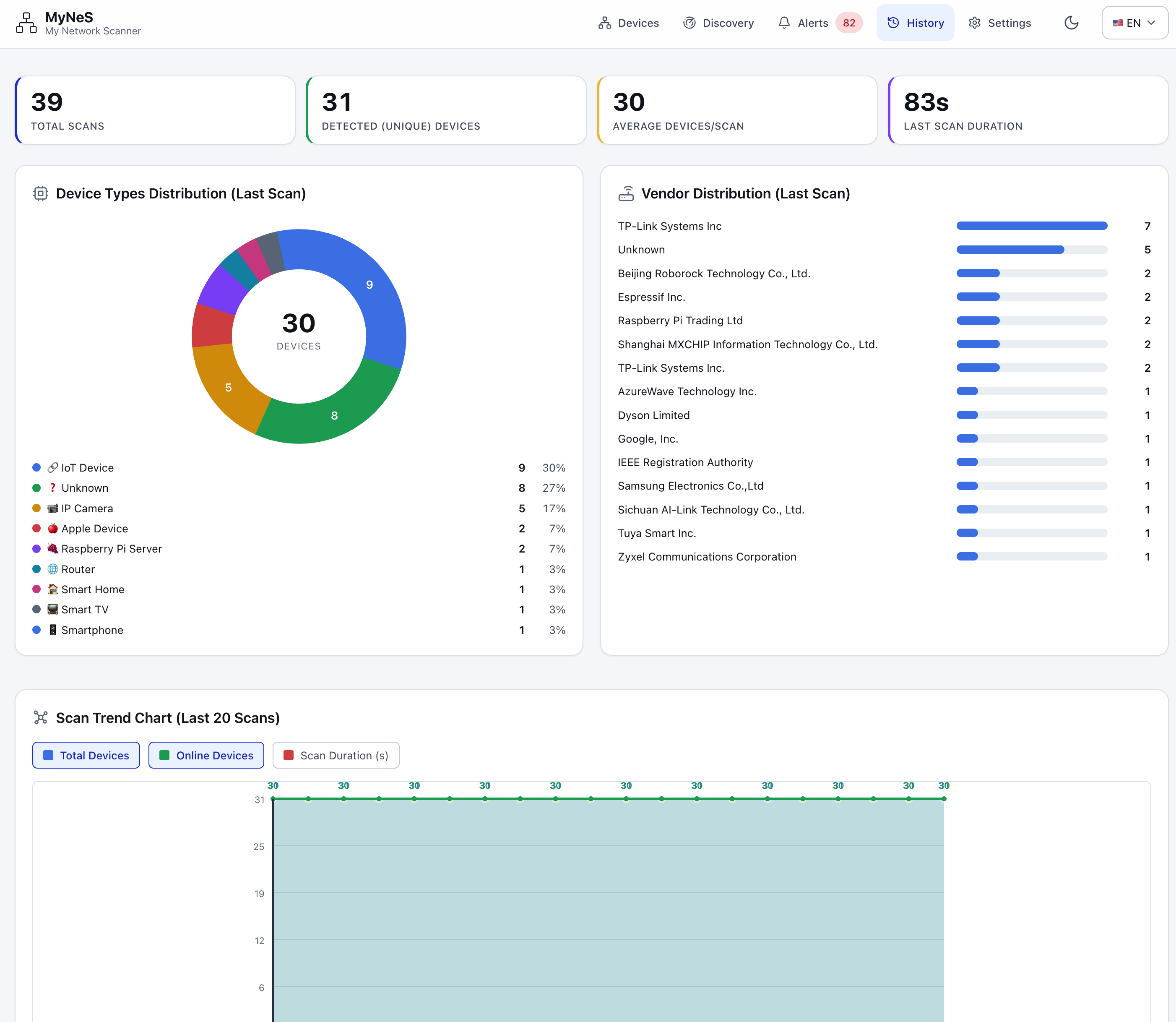 |
Links
- Source and docs: https://github.com/fxerkan/my_network_scanner
- Issues: https://github.com/fxerkan/my_network_scanner/issues
- Full deployment guide: docs/docker-deployment.md
MIT licensed. Made by fxerkan.
Tag summary
Content type
Image
Digest
sha256:eaac45231…
Size
102.8 MB
Last updated
26 days ago
docker pull fxerkan/my_network_scanner