gafda/pidupe-net
High-performance picture duplicate finder.
272
gafda/pidupe-net repository overview
Pidupe.Net

High-performance image duplicate finder — powered by .NET 10, Blazor Server, SkiaSharp, and optional GPU acceleration (NVIDIA CUDA · AMD ROCm/OpenCL · Intel OpenCL · CPU fallback).
👤 Developer: @gafda
📄 License: GPL v3
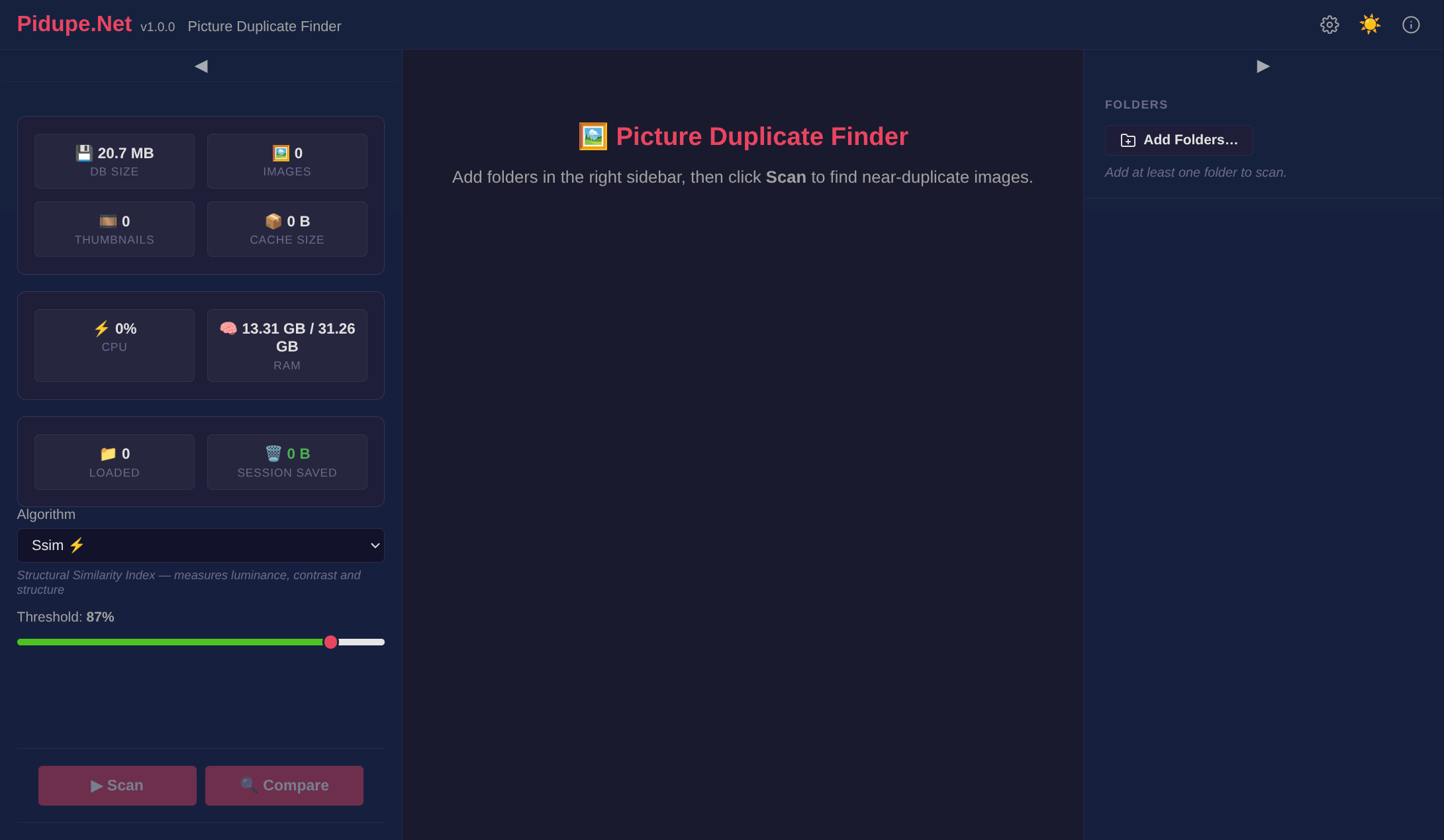
What is Pidupe.Net?
Pidupe.Net scans your photo library and surfaces near-duplicate files through seven complementary algorithms:
| Algorithm | Speed | Accuracy | Description |
|---|---|---|---|
| CLIP | ★★☆☆☆ | ★★★★★+ | Semantic visual matching via CLIP ViT-B/32 (ONNX, GPU recommended) |
| LPIPS | ★★☆☆☆ | ★★★★★ | Deep perceptual distance via AlexNet backbone (ONNX, GPU recommended) |
| SSIM | ★★★☆☆ | ★★★★☆ | Structural Similarity Index (GPU-accelerable via ILGPU) |
| pHash | ★★★★★ | ★★★☆☆ | DCT perceptual hash — fast structural fingerprinting |
| dHash | ★★★★★ | ★★★☆☆ | Gradient-based difference hash — robust to scaling |
| Histogram | ★★★★★ | ★★☆☆☆ | Color distribution correlation |
| MSE | ★★★★★ | ★☆☆☆☆ | Mean Squared Error — pixel-level comparison |
Results appear in a clean browser UI with side-by-side previews, metadata comparison, and one-click delete or ignore actions. Everything is cached in SQLite so repeated scans are instant.
Image tags
Tags follow semantic versioning (
X.Y.Z).
| Tag | Architecture | Description |
|---|---|---|
latest | amd64 + arm64 | Multi-arch alias for the most recent stable release |
1.0.0 | amd64 + arm64 | Current stable release |
Both tags are multi-arch manifest lists — Docker and Podman automatically pull the correct image for your host architecture. Use an exact X.Y.Z tag for reproducible deployments; latest is convenient for quick testing.
Quick start
# Docker
docker run -d \
  --name pidupe \
  -p 8008:8008 \
  -v /path/to/your/photos:/photos:rw \
  -v pidupe-data:/data \
  gafda/pidupe-net:1.0.0

# Podman
podman run -d \
  --name pidupe \
  -p 8008:8008 \
  -v /path/to/your/photos:/photos:rw \
  -v pidupe-data:/data \
  gafda/pidupe-net:1.0.0
Then open http://localhost:8008 in your browser, add /photos as a scan folder, and start scanning.
Docker Compose
Basic (CPU only)
services:
  pidupe:
    image: gafda/pidupe-net:1.0.0
    container_name: pidupe
    ports:
      - "8008:8008"
    volumes:
      # Your photo library (read-only is enough for scanning but not for removal)
      - /path/to/photos:/photos:ro
      # Add as many source directories as you need
      # - /mnt/nas/camera-roll:/camera-roll:ro
      # Persistent cache database and settings
      - pidupe-data:/data
    environment:
      - Pidupe__DataDirectory=/data
    restart: unless-stopped

volumes:
  pidupe-data:
GPU Acceleration
Pidupe.Net uses two independent GPU systems — ILGPU (pHash DCT, SSIM) and ONNX Runtime (CLIP, LPIPS). The container image is GPU-agnostic — GPU drivers are injected at runtime by the host toolkit. Add the relevant section to your Compose service and choose only one.
NVIDIA (CUDA)
Docker: Install nvidia-container-toolkit.
Podman: Install nvidia-ctk CDI.
# Docker Compose
services:
  pidupe:
    image: gafda/pidupe-net:1.0.0
    container_name: pidupe
    ports:
      - "8008:8008"
    volumes:
      - /path/to/photos:/photos:ro
      - pidupe-data:/data
    environment:
      - Pidupe__DataDirectory=/data
    restart: unless-stopped
    deploy:
      resources:
        reservations:
          devices:
            - driver: nvidia
              count: 1
              capabilities: [gpu]

volumes:
  pidupe-data:
# Podman (CDI-based, no compose changes needed)
podman run -d --name pidupe -p 8008:8008 \
  --device nvidia.com/gpu=all \
  -v /path/to/photos:/photos:ro \
  -v pidupe-data:/data \
  gafda/pidupe-net:1.0.0
Verify GPU access:
# Docker
docker run --rm --gpus all nvidia/cuda:12.6.0-base-ubuntu24.04 nvidia-smi
# Podman
podman run --rm --device nvidia.com/gpu=all nvidia/cuda:12.6.0-base-ubuntu24.04 nvidia-smi
AMD (ROCm / OpenCL)
Prerequisite: AMDGPU kernel module and ROCm runtime on the host.
Desktop cards RX 5000+ work with the open-sourceamdgpudriver.
services:
  pidupe:
    image: gafda/pidupe-net:1.0.0
    container_name: pidupe
    ports:
      - "8008:8008"
    volumes:
      - /path/to/photos:/photos:ro
      - pidupe-data:/data
    devices:
      - /dev/kfd:/dev/kfd
      - /dev/dri:/dev/dri
    group_add:
      - video
      - render
    environment:
      - Pidupe__DataDirectory=/data
    restart: unless-stopped

volumes:
  pidupe-data:
# Podman equivalent
podman run -d --name pidupe -p 8008:8008 \
  --device /dev/kfd --device /dev/dri \
  --group-add video --group-add render \
  -v /path/to/photos:/photos:ro \
  -v pidupe-data:/data \
  gafda/pidupe-net:1.0.0
Intel (Arc / Iris / integrated graphics, OpenCL)
Prerequisite:
i915orxekernel driver and Intel compute runtime (intel-opencl-icd) on the host.
services:
  pidupe:
    image: gafda/pidupe-net:1.0.0
    container_name: pidupe
    ports:
      - "8008:8008"
    volumes:
      - /path/to/photos:/photos:ro
      - pidupe-data:/data
    devices:
      - /dev/dri:/dev/dri
    group_add:
      - video
      - render
    environment:
      - Pidupe__DataDirectory=/data
    restart: unless-stopped

volumes:
  pidupe-data:
# Podman equivalent
podman run -d --name pidupe -p 8008:8008 \
  --device /dev/dri \
  --group-add video --group-add render \
  -v /path/to/photos:/photos:ro \
  -v pidupe-data:/data \
  gafda/pidupe-net:1.0.0
Force CPU mode (disable GPU)
Set Pidupe__PreferCpu=true to disable GPU detection entirely:
environment:
  - Pidupe__DataDirectory=/data
  - Pidupe__PreferCpu=true
Volumes
| Path | Purpose | Notes |
|---|---|---|
/data | SQLite cache DB + settings | Must be persistent — mount a named volume or host path |
/photos (or any path) | Photo source directories | Read-only (:ro) is sufficient for scanning; add as many as needed. Read-Write (:rw) if intended to delete files. |
# Named volume (recommended)
-v pidupe-data:/data

# Host path (alternative)
-v /home/user/.pidupe:/data
Environment variables
| Variable | Default | Description |
|---|---|---|
Pidupe__DataDirectory | /data | Directory for the SQLite cache and settings file |
Pidupe__PreferCpu | false | Set to true to skip GPU detection and use CPU only |
Accessing over the network
By default Pidupe.Net listens on port 8008. Map it to any host port:
# Access on port 80
-p 80:8008

# Bind only to localhost (reverse-proxy setup)
-p 127.0.0.1:8008:8008
For HTTPS, place a reverse proxy (e.g. Caddy, Nginx, Traefik) in front and forward requests to port 8008.
Mounting network shares (NAS / SMB / NFS)
Pre-mount the share on the host, then bind-mount the directory into the container:
# Mount a Samba share on the host first
sudo mount -t cifs //192.168.1.100/photos /mnt/nas-photos \
  -o username=user,password=pass,vers=3.0

# Then reference the host mount in Docker Compose
volumes:
  - /mnt/nas-photos:/nas-photos:ro
Alternatively, use Docker named volumes with the local driver:
volumes:
  nas-photos:
    driver: local
    driver_opts:
      type: cifs
      o: "username=user,password=pass,vers=3.0"
      device: "//192.168.1.100/photos"
Upgrading
# Docker
docker pull gafda/pidupe-net:1.0.0
docker compose up -d

# Podman
podman pull gafda/pidupe-net:1.0.0
podman stop pidupe && podman rm pidupe
# Re-run with same volumes (data is preserved)
The SQLite cache and settings in /data are forward-compatible between minor versions. A fresh scan after upgrading reuses all cached metadata.
Troubleshooting
| Symptom | Solution |
|---|---|
| Page does not load | Check docker logs pidupe — port conflict or startup error |
| GPU not detected | Verify host drivers and toolkit, then check logs for ILGPU/ONNX output |
| CLIP/LPIPS on CPU despite GPU | ONNX Runtime CUDA needs CUDA Toolkit 12.x + cuDNN 9.x on the host (injected via nvidia-ctk) |
| Scan finds no images | Confirm the volume mount path is correct with docker exec pidupe ls /photos |
| Volumes empty on Podman + SELinux (Fedora, Bazzite, RHEL) | Add :z to each -v flag to relabel the mount: -v /path/to/photos:/photos:ro,z |
| Very slow first scan | Expected — subsequent scans use cache and are near-instant |
| Out of memory on large libraries | Raise the container memory limit; the app will auto-pause and resume |
# Stream live logs
docker logs -f pidupe
podman logs -f pidupe

# Open a shell inside the container
docker exec -it pidupe /bin/bash
podman exec -it pidupe /bin/bash
Architecture and technical notes
- Runtime: .NET 10, published as a self-contained single-file binary
- UI: Blazor Interactive Server (WebSocket-based, no npm/webpack)
- Cache: SQLite in WAL mode — safe for concurrent reads across scans
- GPU (ILGPU): CUDA → OpenCL → CPU fallback for pHash DCT and SSIM
- GPU (ONNX Runtime): CUDA → ROCm → CPU fallback for CLIP and LPIPS neural networks
- Image loading: SkiaSharp for format decoding, resizing, and thumbnail generation
- Metadata: MetadataExtractor for EXIF, IPTC, XMP extraction
- Container: GPU-agnostic image; NVIDIA/AMD/Intel drivers injected at runtime via host toolkit
Pidupe.Net — find the duplicates, reclaim the space.
Tag summary
Content type
Image
Digest
sha256:d7468dd6e…
Size
855.5 MB
Last updated
6 months ago
docker pull gafda/pidupe-net