gathecageorge/node-names-application
https://github.com/gathecageorge/node-names-application?tab=readme-ov-file#about-app
1.4K
gathecageorge/node-names-application repository overview
More updated information here https://github.com/gathecageorge/node-names-application?tab=readme-ov-file#about-app
About APP
This is a simple node application. It will connect to a database, and show a page with a form to submit data to be saved on the database.
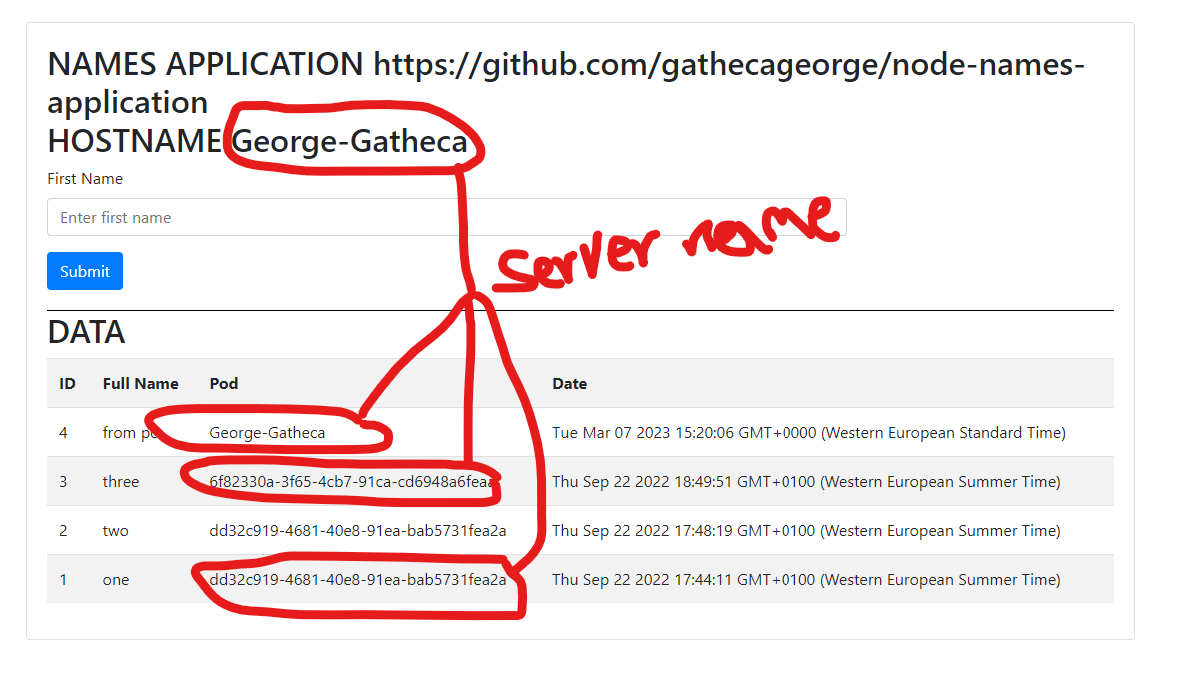
Its indended to just be used for learning load balancing because when you have many instances of this application, whenever a page is shown it will show which server is responding to the request.
i.e Lets say you have 3 instances of the application, like 3 kubernetes pods with a load balancer infront of the instances.
- When a request comes to load balancer, it can be sent to any of the kubernetes pods
- When a response is received, the page will show which pod served the request
- Each time a record is saved in the database, you can see which server saved the request.
Supports dev container
Once opened run node js/server.js
Running using docker
- Use dbpostgres.yml file with docker compose to create a database for testing
docker-compose -f dbpostgres.yml up -d - Use command below. Replace environment variables as required.
docker run --rm -d --add-host=host.docker.internal:host-gateway --name node-app -p 3001:3001 -e DATABASE_PORT=5432 -e APPLICATION_PORT=3001 -e DATABASE_HOST=host.docker.internal -e DATABASE_USER=postgres -e DATABASE_PASSWORD=example -e DATABASE_NAME=nodeNamesApplication gathecageorge/node-names-application:latest - Open
localhost:APPLICATION_PORTto see the application
Tag summary
Content type
Image
Digest
sha256:17ba057fd…
Size
392.4 MB
Last updated
9 months ago
docker pull gathecageorge/node-names-application