goodlinux/zipsme-sso
URL shortener on docker image with Synology SSO account login
1.1K
goodlinux/zipsme-sso repository overview
INFO


Create your own url shortener running on docker.
You can find the modified sources for docker here :

I have update the code to use with alpine 3.17, nginx server, php8.1
In Alpine 3.17 php8 packages are not availables, changed by php81
I have also change the mysql-php by msqli-php library in all the code
I have change from LDAP connexion with Synology SSO server, each shortcut is the property of the one who created it
You don't have to be connected to use all the shortcuts even if it has been created by someone else
But to create a new shortcut, you have to be connected.
To Delete or Update an existing shortcut you have to be owner of it.
If you pass to the url http://go/xxx and xxx is not yet defined, it ask you if you want to create it.
INSTALL

First create a MySQL database and MySQL user.
Make sure the user has permission to SELECT, INSERT, UPDATE, DELETE, and CREATE.
Note of the database name, the database user name, and the password.
Launch the container, and modify the environments variables to full fill your
Database Name, User and Password and the others parameters
in Synology SSO add your application get informations of app id (param APPID_SSO) and app uri (param SITE_URL)
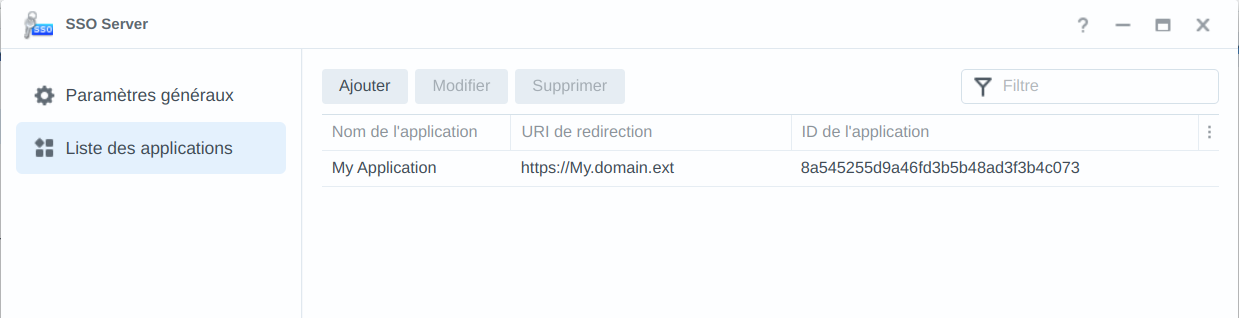
You can change variables before building the container in the DockerFile,
then create the container whith the command line : docker build -t containername.
Or change the variable when you run the container, to be able to connect to your Mysql sgbd (personaly I use Mariadb)
ENV VARIABLES
used in the config.php
DB_USER = Data Base Username
DB_PASSWORD = Data Base Password
DB_NAME = Name Of Base
DB_SERVER = Url of the Database server. ex : 192.168.110.55:3306 or localhost:3306
SITE_NAME = Name of you website
SITE_URL = Url to access to your Site. it should be the same as the redirection uri in SSO server ex : http://go or https://My.domain.ext
SERVEUR_SSO = url of the SSO server. ex : https://192.168.10.159.
APPID_SSO = Application Id in the SSO server "Application list" page
SRV_NAME = server name display at the footer of the admin page ex : 'docker 1 server'
TZ =Europe/Paris Time zone of the container
First Launch
In the entrypoint.sh of the container, there is a script "CreateConf.sh" that update the constants "Const.php"
to take into acount any change of a parameter of the container.
When your container is alive and the environments variable are ok,
Run the "install.php" file in your browser. If your URL shortener is http://go/,
the file will be located at http://go/install.php.
After the install script has created or update the database,
it will display a link to the admin section (located at http://go/admin.php).
You can now log in with the username/password combination from your LDAP.
You can create, delete or update shortcuts only if you are connected to the ldap
but you can use the shortcuts even if you have not create them or without connecting.
Enjoy!
Tag summary
Content type
Image
Digest
sha256:81c835c9c…
Size
21.2 MB
Last updated
10 months ago
docker pull goodlinux/zipsme-sso