gotechnies/alpine-ssh
The alpine image ready with ssh server.
Image
13
500K+
gotechnies/alpine-ssh repository overview
alpine-ssh


A minimal Docker image based on Alpine Linux with a complete package index and only 5 MB in size!
I have prepared this Dockerfile to enable SSH on the alpine docker container. That is completely working good. The above Dockerfile has root enabled in the ssh server as well as run ssh on the time of docker container creation.
How to build this Dockerfile.
$ docker build --build-arg PASSWORD=passowrd -t arvindr226/alpine-ssh -f Dockerfile .
How to run the docker container with ssh ?
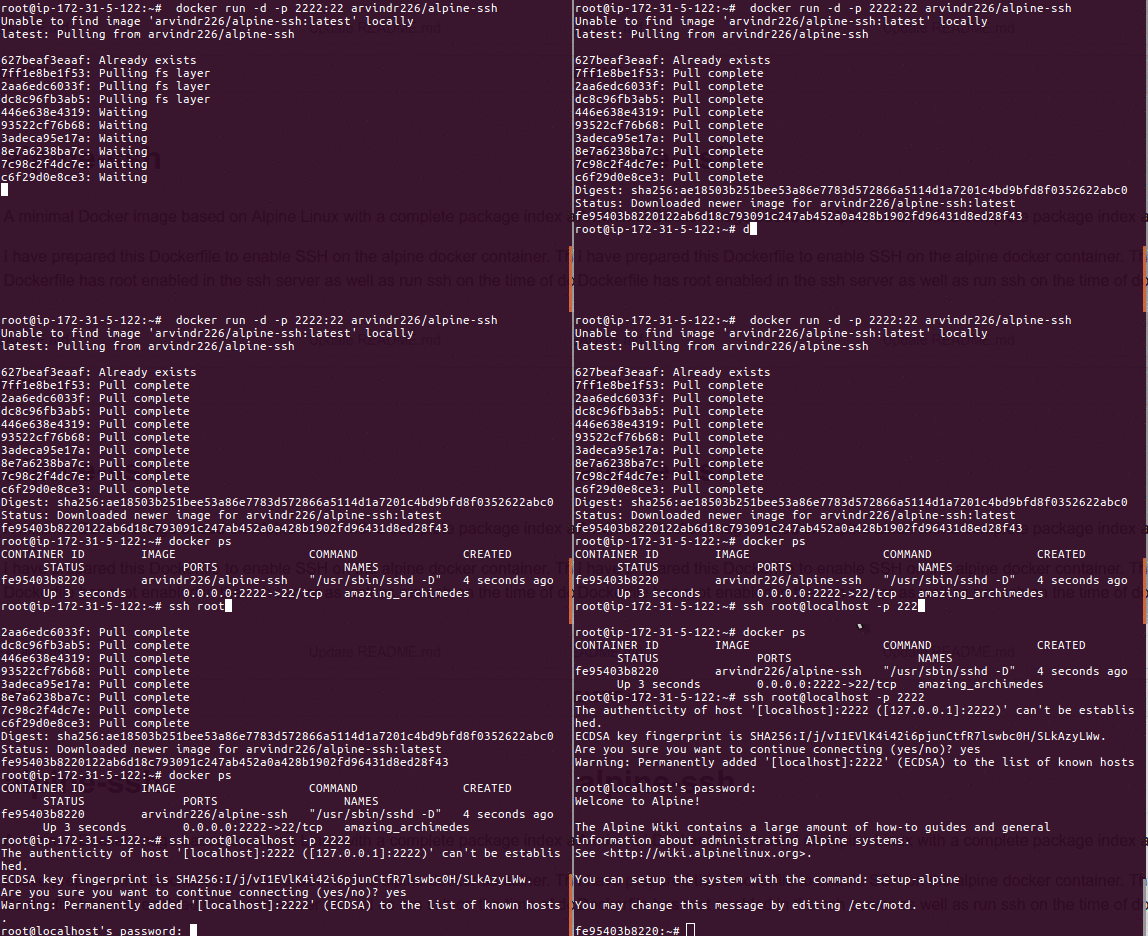
I have exposed the port 22 in the Dockerfile. You can use the below command to run the docker container.
$ docker run -d -p 2222:22 arvindr226/alpine-ssh
To connect the docker container via ssh.
ssh root@localhost -p 2222
Use Password: password
License
Tag summary
Content type
Image
Digest
Size
4.3 MB
Last updated
over 5 years ago
docker pull gotechnies/alpine-ssh