gounix/docker-rate-limit
Make your Docker rate limit available to Prometheus.
916
gounix/docker-rate-limit repository overview
Overview
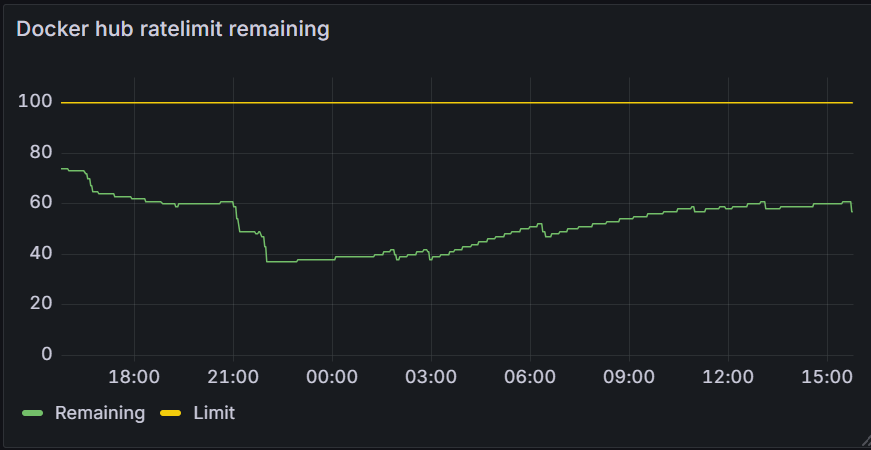
The docker-rate-limit container queries the current rate limit settings at docker.io for an anonymous connection. Limits for authenticated users are supported in the 1.1 release. The values are made available for scraping by prometheus. The scrape url is http://<service_address>:<PORT_NUMBER>/metrics. If you use the prometheus-operator deployment in combination with our helm chart the scrape config is not needed. The helm chart contains a serviceMonitor definition.
Screenshot
Environment variables
The following enviroment variables are supported:
| Variable | Description |
|---|---|
| REFRESH_SECONDS | The amount of seconds between successive polls of docker.io |
| PORT_NUMBER | The port that is used for publishing the metrics |
| IMAGEPULL_SECRET | The name of the pull secret |
| NAMESPACE | The namespace where the secret can be found (the namespace of this deployment) |
| HTTPS_PROXY | The optional proxy server to use (example http://proxy.example.com:8080) |
Working with authenticated limits
When querying authenticated limits an additional secret has to be created in the following way:
kubectl create secret docker-registry regcred -n docker-rate-limit --docker-server="https://index.docker.io/v1/" --docker-username="me" --docker-password="my passwd" --docker-email="[email protected]"
This secret has to be created in the namespace of the docker-rate-limit.
Available metrics
There are two metrics available, ratelimit_limit and ratelimit_remaining, both have a label account that is set to the
ccount that is set in the IMAGEPULL_SECRET. When using an anonymous connection account is set to your ip address.
Helm chart
Sources
Tag summary
Content type
Image
Digest
sha256:46f7b0407…
Size
85.1 MB
Last updated
4 months ago
docker pull gounix/docker-rate-limit:1.2.1