gpongelli/pgadmin4-arm
pgAdmin4 - Docker Image for ARM architecture (Raspberry Pi)
1.4K
gpongelli/pgadmin4-arm repository overview

Last updated by bot: 2023-01-19
pgAdmin 4
This is a simple Raspberry Docker image for running pgAdmin 4 in a container. The default configuration is not intended for production use (it runs in "desktop mode", so authentication is disabled).
This image uses an unprivileged user, and uses port 5050 instead of 80.
To access the web-interface on port 80 instead of 5050, you can map the
port using -p 80:5050.
Fix issue of Docker on Mac OSX
Sometimes happens that Docker on Mack hangs at startup, an useful list of command to fix is:
rm -rf ~/Library/Containers/com.docker.*
cd /usr/local/bin
chmod 0755 dock*
Original credits
Credits for the starting structure of this project goes to FlorianASchroeder.
Starting from that project, I've added the github actions to build docker image for Raspberry's armv7 architecture.
Tags
To use a specific combination of pgAdmin 4 and python see the following table of available image tags.
| Tag | pgAdmin version | Python version | Distro | Architecture |
|---|---|---|---|---|
7.1-py3.11-armv8 | 7.1 | 3.11.3 | alpine3.16 | armv8 |
7.0-py3.11-armv8 | 7.0 | 3.11.3 | alpine3.16 | armv8 |
6.21-py3.11-armv7 | 6.21 | 3.11.3 | alpine3.16 | armv7 |
6.21-py3.11-armv8 | 6.21 | 3.11.3 | alpine3.16 | armv8 |
6.20-py3.11-armv7 | 6.20 | 3.11.3 | alpine3.16 | armv7 |
6.20-py3.11-armv8 | 6.20 | 3.11.3 | alpine3.16 | armv8 |
6.19-py3.11-armv7 | 6.19 | 3.11.3 | alpine3.16 | armv7 |
6.19-py3.11-armv8 | 6.19 | 3.11.3 | alpine3.16 | armv8 |
Lovely! These tags are kept updated automatically (when new minor or patch version are released) by build_versions.py which is run twice a day on CircleCI.
Example use
Docker compose example
version: '2'
services:
  pg_admin:
    container_name: pgAdmin
    image: gpongelli/pgadmin4-docker-armv7:6.19-py3.11
    restart: unless-stopped
    ports:
      - 5050:5050
    volumes:
      - ./volumes/pg_admin/servers.json:/pgadmin/servers.json
    networks:
      ...
    environment:
      ...
Quick start
To see this image in action, run the following command;
$ docker run --rm -p 5050:5050 docker pull gpongelli/pgadmin4-docker-armv7:6.19-py3.11
This starts a one-off container in non-detached mode, and container logs are
printed in your terminal. After the container has finished starting, visit
http://[your-docker-host]:5050 in your browser to try pgAdmin 4.
To exit and remove the container, press CTRL+C in your terminal.
Practical example
This example uses a custom network, and runs a PostgreSQL container.
# create a custom network for easier connecting
$ docker network create pg

# start a postgres container
$ docker run -d -e POSTGRES_PASSWORD=password --network=pg --name postgres postgres:9-alpine

# start pgAdmin container
$ docker run -d -p 5050:5050 --name pgadmin --network=pg gpongelli/pgadmin4-docker-armv7:6.19-py3.11
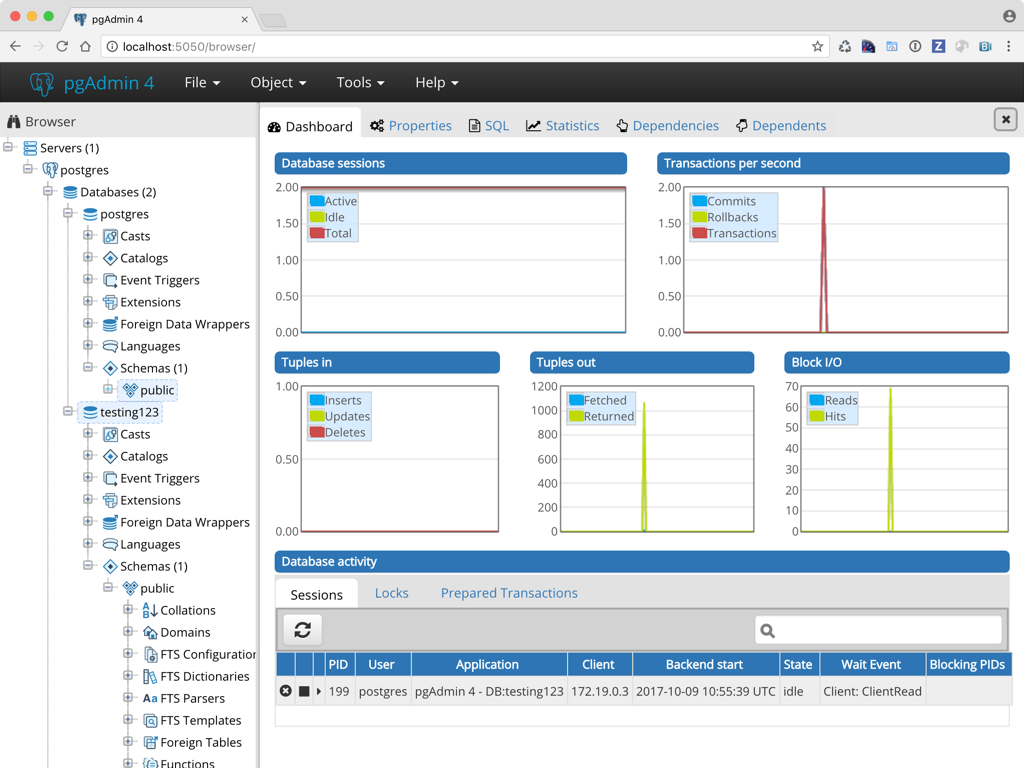
Now visit http://[your-docker-host]:5050 in your browser. You can add the
postgres database (hostname is postgres, password is password) to test
if everything is working.
Persistent data
Persistent data is stored in a volume, located at /pgadmin/. This allows
you to upgrade the container to a new version without losing configuration.
The following directories can be found inside the volume;
/pgadmin/config/pgadmin4.db- SQLite configuration database/pgadmin/storage/- other storage
You can override the storage location using the PG_ADMIN_DATA_DIR
environment variable
Unprivileged user
pgAdmin runs as an unprivileged user (pgadmin) with uid:gid 1000:50.
The uid:gid is selected for compatibility with Docker Toolbox, and allows
you to bind-mount a local directory inside the container for persistent
storage
For example, to bind-mount the /Users/me/pgadmin directory as storage directory;
$ docker run -d -p 5050:5050 -v /Users/me/pgadmin:/pgadmin gpongelli/pgadmin4-docker-armv7:6.19-py3.11
Run the image with a read-only filesystem
This image can be run with a read-only filesystem. To do so, specify the
--read-only flag when starting the container.
$ docker run -d -p 5050:5050 --name pgadmin --read-only gpongelli/pgadmin4-docker-armv7:6.19-py3.11
Runtime configuration
This image can be configured at runtime, by setting environment variables;
PG_ADMIN_DATA_DIRdirectory to use for storing data (defaults to/pgadmin/)PG_ADMIN_PORTport to listen on (defaults to5050)PG_ADMIN_SESSION_DIRdirectory to use for storing server-side sessions (defaults to/dev/shm/pgAdmin4_session)DEBUGenable debug mode (detaults toFalse)
More information on pgAdmin 4 development can be found here;
Reporting issues and feature requests
Issues and feature requests can be reported on GitHub; https://github.com/gpongelli/pgadmin4-docker-armv7
Tag summary
Content type
Image
Digest
sha256:b4782a745…
Size
200.3 MB
Last updated
over 3 years ago
docker pull gpongelli/pgadmin4-arm:7.1-py3.11-armv8