hakdogan/elasticsearch
📎 This application illustrates and demonstrates use of ElasticSearch Java API in the backend
Image
0
337
hakdogan/elasticsearch repository overview




 Illustration and demonstration use of ElasticSearch
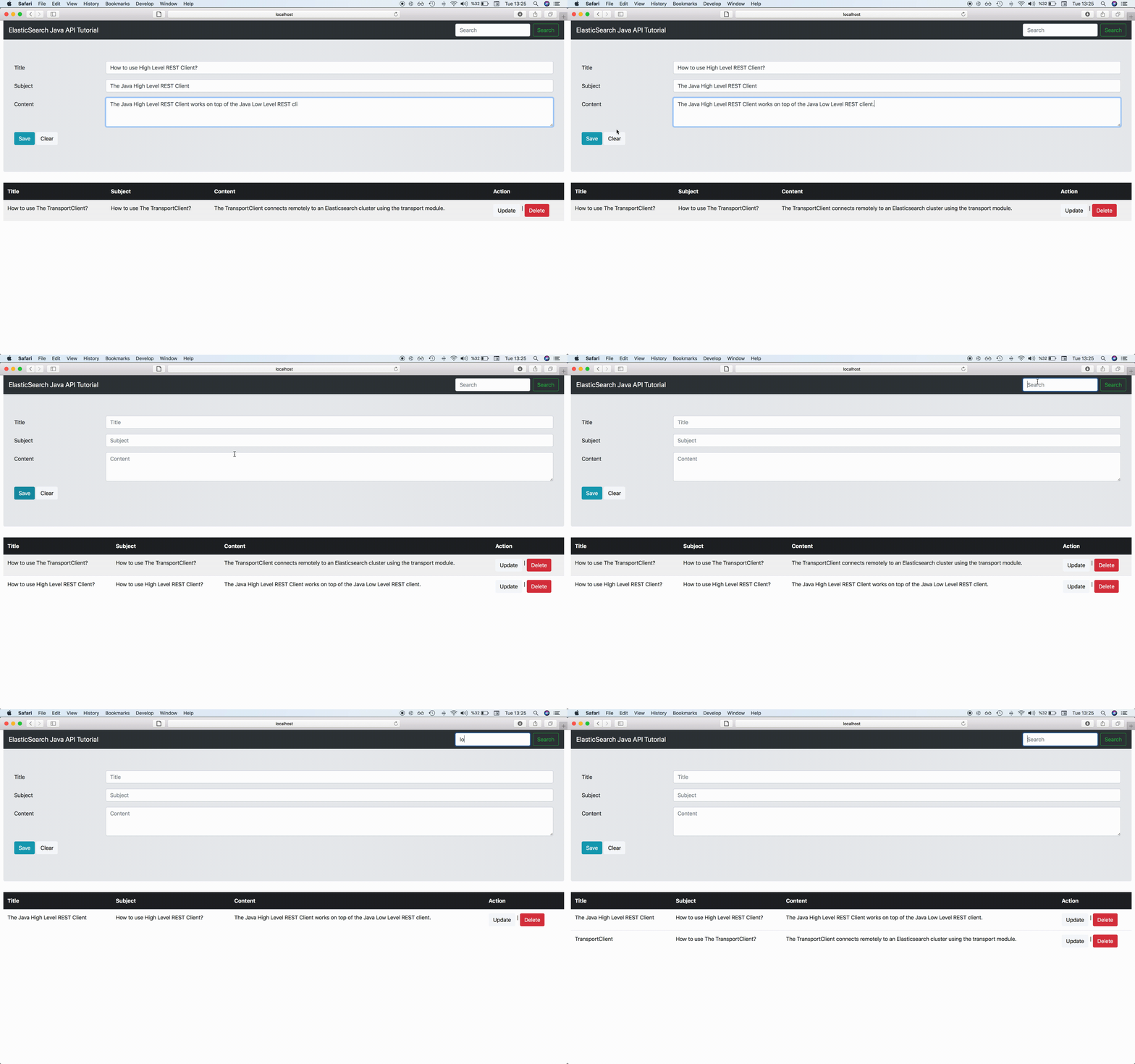
This repository illustrates and demonstrates the use of ElasticSearch Java API via Transport Client and Java High Level REST Client. If you want to see the sample of the old version, please visit the oldVersion branch.
What you will learn in this repository?
- How to use Transport Client
- How to perform Administration operations
- Index creation
- Mapping settings
- How to use Java High Level REST Client
- How to perform CRUD operations
Initialization Transport Client
    @Bean(destroyMethod = "close")
    public TransportClient getTransportClient() throws UnknownHostException {
        try (TransportClient client = new PreBuiltTransportClient(Settings.EMPTY)
                .addTransportAddress(new TransportAddress(InetAddress.getByName(props.getClients().getHostname()),
                        props.getClients().getTransportPort()))){
            return client;
        }
    }
Initialization Java High Level REST Client
    @Bean(destroyMethod = "close")
    public RestHighLevelClient getRestClient() {
        return new RestHighLevelClient(RestClient.builder(new HttpHost(props.getClients().getHostname(),
                props.getClients().getHttpPort(), props.getClients().getScheme())));
    }
Index creation with Transport Client
IndicesExistsRequest request = new IndicesExistsRequest(props.getIndex().getName());
IndicesExistsResponse indicesExistsResponse = indicesAdminClient.exists(request).actionGet();
Shard and Replica Settings
indicesAdminClient.prepareCreate(props.getIndex().getName())
    .setSettings(Settings.builder()
        .put("index.number_of_shards", props.getIndex().getShard())
        .put("index.number_of_replicas", props.getIndex().getReplica()))
    .get();
Mapping Settings
    XContentBuilder builder = jsonBuilder()
        .startObject()
            .startObject(props.getIndex().getType())
                .startObject("properties")
                    .startObject("id")
                        .field("type", "text")
                    .endObject()
                    .startObject("firstname")
                        .field("type", "text")
                    .endObject()
                    .startObject("lastname")
                        .field("type", "text")
                    .endObject()
                    .startObject("message")
                        .field("type", "text")
                    .endObject()
                .endObject()
            .endObject()
        .endObject();

    indicesAdminClient.preparePutMapping(props.getIndex().getName())
        .setType(props.getIndex().getType())
        .setSource(builder.string(), XContentType.JSON).get();
Index creation with Java High Level REST Client
IndexRequest request = new IndexRequest(props.getIndex().getName(), props.getIndex().getType());
request.source(gson.toJson(document), XContentType.JSON);
IndexResponse response = client.index(request);
Using SearchSourceBuilder and showing search results
sourceBuilder.query(builder);
SearchRequest searchRequest = getSearchRequest();

SearchResponse searchResponse = client.search(searchRequest);
SearchHits hits = searchResponse.getHits();
SearchHit[] searchHits = hits.getHits();
for (SearchHit hit : searchHits) {
    Document doc = gson.fromJson(hit.getSourceAsString(), Document.class);
    doc.setId(hit.getId());
    result.add(doc);
}
Using Query String with Wildcard
result = getDocuments(QueryBuilders.queryStringQuery("*" + query.toLowerCase() + "*"));
Document deletion
DeleteRequest deleteRequest = new DeleteRequest(props.getIndex().getName(), props.getIndex().getType(), id);
How to compile?
mvn clean install
Testcontainers library needs Docker daemon, if you don't have it you should use -Dmaven.test.skip=true parameter.
How to run?
mvn spring-boot:run
With this option, you should provide an elasticsearch server.
How to run with Docker?
sh run.sh
With this option, this application and an elasticsearch server run together.
Tag summary
Content type
Image
Digest
Size
122.7 MB
Last updated
over 6 years ago
docker pull hakdogan/elasticsearch:newVersion