halotools/jira_halo_issues_sync repository overview
jira_halo_issues_sync
Synchronize Halo issues with Jira
What it does
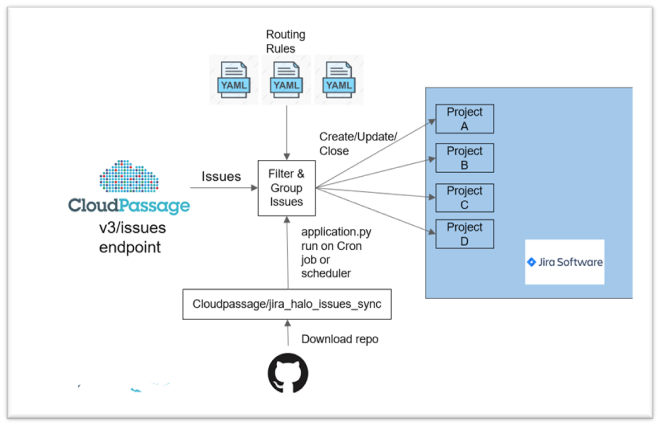
This tool filters issues discovered in Halo using issue attributes and then routes those issues to Jira projects specified in routing configuration files. These issues are then continuously synced as follows:
-
New issues discovered in Halo cause new issues to be created in Jira.
-
Updated issues in Halo will update issues in Jira
-
Closed issues in Halo will cause the corresponding Jira issue to be closed.
-
Jira issues which have been prematurely closed will be re-opened if the issue is still active in Halo
-
Halo issues which are re-opened will cause the corresponding Jira issue to re-open.
Architecture
- Architecture of HALO and JIRA Issues Sync Project
Requirements
- CloudPassage Halo API key (with auditor permissions).
- Jira user account must have permissions to create, search, and transition issues between workflow statuses.
- Jira Cloud API token (https://confluence.atlassian.com/cloud/api-tokens-938839638.html).
- Scheduling system such as crontab.
- Python 3.6+ including packages specified in "requirements.txt"
Installation
- Clone "jira_halo_issues_sync" Project from GitHub repository.
git clone https://github.com/cloudpassage/jira_halo_issues_sync.git
- Install all required packages in file “requirements.txt”.
pip install -r requirements.txt
Configuration
Define the following environment variables:
Define the following environment variables:
| Name | Example | Explanation |
|---|---|---|
| HALO_API_KEY | ayj198p9 | |
| HALO_API_SECRET_KEY | 6ulz0yy85xkxkjq8v9z5rahdm4aj909e | |
| JIRA_API_USER | [email protected] | Jira username |
| JIRA_API_TOKEN | ayeulwtyhktcg53b7wb795as | |
| JIRA_API_URL | https://yourdomain.atlassian.net | Jira domain URL |
Note: Make sure the Jira API user and key have privileges to create, update, delete, transition, and search issues for each project specified in the routing rules.
Setup routing rules
- Navigate to "/config/routing" and create routing files based on the template files given. Delete template files when finished.
- In /config/routing directory, define routing rules in YAML format.
-
Define issue filters: Works the same way as portal UI and the API; Can use portal to get an idea of issues after filter is applied.
- Go to https://api-doc.cloudpassage.com/help#issues-filtering-issues for more info on filtering.
-
Define Group issues: Will create an epic in Jira for each group.
- Examples:
- type: epic group for sva, csm, lids, etc.
- csp_resource_id: epic group for each unique instance ID (for servers).
- Examples:
-
Define Map Dynamic Fields: Maps CloudPassage Halo fields to custom fields in Jira.
- Actual values of Issue attributes will be dynamically populated.
-
Define Map Static Fields:
- A constant value can be specified in a static Jira field.
- Due date is calculated from the first_seen_at date of issue.
-
Specify the field in Jira that will contain the CloudPassage unique issue ID.
- This is how integration searches for issues and keeps them in sync.
-
For each routing rule created, list the project keys that you want to route the filtered issues to.
- The list of projects must have the same workflow configuration.
-
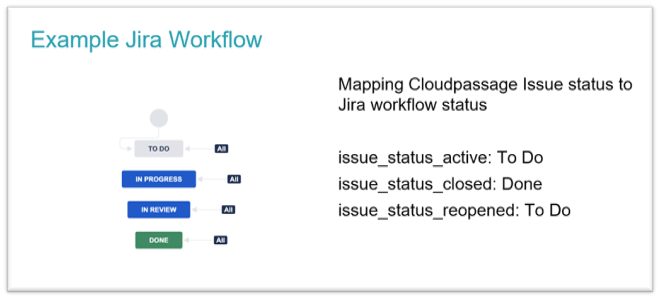
Specify the Jira workflow statuses that will map to issue active, closed, reopened respectively.
- Make sure transitions are available between these statuses.
-
-
Note: Custom fields created in Jira must be of type “text field”. For more information about creating custom fields in Jira go to: https://confluence.atlassian.com/adminjiraserver/adding-a-custom-field-938847222.html
-
An example routing file:
# For more information about filters go to https://api-doc.cloudpassage.com/help#issues-filtering-issues
filters:
  issue:
    asset_id: 9c226eaa-a050-44b1-af19-a1541e2b6b1d
    asset_name: ris-win2008r2-policy-test
    asset_type: server
    asset_fqdn: ip-172-31-6-100.us-west-1.compute.internal
    asset_hostname: ip-172-31-6-100
    cp_rule_id: CP:EC2:12
    critical: true
    csp_account_id: 849489318606
    csp_account_name: cloudpassage-qa
    csp_account_type: aws
    csp_image_id: ami-01bbe152bf19d0289
    csp_region: ap-south-1
    csp_resource_id: i-0d318864f4a276ea4
    csp_tags:
      - environment:development
      - Name:halo-aws-s1-ec2-bu01-02
    cve_id:
      - CVE-2017-10684
      - CVE-2017-10685
    first_seen_at: 2019-10-04T07:31:08.237537Z
    group_id: b3d8bec2-6d9a-11e8-a7c2-59b3c642f12b
    group_name: customer-success
    image_sha: null
    name: nameofissue
    source: server_secure
    type: sva
    last_seen_at: 2020-04-27T14:35:53.035654Z
    max_cvss_gte: 7.0
    os_type: linux
    policy_name: CIS AWS Foundations Benchmark Customized v1.2 2019-07-11
    registry_id: c11da753-c69e-4a73-b15b-52c317708df7
    registry_name: cloudpassage_registry
    repository_id: ed843ea1-1f75-47c3-85ef-49a330c686af
    repository_name: cloudpassage_repo
groupby:
  # Group issues into Jira epics based on specified attributes
  - csp_resource_id
fields:  # Optional
  mapping:
    # Maps Halo field to field in Jira. Values will then be dynamically populated for each issue.
    # Make sure the custom Jira field is created in Jira
    # Format is "halo_field: jira_field"
    # e.g. "issue_source: jira_field_for_issue_source"
    issue.source: issue source
    issue.critical: critical
    issue.type: issue type
    issue.asset_type: asset type
  static:
    # Insert static value in a Jira field for each issue created
    # jira_field: static_value
    duedate: 30  # Specify duedate in number of days (Calculated from first_seen_at)

jira_config:
  project_keys:  # Required
    # Enter Jira project keys to route issues to
    - CL
  jira_issue_id_field: halo_jira_id  # Required, Jira field that will contain the unique Halo Issue ID
  jira_issue_type: Bug  # Required, Specify an issue type defined in Jira
  issue_status_active: To Do  # Required, Specify a Jira workflow status for active issues
  issue_status_closed: Done  # Required, Specify a Jira workflow status for closed issues
  issue_status_reopened: To Do # Required, Specify a Jira workflow status for reopened
Running (stand-alone)
- navigate into "jira_halo_issues_sync" directory
cd jira_halo_issues_sync
- To invoke one time only:
python application.py
- For scheduled job:(Crontab example)
crontab -e */2 * * * * /usr/bin/python application.py
Running (Containerized)
Be sure to inject all the environment variables defined above in the Docker run command as illustrated below.
- navigate into "jira_halo_issues_sync" directory
cd jira_halo_issues_sync
- Build Docker Image:
docker build -t jira_halo_issues_sync .
- Run Docker Container (Linux):
docker run -it \
    -e HALO_API_KEY=$HALO_API_KEY \
    -e HALO_API_SECRET_KEY=$HALO_API_SECRET_KEY \
    -e JIRA_API_USER=$JIRA_API_USER \
    -e JIRA_API_TOKEN=$JIRA_API_TOKEN \
    -e JIRA_API_URL=$JIRA_API_URL \
    jira_halo_issues_sync
- Run Docker Container(Windows PowerShell):
docker run -it \
    -e HALO_API_KEY=$env:HALO_API_KEY \
    -e HALO_API_SECRET_KEY=$env:HALO_API_SECRET_KEY \
    -e JIRA_API_USER=$env:JIRA_API_USER \
    -e JIRA_API_TOKEN=$env:JIRA_API_TOKEN \
    -e JIRA_API_URL=$env:JIRA_API_URL \
    jira_halo_issues_sync
Sample Results
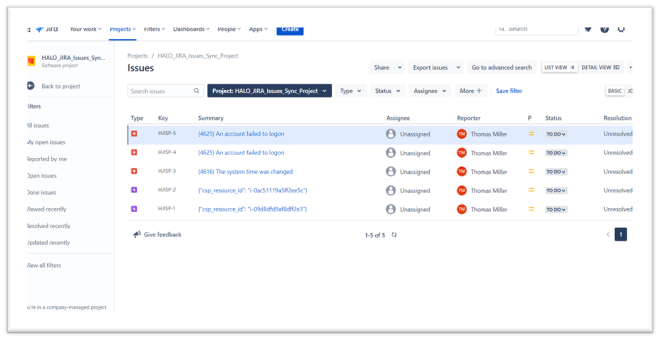
- List of HALO Issues in JIRA Project
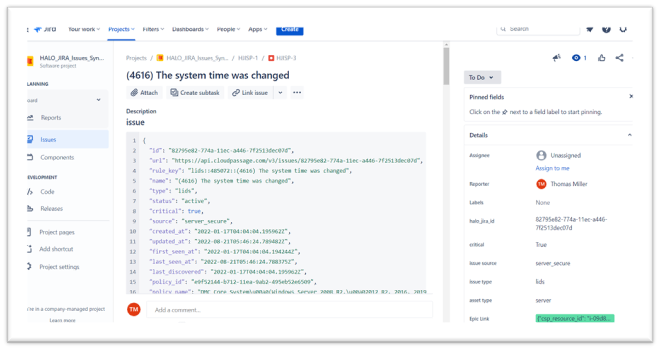
- Details of HALO Issue in JIRA Project
Tag summary
Content type
Image
Digest
Size
216.7 MB
Last updated
over 6 years ago
docker pull halotools/jira_halo_issues_sync