hannshu/stcluster
Accurate spatial domain deciphering for spatially resolved transcriptomics with stCluster
173
hannshu/stcluster repository overview
stCluster
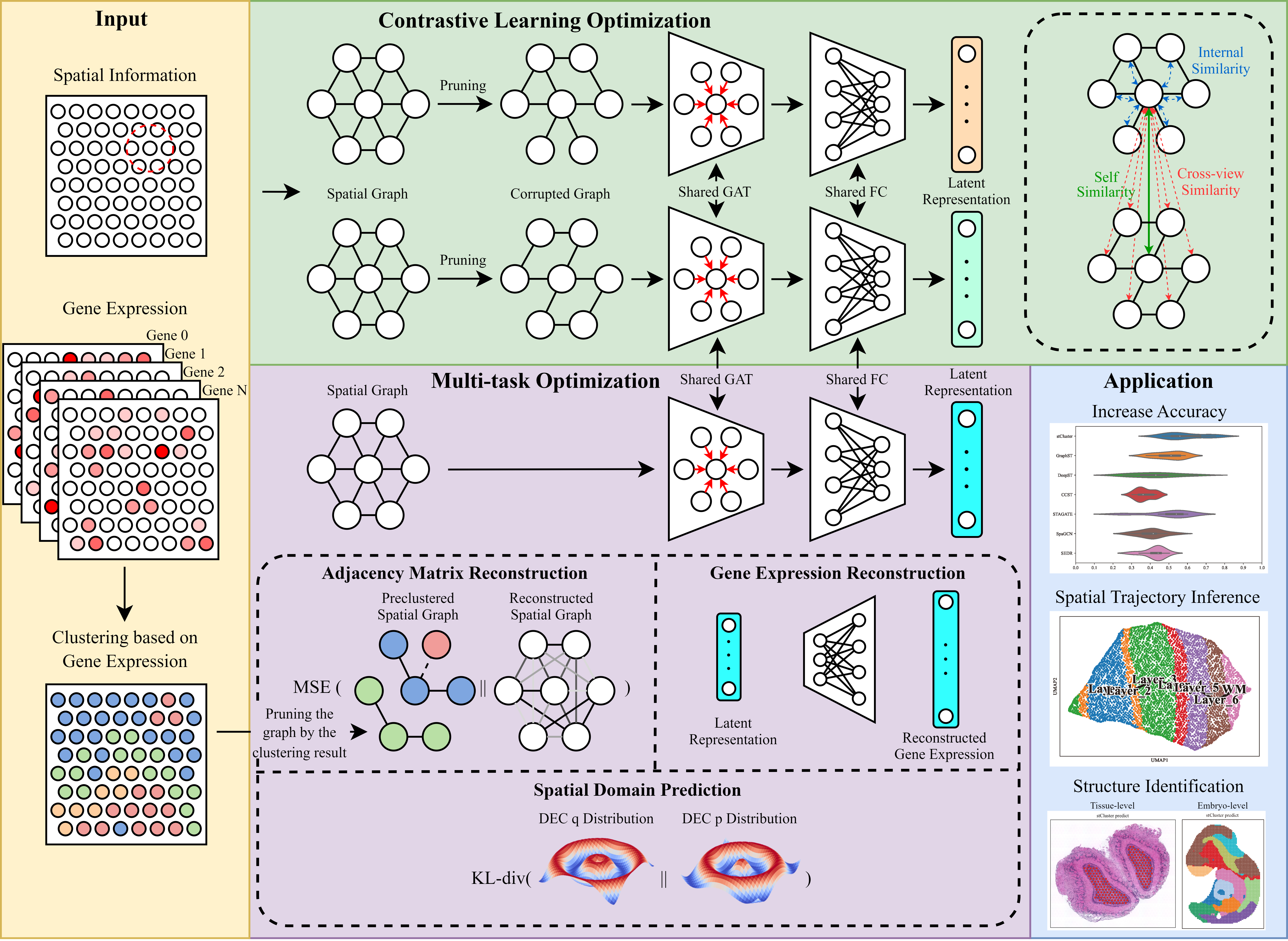
Overview
Spatial transcriptomics offers unprecedented insights into gene expression within the native tissue context, effectively bridging molecular data with spatial information to unveil intricate cellular interactions and tissue organizations. In this regard, deciphering cellular spatial domains is a crucial task that requires the effective integration of gene expression data and spatial information. We introduce stCluster, a novel method that integrates graph contrastive learning with multi-task learning to refine informative representations for spatial transcriptomic data, consequently improving spatial domain identification. stCluster first leverages graph contrastive learning to learn discriminative representations capable of recognizing spatially coherent patterns. Through jointly optimizing multiple tasks, stCluster further fine-tunes the representations to be able to capture complex relationships between gene expression and spatial organization. Experimental results reveal its proficiency in accurately identifying complex spatial domains across various datasets and platforms, spanning tissue, organ, and embryo levels, outperforming existing state-of-the-art methods. Moreover, stCluster can effectively denoise the spatial gene expression patterns and enhance the spatial trajectory inference.
Software dependencies
scanpy==1.9.3
squidpy==1.3.0
pytorch==1.13.1(cuda==11.7)
DGL==1.1.1(cuda==11.7)
R==4.2.0
mclust==5.4.10
To fully reproduce the results as described in the paper, it is recommended to use the container we have provided on a Nvidia RTX 3090 GPU device.
Setup stCluster
Setup by Docker (Recommended):
- Download the stcluster image from DockerHub and setup a container:
docker run --gpus all --name your_container_name -idt hannshu/stcluster:latest
- Access the container:
docker start your_container_name
docker exec -it your_container_name /bin/bash
- Write a python script to run stCluster
The anaconda environment for stCluster will be automatically activate in the container. The stCluster source code is located at \root\stCluster, please run git pull to update the codes before you use.
- Note: Please make sure
nvidia-docker2is properly installed on your host device. (Or follow this instruction to setup nvidia-docker2 first)
Setup by anaconda:
- Clone this repository from Github:
git clone https://github.com/hannshu/stCluster.git
- Download dataset repository:
git submodule init
git submodule update
- Import conda environment:
conda env create -f environment.yml
- Write a python script to run stCluster
Example
from stCluster.train import train
from st_datasets.dataset import get_data, dataset_you_need

# load dataset
adata, n_cluster = get_data(dataset_func=dataset_you_need, dataset_args)

# train stCluster
adata, g = train(adata, train_args)

# downstream analysis
# clustering
from stCluster.run import evaluate_embedding

adata, score = evaluate_embedding(adata=adata, n_cluster=n_cluster, cluster_method=['mclust'], cluster_score_method=['ARI'])
print(score)    # show ARI score
# ...

# denoising
from stCluster.denoising import train as denoising

adata = denoising(adata, spatial_graph=g, denoising_args)
# evaluate denoised gene expression
# ...

# other downstream tasks
# ...
Tutorial
Read the Documentation for detailed tutorials.
Tag summary
Content type
Image
Digest
sha256:766ecb539…
Size
9.3 GB
Last updated
almost 3 years ago
docker pull hannshu/stcluster