hapimcp/hapi-cli
Deploy and manage APIs+Arazzo as Model Context Protocol servers effortlessly, MCPs with NO shadows.
6.0K
hapimcp/hapi-cli repository overview
Deploy and run MCP servers using Docker for local development, cloud deployments, and air-gapped environments. For further information, check our documentation: https://docs.mcp.com.ai/deployment/docker
Quick Start: Run Locally
The fastest way to start an HAPI MCP server locally is using docker run with volume mounts for configuration and specs.
Basic Example
docker run --name hapi-petstore -d --rm \
  -p 3030:3030 \
  -v ~/.hapi:/app/.hapi \
  hapimcp/hapi-cli:latest serve petstore \
  --port 3030 \
  --url "https://petstore3.swagger.io/api/v3" \
  --host 0.0.0.0 --public-host https://api.example.com \
  --headless
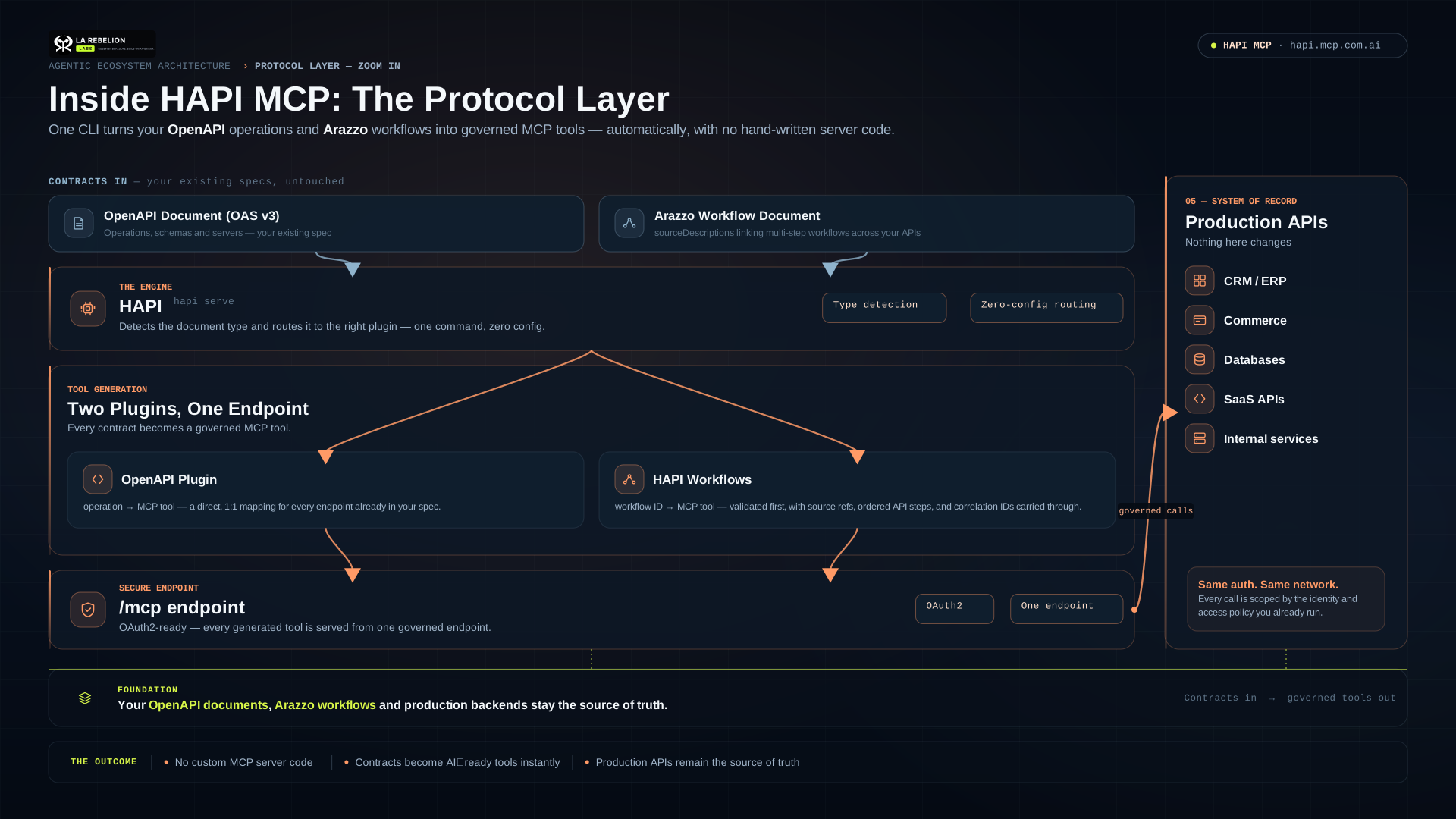
HAPI MCP and HAPI Workflows CLI
Run OpenAPI APIs and Arazzo workflows as MCP servers with Docker.
latest remains the production-ready HAPI 0.8.x line. The workflows and arazzo tags point to the upcoming HAPI v1 beta, intended for early adopters testing the new plugin architecture and HAPI Workflows (Arazzo).
hapimcp/hapi-cli:workflows— HAPI v1 beta with OpenAPI and HAPI Workflowshapimcp/hapi-cli:arazzo— alias ofworkflowshapimcp/hapi-cli:1.0.0-beta.0823— pinned v1 beta releasehapimcp/hapi-cli:latest— stable HAPI 0.8.x release line
HAPI v1 beta is for evaluation and feedback. Use
latestfor production workloads until v1 is stable.
Quick start: OpenAPI MCP server
Mount an OpenAPI document, expose port 3000, and point HAPI at the API backend:
docker run --name hapi-petstore --rm -d \
  -p 3000:3000 \
  -v "$PWD:/specs:ro" \
  hapimcp/hapi-cli:workflows \
  serve --specs /specs/openapi.yaml \
  --url https://petstore3.swagger.io/api/v3 \
  --headless \
  --host 0.0.0.0 \
  --public-host http://localhost:3000
Your MCP endpoint is available at:
http://localhost:3000/mcp
Quick start: HAPI Workflows (Arazzo)
HAPI v1 can serve Arazzo workflows as MCP tools. workflows and arazzo are exact command aliases.
docker run --name hapi-workflows --rm -d \
  -p 3000:3000 \
  -v "$PWD:/specs:ro" \
  hapimcp/hapi-cli:workflows \
  workflows serve --specs /specs/workflow.yaml \
  --host 0.0.0.0 \
  --public-host http://localhost:3000
By default, each workflow uses the backend declared in its Arazzo sourceDescriptions. Use --url only when you need to override a backend URL.
hapi workflows serve --specs /specs/workflow.yaml \
  --url https://api.example.com
Persistent HAPI home
The image stores HAPI state under /var/lib/hapi. Mount it when you want persistent specs, configuration, and other local state:
docker run --rm \
  -v "$HOME/.hapi:/var/lib/hapi" \
  hapimcp/hapi-cli:workflows plugins list
The container runs as a non-root user and writes operational logs to Docker stdout/stderr:
docker logs -f hapi-workflows
Common options
--specs: Local path,file:/path:URL, or HTTP(S) document URL.--url: Overrides the OpenAPI backend or applicable Arazzo source URL.--host 0.0.0.0: Required for access through Docker port publishing.--public-host: Public MCP URL advertised in OAuth/resource metadata.--headless: OpenAPI mode where HAPI exposes MCP while the backend API remains external.
References
Tag summary
Content type
Image
Digest
sha256:51d5c6341…
Size
220.4 MB
Last updated
24 days ago
docker pull hapimcp/hapi-cli