hardock14/docker-mediathekview repository overview
docker-mediathekview
X11rdp Version of Mediathekview
About
Using this container allows you to run Mediathekview as a Service and control it via webbrowser like firefox or chrome. The x11rdp feature is copied from https://github.com/sparklyballs/desktop-dockers. I'm running this on a NAS to add Videos out of the Mediathek directly to my Multimedia Collection.
Installation
Manual
- download Dockerfile or clone the repository
- run
docker build .to create the docker image - wait until build process is finished
Automatic
- run
docker pull tuxflo/docker-mediathekviewto download the image from dockerhub
Run
The container can be started using docker run -p <PORT>:8080 -v <PATH_TO_FOLDER>:/nobody/MediathekView <IMAGE_ID_OF_DOCKER_BUILD> if installed manually or docker run -p <PORT>:8080 -v <PATH_TO_FOLDER>:/nobody/MediathekView tuxflo/docker-mediathekview if pulled from dockerhub. Replace by a free port you want to use to access the container. Replace <PATH_TO_FOLDER> with your Multimedia location of the host system.
Now you can access the webgui by locating your browser to serverpath: for example localhost:8080 if running locally. Choose MediathekView listed under "ALL CONNECTIONS" and hit OK in the xrdp window.
If you also map the port 3389 you can use rdesktop to access the GUI wich is faster on NAS systems with limited ressources.
Issues
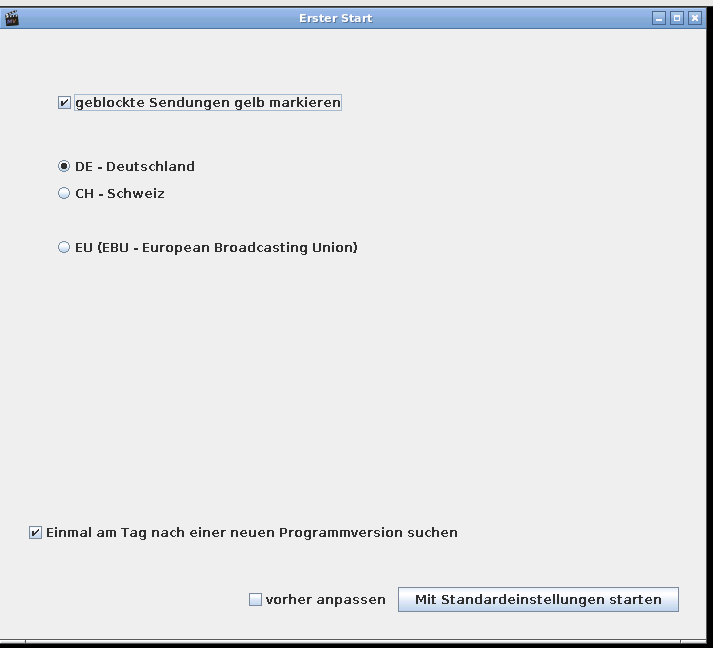
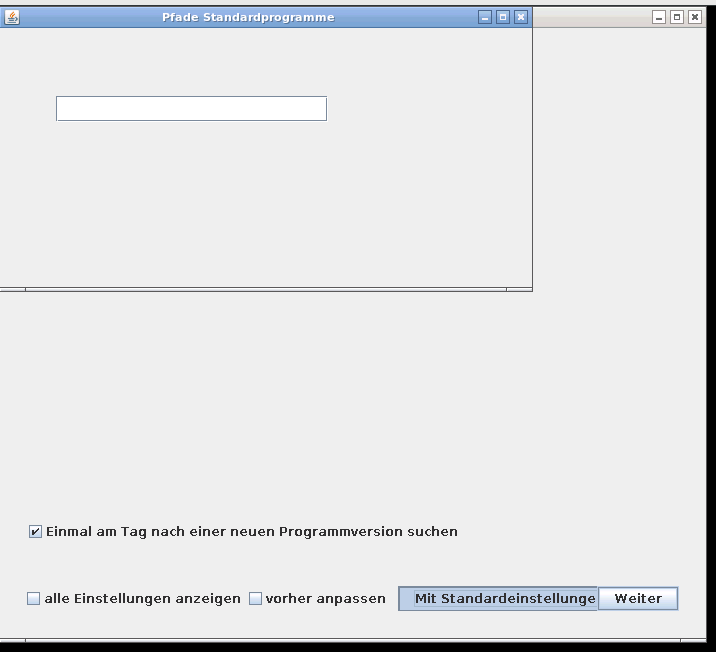
- For some reason the content of the initialization Wizzard gets only renderd in the browserwindow if hovered by the mousepointer, so move the mouse across the window to make the buttons visible. On the second step close the empty window and click on "Weiter" button (see second screenshot)
- The configuration file is not stored persitently, so if you restart the container you have to click through the initialization wizzard again or have to commit your changes to the docker image.
Tag summary
Content type
Image
Digest
Size
1.1 GB
Last updated
over 9 years ago
docker pull hardock14/docker-mediathekview