harshhaareddy/terraview
A self-hostable, git-native dashboard for Terraform resource status.
387
harshhaareddy/terraview repository overview
████████╗███████╗██████╗ ██████╗  █████╗ ██╗   ██╗██╗███████╗██╗    ██╗
╚══██╔══╝██╔════╝██╔══██╗██╔══██╗██╔══██╗██║   ██║██║██╔════╝██║    ██║
   ██║   █████╗  ██████╔╝██████╔╝███████║██║   ██║██║█████╗  ██║ █╗ ██║
   ██║   ██╔══╝  ██╔══██╗██╔══██╗██╔══██║╚██╗ ██╔╝██║██╔══╝  ██║███╗██║
   ██║   ███████╗██║  ██║██║  ██║██║  ██║ ╚████╔╝ ██║███████╗╚███╔███╔╝
   ╚═╝   ╚══════╝╚═╝  ╚═╝╚═╝  ╚═╝╚═╝  ╚═╝  ╚═══╝  ╚═╝╚══════╝ ╚══╝╚══╝
A self-hostable, git-native dashboard for Terraform resource status.
Parse HCL + state (+ optional plan), classify every resource, and browse it in a live web UI.



What is Terraview?
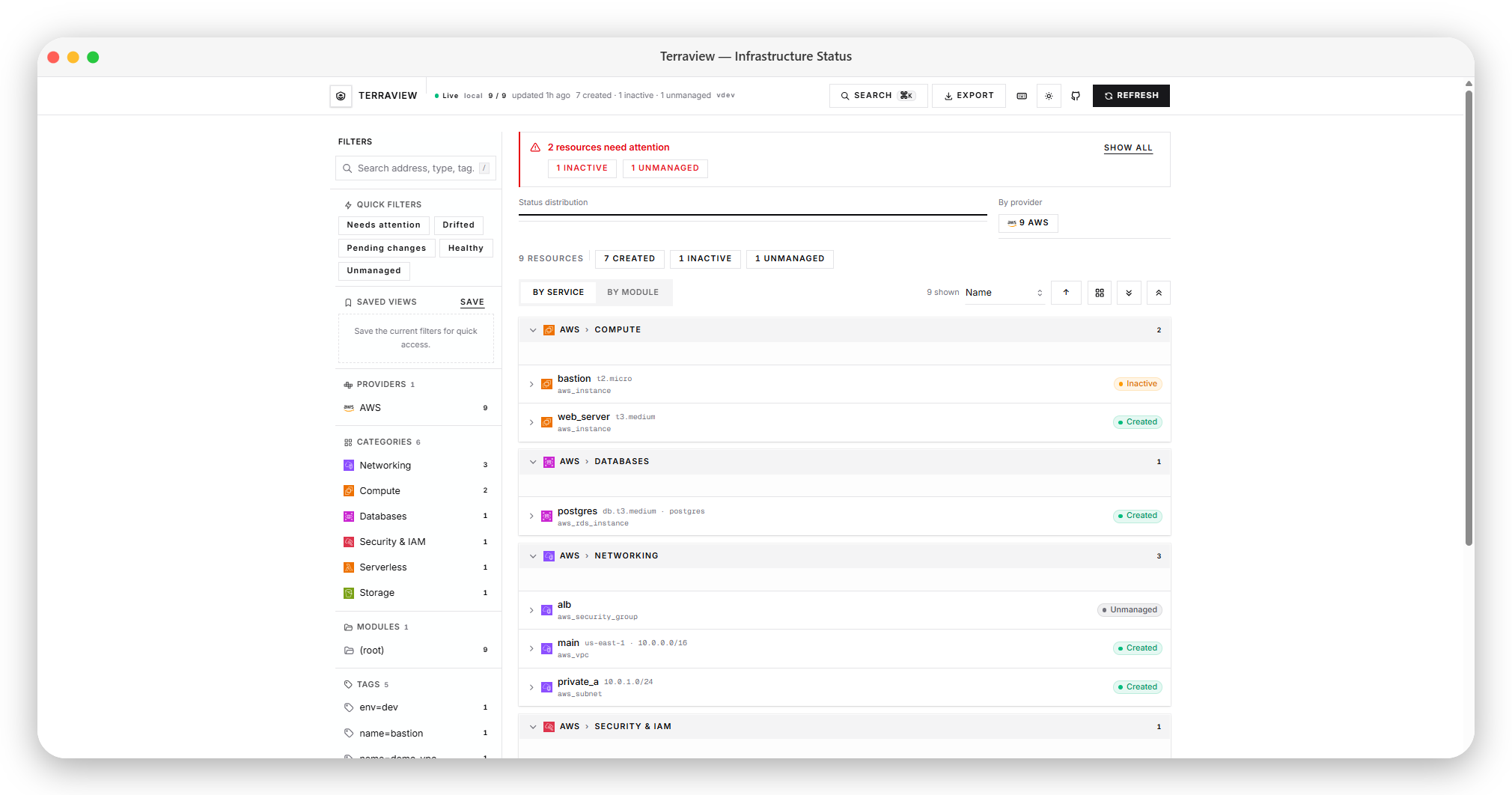
Terraview reads your Terraform project — .tf files, state backend, and optionally a JSON plan — then renders a live status grid grouped by cloud provider and service type. No SaaS account required: run a single binary locally, in Docker, or behind your CI pipeline.
Backend: Go engine + HTTP API + background poller
Frontend: Next.js dashboard (shadcn / radix-sera preset)
Why Terraview?
| Pain | Terraview's answer |
|---|---|
terraform state list is a flat text dump | Visual grid grouped by provider › service (or module) |
| GUI tools are often SaaS or enterprise-only | Self-hosted binary; optional basic auth |
| Hard to see pending vs applied at a glance | Eight lifecycle statuses with filters and summary chips |
Drift only visible after terraform plan | Plan JSON resource_drift surfaced as drifted status |
| Sharing infra status with non-engineers | Shareable filter URLs; export JSON/CSV |
Features
Engine & backends
- Zero-config local mode — point at a directory; discovers
.tffiles andterraform.tfstate - Multi-backend state — local, S3, GCS, Azure Blob, Terraform Cloud / HCP Terraform
- Plan ingestion — optional
plan_file(terraform show -json) for pending changes and drift - Plan & drift metadata —
plan_actionanddrift_attributeson each resource when a plan is loaded - State metadata —
state_serialandstate_modified_aton snapshots (local backend mtime) - Eight lifecycle statuses —
created,inactive,pending_create,pending_update,pending_destroy,drifted,unmanaged,unknown - Auto-categorization — AWS / GCP / Azure / Kubernetes → Compute, Networking, Databases, Storage, IAM, Serverless, …
- Module-aware — shows module path per resource
- Multi-workspace support — switch between
default,dev,staging,prod(and remote workspaces) from the UI without restarting the server; snapshots are cached per workspace - Resource dependency graph — directed graph built from state
depends_onand HCL references; toggle Graph view in the dashboard - Live polling — background refresh (default 30s) + SSE push to the UI
- CI mode —
terraview statusprints JSON or Markdown; exit code2when drift is detected
Dashboard (UI)
- Filter sidebar — search, provider, category, module, and tag facets
- Quick filters — Needs attention, Drifted, Pending changes, Healthy, Unmanaged
- Saved views — persist named filter sets in the browser
- Shareable URLs — filters sync to query params (
?status=drifted&provider=AWS) - Summary bar + status distribution — clickable status chips and segment bar
- Attention banner — highlights resources that need action
- Group by service or module — toggle grid grouping; preference saved locally
- Sort & density — sort by name, status, type, or address; compact row mode
- Collapsible groups — expand/collapse all resource sections
- Resource detail sheet — full metadata, tags, copy address, Terraform CLI hints, plan action & drift attributes, upstream dependencies
- Dependency graph view — readable SVG layout of resource dependencies (toggle Grid / Graph in the toolbar)
- Workspace switcher — pick a Terraform workspace from the header; uses
terraform.tfstate.d/<workspace>/locally orenv:/<workspace>/on remote backends - Provider breakdown chart — clickable bar chart by cloud provider
- State info bar — state serial and last-modified timestamp from backend
- CI headline in header — live status summary from
/api/status - Tag filter from detail — click a tag in the detail sheet to filter the grid
- Markdown export — download filtered resources as a Markdown report
- Cloud service icons — official AWS/GCP/Azure SVGs via
@thesvg/cli(group headers, rows, provider chips) - Deep links —
#resource=aws_instance.webopens the detail panel - Command palette —
Ctrl+K/⌘Kto jump to any resource - Keyboard shortcuts —
/search,rrefresh,Escclear filters,?help - Export — download filtered resources as JSON or CSV; copy view link
- Live connection badge — Live / Polling / Offline SSE status in the header
- Theme toggle — light, dark, or system
- Optional auth UI — login form when basic auth is enabled
API
| Endpoint | Description |
|---|---|
GET /api/health | Liveness + version |
GET /api/snapshot | Full snapshot (resources, summary, UI config, dependency graph) |
GET /api/workspaces | List Terraform workspaces + active workspace |
POST /api/workspace | Switch active workspace ({"workspace":"dev"}) |
GET /api/graph | Dependency graph for the active workspace |
GET /api/resources | Filtered resource list (?status=&provider=&module=&category=&tag=&q=&limit=&offset=) |
GET /api/resource | Single resource by address (?address=aws_instance.web) |
GET /api/facets | Filter facet counts (optionally pre-filtered) |
GET /api/summary | Aggregate counts only |
GET /api/status | Compact headline for badges / CI |
POST /api/refresh | Force refresh |
GET /api/events | SSE stream (refreshed events) |
POST /api/login | Exchange credentials for session token (when auth enabled) |
Quick start
Prerequisites
- Go 1.25+ (to build from source)
- Node 20+ (UI development only)
Binary
git clone https://github.com/NotHarshhaa/terraview
cd terraview

go run ./cmd/terraview serve ./testdata/sample-project
# API + UI (if ui/out exists) → http://localhost:7777
Development (API + UI)
Use two terminals — the UI proxies /api/* to the Go server via Next.js rewrites (no CORS setup needed):
# Terminal 1 — API
go run ./cmd/terraview serve ./testdata/sample-project --no-ui

# Terminal 2 — UI
cd ui && npm install && npm run dev
# → http://localhost:3000
Or use the Makefile:
make run          # build + serve sample project on :7777
make ui-dev       # Next.js on :3000 (requires API on :7777)
make test         # go test ./...
Docker
docker compose up --build
# or pull the published image:
docker pull ghcr.io/notharshhaa/terraview:latest
docker run -p 7777:7777 -v "$(pwd):/workspace" ghcr.io/notharshhaa/terraview:latest
Images are built and published to GHCR when you:
- Create a version tag — e.g.
git tag v0.1.0 && git push origin v0.1.0(publishesv0.1.0,0.1.0,0.1, andlatest) - Run the workflow manually — Actions → Publish Docker image → Run workflow (publishes
sha-<commit>; optionally check Also tag as latest)
CI / PR comments
Use the published Terraview Status Check GitHub Action (Marketplace) or the CLI directly.
GitHub Actions:
permissions:
  contents: read
  pull-requests: write

jobs:
  terraview:
    runs-on: ubuntu-latest
    steps:
      - uses: actions/checkout@v4

      - uses: NotHarshhaa/terraview-action@v1
        with:
          working-directory: ./infra
          mode: status-check          # also: drift-gate, destroy-guard, summary-report
          plan-file: ./plan.json
          # backend: s3
| Mode | Behavior |
|---|---|
status-check | Post/update PR comment with resource table (read-only) |
drift-gate | Fail when drift is detected (exit 2) |
destroy-guard | Fail when any pending_destroy resources exist |
summary-report | Write JSON/HTML report files for pipeline artifacts |
See the terraview-action README for full inputs and workflow examples.
CLI-only CI (no Action wrapper):
terraview status ./infra --format markdown
terraview status ./infra --plan-file ./plan.json   # includes pending + drift
# Exit 2 if any resource is drifted
Status classification
Each resource is classified from HCL declarations, state, and plan:
In state?
├── NO  → in plan as create?  → pending_create
│         declared in .tf?    → unmanaged
│         else                → unknown
└── YES → in plan?
│         ├── delete          → pending_destroy
│         ├── update/replace  → pending_update
│         └── create          → pending_create
          drift in plan?        → drifted
          provider inactive?    → inactive
          else                  → created
Drift detection reads the resource_drift section from a Terraform plan JSON file. Pass it via plan_file in config or --plan-file on the CLI.
Configuration
Copy .terraview.yaml.example to your project root. All fields are optional.
port: 7777
poll_interval: 30s
working_dir: .
plan_file: ./plan.json          # optional: terraform show -json output

backend:
  type: local                   # local | s3 | gcs | azureblob | tfc
  # S3: bucket, key, region, dynamodb_table, endpoint
  # GCS: bucket, key
  # Azure: storage_account, container, key
  # TFC: organization, workspace, token, hostname

ui:
  title: "My Project — Infrastructure"
  show_cost_column: false       # reserved for future Infracost integration
  default_filter: status=created

auth:
  enabled: false
  username: admin
  password_env: TV_PASSWORD
  access_token: secret-token    # Bearer / ?access_token= for SSE
Environment variables
| Variable | Default | Description |
|---|---|---|
TV_PORT | 7777 | HTTP port |
TV_POLL_INTERVAL | 30s | Snapshot refresh interval (min 5s) |
TV_WORKING_DIR | . | Terraform project root |
TV_BACKEND | local | Backend type |
TV_STATE_BUCKET | — | S3/GCS bucket |
TV_STATE_KEY | — | State object key |
TV_STATE_REGION | — | AWS region (S3) |
TV_STATE_FILE | — | Explicit local state path |
TV_PLAN_FILE | — | Plan JSON path |
TV_UI_TITLE | Terraview | Dashboard title |
TV_PASSWORD | — | Basic auth password |
TV_ACCESS_TOKEN | — | Static API token (SSE-friendly) |
TFE_TOKEN | — | Terraform Cloud token |
Auth
When auth.enabled: true, the API accepts:
- HTTP Basic auth (
username/password) - Bearer token header (
access_tokenor session token from login) ?access_token=query param (required for browser EventSource / SSE)- Session cookie from
POST /api/login
The UI stores credentials in sessionStorage and shows a login form on 401.
Supported backends
| Backend | Status | Notes |
|---|---|---|
Local (terraform.tfstate) | Supported | Default; also checks .terraform/terraform.tfstate |
| Amazon S3 | Supported | AWS SDK v2; optional S3-compatible endpoint |
| Google Cloud Storage | Supported | Application Default Credentials |
| Azure Blob Storage | Supported | DefaultAzureCredential |
| Terraform Cloud / HCP | Supported | HTTP API; set TFE_TOKEN or backend.token |
Contributing
See CONTRIBUTING.md. High-impact areas:
- Provider category mappings (new resource types)
- Plan / drift edge cases
- Remote backend hardening (locks, retries)
- Infracost cost column integration
git clone https://github.com/NotHarshhaa/terraview
cd terraview

go test ./...
go vet ./...

cd ui && npm run typecheck && npm run build
Related projects
devops-project-generator — scaffold DevOps project structuresterraform-cost-estimator — cost estimation for Terraform plansjenkins-plus — batteries-included Jenkins with modern UI
License
Apache 2.0 — see LICENSE
Tag summary
Content type
Image
Digest
sha256:502283e5e…
Size
17.2 MB
Last updated
5 months ago
docker pull harshhaareddy/terraview